
1. Уводзіны
The ATTACK SHARK R85 HE is a high-performance 75% wired gaming keyboard featuring magnetic switches, designed for precision and responsiveness. This manual provides detailed instructions for setting up, operating, and maintaining your keyboard.

Image 1: ATTACK SHARK R85 HE Magnetic Switch Gaming Keyboard.
Асноўныя характарыстыкі:
- Ultra-Low Latency & Unrivaled Precision: Equipped with a high-frequency gaming chip, offering an 8000Hz polling rate and 0.005mm trigger accuracy.
- 16.8 Million Color RGB Lighting & Unique Light Bar: South-facing LEDs provide vibrant, uniform lighting. Features 19 built-in light effects and 6 light bar modes.
- ATTACK SHARK Purple Magnetic Switches: High-performance magnetic switches designed for professional e-sports, offering brighter RGB, improved structural stability, faster rebound, and smoother typing.
- 5-слаёвы гук DampСістэма адкрыцця: Advanced design with PE foam, IXPE pads, PET acoustic layers, and silicone bottom coating for pure, clear switch acoustics.
- Comprehensive Professional Software: Fully programmable via dedicated software, including Rapid Trigger (RT), Dynamic Keystroke (DKS), Mod-Tap (MT), and Toggle Key (TGL) functions.
- Compact 75% Layout with Aluminum Plate: Optimizes space while retaining F1-F10 keys. Aluminum positioning plate enhances structure and stability.
- Dual-Level Adjustable Support & Durable PBT Keycaps: Adjustable feet for ergonomic comfort. Double-shot PBT keycaps offer durability and resistance to wear.
- Магнітныя перамыкачы з магчымасцю гарачай замены: Easily change or mix high-performance magnetic switches. Each key can be individually adjusted for a personalized actuation point.
2. Змесціва ўпакоўкі
Калі ласка, пераканайцеся, што ўсе прадметы прысутнічаюць у камплекце:
- 1 x R85 HE Keyboard
- 1 х здымнік каўпачкоў
- 1 х пылаахоўны чахол
- 1 x C01ULTRA Cable
- 1 х Кіраўніцтва карыстальніка
- 2 x "ATTACK SHARK" Stickers
- 1 х стужка
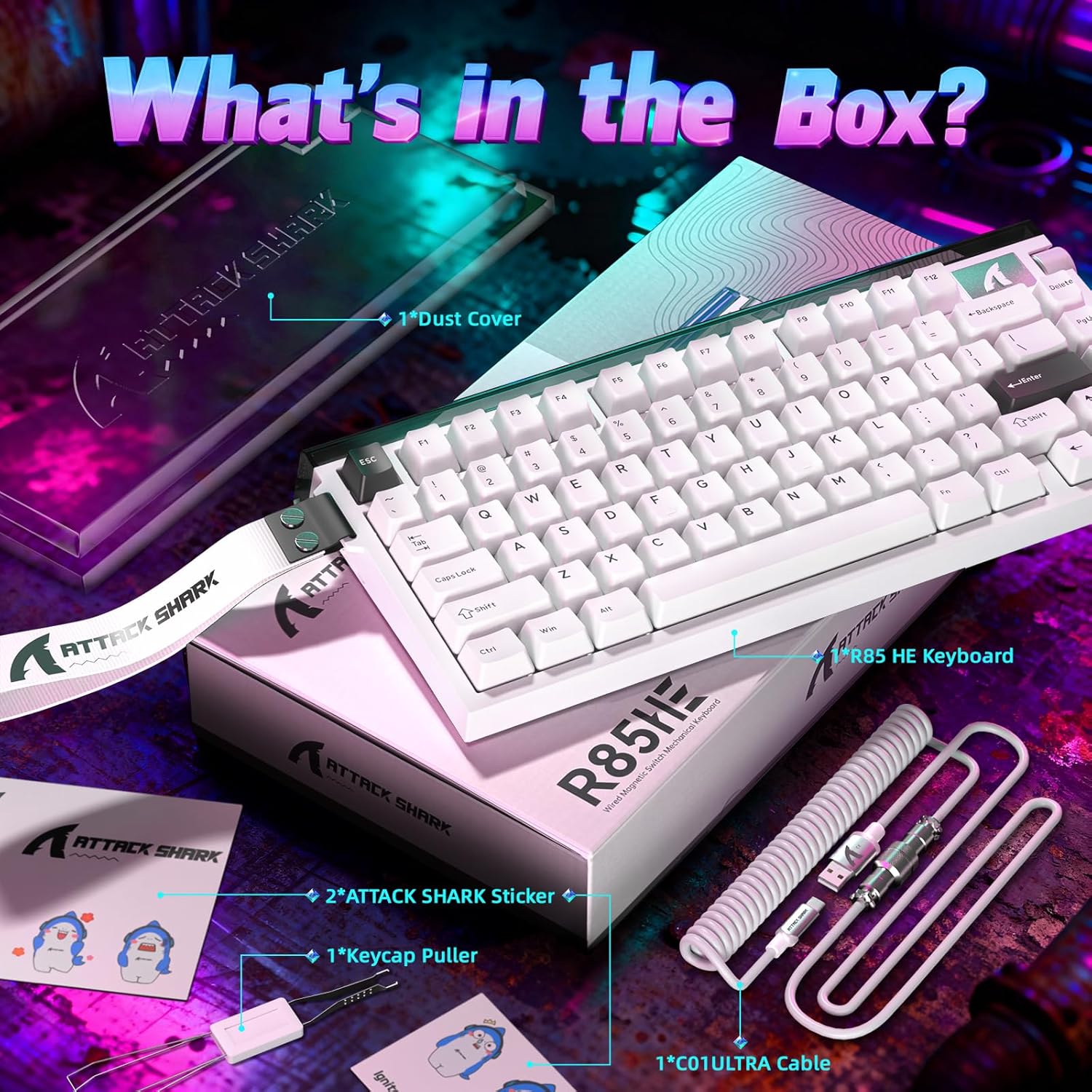
Image 2: All items included in the ATTACK SHARK R85 HE keyboard package.
3. Інструкцыі па ўсталёўцы
Follow these steps to set up your ATTACK SHARK R85 HE keyboard:
- Распакуйце клавіятуру: Асцярожна дастаньце клавіятуру і ўсе аксэсуары з упакоўкі.
- Падключыце кабель: Insert the USB-C end of the provided C01ULTRA cable into the USB-C port on the keyboard. Connect the other end (USB-A or USB-C, depending on your cable variant) to an available USB port on your computer.
- Пачатковае ўключэнне: The keyboard will automatically power on and its RGB lighting will illuminate. Your computer should recognize the device without additional drivers for basic functionality.
- Усталяванне праграмнага забеспячэння (неабавязкова, але рэкамендуецца): For full customization and advanced features, download the dedicated software from qmk.top.

Image 3: The C01ULTRA cable, featuring 8000 Polling Rate, Colorful LED, and Type-C connectivity.
4. Інструкцыя па эксплуатацыі
Keyboard Layout and Function Keys:
The R85 HE features a 75% QWERTY layout with 79 keys and a scroll wheel. Many functions are accessible via the FN ключ у спалучэнні з іншымі ключамі.
Спалучэнні клавіш:
- FN + \|: Змяніць рэжым асвятлення
- FN + C: Enable/disable case lighting
- FN + ↑: Павялічыць яркасць
- FN + ↓: Паменшыць яркасць
- Additional shortcuts can be found in the software.
Кіраванне RGB-падсветкай:
The keyboard offers extensive RGB customization. Use the FN key shortcuts or the dedicated software to adjust lighting effects, colors, and brightness for both the key backlighting and the unique light bar.
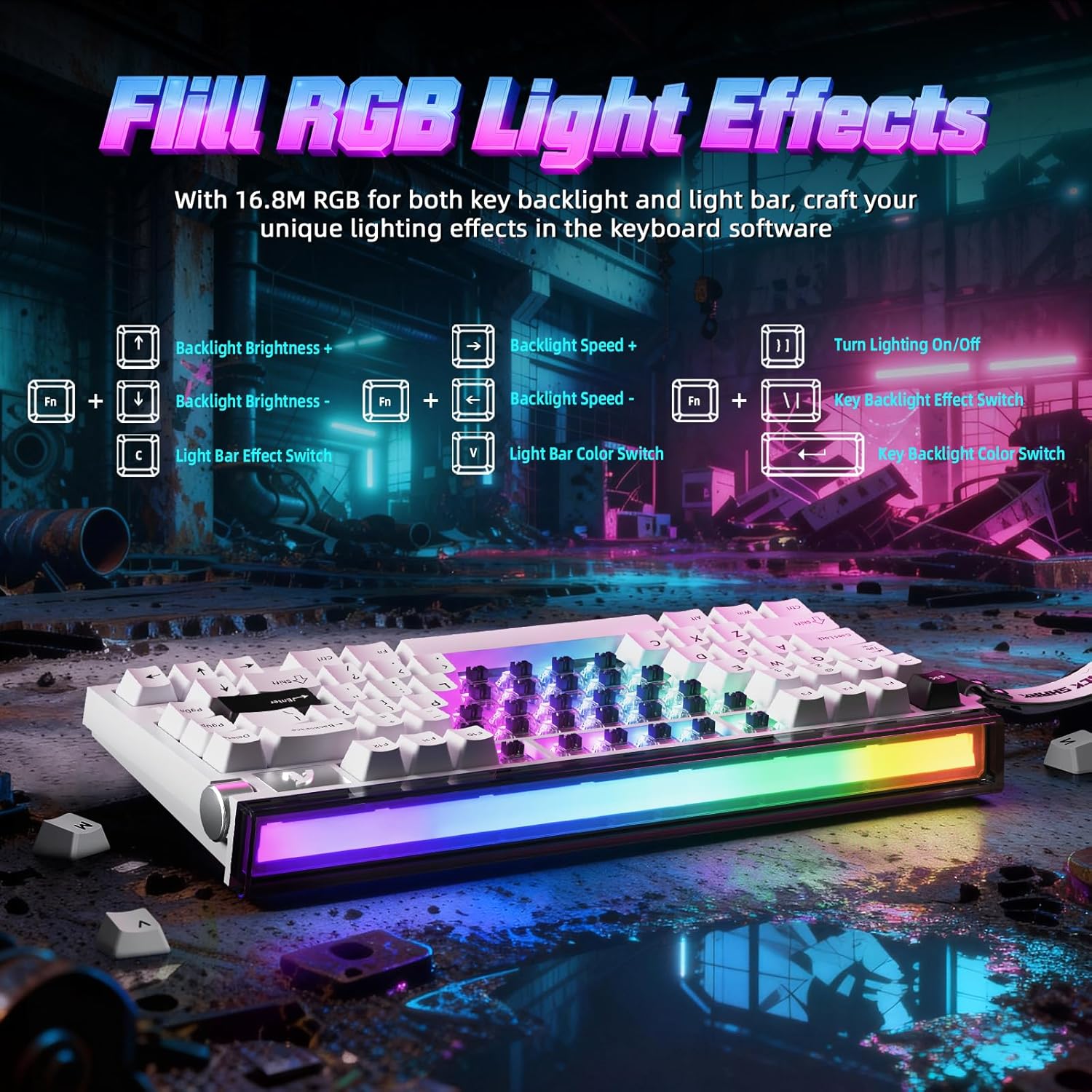
Image 4: FN key combinations for controlling backlight brightness, speed, and color, as well as light bar effects.
Настройка праграмнага забеспячэння:
The ATTACK SHARK R85 HE is fully programmable through its dedicated software, available at qmk.top. The software allows you to:
- Customize individual key functions.
- Adjust RGB lighting effects and colors.
- Configure advanced gaming features like Rapid Trigger (RT), Dynamic Keystroke (DKS), Mod-Tap (MT), and Toggle Key (TGL).
- Set personalized actuation points for magnetic switches.

Выява 5: Канецview of the multi-functional software interface for keyboard customization.
Magnetic Switches and Key Customization:
The R85 HE features ATTACK SHARK Purple Magnetic Switches, which are hot-swappable. This allows for easy replacement or mixing of switches. The software enables precise adjustment of the actuation point for each key, ranging from 0.1mm to 3.3mm, with a sensitivity of 0.005mm.

Малюнак 6: Падрабязны view of the magnetic switch, showing its components and specifications like start force, end force, sensitivity, and actuation range.
5. Design and Construction
5-слаёвы гук DampСістэма адкрыцця:
The keyboard incorporates a sophisticated 5-layer sound dampening system to optimize acoustics. This system includes PE foam, IXPE pads, PET acoustic layers, and a silicone bottom coating, ensuring a pure and clear sound profile from the magnetic switches.
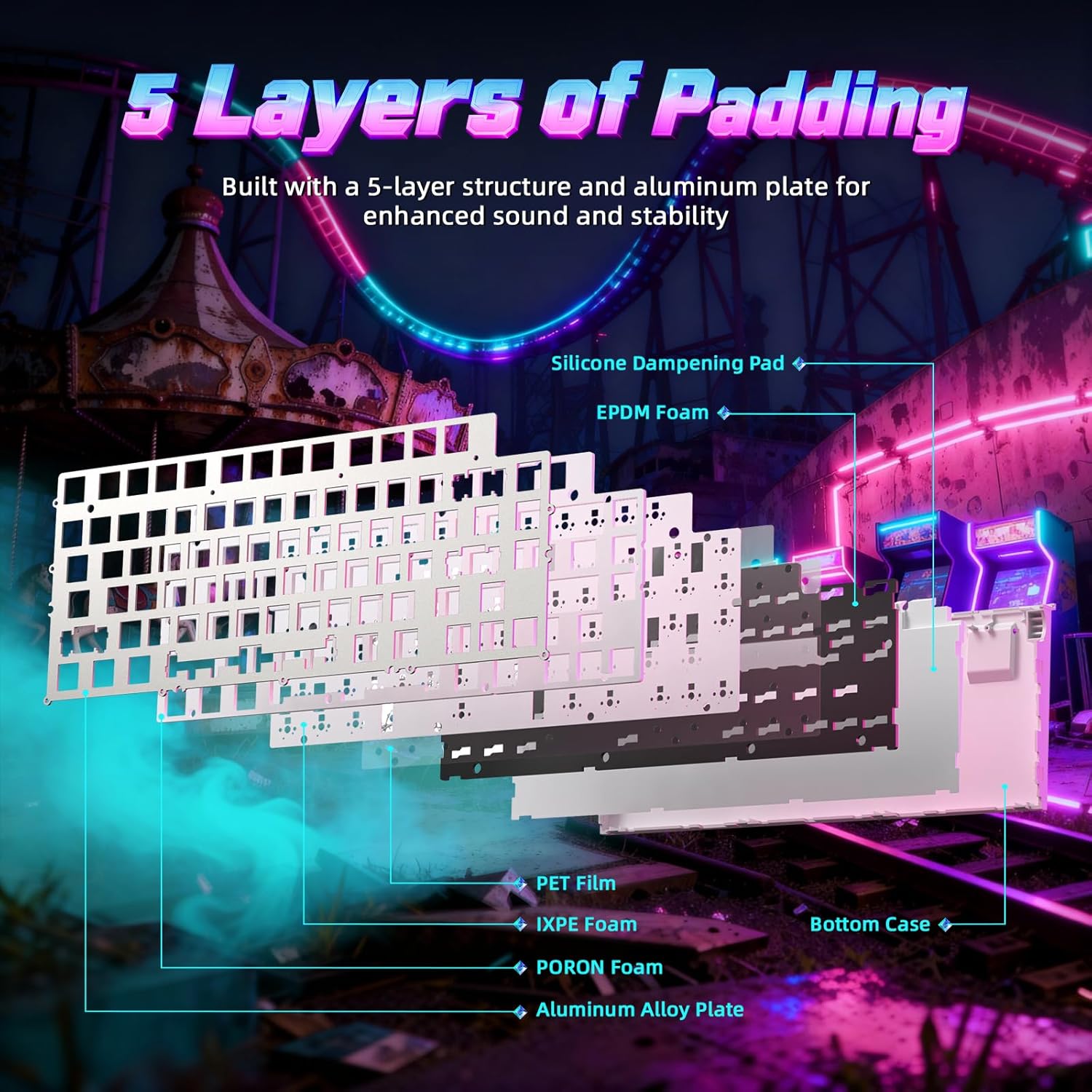
Малюнак 7: У разабраным выглядзе view of the keyboard's internal structure, highlighting the 5 layers of padding for sound dampening and stability.
Aluminum Plate and PBT Keycaps:
The R85 HE features an aluminum positioning plate for enhanced structural integrity and stability. The keycaps are made from durable double-shot PBT material, which resists wear and shine over time, providing a consistent typing feel.
Adjustable Support:
The keyboard includes dual-level adjustable feet, allowing you to set the optimal typing or gaming angle for comfort.
6. Тэхнічнае абслугоўванне
To ensure the longevity and optimal performance of your ATTACK SHARK R85 HE keyboard, follow these maintenance guidelines:
- Уборка: Regularly clean the keyboard with a soft, dry cloth. For dust and debris between keycaps, use compressed air. For stubborn dirt, you may carefully remove keycaps using the provided keycap puller and clean the switches and plate.
- Keycap and Switch Replacement: The hot-swappable design allows for easy replacement of keycaps and magnetic switches. Use the provided keycap puller and switch puller (if included) to carefully remove and install components. Ensure proper alignment when reinserting switches.
- Сыход за кабелем: Avoid sharp bends or excessive pulling on the C01ULTRA cable to prevent damage.
7. Выпраўленне непаладак
If you encounter issues with your keyboard, refer to the following common troubleshooting steps:
- Клавіятура не адказвае:
- Пераканайцеся, што кабель USB-C надзейна падключаны як да клавіятуры, так і да кампутара.
- Паспрабуйце падключыць клавіятуру да іншага USB-порта на вашым кампутары.
- Праверце клавіятуру на іншым кампутары, каб выключыць праблемы, характэрныя для сістэмы.
- RGB-асвятленне не працуе:
- Check if the lighting is turned off using the FN+C shortcut.
- Adjust brightness using FN+↑/↓.
- Ensure the keyboard software is installed and updated, and check lighting settings within the software.
- Клавішы не рэгіструюцца або набіраюцца два разы:
- This can sometimes be resolved by cleaning the switch or replacing the affected magnetic switch.
- Check the actuation point settings in the software; a very low actuation point might cause unintended triggers.
- Праграмнае забеспячэнне не распазнае клавіятуру:
- Ensure the software is the correct version for your R85 HE model.
- Перазагрузіце кампутар і праграмнае забеспячэнне.
- Часова адключыце любое антывіруснае праграмнае забеспячэнне або брандмаўэр, якія могуць блакаваць злучэнне.
8. Тэхнічныя характарыстыкі
| Асаблівасць | Дэталь |
|---|---|
| Марка | АТАКА АКУЛА |
| мадэль | R85 HE |
| Тэхналогія падлучэння | USB-C (правадны) |
| Апісанне клавіятуры | Гульнявая |
| Асаблівасць | Эрганамічны |
| Колер | Starlight White (Blanc étoilé) |
| Keyboard Backlight Color Support | RGB |
| Матэрыял | Plastic (Internal), Aluminum (Plate) |
| Тып перамыкача | Linear Magnetic Switches |
| Раскладка клавіятуры | QWERTY (79 keys + scroll wheel) |
| Сумяшчальныя аперацыйныя сістэмы | Windows, Mac |
| Стаўка апытання | 8000 Гц |
| RT Accuracy | 0.005 мм |
| Дыяпазон спрацоўвання | 0.1-3.3 мм |
| Матэрыял клавішы | PBT (Double Injection) |
| GTIN | 752010861071 |
9. Гарантыя і падтрымка
Інфармацыя аб гарантыі:
The ATTACK SHARK R85 HE keyboard comes with a one-year warranty against manufacturing defects. Please retain your proof of purchase for warranty claims.
Тэхнічная падтрымка:
For further assistance, software downloads, or advanced configurations, please visit the official software webсайт: qmk.top.