
Уводзіны
This manual provides essential information for setting up, operating, maintaining, and troubleshooting your HP 15.6-inch FHD IPS Touchscreen Laptop. Please read this guide thoroughly to ensure optimal performance and longevity of your device. This laptop features an AMD Ryzen 7 7730U processor, 64GB DDR4 RAM, 2.28TB storage (2TB SSD + 288GB Docking Station Set), AMD Radeon Graphics, and runs on Windows 11 Pro.
Настройка
Распакоўка і першае ўключэнне
Carefully remove all components from the packaging. Connect the power adapter to the laptop and a power outlet. Press the power button to turn on the laptop. Follow the on-screen instructions to complete the initial Windows 11 Pro setup.
Аксэсуары ў камплекце
Your laptop package includes the following accessories:
- 1x 7-in-1 Docking Station with 256GB Storage
- 1x карта MicroSD на 32 ГБ з адаптарам
- 1x кабель перадачы дадзеных тыпу C
- 1x кабель для зарадкі 3-у-1
- 1x сурвэтка для чысткі замшу
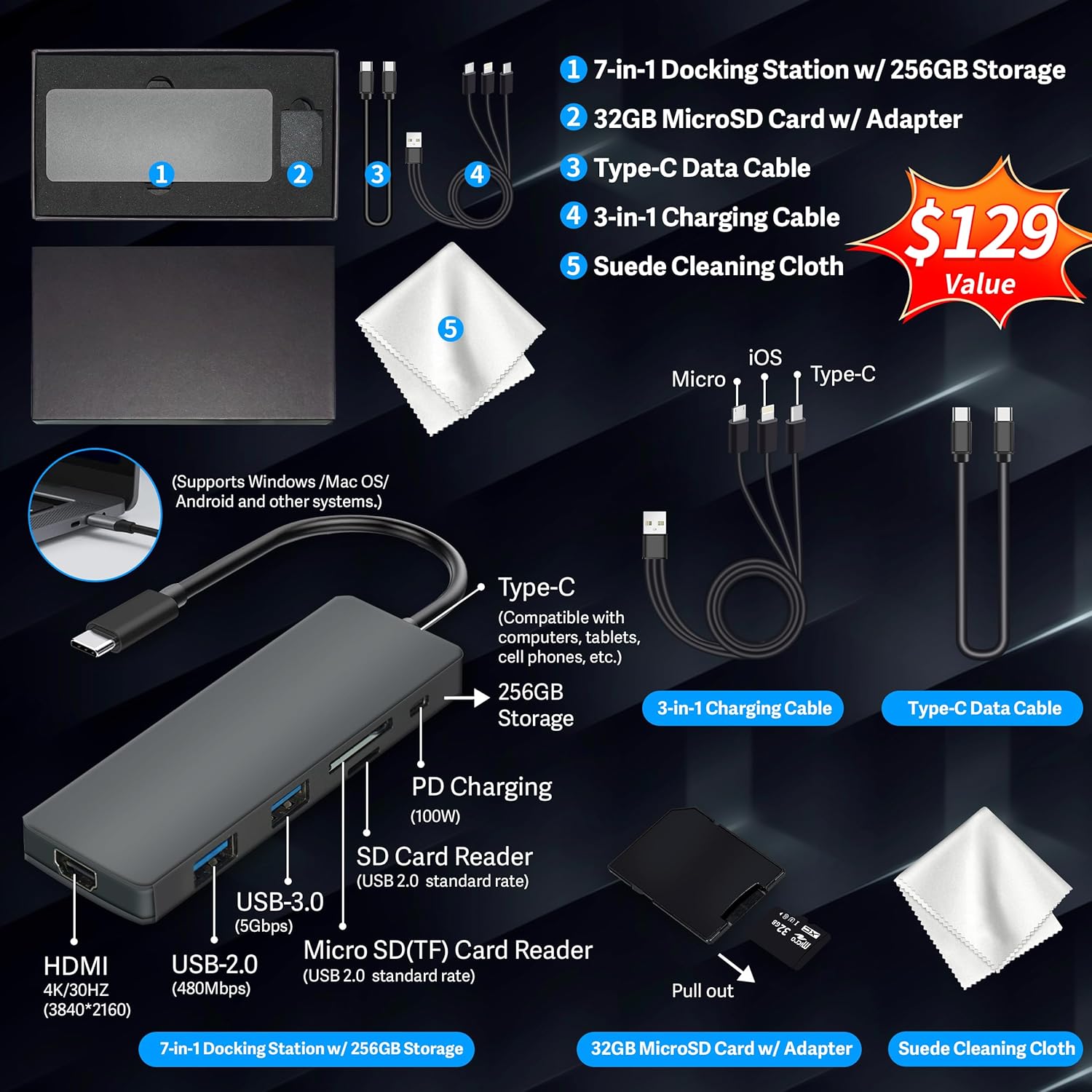
Figure 1: Included accessories, including the 7-in-1 docking station, various cables, and a cleaning cloth.
Кіраванне ноўтбукам
Асаблівасці дысплея
The HP 15.6-inch laptop features an FHD IPS touchscreen display with a resolution of 1920 x 1080 pixels and an anti-glare coating. This display provides clear and vibrant visuals from various viewныя вуглы.

Figure 2: The 15.6-inch FHD IPS display offers crisp and vivid details.
Падключэнне і перыферыйныя прылады
Your laptop is equipped with various connectivity options and integrated features to enhance your user experience.
- 720p HD-камера: For video calls and online meetings.
- Wi-Fi 6: Для хуткаснага бесправаднога падключэння да Інтэрнэту.
- Bluetooth: Для падключэння бесправадных перыферыйных прылад, такіх як мышы, клавіятуры і навушнікі.
- Лічбавая клавіятура: A full numeric keypad is integrated for efficient data entry and calculations.

Figure 3: Key features for staying connected and productive, including the numeric keypad.
The laptop includes multiple ports for connecting external devices:
- 2 порты USB тыпу A
- 1 порт USB тыпу C
- 1 порт HDMI
- 1 камбінаваны раз'ём для навушнікаў/мікрафона

Figure 4: Multi-port configuration on the laptop for various connections.
Прадукцыйнасць і шматзадачнасць
Equipped with an AMD Ryzen 7 7730U processor, 64GB DDR4 RAM, and AMD Radeon Graphics, this laptop is designed for efficient multitasking and demanding applications. The 2.28TB storage (2TB SSD + 288GB Docking Station Set) provides ample space and fast access to your files.

Figure 5: Core specifications for performance and storage.

Figure 6: Laptop demonstrating effortless multitasking with several applications running simultaneously.
The laptop is designed for extended use, offering reliable battery life to support your daily tasks.

Figure 7: The laptop supports continuous work throughout the day with its battery performance.
Тэхнічнае абслугоўванне
Каб забяспечыць даўгавечнасць і аптымальную прадукцыйнасць вашага ноўтбука HP, выконвайце наступныя рэкамендацыі па тэхнічным абслугоўванні:
- Уборка: Use the provided suede cleaning cloth or a soft, lint-free cloth to clean the screen and exterior. Avoid harsh chemicals.
- Абнаўленні праграмнага забеспячэння: Рэгулярна абнаўляйце аперацыйную сістэму Windows 11 Pro і драйверы, каб забяспечыць бяспеку і прадукцыйнасць.
- Сыход за батарэяй: Avoid fully discharging the battery frequently. For long-term storage, charge the battery to about 50-70%.
- Вентыляцыя: Каб пазбегнуць перагрэву, пераканайцеся, што вентыляцыйныя адтуліны ноўтбука не заблакаваныя. Выкарыстоўвайце ноўтбук на цвёрдай, роўнай паверхні.
- захоўванне: Захоўвайце ноўтбук у прахалодным, сухім месцы, удалечыні ад прамых сонечных прамянёў і экстрэмальных тэмператур.
Ліквідацыю непаладак
У гэтым раздзеле разглядаюцца распаўсюджаныя праблемы, з якімі вы можаце сутыкнуцца пры выкарыстанні ноўтбука.
Ноўтбук не ўключаецца
- Пераканайцеся, што адаптар сілкавання надзейна падключаны як да ноўтбука, так і да спраўнай разеткі.
- Праверце працаздольнасць разеткі, падключыўшы да яе іншую прыладу.
- Калі акумулятар цалкам разрадзіўся, дайце яму зарадзіцца не менш за 15-30 хвілін, перш чым спрабаваць уключыць прыладу.
Screen Remains Blank
- Праверце, ці ўключаны ноўтбук (індыкатар харчавання гарыць).
- Try connecting an external monitor to see if display output is available.
- Адрэгулюйце яркасць экрана з дапамогай функцыянальных клавіш.
Праблемы з падключэннем да Wi-Fi
- Пераканайцеся, што Wi-Fi уключаны ў наладах Windows.
- Перазагрузіце маршрутызатар і мадэм.
- Абнавіце драйверы Wi-Fi праз дыспетчар прылад.
- Check for any physical obstructions or interference.
Павольная прадукцыйнасць
- Зачыніце непатрэбныя праграмы, якія працуюць у фонавым рэжыме.
- Праверце дыспетчар задач на наяўнасць працэсаў, якія спажываюць шмат рэсурсаў працэсара або аператыўнай памяці.
- Пераканайцеся, што ваша аперацыйная сістэма і драйверы абноўлены.
- Запусціце ачыстку і дэфрагментацыю дыска (для жорсткіх дыскаў, неабавязкова для SSD).
- Праскануйце на наяўнасць шкоднасных праграм або вірусаў.
Тэхнічныя характарыстыкі
Below are the detailed technical specifications for your HP 15.6-inch FHD IPS Touchscreen Laptop.

Figure 8: Laptop dimensions and weight for portability.
| Асаблівасць | Дэталь |
|---|---|
| Марка | HP |
| Назва мадэлі | HP 15.6" FHD IPS Touchscreen Laptop |
| Памер экрана | 15.6 цалі |
| Дазвол дысплея | 1920 x 1080 пікселяў (FHD) |
| Тып дысплея | LED IPS Touchscreen |
| Працэсар | AMD Ryzen 7 7730U (8 Cores, 2 GHz base) |
| Графічны супрацэсар | Графіка AMD Radeon (інтэграваная) |
| Аператыўная памяць | 64 ГБ DDR4 (3200 МГц) |
| Захоўванне | 2 TB SSD + 288 GB Docking Station Set (Total 2.28 TB) |
| Аперацыйная сістэма | Windows 11 Pro |
| Сувязь | Wi-Fi 6 (802.11ax), Bluetooth, HDMI, USB |
| Парты | 2x USB Type-A, 1x USB Type-C, 1x HDMI, 1x Headphone/Microphone Combo |
| Webкамера | 720p HD-камера |
| Клавіятура | Поўнапамерны з лічбавай клавіятурай |
| Памеры (Д х Ш х Г) | 14.17" x 9.29" x 0.73" |
| Вага прадмета | 3.52 фунта (прыблізна 1.6 кг) |
| Колер | Серабро |
| UPC | 196188514924 |
| ASIN | B0FX2NR2WN |
Інфармацыя аб гарантыі
Your HP laptop comes with a manufacturer's warranty. For upgraded components (RAM/SSD), a 1-year warranty is provided by SnowBell. The original 1-year manufacturer warranty applies to all other components of the laptop. Please retain your proof of purchase for warranty claims. For detailed terms and conditions, refer to the warranty documentation included with your product or visit the official HP support webсайт.
Падтрымка
For further assistance, technical support, or service inquiries, please refer to the following resources:
- Афіцыйная падтрымка HP Webсайт: Наведайце support.hp.com для драйвераў, інструкцый і кіраўніцтваў па ліквідацыі непаладак.
- Інтэрнэт-даведка: Utilize the built-in Windows 11 Pro help features for software-related questions.
- Звязацца з прадаўцом: For issues related to upgraded components or purchase, contact SnowBell or your point of purchase.