
1. Уводзіны
This manual provides detailed instructions for the VILTROX 85mm F2.0 EVO Z-Mount Full Frame Lens. This lens is a medium telephoto prime lens designed for Nikon Z-Mount cameras, offering a versatile focal length and wide aperture suitable for various photographic applications, including portraits, low-light conditions, and close-up photography. Please read this manual thoroughly before using the lens to ensure proper operation and care.
2. Асноўныя магчымасці
- Вялікая дыяфрагма F2.0: Excels in low-light conditions, producing bright, clean images with excellent noise control. Delivers sharp results even at the widest aperture.
- 0.74m Closer Focus: Allows for a minimum focus distance of 0.74m, enabling stunning close-ups and detailed magnification. Optimized focus group ensures sharpness at various distances.
- Classic 85mm Focal Length: Ideal for portrait photography, offering natural perspective and flattering compression with excellent distortion control.
- Reliable Weather Resistance: Features a dust- and moisture-resistant seal at the lens mount and a water- and oil-repellent coating on the front element for outdoor protection.
- Professional Control: Includes a customizable Fn button, a Click ON/OFF switch for the aperture ring (suitable for both photos and video), and a quick AF/MF mode switch for seamless control.
3. Што ў скрынцы
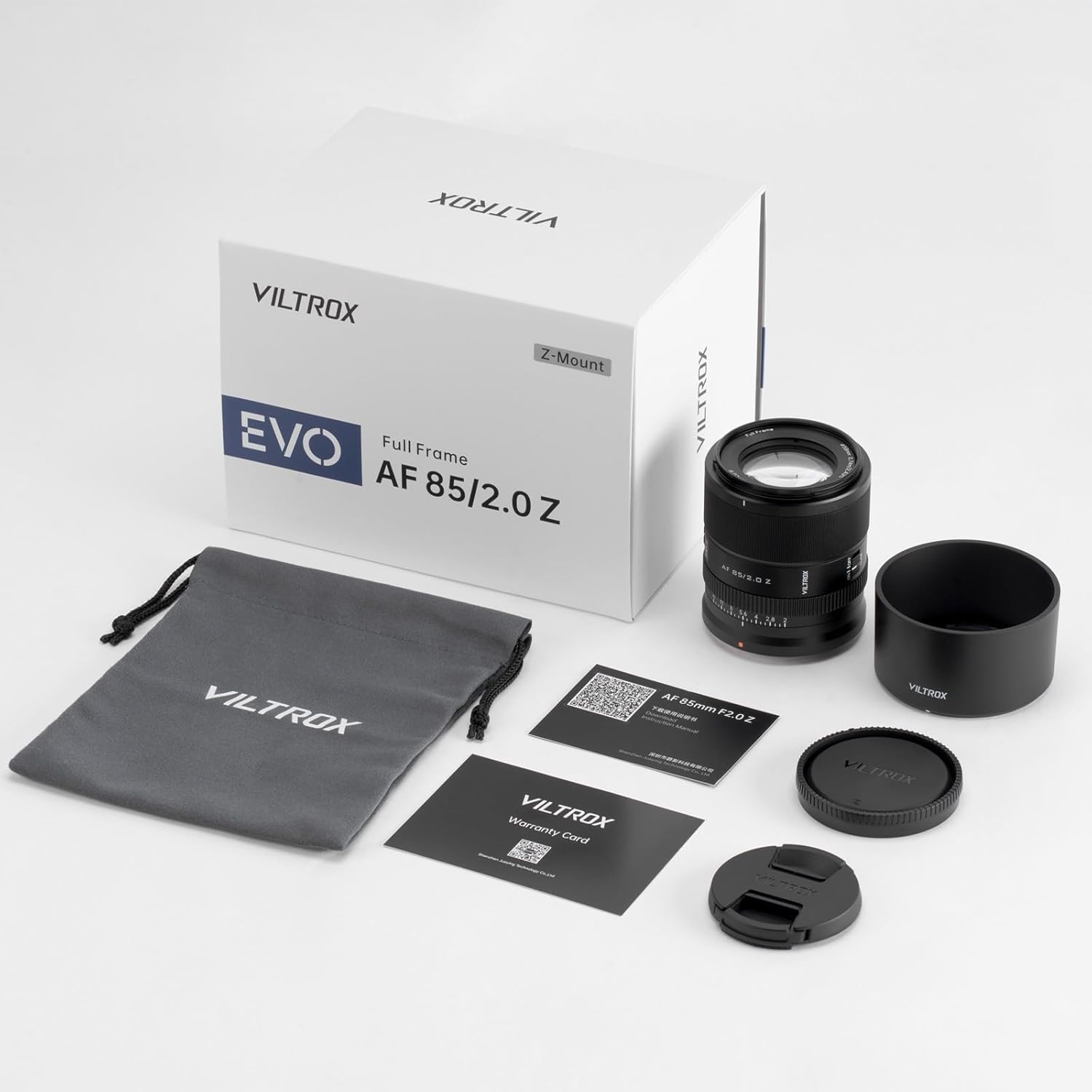
Image: The VILTROX 85mm F2.0 EVO Z-Mount lens and its included accessories laid out on a white surface.
- 1x VILTROX 85mm F2.0 EVO Z-Mount Lens
- 1x сумка для пераноскі
- 1x Lens Hood
- 1x Rear Cap
- 1x Front Lens Cap
- 1x ачышчальная тканіна
4. Настройка
4.1 Mounting the Lens
- Ensure your camera is turned off before attaching or detaching the lens.
- Remove the rear lens cap from the VILTROX 85mm F2.0 EVO lens and the body cap from your Nikon Z-Mount camera.
- Align the white mounting index mark on the lens barrel with the corresponding white mounting index mark on your camera body.
- Устаўце аб'ектыў у мацаванне камеры і павярніце яго па гадзіннікавай стрэлцы, пакуль ён не зафіксуецца са шчоўкам. Не ўстаўляйце аб'ектыў сілай.

Image: The VILTROX 85mm F2.0 EVO Z-Mount lens securely attached to a Nikon Z-Mount camera body.
4.2 Усталяванне бленды аб'ектыва
Align the mark on the lens hood with the mark on the front of the lens, then twist the hood clockwise until it locks into position. The lens hood helps to prevent flare and protect the front element.
5. Інструкцыя па эксплуатацыі
5.1 Пераключальнік рэжымаў факусоўкі (AF/MF)

Image: The AF/MF switch and Fn button located on the side of the lens barrel.
- АФ (аўтафакусоўка): Slide the switch to 'AF' for automatic focusing. The lens will use the camera's autofocus system, including features like Face and Eye Detection AF, for quick and precise focus.
- MF (ручная факусоўка): Slide the switch to 'MF' to manually adjust focus using the focus ring on the lens. This mode is useful for precise control in specific photographic situations.
5.2 Aperture Ring and Click Switch
The lens features an aperture ring for direct control over the aperture setting. A 'Click ON/OFF' switch is provided:
- Click ON: Provides tactile clicks at each aperture stop, ideal for photography where precise, stepped adjustments are preferred.
- Click OFF: Allows for smooth, stepless aperture adjustments, which is beneficial for video recording to avoid audible clicks during exposure changes.
5.3 Customizable Fn Button
The lens is equipped with a customizable Fn (Function) button. This button can be assigned various functions through your camera's menu settings, allowing for quick access to frequently used features without navigating through menus.
5.4 Minimum Object Distance (MOD)
The VILTROX 85mm F2.0 EVO lens has a minimum object distance of 0.74 meters (approximately 2.43 feet). This allows for close-up shots, capturing fine details with a pleasinразмыццё фону g.
6. Тэхнічнае абслугоўванне
6.1 Ачыстка аб'ектыва

Image: A person cleaning the front element of a VILTROX lens with a soft cloth.
- Use the provided cleaning cloth or a soft, lint-free microfiber cloth to gently wipe dust and smudges from the lens surfaces.
- For stubborn marks, use a specialized lens cleaning solution applied to the cloth, not directly to the lens.
- The front element has a water- and oil-repellent coating, making it easier to clean.
6.2 Захоўванне
- When not in use, always attach the front and rear lens caps to protect the optical elements.
- Store the lens in the provided carrying pouch to prevent scratches and minor impacts.
- Keep the lens in a cool, dry place away from direct sunlight and extreme temperatures.
6.3 Устойлівасць да ўздзеяння надвор'я

Image: A VILTROX lens on a camera, showing water droplets on its exterior, highlighting its weather-resistant design.
The lens features a dust- and moisture-resistant seal at the lens mount. While this provides protection against light rain and dust, it is not fully waterproof. Avoid exposing the lens to heavy rain or submerging it in water.
7. Выпраўленне непаладак
7.1 Lens Not Recognized by Camera
- Ensure the lens is securely mounted to the camera body. Remove and reattach the lens, ensuring it clicks into place.
- Check your camera's settings to ensure it is configured to shoot without a lens (if applicable) or to recognize third-party lenses.
- Абнаўленне прашыўкі: Outdated lens firmware can sometimes cause compatibility issues. Visit the official VILTROX website or contact VILTROX support to check for the latest firmware for your lens and camera model. Follow the provided instructions carefully for updating.
- Clean the electronic contacts on both the lens mount and the camera body with a clean, dry cloth.
7.2 Праблемы з аўтафакусоўкай
- Ensure the AF/MF switch on the lens is set to 'AF'.
- Check your camera's autofocus settings (e.g., AF mode, AF area).
- Пераканайцеся, што вакол аб'екта дастаткова святла і кантраснасці, каб сістэма аўтафокуса працавала эфектыўна.
- If the issue persists, consider performing a firmware update as described above.
8. Тэхнічныя характарыстыкі
| Спецыфікацыя | Каштоўнасць |
|---|---|
| Марка | VILTROX |
| Нумар мадэлі | 85mm F2.0 EVO Full Frame |
| Апісанне фокуснай адлегласці | 85mm F2.0 Fixed Focal Length |
| Тып аб'ектыва | Тэлеаб'ектыў |
| Сумяшчальныя мацавання | Nikon Z |
| Максімальная фокусная адлегласць | 85 міліметра |
| Памеры прадукту | 3.07 х 2.72 х 2.72 цалі |
| Вага прадмета | 11.7 унцыі |
9. Афіцыйнае відэа прадукту
Відэа: Афіцыйная відэапрэзентацыя прадуктуasing the VILTROX AF 85mm F2.0 EVO lens, its features, and sample photography.
10. Гарантыя і падтрымка
VILTROX is committed to providing quality products and support. If you encounter any issues or require assistance with your VILTROX 85mm F2.0 EVO lens, please contact VILTROX customer support. For the latest firmware updates and detailed support information, please refer to the official VILTROX webсайт.