
Уводзіны
Welcome to the HP OmniDesk M03 AI Desktop PC. This manual provides essential information for setting up, operating, maintaining, and troubleshooting your new computer. The HP OmniDesk M03 is designed for performance and efficiency, featuring an Intel Core Ultra 7 265 processor with dedicated AI cores, 16GB DDR5 RAM, and a 2TB NVMe SSD, running on Windows 11 Home.
Што ў скрынцы
Праверце наяўнасць усіх кампанентаў ва ўпакоўцы:
- HP OmniDesk Desktop PC
- Бесправадная клавіятура
- Мышка
- Кароткае кіраўніцтва па ўстаноўцы
- Сілавы кабель

Image: The HP OmniDesk M03 desktop PC, wireless keyboard, mouse, and power cable, illustrating the contents of the product box.
Настройка
1. Падключэнне перыферыйных прылад
Before powering on your PC, connect your monitor, keyboard, and mouse.
- Манітор: Connect your monitor to the PC using an HDMI or DisplayPort cable. The ports are located on the rear of the PC.
- Клавіятура і мыш: The included keyboard and mouse are wireless. Insert batteries (if not pre-installed) and connect their USB receiver to an available USB port on the PC.
- Магутнасць: Connect the power cable to the PC's power input on the rear and then to a wall outlet.
- Сетка (неабавязкова): For a wired internet connection, connect an Ethernet cable from your router to the RJ45 port on the rear of the PC.

Image: Rear panel of the HP OmniDesk M03, highlighting the DisplayPort, HDMI, USB, and Ethernet ports for connecting external devices.

Выява: Збоку view of the HP OmniDesk M03 AI Desktop PC, showing its compact tower design.
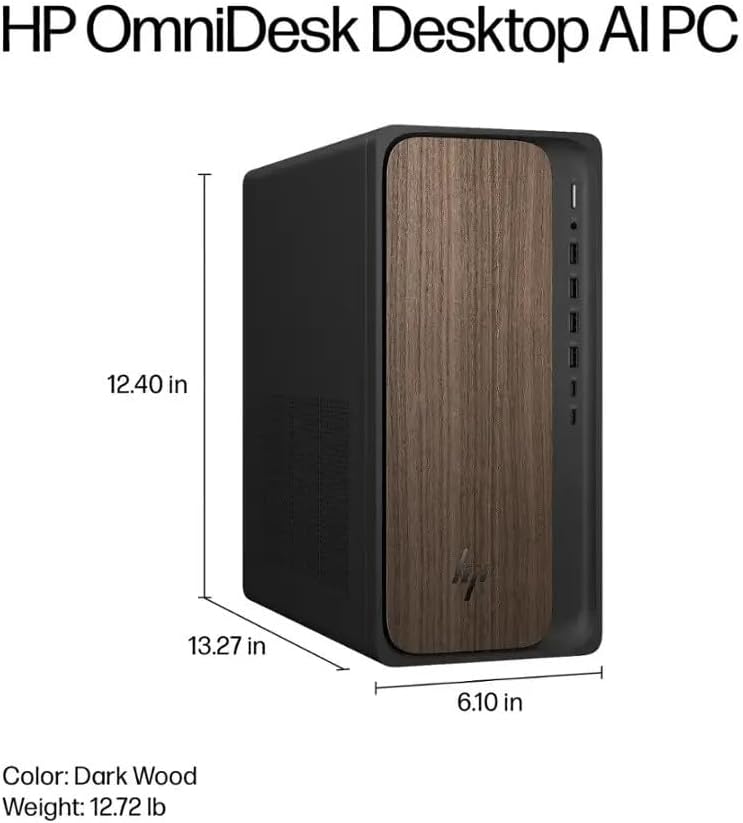
Image: Diagram illustrating the location and type of front and rear ports on the HP OmniDesk M03, including USB-A, USB-C, HDMI, DisplayPort, and audio jacks.
2. Уключэнне і пачатковая налада
Пасля падключэння ўсіх перыферыйных прылад:
- Націсніце кнопку харчавання, размешчаную на пярэдняй панэлі ПК.
- Follow the on-screen instructions to complete the Windows 11 Home initial setup, including language selection, network connection (if not wired), account creation, and privacy settings.

Выява: спераду view of the HP OmniDesk M03, showing the power button at the top right and various USB ports below it.
Кіраванне вашым ПК
Windows 11 хатняя
Your HP OmniDesk M03 comes pre-installed with Windows 11 Home. Familiarize yourself with the operating system's interface, Start menu, and settings. Microsoft provides extensive online resources for Windows 11 usage.
Асаблівасці AI
The Intel Core Ultra 7 265 processor includes dedicated AI cores and Intel AI Boost, enhancing performance for AI-driven applications and features within Windows 11, such as AI Copilot. These features can assist with tasks, content creation, and system optimization.
Сувязь
- Wi-Fi 6 (802.11ax): Падключайцеся да бесправадных сетак для доступу ў Інтэрнэт. Кіруйце наладамі Wi-Fi праз налады сеткі Windows 11.
- Bluetooth 5.4: Pair wireless devices such as headphones, speakers, or additional input devices. Access Bluetooth settings via the Windows 11 settings menu.
- Ethernet: For a stable, high-speed wired connection, ensure an Ethernet cable is connected to the RJ45 port.
Тэхнічнае абслугоўванне
Ачыстка вашага ПК
- Знешні выгляд: Выкарыстоўвайце мяккую безворсовую тканіну, злёгку dampened with water or a mild cleaning solution to wipe down the exterior. Avoid harsh chemicals.
- вентылі: Перыядычна чысціце вентыляцыйныя рашоткі ад пылу сціснутым паветрам, каб забяспечыць належную цыркуляцыю паветра і прадухіліць перагрэў.
- парты: Трымайце парты чысцінёй ад пылу і смецця.
Абнаўлення праграмнага забеспячэння
Regularly update Windows 11 and device drivers to ensure optimal performance, security, and compatibility. Access Windows Update through the Settings menu.
Рэзервовае капіраванне даных
Рэкамендуецца рэгулярна рабіць рэзервовыя копіі важных дадзеных на знешні дыск або ў воблачнае сховішча, каб прадухіліць страту дадзеных.
Ліквідацыю непаладак
У гэтым раздзеле разглядаюцца распаўсюджаныя праблемы, з якімі вы можаце сутыкнуцца.
- Няма харчавання:
- Пераканайцеся, што кабель харчавання надзейна падключаны як да кампутара, так і да разеткі.
- Праверце працаздольнасць разеткі, падключыўшы да яе іншую прыладу.
- Няма дысплея:
- Check that the monitor is powered on and correctly connected to the PC via HDMI or DisplayPort.
- Пераканайцеся, што на маніторы выбрана правільная крыніца ўваходнага сігналу.
- Няма падключэння да Інтэрнэту:
- Для Wi-Fi праверце, ці ўключаны адаптар Wi-Fi і ці падключаны вы да правільнай сеткі з правільным паролем.
- For wired connection, ensure the Ethernet cable is properly connected and your router is working.
- Клавіятура/мыш не рэагуе:
- Праверце ўзровень зарада батарэі бесправадных прылад.
- Ensure the USB receiver is plugged into a functional USB port.
- Паспрабуйце перазагрузіць ПК.
Па больш складаных пытаннях звярніцеся ў службу падтрымкі HP webсайт або звярніцеся ў службу падтрымкі.
Тэхнічныя характарыстыкі
Detailed technical specifications for the HP OmniDesk M03 AI Desktop PC:
| Кампанент | Спецыфікацыя |
| Працэсар | Intel Core Ultra 7 265 (20-Core, up to 5.3 GHz, Intel AI Boost) |
| Аперацыйная сістэма | Windows 11 Home (64-разрадная) |
| Памяць (RAM) | 16 ГБ DDR5 5600 МГц |
| Захоўванне | 2 ТБ PCIe NVMe M.2 Цвёрдацельны назапашвальнік |
| Графіка | Убудаваная графіка Intel |
| Відэавыхад | 1x HDMI 2.1, 1x DisplayPort 1.4a |
| USB-парты (спераду) | 2x USB-A 5Gbps, 2x USB-A 10Gbps, 1x USB-C 5Gbps, 1x USB-C 10Gbps |
| USB-парты (ззаду) | 4x USB 2.0 тыпу A |
| Аўдыёпарты | 1x Headphone/Microphone Combo, 1x Line Input, 1x Line Output |
| Сетка | Wi-Fi 6 (802.11ax), Bluetooth 5.4, Gigabit Ethernet (RJ45) |
| Памеры (В х Ш х Г) | 13.3 цалі х 6.1 цалі х 12.4 цалі (33.8 см х 15.5 см х 31.5 см) |
| Вага | 11.77 фунтаў (5.34 кг) |

Image: Diagram showing the height (13.27 inches), width (6.10 inches), and depth (12.40 inches) of the HP OmniDesk M03 desktop PC.
Гарантыя і падтрымка
Інфармацыя аб гарантыі
Your HP OmniDesk M03 AI Desktop PC comes with a 90-дзённая абмежаваная гарантыя. This warranty covers defects in materials and workmanship under normal use. For detailed terms and conditions, please refer to the warranty documentation included with your product or visit the official HP support webсайт.
Падтрымка кліентаў
For technical assistance, troubleshooting, or warranty claims, please contact HP Customer Support:
- Інтэрнэт-падтрымка: Наведайце чыноўніка Служба падтрымкі HP Webсайт для драйвераў, інструкцый і кіраўніцтваў па ліквідацыі непаладак.
- Падтрымка па тэлефоне: Refer to the Quick Setup Guide or HP's webсайт рэгіянальных кантактных тэлефонаў.
When contacting support, please have your product model (M03) and serial number ready.