
1. паview
The Xiaomi Redmi Note 15 Pro 5G is a high-performance smartphone designed for robust daily use. It features a massive 6580 mAh battery, IP66/IP68 dust and water resistance, a 200 MP camera, and a 6.83-inch 1.5K AMOLED display. This manual provides essential information for setting up, operating, and maintaining your device.

Выява: некалькі views of the Xiaomi Redmi Note 15 Pro 5G smartphone, showcasinяго дызайн і модуль камеры.
2. Што ў скрынцы
Пасля распакавання Xiaomi Redmi Note 15 Pro 5G вы павінны знайсці наступныя прадметы:
- Смартфон Xiaomi Redmi Note 15 Pro 5G
- USB-кабель (USB тыпу C)
- Інструмент для выцягвання SIM-карты
- Ахоўны футляр
- Holding Ring (Keyring)
Note: A power adapter is not included with this device.
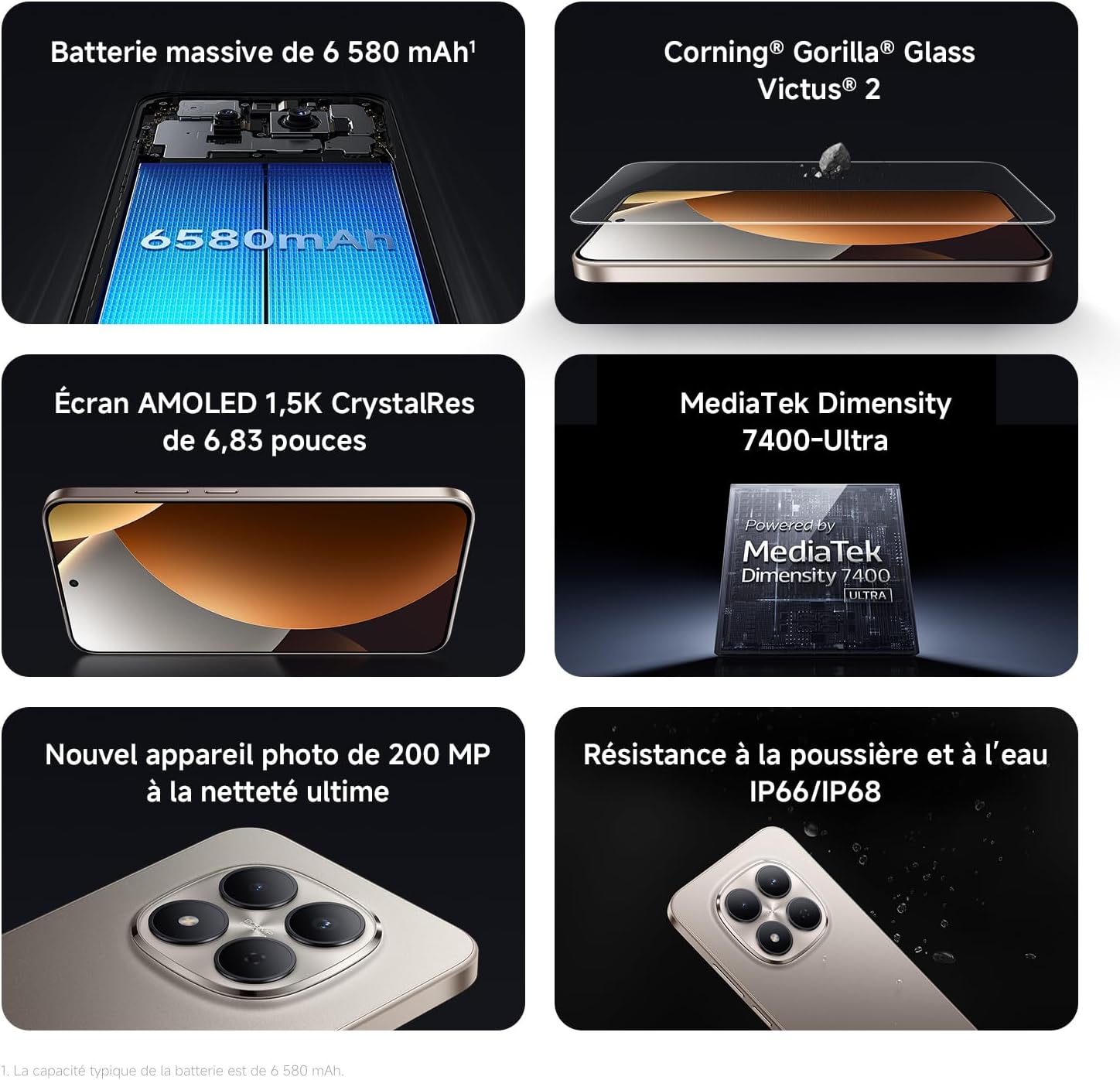
Image: Contents of the Xiaomi Redmi Note 15 Pro 5G box, showing the smartphone, USB-C cable, SIM ejection tool, protective case, and holding ring.
3. Асноўныя магчымасці
- Massive 6580 mAh Battery with 45W Turbo Charging: Equipped with an ultra-large silicon-carbon battery for extended usage while maintaining a slim and light design. Supports 45W turbo charging and up to 22.5W reverse charging.
- IP66 / IP68 Dust and Water Resistance: The device has successfully passed 2-meter water resistance tests for 24 hours. It is designed to withstand daily splashes, accidental immersion, or drops in water without affecting performance.
- New 200 MP Ultra-Clear Camera System: Features a 4th generation 200 MP main sensor combined with a large 1/1.4-inch sensor, offering unprecedented image detail.
- Immersive 6.83-inch 1.5K Eye-Care AMOLED Display: Utilizes flagship-level luminous materials for reduced power consumption and a peak brightness of 3200 nits, ensuring clear visibility even in bright sunlight.
- Памочнік AI: Intelligent optimization with a single gesture, enhancing imaging capabilities and creative efficiency.
- Шкло Corning Gorilla Glass Victus 2: Reinforced front glass for enhanced shock and scratch resistance, ensuring long-term durability.
- Працэсар MediaTek Dimensity 7400-Ultra: Built on a 4nm TSMC process with an octa-core architecture up to 2.6 GHz, providing powerful multitasking, smooth gaming, and stable performance.
- Xiaomi HyperOS 2: Offers a faster, smarter, and smoother user experience with 6 years of security updates.

Image: Diagram illustrating the 6580 mAh battery capacity of the Redmi Note 15 Pro 5G.

Image: The Redmi Note 15 Pro 5G with water droplets, demonstrating its IP66/IP68 dust and water resistance.

Выява: Крупны план view of the 200 MP camera module on the Redmi Note 15 Pro 5G.

Image: The 6.83-inch 1.5K AMOLED display of the Redmi Note 15 Pro 5G with its specifications.

Image: Before and after images demonstrating AI photo optimization on the Redmi Note 15 Pro 5G.

Image: Illustration of Corning Gorilla Glass Victus 2 durability on the Redmi Note 15 Pro 5G.

Image: Technical image showing RAM chips, indicating up to 24GB RAM with memory extension on the Redmi Note 15 Pro 5G.

Image: Screenshot of the Xiaomi HyperOS 2 interface on the Redmi Note 15 Pro 5G.
4. Настройка
4.1. Устаўка SIM-карты
- Знайдзіце латок для SIM-карты на бакавой частцы прылады.
- Insert the SIM ejection tool into the small hole next to the tray and press firmly until the tray pops out.
- Place your Nano-SIM card(s) into the tray with the gold contacts facing down. Ensure they are correctly aligned.
- Carefully push the SIM card tray back into the device until it clicks into place.
4.2. Пачатковае ўключэнне і налада
- Націсніце і ўтрымлівайце кнопку харчавання (звычайна з правага боку), пакуль не з'явіцца лагатып Xiaomi.
- Выконвайце інструкцыі на экране, каб выбраць мову, рэгіён і падключыцца да сеткі Wi-Fi.
- Увайдзіце ў свой уліковы запіс Google або стварыце новы, каб атрымаць доступ да сэрвісаў Google і Play Store.
- Set up your screen lock (PIN, pattern, password, fingerprint, or face unlock) for security.
- Review and accept the terms and conditions to complete the setup process.
5. Інструкцыя па эксплуатацыі
5.1. Базавая навігацыя
- Галоўны экран: Правядзіце пальцам улева або ўправа, каб перамяшчацца паміж галоўнымі экранамі.
- Скрыня праграм: Правядзіце пальцам уверх ад ніжняй часткі экрана, каб атрымаць доступ да ўсіх усталяваных праграм.
- Апавяшчэнні і хуткія налады: Правядзіце пальцам уніз ад верхняй частцы экрана да view апавяшчэнні і доступ да хуткіх налад пераключальнікі.
- Апошнія праграмы: Swipe up from the bottom and hold, or tap the square navigation button (if enabled) to see recently used applications.
5.2. Выкарыстанне камеры
The 200 MP camera system offers various modes for capturing photos and videos.
- Адкрыйце праграму «Камера» на галоўным экране або ў панэлі праграм.
- Swipe left or right on the screen to switch between modes like Photo, Video, Portrait, Pro, and more.
- Націсніце кнопку спуску засаўкі, каб зрабіць фотаздымак, або кнопку запісу, каб пачаць/спыніць відэазапіс.
- Use the zoom options (e.g., 0.6x, 1x, 2x) or pinch to zoom for different perspectives.
- Access settings (gear icon) for advanced options like resolution, aspect ratio, and AI enhancements.

Image: A hand holding the Redmi Note 15 Pro 5G, displaying the camera interface with various modes and controls.
5.3. Налады дысплея
Наладзьце дысплей для аптымальнага viewінг і камфорт.
- Перайсці да Налады > Дысплей.
- Adjust brightness, enable Adaptive brightness, or activate Reading mode for eye comfort.
- Change the Refresh rate (up to 120Hz) for smoother scrolling and animations.
- Select Color scheme and adjust color temperature to your preference.
5.4. Кіраванне батарэяй
Optimize your battery life and utilize charging features.
- Доступ Налады > Акумулятар каб view usage statistics and enable Battery Saver modes.
- Use the provided USB Type-C cable with a compatible 45W charger for turbo charging.
- To use reverse charging, connect a compatible device to your smartphone via a USB-C to USB-C cable.
6. Інтэграцыя медыя
6.1. Прадукт скончыўсяview Відэа
Video: A seller-provided overview of the Redmi Note 15 Pro, showcasing its design, interface, and camera features. This video highlights the device's smooth operation and aesthetic appeal.
7. Тэхнічнае абслугоўванне
7.1. Ачыстка прылады
- Выкарыстоўвайце мяккую тканіну без ворса для чысткі экрана і корпуса тэлефона.
- Пазбягайце выкарыстання агрэсіўных хімікатаў або абразіўных матэрыялаў.
- For speaker and port cleaning, the device features a function to expel water and dust. Access this feature through the settings or a dedicated app.

Image: Screenshot of the Redmi Note 15 Pro 5G showing a speaker cleaning function on the screen, which uses high-frequency vibration to expel residual water and dust.
7.2. Абнаўленне праграмнага забеспячэння
Рэгулярна правярайце наяўнасць абнаўленняў праграмнага забеспячэння і ўсталёўвайце іх, каб забяспечыць аптымальную прадукцыйнасць, бяспеку і доступ да новых функцый.
- Перайсці да Налады > Аб тэлефоне > Версія MIUI (or HyperOS version) to check for updates.
8. Выпраўленне непаладак
8.1. Прылада не адказвае
- Націсніце і ўтрымлівайце кнопку харчавання каля 10-15 секунд, каб прымусова перазагрузіць кампутар.
- If the issue persists, ensure the device is charged. Connect it to a charger and wait a few minutes before attempting to power it on again.
8.2. Праблемы з падключэннем да сеткі
- Toggle Airplane mode on and off from Quick Settings.
- Перазапусціце прыладу.
- Праверце, ці правільна ўстаўлена ваша SIM-карта.
- Перайсці да Налады > SIM-карты і мабільныя сеткі to ensure your mobile data is enabled and the correct network type is selected.
8.3. Збоі або завісанні праграм
- Clear the cache and data of the problematic app (Налады > Праграмы > Кіраванне праграмамі > [Назва праграмы] > Ачысціць даныя).
- Выдаліце і пераўсталюйце праграму.
- Пераканайцеся, што праграмнае забеспячэнне вашай прылады абноўлена.
8.4. Скід да заводскіх налад
If you encounter persistent issues, a factory reset may be necessary. Папярэджанне: Гэта сатрэ ўсе дадзеныя на вашай прыладзе. Перад тым, як працягнуць, зрабіце рэзервовую копію важных дадзеных.
- Перайсці да Налады > Аб тэлефоне > Скід да заводскіх налад.
- Выконвайце інструкцыі на экране, каб пацвердзіць скід.
9. Тэхнічныя характарыстыкі
| Асаблівасць | Дэталь |
|---|---|
| Марка | XIAOMI |
| Назва мадэлі | Redmi Note 15 Pro 5G |
| Аперацыйная сістэма | Гіпер АС |
| АЗП | 12 ГБ |
| Ёмістасць захоўвання | 512 ГБ |
| Мадэль працэсара | Mediatek Dimensity 7400 |
| Памер экрана | 6.83 цалі |
| Дазвол дысплея | 1560 х 720 |
| Частата абнаўлення | 120 Гц |
| Тып дысплея | AMOLED |
| Аператар бесправадной сувязі | Адмыкнутая |
| Колер | Чорны |
| Слоты для SIM-карт | Дзве SIM |
| ўваходных інтэрфейс | USB тыпу C |
| Узровень воданепранікальнасці | Waterproof (IP66/IP68) |
| Раздзяленне франтальнай камеры | 20 МП |
| Раздзяленне задняй камеры | 200 мегапікселяў |
| Ёмістасць батарэі | 6580 мАг |
| Сотавая тэхналогія | 5G |
| Тэхналогія падлучэння | Bluetooth, NFC, USB, Wi-Fi |
| Мадэльны год | 2026 |

Image: Technical specifications and feature legends for the Redmi Note 15 Pro 5G.
10. Гарантыя і падтрымка
Your Xiaomi Redmi Note 15 Pro 5G comes with a 2-гадовая гарантыя вытворцы. Гэтая гарантыя распаўсюджваецца на дэфекты матэрыялаў і вырабу пры звычайным выкарыстанні.
For warranty claims, technical support, or service inquiries, please contact Xiaomi customer service or visit the official Xiaomi support webсайт. Захоўвайце пацвярджэнне пакупкі для пацверджання гарантыі.