
1. Уводзіны
The YUNZII B75 PRO MAX is a 75% layout wireless mechanical keyboard featuring QMK/VIA programmability, a customizable TFT screen, and a multi-function knob. It supports tri-mode connectivity (wired, 2.4GHz wireless, and Bluetooth) and is designed for a premium typing experience with hot-swappable, pre-lubed switches and a gasket-mount structure.
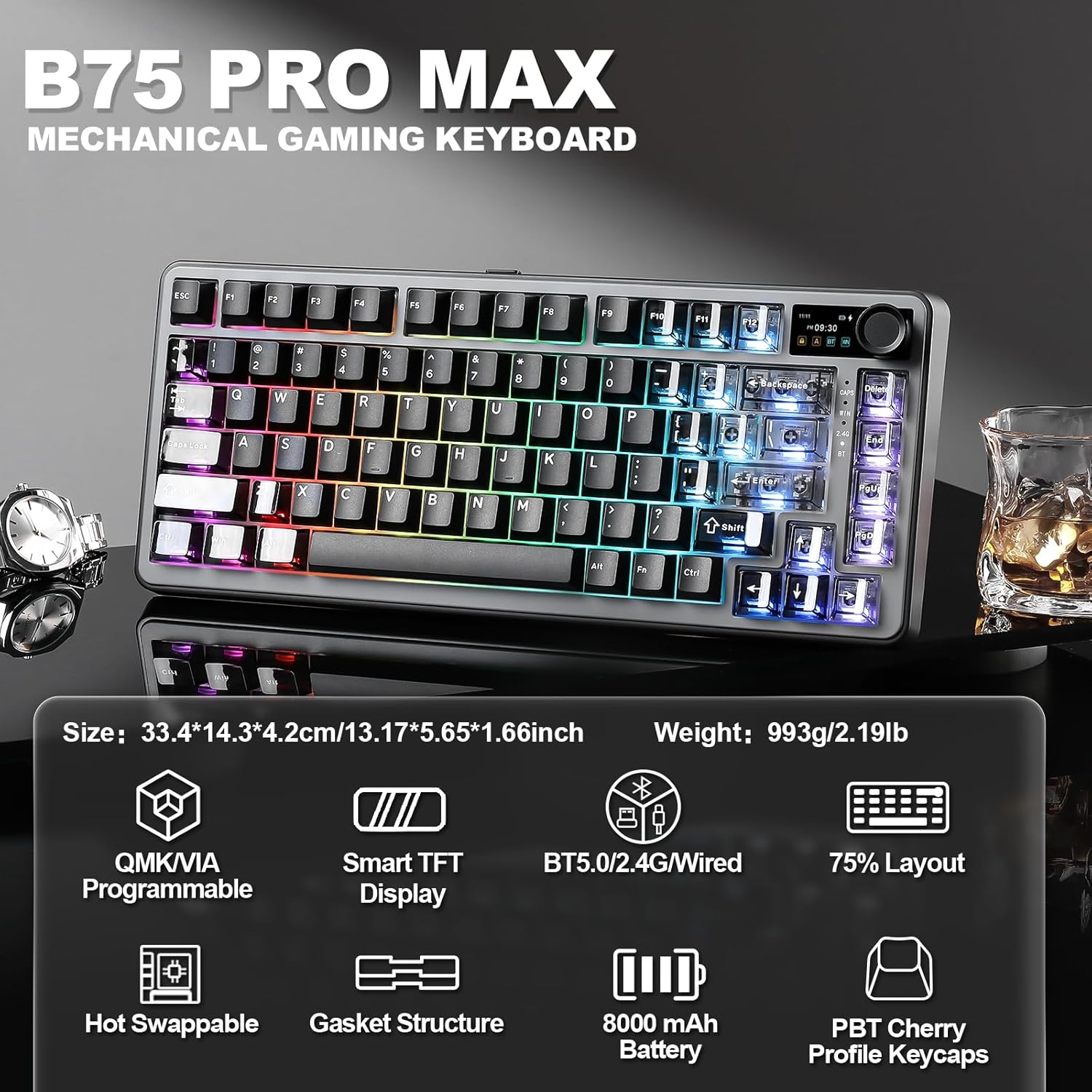
Image: YUNZII B75 PRO MAX Mechanical Gaming Keyboard with RGB lighting.
2. Змесціва ўпакоўкі
Калі ласка, пераканайцеся, што ўсе прадметы прысутнічаюць у вашай упакоўцы:
- B75 PRO MAX Keyboard x 1
- USB Cable for Type-C x 1
- Switch and Keycap Puller x 1
- Кіраўніцтва карыстальніка x 1
- 2.4G Dongle x 1
- Пылаахоўны чахол x 1
- Extra Keycaps and Switches (if applicable to your model)

Image: Contents included in the YUNZII B75 PRO MAX package.
3. Keyboard Layout and Features Overview
The B75 PRO MAX features a compact 75% layout, integrating essential keys while saving desk space. Key features include:
- 75% макет: Efficient design with 81 keys, a multi-function knob, and a TFT screen.
- Customizable TFT Screen: Displays battery level, date, time, operating system, and supports custom GIFs or images.
- Multi-Function Knob: Default control for volume, customizable via QMK/VIA.
- Канструкцыя мацавання пракладкі: Enhances typing feel and sound by reducing internal vibrations.
- Hot-Swappable Sockets: Compatible with 3-pin and 5-pin mechanical switches for easy customization.
- Pre-Lubed Switches: Ensures smooth keystrokes and consistent tactile response.
- PBT Cherry Profile Клавішы: Durable and comfortable for extended use.
- Акумулятар 8000 мАг: Забяспечвае пашыранае выкарыстанне бесправадной сувязі.
- НКРО: N-Key Rollover for accurate simultaneous key presses.
- RGB-падсветка: Over 19 vibrant backlight modes with south-facing LEDs.

Выява: Зверхуview of the YUNZII B75 PRO MAX 75% layout and dimensions.

Выява: Падрабязная view of the keyboard's gasket structure components.

Image: Close-up of the customizable TFT smart screen and multi-media knob.
4. Настройка
4.1 Connectivity (Tri-Mode)
The B75 PRO MAX supports three connection modes: Wired (Type-C), 2.4GHz Wireless, and Bluetooth.

Image: Tri-mode connection options for the YUNZII B75 PRO MAX keyboard.
4.1.1 Правадное злучэнне
- Connect the provided USB Type-C cable to the keyboard's Type-C port.
- Падключыце другі канец кабеля да USB-порта вашага кампутара.
- Клавіятура аўтаматычна пераключыцца ў правадны рэжым.
4.1.2 Бесправадное злучэнне 2.4 ГГц
- Locate the 2.4G wireless dongle (usually stored in a slot on the keyboard).
- Падключыце ключ да вольнага порта USB на вашым кампутары.
- Switch the mode button on the keyboard to the 2.4G wireless position.
- The keyboard should connect automatically. If not, long press Fn+4 to enter pairing mode.

Image: Step-by-step guide for setting up 2.4GHz wireless mode.
4.1.3 Злучэнне Bluetooth
- Switch the mode button on the keyboard to the Bluetooth (BT) position.
- Short press Fn+1, Fn+2, or Fn+3 to select a Bluetooth channel.
- Long press the selected Fn+ (1/2/3) key combination to enter pairing mode. The BT indicator will flash rapidly.
- On your device (PC, laptop, smartphone, tablet), search for Bluetooth devices and select "YUNZII B75 PRO MAX" to connect.

Image: Step-by-step guide for setting up Bluetooth mode.
4.2 Першапачатковая плата
The keyboard is equipped with an 8000mAh high-capacity battery. For optimal performance, it is recommended to fully charge the keyboard before its first use. Connect the USB Type-C cable to a power source.
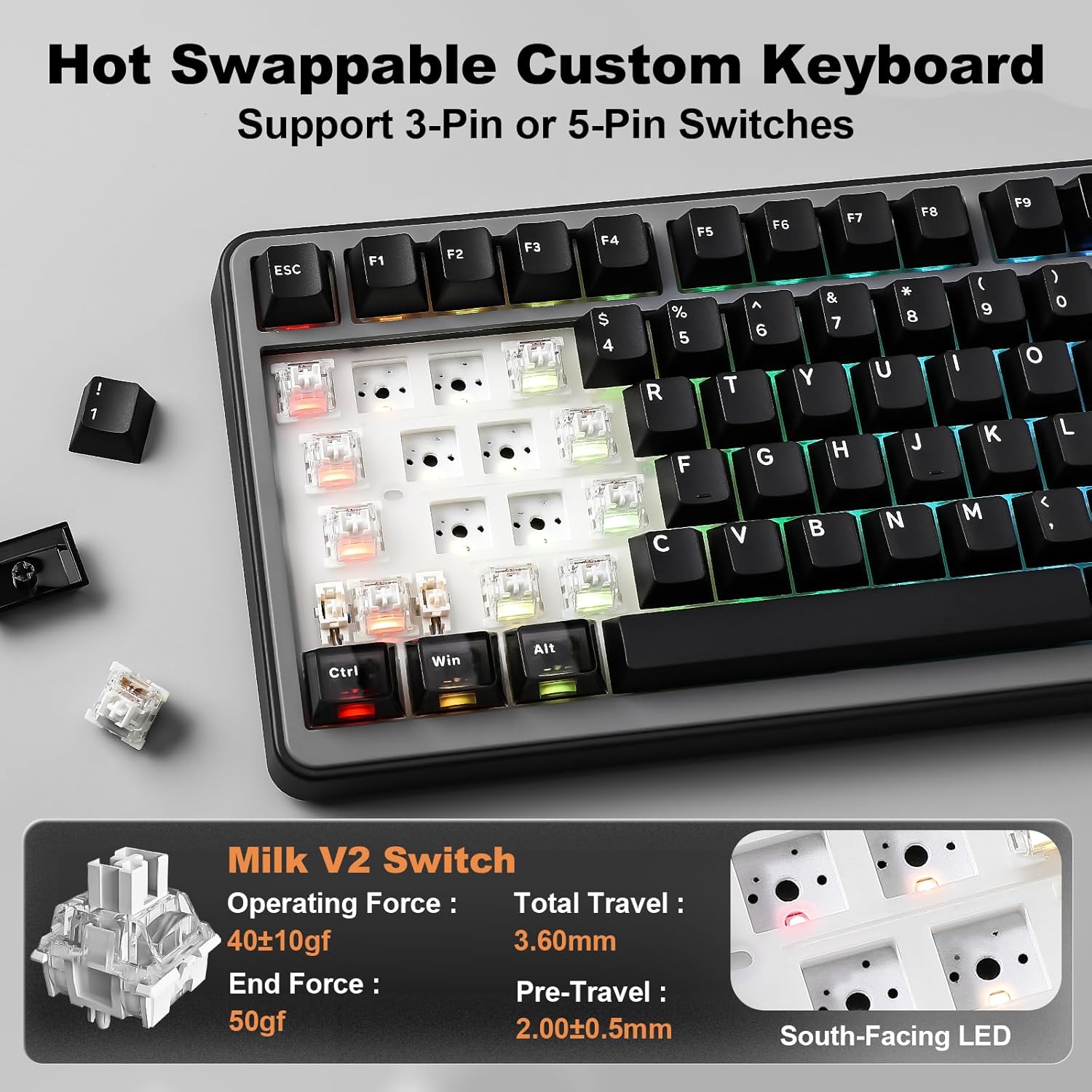
Image: Information on the keyboard's 8000mAh battery and usage duration.
4.3 Сумяшчальнасць сістэмы
The YUNZII B75 PRO MAX is compatible with various operating systems, including Windows, macOS, Linux, and Android devices (laptops, PCs, smartphones, tablets).

Image: The keyboard supports a wide range of devices and operating systems.
Відэа: Оверview of the YUNZII B75 PRO MAX Wireless Mechanical Keyboard in Black.
Video: An unboxing of the YUNZII B75 PRO MAX Wireless Mechanical Keyboard.
5. Інструкцыя па эксплуатацыі
5.1 TFT Smart Screen Customization
The TFT screen can display various information and custom content. Use the YUNZII web application to customize it.
- хатняя старонка: Press Fn+8 to view battery, time, date, and connection mode.
- Picture Page: Press Fn+9 to display uploaded pictures.
- GIF Page: Press Fn+0 to display uploaded GIFs.
- Фармат часу: Press Fn+END to switch between 12H/24H format.
Video: Guide on how to customize the TFT screen of the YUNZII B75 PRO MAX.
5.2 Multi-Media Knob
The knob's default function is volume control. Rotate left to decrease volume, right to increase. Press the knob to mute/unmute audio. The knob's functions can be customized via QMK/VIA software.
5.3 QMK/VIA Customization
The keyboard supports QMK/VIA open-source firmware for advanced customization:
- Пераназначэнне клавіш: Прызначце новыя функцыі любой клавішы.
- Макрасы: Create complex sequences of key presses.
- Светлавыя эфекты: Adjust RGB lighting patterns and colors.
- Multiple Layers: Configure different key layouts for various tasks or applications.
Access the YUNZII web application for QMK/VIA customization.
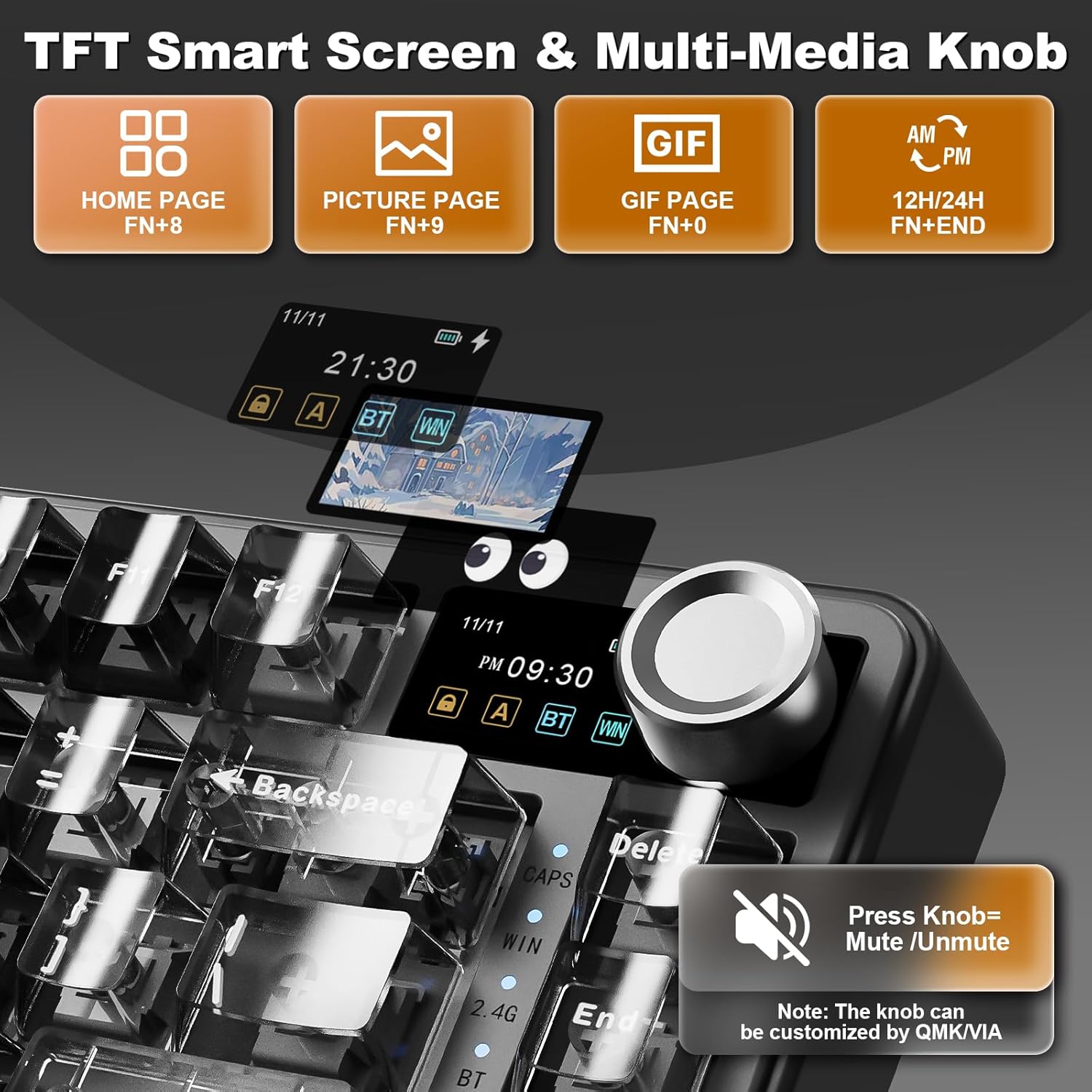
Image: Interface for QMK/VIA software customization, showing options for key mappings, macros, and lighting effects.
5.4 Кіраванне падсветкай RGB
The keyboard features 16.8 million RGB backlight with 19 default lighting effects. Use the following Fn key combinations:
- Fn + Backspace: Падсвятленне ВКЛ/ВЫКЛ
- Fn + \|: Змяніць эфект падсветкі
- Fn + Enter: Змяніць колер падсвятлення
- Fn + ↑: Павялічыць яркасць
- Fn + ↓: Паменшыць яркасць
- Fn + →: Increase Blinking Speed
- Fn + ←: Decrease Blinking Speed

Image: Visual guide for controlling the 16.8 million RGB backlight effects.
5.5 Function Keys (Windows/macOS)
The keyboard includes dedicated function key combinations for both Windows and macOS environments:
Windows (Fn+A)
- Fn+F1: Screen Brightness ↓
- Fn+F2: Screen Brightness ↑
- Fn+F3: Open Task View (Win+Tab)
- Fn+F4: калькулятар
- Fn+F5: электронная пошта
- Fn+F6: браўзер
- Fn+F7: папярэдні трэк
- Fn+F8: прайграванне/паўза
- Fn+F9: наступны трэк
- Fn+F10: адключыць гук
- Fn+F11: Volume ↓
- Fn+F12: Volume ↑
macOS (Fn+S)
- F1: Screen Brightness ↓
- F2: Screen Brightness ↑
- F3: кіраванне місіяй
- F4: панэль запуску
- F5: No Function
- F6: No Function
- F7: папярэдні трэк
- F8: прайграванне/паўза
- F9: Наступны трэк
- F10: адключыць гук
- F11: Volume ↓
- F12: Volume ↑

Image: Function key combinations for Windows and macOS operating systems.
6. Customization and Maintenance
6.1 Перамыкачы з магчымасцю гарачай замены
The B75 PRO MAX features hot-swappable sockets, allowing you to easily change switches without soldering. It supports both 3-pin and 5-pin switches. Use the provided switch puller to carefully remove and insert switches.
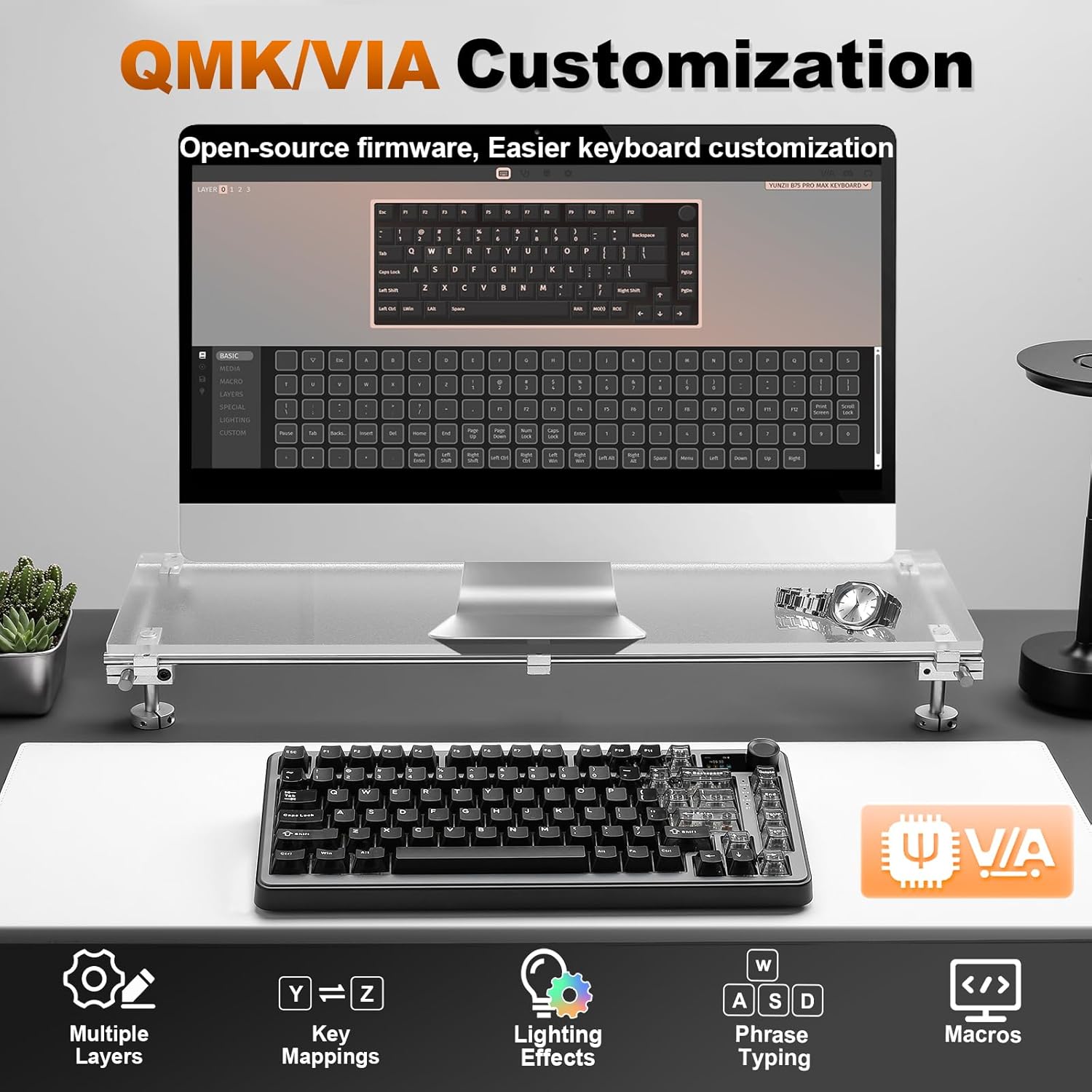
Image: Demonstrating the hot-swappable feature, supporting both 3-pin and 5-pin switches.

Image: Details on the available switch types: Candy Linear, Cocoa Cream V2 Linear, and Milk V2 Linear switches.
6.2 Замена каўпачка клавіш
The keyboard comes with durable PBT Cherry profile keycaps. You can replace them with custom keycaps using the provided keycap puller. Some models include extra themed keycaps for personalization.
Відэа: Прэзентацыяasing coffee-themed extra keycaps for the B75 PRO MAX Black Keyboard.
6.3 Ачыстка
To clean your keyboard, power it off and disconnect it from your device. Use a soft, lint-free cloth to wipe down the keycaps and chassis. For deeper cleaning, remove keycaps and use compressed air to clear debris from between switches.
7. Выпраўленне непаладак
- Клавіятура не рэагуе: Ensure the keyboard is charged and correctly connected (wired, 2.4G dongle, or Bluetooth paired). Try restarting your computer.
- 2.4GHz wireless connection issues: Ensure the dongle is securely plugged in and the keyboard is in 2.4G mode. Try re-pairing by long pressing Fn+4.
- Праблемы з падключэннем Bluetooth: Ensure the keyboard is in Bluetooth mode and the correct channel (Fn+1/2/3) is selected. Try re-pairing by long pressing the Fn+channel key. Ensure your device's Bluetooth is enabled.
- Не працуе падсветка: Press Fn+Backspace to toggle the backlight. Check brightness settings (Fn+↑/↓).
- TFT screen not updating: Ensure the keyboard is connected to the YUNZII web application for customization.
8. Тэхнічныя характарыстыкі
| Асаблівасць | Дэталь |
|---|---|
| Памеры прадукту | 12.99 х 5.51 х 1.57 цалі |
| Вага прадмета | 1.98 фунта |
| Вытворца | ЮНЗІІ |
| Тэхналогія падлучэння | Bluetooth, 2.4GHz, Type-C |
| Апісанне клавіятуры | Механічны |
| Рэкамендуемае выкарыстанне | Штодзённае выкарыстанне, гульні |
| Асаблівасці | Backlit, Ergonomic, 3 Modes, Customizable Display, Hot-Swappable |
| Колер | Black (variant shown) |
| Падсвятленне клавіятуры | RGB |
| Матэрыял | Пластыкавыя |
| акумулятар | 8000 мАг (1 батарэйка тыпу AAA ў камплекце) |
9. Гарантыя і падтрымка
For warranty information and technical support, please refer to the documentation included with your product or visit the official YUNZII website. If you encounter any issues not covered in this manual, please contact YUNZII customer service for assistance.