
Уводзіны
This manual provides detailed instructions for the setup, operation, and maintenance of your wegear CHERRY x PIXIU 98 8KHz Esports Gaming Mechanical Keyboard. Designed for high-performance gaming and versatile use, this keyboard features advanced CHERRY MX2A switches, tri-mode connectivity, and customizable RGB lighting. Please read this manual thoroughly to ensure optimal performance and longevity of your device.
Што ўключана
Праверце наяўнасць усіх прадметаў у камплекце:
- 1 x wegear CHERRY x PIXIU 98 Mechanical Keyboard
- 1 х 1.8 м USB-кабель
- 1 x 4K Wireless Receiver
- 1 х здымнік каўпачкоў
- 1 х Кіраўніцтва карыстальніка
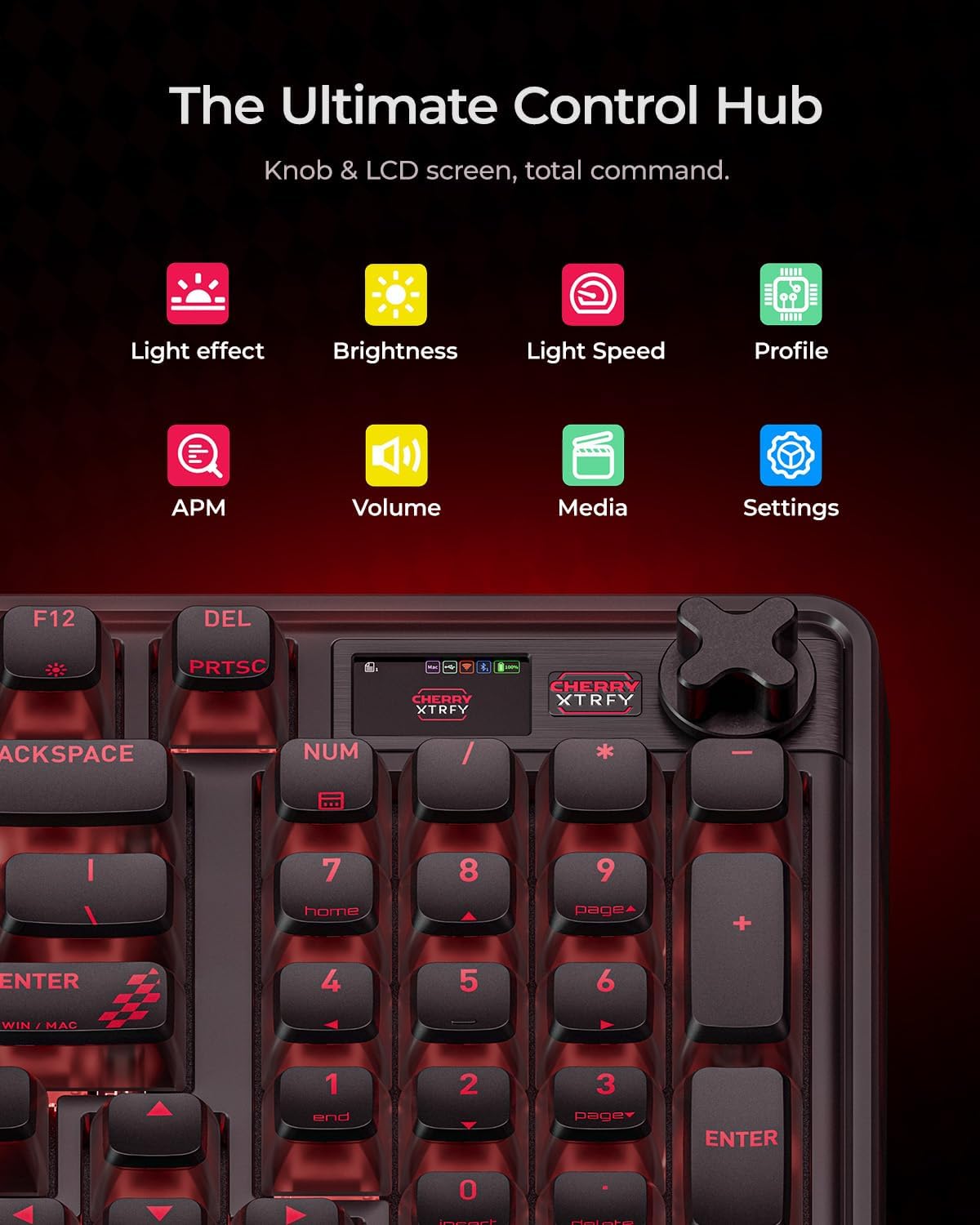
Image: The complete setup of the wegear CHERRY x PIXIU 98 keyboard, showing the keyboard, USB cable, 4K wireless receiver, keycap puller, and user manual laid out next to the product box.
Настройка
Параметры падлучэння
The PIXIU 98 keyboard offers three versatile connection modes:
- Правадны USB-C: For the lowest latency and stable connection, connect the provided USB-C cable directly to your computer.
- Бесправадная сувязь 2.4 ГГц: For high-speed wireless performance, plug the 4K wireless receiver into a USB port on your computer.
- Bluetooth: For multi-device convenience, pair the keyboard via Bluetooth. It supports seamless switching between up to three paired devices.

Image: A visual representation of the keyboard's tri-mode connectivity, highlighting the USB-C port, 2.4GHz wireless icon, and Bluetooth icon, along with the physical switch on the keyboard for mode selection.
Першапачатковае злучэнне
- Locate the connection mode switch on the side of the keyboard.
- Select your desired connection mode (Wired, 2.4G, or Bluetooth).
- For 2.4G wireless, ensure the 4K wireless receiver is plugged into your device.
- For Bluetooth, activate Bluetooth on your device and search for "PIXIU 98" to pair.
Інструкцыя па эксплуатацыі
Характарыстыкі
- High Polling Rates: Experience ultra-low latency with 8000 Hz wired and 4000 Hz wireless polling rates, ensuring rapid response times.
- Пераключэнне N-клавішы: Full N-key rollover guarantees every keystroke is registered, even during intense gaming sessions.
- CHERRY MX2A Switches: Equipped with precise CHERRY MX2A switches featuring Gold Crosspoint Contact technology for smoother actuation, improved acoustics, and a lifespan of 100 million keystrokes. These switches are hot-swappable for easy customization without soldering.
- Premium Gasket Construction: Enjoy a satisfying typing experience with the keyboard's gasket construction and multi-layer internal padding, reducing unwanted noise and enhancing key feel.

Image: A dynamic graphic showcasing the keyboard's high polling rates: 8000 Hz in wired mode and 4000 Hz in 2.4G wireless mode, emphasizing low latency for competitive gaming.

Image: A detailed exploded diagram of a CHERRY MX2A Brown Switch, illustrating its internal mechanism, Gold Crosspoint Technology, and hot-swappable design, along with its 100 million click lifespan.

Выява: Выбухнула view of the keyboard's internal structure, detailing the premium gasket construction with multiple layers of sound-dampening materials for serene keystrokes.
Настройка і кантроль
- RGB асвятленне: Customize your setup with 16.8 million colors, 12 pre-loaded lighting effects, and 4 speed levels. The softly side-diffused lighting and 4-way transparency design create a comfortable visual experience.
- Knob & LCD Screen: The intuitive knob and LCD screen provide total command over lighting, media, and connections. Monitor battery life, APM (actions per minute), and profileімгненна.
- CHERRY UTILITY Software: For advanced customization of effects, macros, and key settings, download and use the free CHERRY UTILITY software.

Image: A close-up of the keyboard's integrated knob and LCD screen, displaying icons for various functions such as light effects, brightness, light speed, profile management, APM, volume, media controls, and general settings.

Image: A screenshot of the CHERRY UTILITY software, showing options for profiles, lighting effects (Rainbow, Wave, Spectrum, Breathing, Rolling, Curve, Scan, Radiation, Ripples, Single Key, Static, Custom), actions, performance settings, and screen customization for the LCD display.
Эрганоміка і дызайн
- Compact Full-Size Layout: The 95-key layout provides all essential keys while maintaining a compact footprint for more desk space.
- Рэгуляваныя падстаўкі: Два-сtage kickstands allow you to set the keyboard at 5°, 8.2°, or 11.3° angles for personalized comfort and stability.

Image: A visual demonstration of the keyboard's two-stage adjustable kickstands, illustrating the three available tilt angles (5°, 8.2°, and 11.3°) for ergonomic comfort.
Тэрмін службы батарэі
The keyboard features a built-in 4000mAh lithium battery, offering extended runtime:
- Up to 1100 hours (Bluetooth mode, lights off, LCD off)
- Up to 150 hours (Bluetooth mode, lights off, LCD on)
- Up to 45 hours (Bluetooth mode, RGB on, LCD on)
An intelligent sleep mode helps conserve power during periods of inactivity.
Тэхнічнае абслугоўванне
Уборка
- Выкарыстоўвайце мяккую, сухую тканіну для працірання паверхні клавіятуры.
- For dust and debris between keycaps, use compressed air or the provided keycap puller to remove keycaps and clean thoroughly.
- Пазбягайце выкарыстання агрэсіўных хімікатаў або абразіўных матэрыялаў.
Замена перамыкача
The CHERRY MX2A switches are hot-swappable. Use the provided keycap puller to carefully remove keycaps, then use a switch puller (not included) to remove switches. Insert new compatible 3-pin or 5-pin switches by aligning them correctly and pressing firmly until they click into place.

Image: A visual guide demonstrating the hot-swappable nature of the keyboard's switches and the customizable knob, showing a keycap puller and switch puller in action.
Ліквідацыю непаладак
- Клавіятура не рэагуе: Check the connection mode switch. Ensure the USB cable is securely connected, the wireless receiver is properly inserted, or Bluetooth is paired correctly.
- Затрымка ўводу або затрымка ўводу: For optimal performance, ensure the keyboard is fully charged. In wireless modes, minimize interference from other wireless devices. For critical applications, use the wired connection.
- Праблемы з RGB-падсветкай: Use the knob and LCD screen or the CHERRY UTILITY software to adjust lighting effects and brightness. Ensure the battery has sufficient charge if using wireless mode.
- Ключы не рэгіструюцца: Ensure switches are properly seated. If a specific switch is faulty, it can be replaced due to the hot-swappable design.
- Праграма не распазнае клавіятуру: Ensure the CHERRY UTILITY software is up-to-date and the keyboard is connected via USB-C or 2.4G wireless.
Тэхнічныя характарыстыкі
| Асаблівасць | Дэталь |
|---|---|
| Памеры прадукту | 15.35 х 5.5 х 1.38 цалі (15.35"Д х 5.5"Ш х 1.38"В) |
| Вага прадмета | 2.65 фунта |
| Вытворца | wegear |
| Нумар мадэлі тавару | PIXIU 98 |
| Батарэі | 1 нестандартная батарэя (у камплекце) |
| Марка | wegear |
| Сумяшчальныя прылады | Гульнявая кансоль, ноўтбук, ПК, планшэт |
| Тэхналогія падлучэння | 2.4G, Bluetooth, USB-A |
| Апісанне клавіятуры | Гульнявая |
| Рэкамендуемае выкарыстанне | Everyday Use, Gaming, Personal, Programming |
| Асаблівасці | Backlit, Ergonomic, Hot-Swappable, Rechargeable, Volume Roller |
| Падсвятленне клавіятуры | RGB |
| стыль | Тактыльны перамыкач |
Афіцыйныя відэа пра прадукт
Tactile Typing, Knob Control
Video: A short demonstration highlighting the tactile feedback of the keyboard's switches and the functionality of the control knob for various settings.
wegear x CHERRY Mechanical Gaming Keyboard
Відэа: Оверview відэашоўasing the wegear x CHERRY Mechanical Gaming Keyboard, emphasizing its design, features, and gaming capabilities.
Гарантыя і падтрымка
For warranty information and technical support, please refer to the official wegear website or contact customer service through your retailer. Keep your purchase receipt for warranty claims.