
Уводзіны
Thank you for choosing the Nequga Wireless Earbuds, Model A1. These earbuds are designed to provide a superior audio experience with advanced features and comfortable wear. This manual will guide you through the setup, operation, and maintenance of your new earbuds.
Key features include 50 hours of total playtime with the charging case, Bluetooth 5.3 for stable connectivity, HD stereo sound with deep bass, IPX7 waterproofing, and intuitive touch controls.
Што ў скрынцы
- Wireless Earbuds (Left & Right)
- Зарадны чахол са святлодыёдным лічбавым дысплеем
- Зарадны кабель USB-C
- Сіліконавыя амбушуры (малыя, сярэднія, вялікія)
- Кіраўніцтва карыстальніка
Прадукт скончаныview

Figure 1: Nequga A1 Wireless Earbuds and Charging Case.

Figure 2: The charging case features an LED digital display showing the battery percentagкорпуса і асобных навушнікаў-ўкладышаў.

Figure 3: Ergonomic design of the earbuds for comfortable wear, shown with various silicone eartip sizes.
Настройка
1. Зарадка навушнікаў і чахла
Before first use, fully charge the earbuds and charging case. Connect the provided USB-C cable to the charging port on the case and to a 5V power adapter (not included). The LED digital display on the case will show the charging progress. Ensure the earbuds are properly seated in the case for them to charge.

Figure 4: Connect the charging case to a 5V Type-C adapter for optimal charging. The LED display indicates battery levels.
2. Спалучэнне з вашай прыладай
- Адкрыйце зарадны кейс. Навушнікі аўтаматычна ўключацца і пяройдуць у рэжым спалучэння.
- На вашай прыладзе (смартфоне, планшэце, камп'ютары) уключыце Bluetooth.
- Пошук "A1" in the list of available Bluetooth devices and select it to connect.
- Once connected, the earbuds will automatically pair with your last device when taken out of the case.

Figure 5: One-step auto-pairing with Bluetooth 5.3 for quick and stable connection.
3. Нашэнне навушнікаў-ўкладышаў
Choose the silicone eartips that provide the best fit and seal for your ears. Insert the earbuds into your ears and gently twist to ensure a secure and comfortable fit. A proper seal enhances sound quality and bass performance.

Figure 6: Instructions for selecting the correct eartip size and properly inserting the earbuds for a secure fit.
Інструкцыя па эксплуатацыі
Сэнсарныя элементы кіравання
The Nequga A1 earbuds feature intuitive touch controls for easy management of music and calls.

Малюнак 7: Закончанаview of smart touch controls for various functions.
- Прайграванне/Паўза: Адзін націск на любы навушнік.
- Наступны трэк: Двойчы націсніце на правы навушнік-ўкладыш.
- Папярэдні трэк: Двойчы націсніце на левы навушнік-ўкладыш.
- Павялічыць гучнасць: Націсніце і ўтрымлівайце правы навушнік-ўкладыш.
- Паменшыць гучнасць: Націсніце і ўтрымлівайце левы навушнік-ўкладыш.
- Адказ/завяршэнне выкліку: Адзін націск на любы навушнік.
- Адхіліць выклік: Націсніце і ўтрымлівайце любы з навушнікаў.
- Актывацыя галасавога памочніка (Siri): Тройчы націсніце на любы навушнік.
Якасць гуку
Equipped with custom 14.5mm titanium drivers, these earbuds deliver sparkling highs and punchy bass, providing a rich and immersive audio experience. Advanced audio codec support ensures minimal signal compression for studio-quality sound.

Малюнак 8: Разарваны view of an earbud highlighting the 14.5mm titanium driver for enhanced sound.
Call Clarity
The integrated microphone ensures crystal-clear call clarity, making your conversations smooth and uninterrupted.

Figure 9: Clear call functionality with voice assistant support.
Тэхнічнае абслугоўванне
Уборка
Regular cleaning helps maintain optimal sound quality and charging efficiency. Use a soft, dry cloth to wipe the earbuds and charging case. For stubborn dirt or earwax, gently clean the charging contacts and ear tip meshes with an alcohol pad.
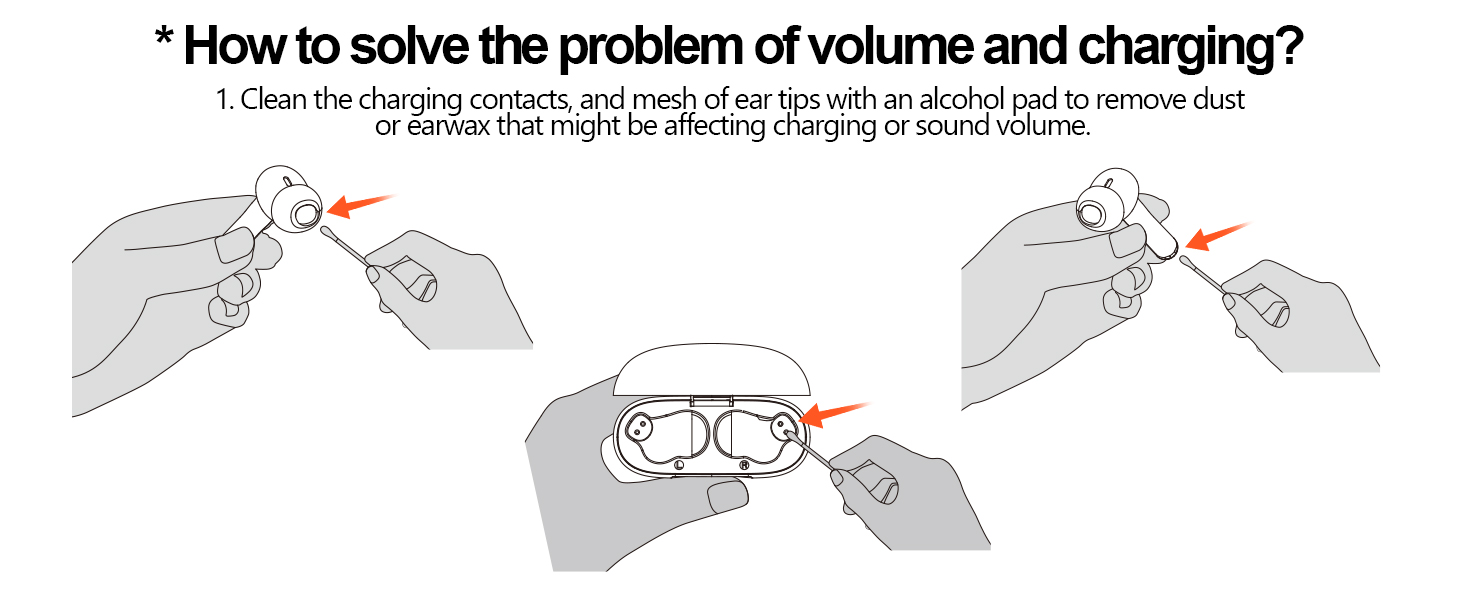
Figure 10: Instructions for cleaning earbud charging contacts and mesh to prevent issues with volume or charging.
Воданепранікальнасць
The earbuds are IPX7 waterproof, making them resistant to sweat and splashes. However, they are not designed for swimming or prolonged submersion in water. Ensure the earbuds are dry before placing them back in the charging case.

Figure 11: IPX7 waterproof rating allows for use during workouts and in various weather conditions.
Ліквідацыю непаладак
If you encounter any issues with your Nequga A1 earbuds, please refer to the following common solutions:
- Няма гуку/нізкая гучнасць: Ensure earbuds are charged, connected to your device, and volume is adjusted on both the earbuds and your device. Clean earbud meshes for any blockages.
- Праблемы спалучэння: Пераканайцеся, што на вашай прыладзе ўключаны Bluetooth, а навушнікі знаходзяцца ў рэжыме спалучэння. Паспрабуйце забыць прыладу на тэлефоне і зноў падключыць яе.
- Навушнікі не зараджаюцца: Check if the charging cable is securely connected and the charging contacts on both the earbuds and case are clean.
- Нестабільнае злучэнне: Ensure your device is within the 49 ft (15m) Bluetooth range. Avoid significant obstacles between the earbuds and your device.
For further assistance, please contact Nequga customer support.
Тэхнічныя характарыстыкі
| Асаблівасць | Спецыфікацыя |
|---|---|
| Назва мадэлі | A1 |
| Тэхналогія падлучэння | Бесправадная сувязь (Bluetooth 5.3) |
| Тэрмін службы батарэі | Да 50 гадзін (з зарадным футлярам) |
| Узровень воданепранікальнасці | IPX7 воданепранікальны |
| Метад кантролю | Дакранацца |
| Тып аўдыё драйвера | Дынамічны драйвер (14.5 мм) |
| Дыяпазон Bluetooth | Да 49 футаў (15 метраў) |
| Форма навушніка | Укладышы |
| Вага прадмета | 2.89 унцыі |
| Памеры прадукту | 3.4 х 0.67 х 3.6 цалі |
Афіцыйнае відэа пра прадукт
Video 1: Official Nequga A1 Wireless Earbuds Product Overview. This video highlights the key features and design of the earbuds, including the digital display, playtime, comfort, and sound quality.
Гарантыя і падтрымка
Your Nequga A1 Wireless Earbuds come with a standard manufacturer's warranty. For detailed warranty information, product registration, or technical support, please visit the official Nequga website or contact their customer service team. Contact information can typically be found on the product packaging or the brand's Amazon store page.