
1. Уводзіны
The Skyworth H30P WiFi 3MP Indoor Camera is designed to provide reliable and smart surveillance for your home or office. This manual provides essential information for setting up, operating, and maintaining your camera to ensure optimal performance and security.
Асноўныя характарыстыкі:
- Ultra-clear 3MP Resolution: Captures sharp, high-definition video.
- Full 360-degree Coverage: Offers smooth horizontal and vertical rotation for comprehensive monitoring.
- Smart Motion and Sound Alerts: Sends instant notifications to your smartphone upon detection.
- Каляровы начны бачанне: Provides bright, full-color images even in complete darkness using dual infrared and LED lights.
- Двухбаковы аўдыё: Дазваляе мець зносіны праз убудаваны мікрафон і дынамік.
- Гнуткая сувязь: Supports both wireless Wi-Fi (including Wi-Fi 6) and wired RJ45 connections.
- Гладкі і кампактны дызайн: Modern white finish suitable for various home decors, with wall-mount or shelf placement options.
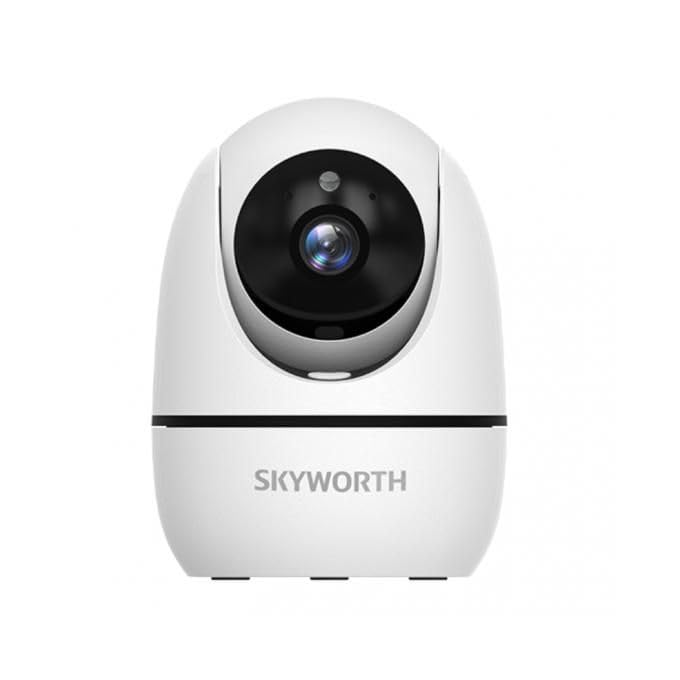
Image: The Skyworth H30P camera, showcasing its 3MP resolution, two-way audio, 360-degree rotation and cruise capabilities, and human detection and tracking features.
2. Інфармацыя па бяспецы
Please read and follow all safety instructions carefully before using this product to prevent damage or injury.
- Ensure the power supply matches the camera's requirements.
- Do not expose the camera to water or moisture. This product is for indoor use only.
- Пазбягайце размяшчэння камеры побач з крыніцамі цяпла або пад прамымі сонечнымі прамянямі.
- Do not attempt to disassemble or repair the camera yourself. Contact qualified service personnel for assistance.
- Трымайце камеру і яе аксэсуары ў месцах, недаступных для дзяцей.
- Выкарыстоўвайце толькі аксэсуары, ухваленыя вытворцам.
3. Змесціва ўпакоўкі
Праверце наяўнасць усіх прадметаў у камплекце:
- Skyworth H30P WiFi 3MP Indoor Camera Body
- Адаптар сілкавання
- Мантажныя шрубы і дзюбелі
- Мантажны кранштэйн
- Кіраўніцтва карыстальніка (гэты дакумент)
4. Прадукт скончыўсяview
Азнаёмцеся з кампанентамі камеры:
- Аб'ектыў: Захоплівае відэа footage.
- Інфрачырвоныя святлодыёды: Забяспечце падсветку для начнога бачання.
- Светлавы індыкатар стану: Shows the camera's current status (e.g., power on, network connection).
- Мікрафон: Captures audio for two-way communication and sound detection.
- Дакладчык: Выводзіць гук для двухбаковай сувязі.
- Порт харчавання: Падключаецца да адаптара сілкавання.
- Порт Ethernet RJ45: Для падлучэння да правадной сеткі.
- Кнопка скіду: Used to restore factory settings (usually located near the SD card slot or on the base).
- Слот для карты MicroSD: For local video storage (MicroSD card not included).
5. Настройка
5.1 Фізічная ўстаноўка
- Выберыце месца: Выберыце памяшканне з празрыстым view of the area you wish to monitor. Ensure it is within range of your Wi-Fi network or close to an Ethernet port.
- Мантаж (дадаткова): If wall-mounting, use the provided mounting bracket as a template to mark drill holes. Drill holes, insert wall plugs, and secure the bracket with screws. Attach the camera to the bracket.
- Уключэнне: Connect the power adapter to the camera's power port and plug it into an electrical outlet. The camera will power on and the status indicator light will activate.
5.2 Загрузка праграмы і стварэнне ўліковага запісу
- Спампаваць прыкладанне: Пошук the recommended surveillance app (e.g., 'Skyworth Smart' or similar, check packaging for specific app name) on your smartphone's app store (App Store for iOS or Google Play Store for Android).
- Усталяваць і зарэгістраваць: Install the app and follow the on-screen instructions to create a new user account.
5.3 Сеткавае падключэнне
Follow the in-app instructions to add your camera. You will typically have two options:
- Падключэнне Wi-Fi: Select the Wi-Fi option in the app. Enter your Wi-Fi network name (SSID) and password. The app may generate a QR code for the camera to scan, or guide you through an audio pairing process.
- Wired (RJ45) Connection: Connect an Ethernet cable from your router to the camera's RJ45 port. The app should automatically detect the camera on the local network.
Once connected, the status indicator light will change (e.g., turn solid blue), and you will see the camera feed in the app.
6. Аперацыйная
6.1 У прамым эфіры View
Адкрыйце праграму і абярыце камеру, каб view the live video feed. You can pinch to zoom and pan across the image.
6.2 Двухбаковае аўдыё
Націсніце на значок мікрафона ў дадатку, каб гаварыць праз дынамік камеры. Націсніце на значок дынаміка, каб слухаць гук з мікрафона камеры.
6.3 Pan/Tilt/Zoom (PTZ) Control
Use the directional controls within the app to remotely rotate the camera horizontally (pan) and vertically (tilt) to adjust the viewing angle. The 360-degree rotation allows for comprehensive coverage. Some models may offer a 'cruise' function to automatically scan predefined areas.
6.4 Выяўленне руху і гуку
Enable motion and sound detection in the app settings. You can customize sensitivity levels and set up notification schedules. The camera supports human motion tracking, which can follow detected individuals within its field of view.
6.5 Начное бачанне
The camera automatically switches to night vision mode in low-light conditions. The color night vision feature provides enhanced visibility with full-color images even in darkness.
6.6 Запіс і захоўванне відэа
The camera supports continuous recording or event-triggered recording (e.g., motion detection). Video footage can be stored on a MicroSD card (up to 128GB, sold separately) or via cloud storage services (subscription may be required). Access recorded footagпраз функцыю прайгравання ў дадатку.
7. Тэхнічнае абслугоўванне
- Уборка: Акуратна працярыце аб'ектыў і корпус камеры мяккай сухой тканінай. Не выкарыстоўвайце агрэсіўныя хімікаты або абразіўныя ачышчальнікі.
- Абнаўленні прашыўкі: Regularly check the app for available firmware updates. Keeping your camera's firmware up-to-date ensures optimal performance, security, and access to new features.
- захоўванне: Калі вы збіраецеся захоўваць камеру працяглы час, адключыце яе ад сілкавання і захоўвайце ў прахалодным, сухім месцы.
8. Выпраўленне непаладак
| праблема | Магчымае рашэнне |
|---|---|
| Камера не ўключаецца | Ensure the power adapter is securely connected to both the camera and a working power outlet. Try a different outlet. |
| Немагчыма падключыцца да Wi-Fi | Verify your Wi-Fi password is correct. Ensure the camera is within range of your router. Try resetting the camera by pressing the reset button for 5-10 seconds. Ensure your Wi-Fi is 2.4GHz (most smart cameras do not support 5GHz). |
| Няма відэаканала | Check network connection. Restart the camera and your router. Ensure the app is up-to-date. |
| Двухбаковы аўдыё не працуе | Check volume settings on your phone and in the app. Ensure microphone and speaker permissions are granted to the app. |
| Папярэджанні аб руху не атрыманы | Verify motion detection is enabled in the app settings. Check notification settings on your smartphone. Adjust motion sensitivity. |
9. Тэхнічныя характарыстыкі
| Асаблівасць | Дэталь |
|---|---|
| Нумар мадэлі | H30P |
| Дазвол відэазахопу | 3 мегапікселяў |
| Тэхналогія падлучэння | Wired (RJ45), Wireless (Wi-Fi) |
| Тэхналогія бесправадной сувязі | Wi-Fi |
| Выкарыстанне ў памяшканні/на вуліцы | У памяшканні |
| Асаблівасці | Night Vision, Sound-activated recording, Two-way audio, Smart motion sensor, Human motion tracking |
| Сумяшчальныя прылады | Смартфон |
| Крыніца харчавання | Правадная электрычная |
| Тып мацавання | Насценнае мацаванне |
| Дыяпазон начнога бачання | 15 метраў |
| Фармат захопу відэа | MP4 |
| Памеры (Д х Ш х У) | 8 х 4 х 8 см |
| Вага прадмета | 240 грамаў |
| Уключаныя кампаненты | Корпус камеры |
| Патрабуюцца батарэі | няма |
10. Гарантыя і падтрымка
For warranty information and technical support, please refer to the documentation provided with your purchase or visit the official Skyworth webсайт. Захоўвайце чэк аб куплі як пацвярджэнне пакупкі для гарантыйных прэтэнзій.
If you encounter any issues not covered in this manual, please contact Skyworth customer support for further assistance.