
1. Уводзіны
The Lilytech ZL-6210A+ is a high-performance temperature controller designed for precise temperature management. Featuring a robust 30A relay output, it is suitable for a wide range of heating or cooling applications. This manual provides essential information for the safe installation, operation, and maintenance of your ZL-6210A+ controller.

Малюнак 1: Спераду view of the ZL-6210A+ Temperature Controller, showing the display and control buttons.
2. Інфармацыя па бяспецы
Please read all safety instructions carefully before installation and operation. Failure to follow these instructions may result in electric shock, fire, or damage to the device.
- Электрычная небяспека: Гэта прылада працуе з высокай гучнасцюtage (185-245Vac). Installation should only be performed by qualified personnel.
- Адключыць харчаванне: Always disconnect power to the circuit before performing any wiring or maintenance.
- Правільнае зазямленне: Ensure the device is properly grounded according to local electrical codes.
- Умовы навакольнага асяроддзя: Do not expose the controller to excessive moisture, dust, or corrosive environments beyond its specified working conditions.
- Грузападымальнасць: Do not exceed the maximum current rating of the relay (30A for R1, 5A for R2).
3. Тэхнічныя характарыстыкі
| Параметр | Каштоўнасць |
|---|---|
| Электразабеспячэнне | 185 ~ 245 В пераменнага току, 50/60 Гц |
| Тып датчыка | NTC (2 meters long) |
| Output Relay R1 | 30A / 250Vac (resistive load) |
| Output Relay R2 | 5A / 250Vac (resistive load) |
| Дыяпазон налады | -40 ~ 120°C |
| Дыяпазон адлюстравання | -40 ~ 130°C |
| Працоўнае асяроддзе | -10 ~ 45°C, 5 ~ 90%RH (non-condensing) |
| Памеры (Ш х У х Г) | 78 х 34.5 х 71 мм |
| Installation Drilling (W x H) | 71 х 29 мм |
| Матэрыялы справы | PC + ABS вогнетрывалы |
| Узровень абароны | IP65 (толькі пярэдні бок) |
| Вага прадмета | 1.76 унцый (прыблізна 50 г) |
NTC Sensor Selection
The ZL-6210A+ uses NTC sensors. Different sensor types are available, varying in seal material, wire length, resistance, and B-value. Ensure the correct sensor type is used for your application.
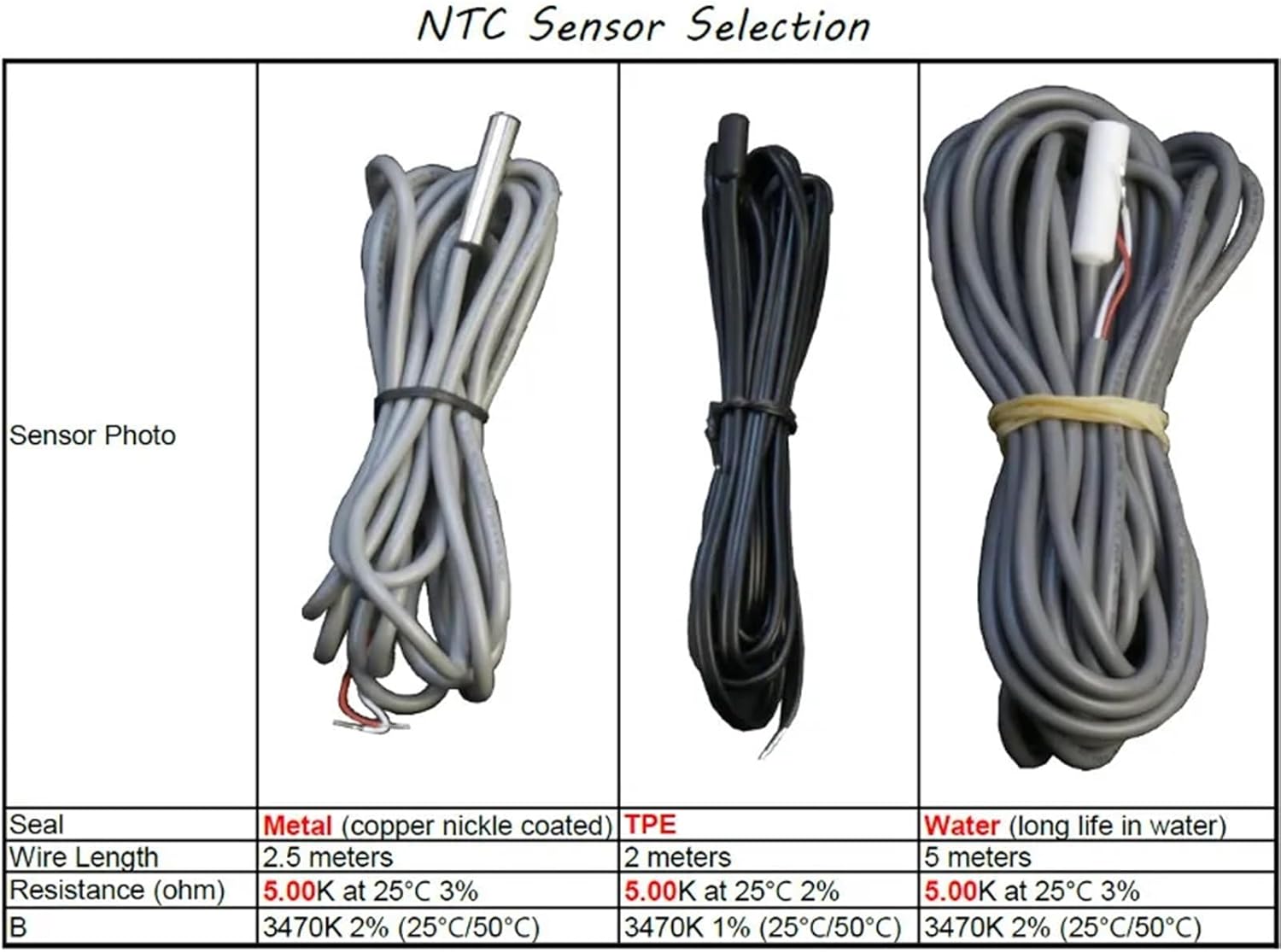
Figure 2: NTC Sensor Selection table, detailing specifications for Metal, TPE, and Water sealed sensors.
4. Ўстаноўка
4.1 Мантаж
The ZL-6210A+ is designed for panel mounting. Create an opening in your panel with the dimensions of 71 mm (width) x 29 mm (height). Insert the controller into the opening and secure it using the provided clips.
4.2 Электраправодка
Refer to the wiring diagrams below for proper connection. Ensure all connections are secure and comply with local electrical codes. The main power input is 185-245Vac. The primary temperature output (R1) is rated for 30A.

Малюнак 3: Задняя частка view of the ZL-6210A+ showing the terminal block layout. Terminals 1-2 are for R1 Temp. Output, 3-6 for 220V~ power (L, N), and 7-10 for Alarm Input and Temp. Sensor.
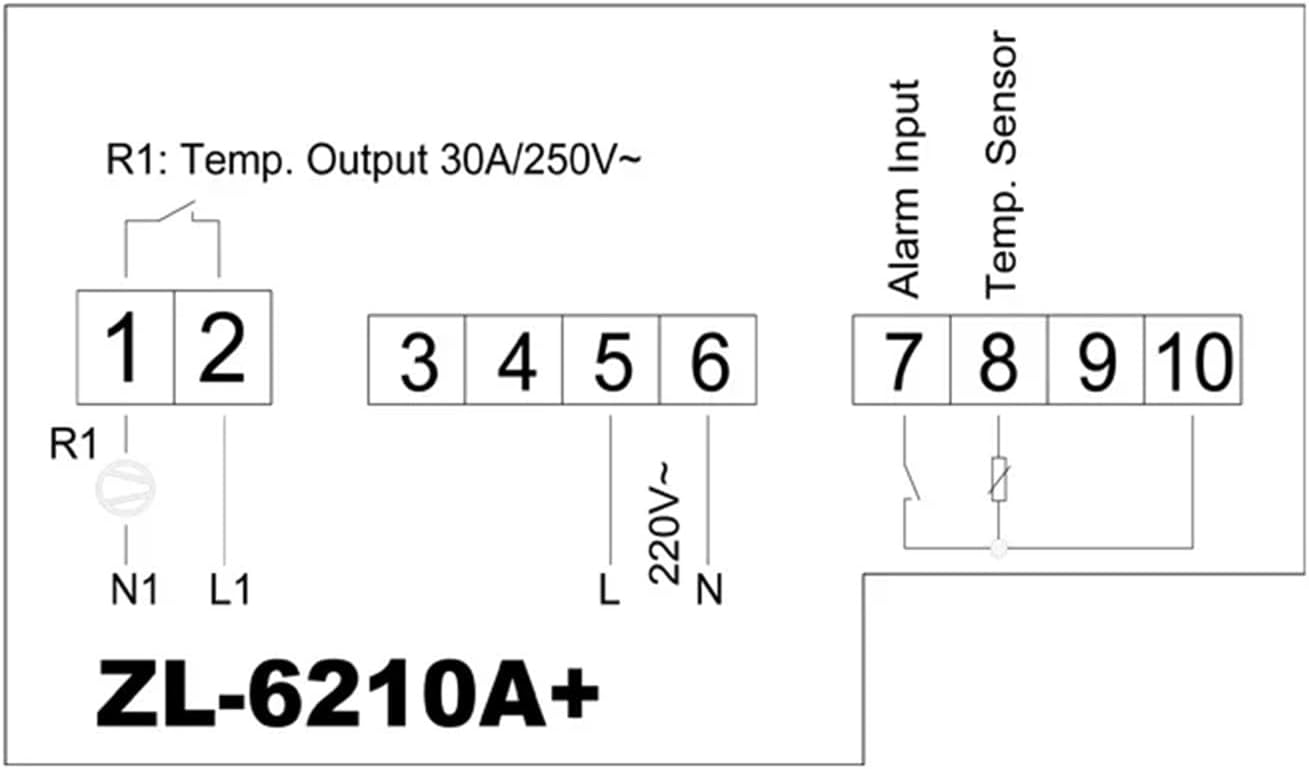
Figure 4: Simplified wiring diagram. Connect power to terminals 5 (L) and 6 (N). Connect the temperature sensor to terminals 9 and 10. The main relay output (R1) is connected to terminals 1 and 2. An alarm input can be connected to terminals 7 and 8.
Тэрмінальныя злучэнні:
- 1, 2: R1 Temperature Output (30A / 250V~)
- 3, 4: (Not explicitly labeled in diagram, often for auxiliary functions or R2 if present)
- 5 (L), 6 (N): Power Supply Input (220V~)
- 7, 8: Увод сігналізацыі
- 9, 10: Temperature Sensor Input (NTC)
5. Аперацыя
The ZL-6210A+ features a digital display and control buttons for setting parameters. Specific operational details, including setting the desired temperature, hysteresis, and alarm functions, are typically accessed via a menu system. Refer to the detailed manual available from the manufacturer for complete programming instructions.

Малюнак 5: Унутраны view showing the digital display and buttons (S1, S2, S3, S4) used for parameter setting and navigation.
Асноўныя функцыі:
- Дысплей тэмпературы: Паказвае бягучую вымераную тэмпературу.
- Рэгуляванне зададзенага значэння: Allows users to set the desired target temperature.
- Выбар рэжыму: Typically allows selection between heating and cooling modes.
- Налады будзільніка: Configures high/low temperature alarms.
6. Тэхнічнае абслугоўванне
Regular maintenance ensures optimal performance and longevity of your temperature controller.
- Уборка: Ачысціце пярэднюю панэль мяккай, damp тканіна. Не выкарыстоўвайце абразіўныя ачышчальнікі або растваральнікі. Сачыце за тым, каб вадкасць не патрапіла ўнутр прылады.
- Экалагічная праверка: Periodically inspect the installation environment to ensure it remains within the specified temperature and humidity ranges.
- Праверка праводкі: Check all wiring connections periodically for tightness and signs of wear or corrosion.
- Sensor Condition: Ensure the temperature sensor is clean and free from damage.
7. Выпраўленне непаладак
If you encounter issues with your ZL-6210A+, refer to the following common problems and solutions:
| праблема | Магчымая прычына | Рашэнне |
|---|---|---|
| Controller does not power on | Няма харчавання; няправільная праводка; перагарэлы засцерагальнік | Check power connections; Verify wiring against diagram; Check for internal fuse (if accessible, consult professional) |
| Няправільнае паказанне тэмпературы | Faulty sensor; Sensor not connected properly; Sensor placed incorrectly | Check sensor wiring; Replace sensor if damaged; Relocate sensor to a representative area |
| Output relay (R1) not switching | Temperature not within set range; Incorrect parameter settings; Faulty relay | Verify set point and hysteresis; Check operating mode (heating/cooling); Consult professional for relay replacement |
| Дысплей паказвае код памылкі | Sensor error; Internal fault | Refer to the full manufacturer's manual for specific error code meanings and solutions. |
8. Гарантыя і падтрымка
For warranty information, please refer to the terms provided by your retailer or the manufacturer at the time of purchase. For detailed technical support, additional documentation, or specific programming instructions, please visit the official Lilytech webсайт або звярніцеся ў службу падтрымкі кліентаў.
A comprehensive manual can be found at: www.suzhoulily.com/pdf/ZL-62x0A(plus)_en_2.0d.pdf