
1. Уводзіны
The ATTACK SHARK G800 is a versatile wireless RGB gaming headset designed for an immersive audio experience across multiple platforms. It features tri-mode connectivity (2.4Ghz wireless, Bluetooth, and wired), 7.1 virtual surround sound, 50mm drivers, and a detachable AI noise-canceling microphone. This manual provides instructions for setup, operation, and maintenance to ensure optimal performance.
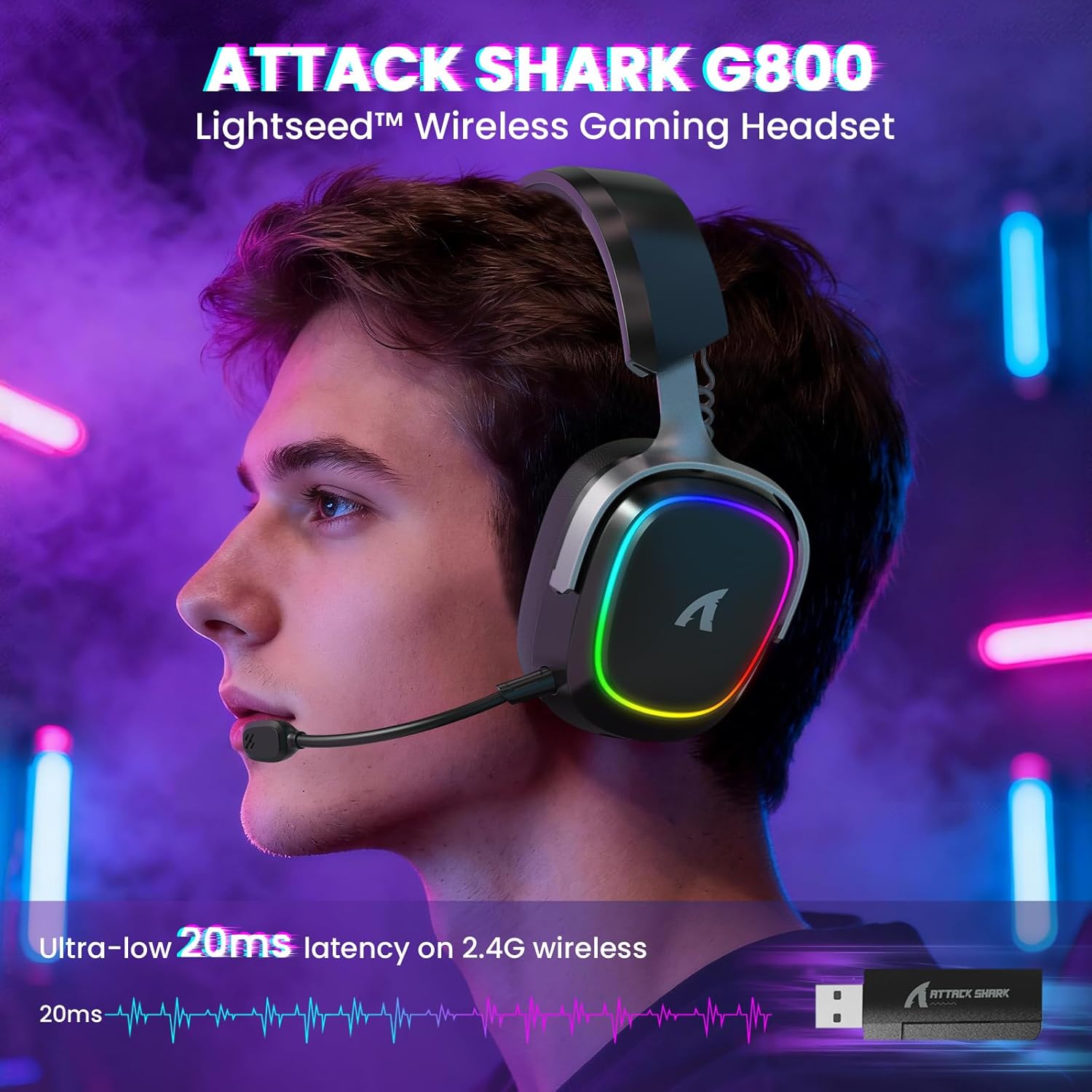
Image: The G800 headset in use, highlighting its RGB lighting and comfortable fit.
2. Што ў скрынцы
- ATTACK SHARK G800 Wireless RGB Gaming Headset
- Detachable AI Noise-Canceling Microphone
- 2.4Ghz Wireless USB-A + Type-C Dual-Head Receiver
- Зарадны кабель USB-A да USB-C
- USB-C to USB-C Audio Cable
- Кіраўніцтва карыстальніка (гэты дакумент)
3. Прадукт скончыўсяviewЭлементы кіравання і парты
Familiarize yourself with the various controls and ports on your G800 headset for seamless operation.
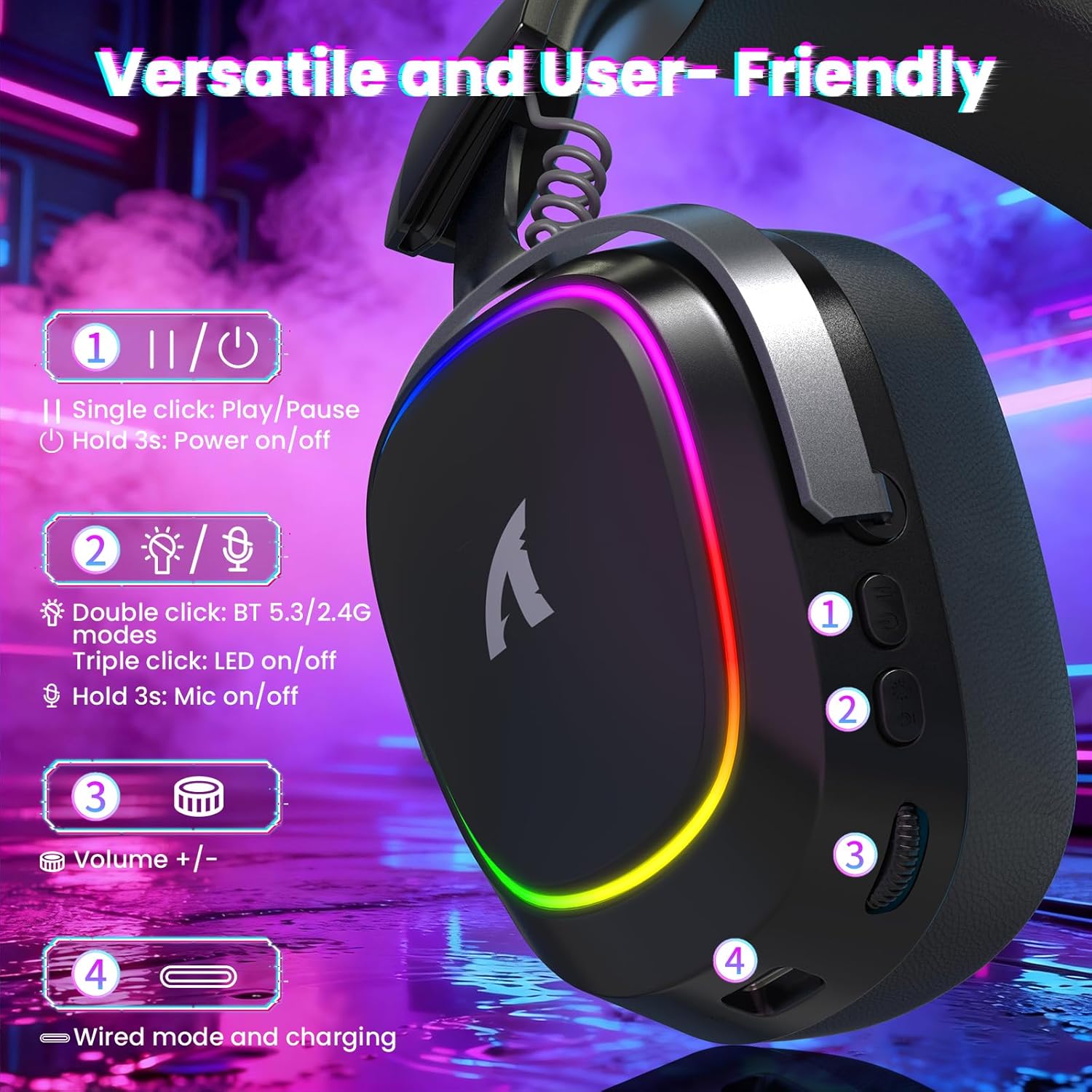
Выява: Падрабязная view of the headset's left earcup with numbered controls and their functions.
- Play/Pause & Power Button: Single click for play/pause. Hold for 3 seconds to power on/off.
- Mode Switch & LED/Mic Control: Double click to switch between Bluetooth (BT 5.3) and 2.4Ghz wireless modes. Triple click to toggle RGB LED on/off. Hold for 3 seconds to toggle microphone on/off.
- Кола гучнасці: Rotate to adjust audio volume up or down.
- Wired Mode & Charging Port: Порт USB-C для праваднога падключэння і зарадкі.
- Раз'ём для мікрафона: Порт для падлучэння здымнага мікрафона.
4. Налада і падключэнне
The G800 headset offers three connection methods: 2.4Ghz wireless, Bluetooth, and wired.
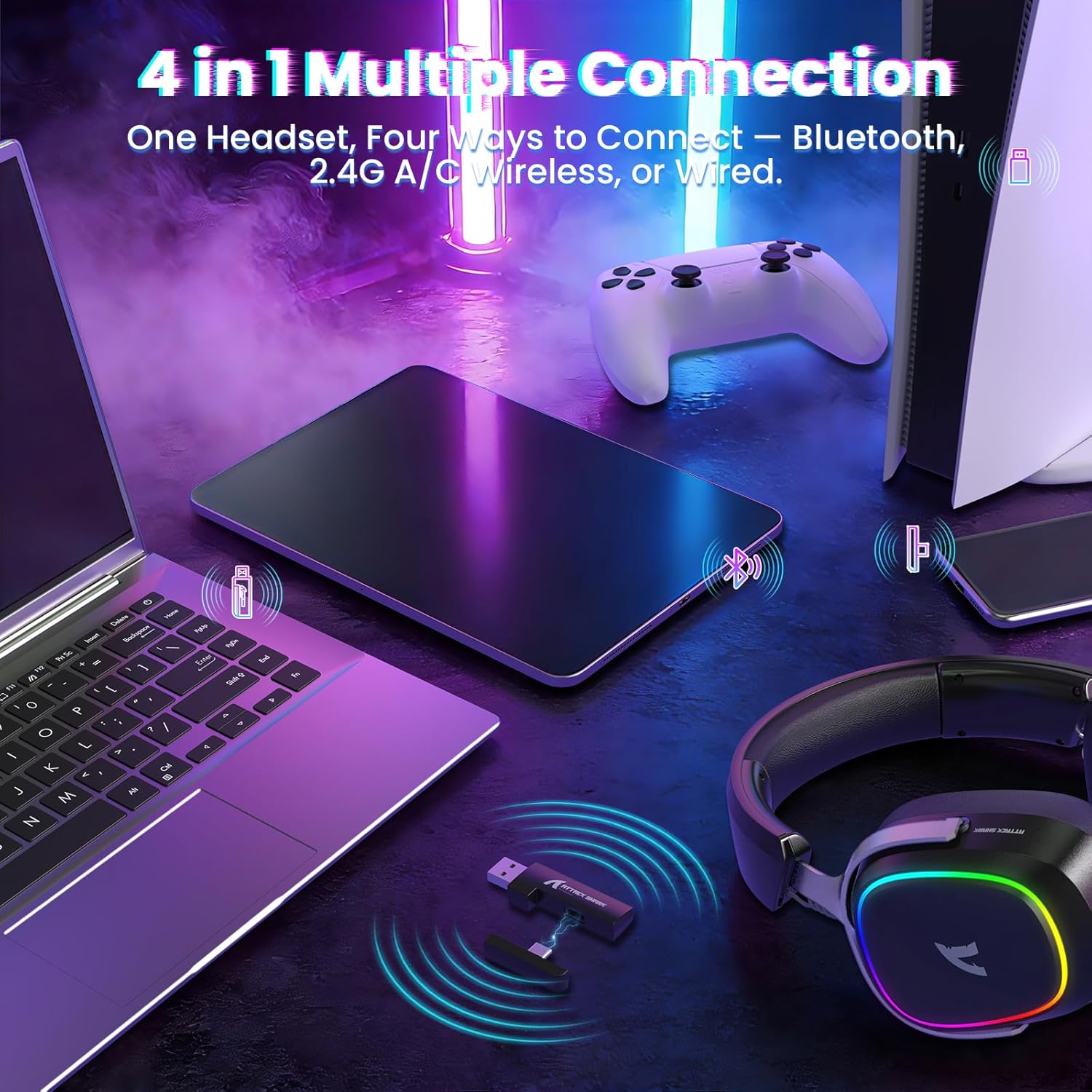
Image: The headset demonstrating its multi-platform connectivity options.
4.1. Бесправадное злучэнне 2.4 ГГц
- Insert the 2.4Ghz USB-A or Type-C dual-head receiver into an available USB port on your PC, laptop, or PS5.
- Power on the G800 headset by holding the Power Button (1) for 3 seconds.
- Double click the Mode Switch (2) until the headset indicates 2.4Ghz mode (usually via an LED indicator or voice prompt).
- The headset should automatically connect to the receiver. If not, ensure the receiver is properly inserted and the headset is in 2.4Ghz mode.
4.2. Злучэнне Bluetooth
- Power on the G800 headset by holding the Power Button (1) for 3 seconds.
- Double click the Mode Switch (2) until the headset indicates Bluetooth mode (usually via an LED indicator or voice prompt). The headset will enter pairing mode.
- On your device (e.g., mobile phone, tablet, PC), go to Bluetooth settings and search for available devices.
- Select "ATTACK SHARK G800" from the list to pair.
4.3. Правадное падключэнне
- Connect one end of the USB-C audio cable to the Wired Mode & Charging Port (4) on the headset.
- Connect the other end of the USB-C audio cable to your device's compatible port.
- Гарнітура аўтаматычна пераключыцца ў правадны рэжым.
4.4. Зарадка гарнітуры
The G800 headset is equipped with a 1000mAh battery for extended use.

Image: Visual representation of the headset's 1000mAh battery capacity.
- Connect the USB-A to USB-C charging cable to the Wired Mode & Charging Port (4) on the headset and to a USB power source (e.g., computer USB port, wall adapter).
- Святлодыёдны індыкатар на гарнітуры будзе паказваць стан зарадкі.
- The headset includes charging over-voltage protection for safety.
- An auto-shutdown function activates after 5 minutes of inactivity to conserve power.
5. Інструкцыя па эксплуатацыі
5.1. Аўдыё Вопыт
The G800 features 50mm large-aperture biological diaphragm drivers and virtual 7.1 surround sound for an immersive audio experience.

Image: The 50mm audio drivers, responsible for high-fidelity sound.

Image: Demonstrating the 7.1 surround sound capability for precise audio positioning.
5.2. Выкарыстанне мікрафона
The detachable 360° AI Noise-Canceling Microphone ensures clear voice communication by filtering out background noise.
- Insert the detachable microphone into the dedicated microphone jack on the headset.
- Hold the Mode Switch (2) for 3 seconds to toggle the microphone on or off.
5.3. Кіраванне RGB-падсветкай
The headset features customizable RGB lighting.
- Triple click the Mode Switch (2) to toggle the RGB LED lighting on or off.
5.4. Налада праграмнага забеспячэння
Enhance your audio experience with the dedicated driver software.
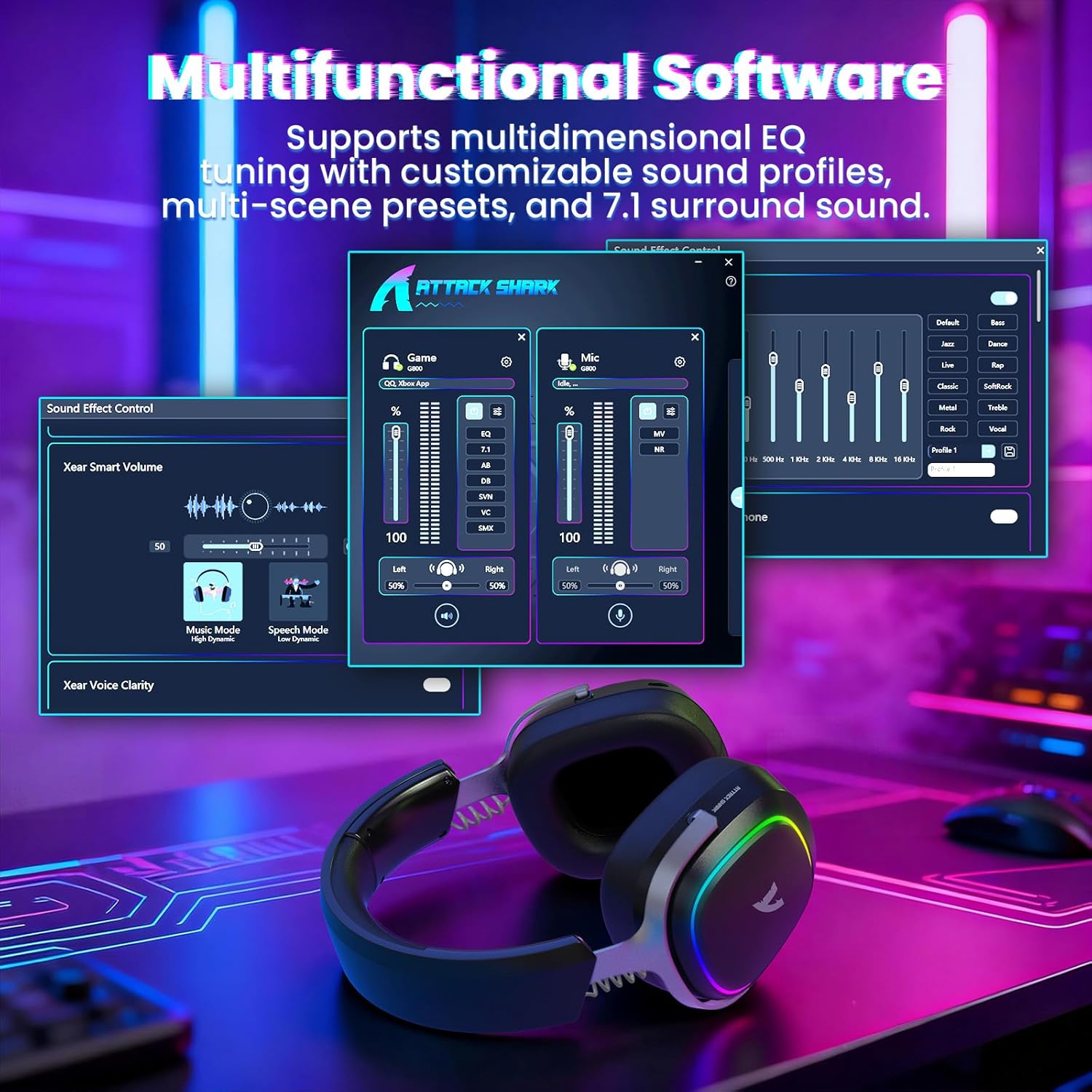
Image: The software interface for customizing audio settings.
- Download the official ATTACK SHARK G800 driver software from the manufacturer's webсайт.
- The software allows you to create custom EQ sound profiles and fine-tune 7.1 surround sound settings to match your preferences and game types.
6. Тэхнічнае абслугоўванне
Proper maintenance ensures the longevity and performance of your G800 headset.
- Уборка: Для чысткі гарнітуры выкарыстоўвайце мяккую сухую тканіну. Пазбягайце выкарыстання вадкіх ачышчальнікаў або абразіўных матэрыялаў.
- захоўванне: Захоўвайце гарнітуру ў прахалодным, сухім месцы, удалечыні ад прамых сонечных прамянёў і экстрэмальных тэмператур.
- Амбушюры: The ear cushions are replaceable. Refer to the manufacturer's website for replacement parts and instructions.

Image: Components of the headset, including replaceable ear cushions.
7. Выпраўленне непаладак
- Няма гуку:
- Праверце ўзровень гучнасці як на гарнітуры, так і на падлучанай прыладзе.
- Ensure the correct audio output device is selected in your device's sound settings.
- Verify the headset is properly connected (2.4Ghz receiver, Bluetooth paired, or wired cable).
- Перазагрузіце гарнітуру і прыладу.
- Мікрафон не працуе:
- Пераканайцеся, што мікрафон надзейна падключаны да гарнітуры.
- Check if the microphone is muted (hold Mode Switch (2) for 3 seconds to toggle).
- Праверце, ці выбрана правільная прылада ўводу мікрафона ў наладах гуку вашай прылады.
- Па магчымасці праверце мікрафон на іншай прыладзе.
- Праблемы з падключэннем:
- For 2.4Ghz, ensure the receiver is fully inserted and the headset is in 2.4Ghz mode.
- For Bluetooth, ensure the headset is in pairing mode and within range of your device. Try unpairing and re-pairing.
- For wired, ensure the cable is securely connected to both the headset and your device.
- Avoid sources of interference (e.g., other wireless devices, microwaves).
- RGB-ліхтары не працуюць:
- Triple click the Mode Switch (2) to toggle the RGB LED on/off.
- Ensure the headset has sufficient battery charge.
8. Тэхнічныя характарыстыкі
| Асаблівасць | Спецыфікацыя |
|---|---|
| Назва мадэлі | G800 |
| Тэхналогія падлучэння | Wired, Bluetooth (BT 5.3), 2.4Ghz Wireless |
| Тып аўдыё драйвера | Дынамічны драйвер (50 мм) |
| Аб'ёмны гук | Virtual 7.1 Spatial Audio |
| Мікрафон | Detachable 360° AI Noise-Canceling |
| Wireless Latency (2.4Ghz) | 20ms (Lightseed Wireless Technology) |
| Wireless Range (2.4Ghz) | Да 10 м / 32.8 футаў |
| Дыяпазон Bluetooth | Да 30 м / 98.4 футаў |
| Ёмістасць батарэі | 1000 мАг |
| Размяшчэнне вушэй | Над вухам |
| Матэрыял | Aluminum Alloy, Protein Leather, Memory Foam |
| Вага | 1.1 фунта (прыблізна) |
| Сумяшчальныя прылады | PC, Laptops, PS5, Mobile Devices |
9. Інфармацыя па бяспецы
- Пазбягайце працяглага праслухоўвання на высокай гучнасці, каб пазбегнуць пашкоджання слыху.
- Не падвяргайце гарнітуру ўздзеянню экстрэмальных тэмператур, вільготнасці або вадкасцей.
- Захоўваць у месцах, недаступных дзецям.
- Не спрабуйце разбіраць або мадыфікаваць гарнітуру. Гэта прывядзе да анулявання гарантыі.
- Утылізуйце прадукт адказна ў адпаведнасці з мясцовымі правіламі.
10. Афіцыйнае відэа прадукту
Відэа: Афіцыйная відэапрэзентацыя прадуктуasing the ATTACK SHARK G800 Wireless Tri Mode RGB Gaming Headset's features and design. This video is provided by the seller, UrWorthLtd US.
11. Гарантыя і падтрымка
For warranty information, technical support, or customer service, please refer to the documentation included with your purchase or visit the official ATTACK SHARK webсайт. Захоўвайце пацвярджэнне пакупкі для прэтэнзій па гарантыі.