
Уводзіны
This manual provides detailed instructions for the proper use and maintenance of your LAUNCH X431 V+ PRO 5.0 diagnostic tool. This device is designed for professional vehicle diagnostics, offering advanced features such as ECU coding, bidirectional control, and extensive maintenance services across a wide range of vehicle brands. Please read this manual thoroughly before operating the device to ensure optimal performance and safety.
Налада і пачатковае выкарыстанне
1. Распакоўка і ідэнтыфікацыя кампанентаў
Carefully unpack all components from the protective case. Verify that all items listed in the complete kit are present.
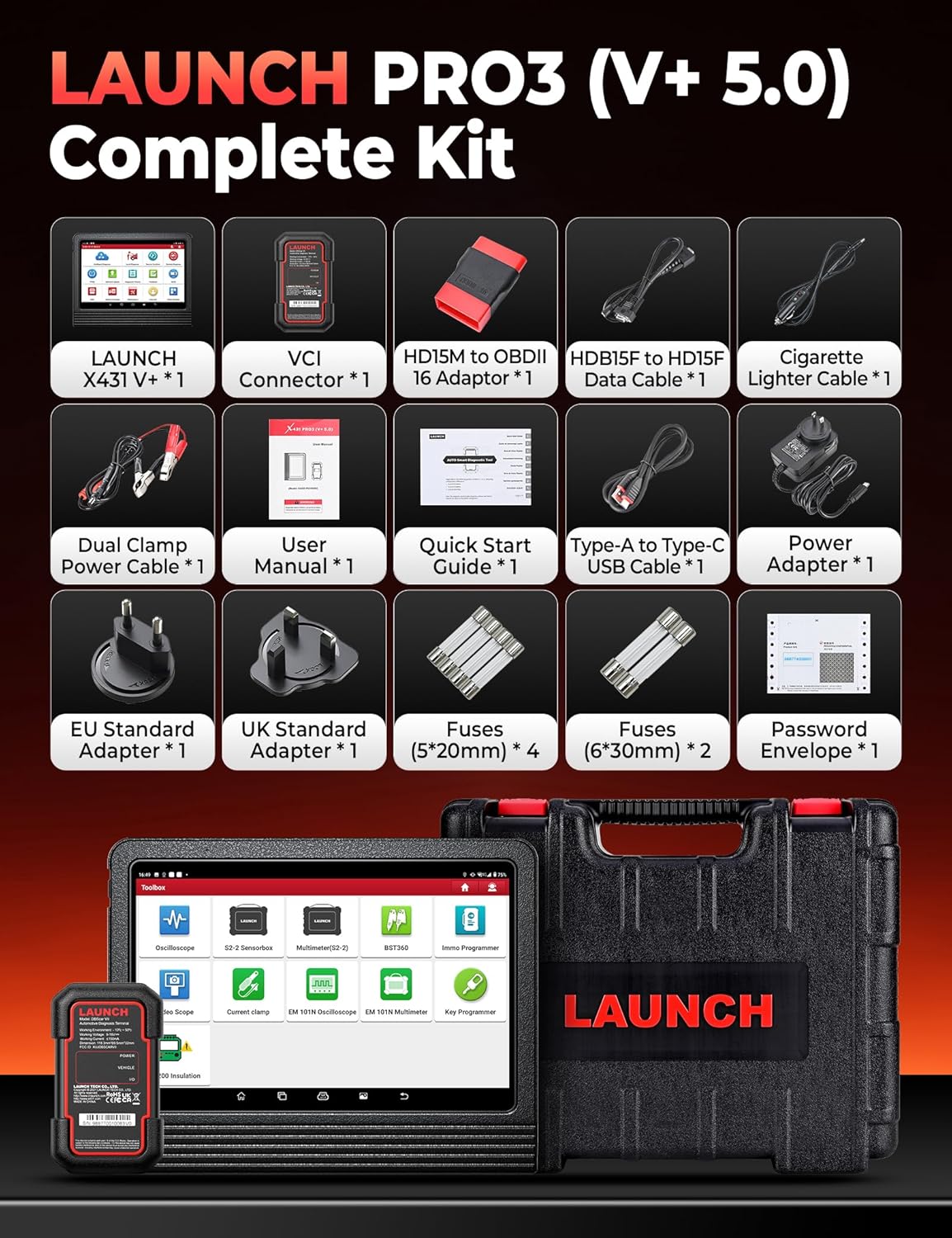
Image: The complete kit includes the LAUNCH X431 V+ unit, VCI Connector, various adapters, cables, power accessories, fuses, user manual, quick start guide, and password envelope, all housed in a protective case.
- Асноўны блок: LAUNCH X431 V+ tablet.
- VCI Connector: DBSCar VII diagnostic connector.
- Перахаднікі: Various OBDII and specific vehicle adapters.
- Кабелі: USB cable, power cables.
- Адаптар сілкавання: For charging the main unit.
- Дакументацыя: User Manual, Quick Start Guide, Password Envelope.
2. Пачатковае ўключэнне і канфігурацыя
Connect the power adapter to the main unit and a power outlet. Press and hold the power button to turn on the device. Follow the on-screen prompts to complete the initial setup, including language selection, Wi-Fi connection, and account registration.

Image: This image details the hardware specifications of the device, including its 2.0GHz 4-Core CPU, Android 10.0 operating system, 10.1-inch screen, 4GB RAM + 64GB ROM, 8MP+5MP cameras, 2.4GHz/5GHz Wi-Fi, and 6300mAh battery.
3. Connecting the DBSCar VII Connector
The DBSCar VII connector supports the CAN-FD protocol, expanding vehicle compatibility. Plug the DBSCar VII connector into the vehicle's OBD-II port, typically located under the dashboard. Ensure a secure connection. The connector will establish a Bluetooth connection with the main unit automatically or can be paired manually via the device's settings.
Інструкцыя па эксплуатацыі
1. Уся сістэмная дыягностыка
The device performs OE-level diagnostics across all available vehicle systems. This includes reading and clearing diagnostic trouble codes (DTCs), viewing 12-in-1 live data streams, accessing freeze frame data, and retrieving ECU information.

Image: This image illustrates the Topology Mapping feature, which systematically displays the communication structure between vehicle modules. It also highlights All System Diagnostics capabilities, including Read/Clear Codes, 12-IN-1 Live Data, Freeze Frame Data, ECU Information, and AutoVIN & Scan for automatic VIN retrieval and system scanning.
- Тапалагічнае адлюстраванне: Systematically displays the communication structure between vehicle modules for a clear overview.
- AutoVIN & AutoScan: Automatically retrieves vehicle identification number (VIN) and scans all systems for quick diagnosis.
- Зчытанне/ачыстка кодаў: Identify and erase diagnostic trouble codes from various vehicle systems.
- Жывыя даныя: View real-time data streams from sensors and components.
- Даныя стоп-кадра: Capture a snapshot of sensor values when a DTC is set.
2. Кадаванне ЭБУ
ECU coding allows for component replacement adaptation and vehicle customization. It supports both online and offline coding for various brands.

Image: This image differentiates between Online Coding and Offline Coding. Online Coding involves cloud server data and automatic instructions for a simpler procedure. Offline Coding allows manual steps, detailed control, and more complete customization adjustments.
- Інтэрнэт-кадаванне: Utilizes cloud server data for automatic instructions, simplifying the coding process. Supported for brands like BMW, VW, Audi, Skoda, Seat.
- Аўтаномнае кадаванне: Provides manual control over each coding step, offering more detailed customization.
- Настройка: Adjust vehicle parameters such as disabling seat belt chimes or customizing mirror folding behavior.
- Кіраваныя функцыі: Provides OE-level instructions for simplified diagnostic procedures on supported vehicles (VW, Audi, Skoda, Seat).
3. Двунакіраванае кіраванне (актыўныя тэсты)
Perform active tests to send commands to vehicle systems and components, verifying their operational status without using the vehicle's controls. This helps in quickly pinpointing faulty areas.
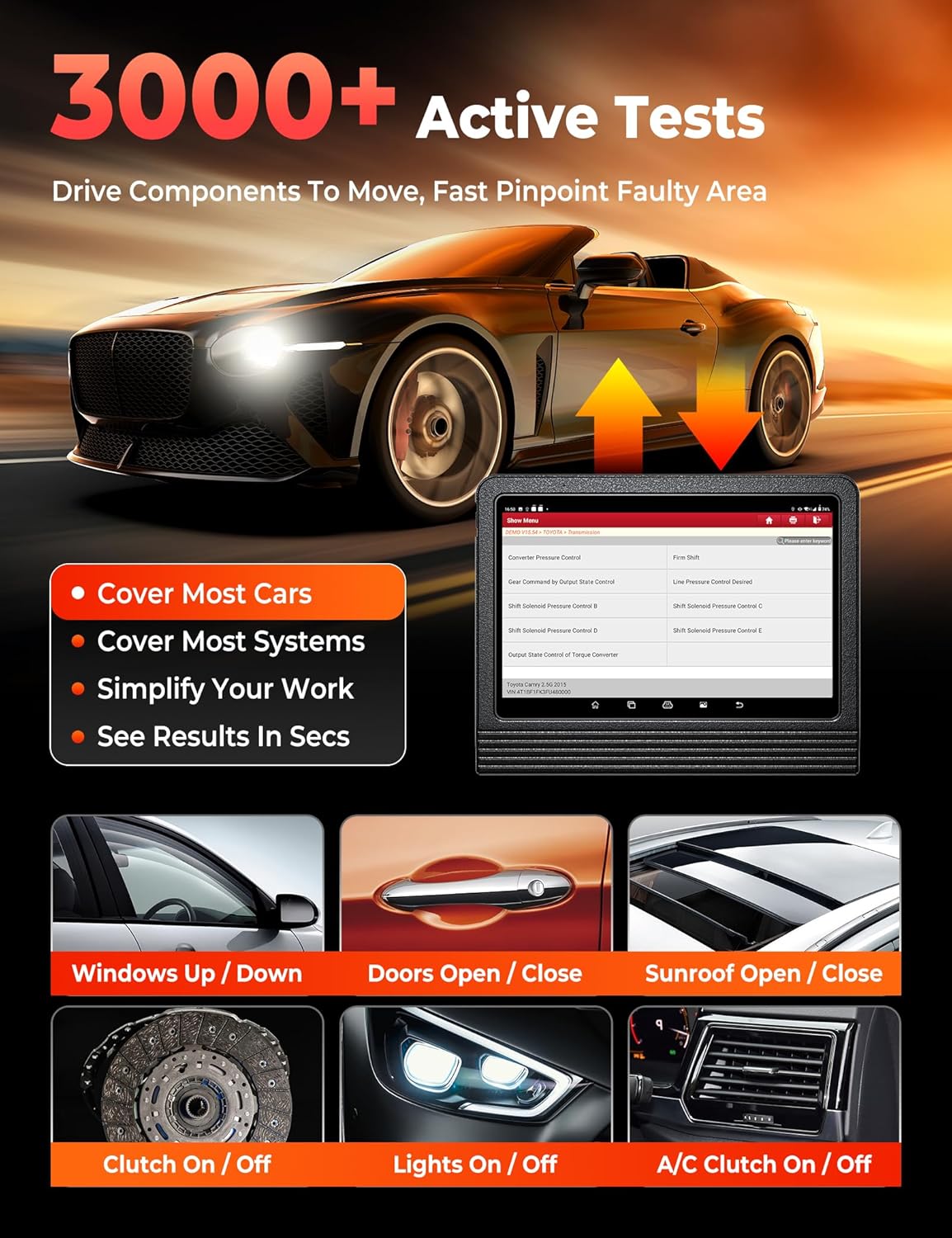
Image: This image demonstrates the 3000+ Active Tests feature, which allows the user to drive components to move and quickly pinpoint faulty areas. Examples include controlling windows, doors, sunroof, clutch, lights, and A/C.
4. Страхаванне транспартных сродкаў
The tool supports over 200,000 vehicle models from 1984-2025 across American, Asian, and European markets. It includes support for FCA AutoAuth for SGW-equipped vehicles (Chrysler, Dodge, Jeep, Alfa Romeo, Fiat) and CAN-FD protocol for newer GM vehicles.

Image: This image highlights the extensive 200+ Brands Coverage of the LAUNCH X431 V+ PRO 5.0, including American (Chevrolet, Chrysler, Ford, Buick, Cadillac, Dodge, GM, Hummer, Jeep, Lincoln, Brazil-Fiat), European (BMW, Jaguar, LandRover, Volvo, Abarth, Alfa Romeo, Audi, Bentley, Bugatti, Citroen, Dacia), Asian (Toyota, Honda, Nissan, Hyundai, Kia, Acura, Daihatsu, Infiniti, Isuzu, Lexus, Mazda, Mitsubishi, Nissan GTR, Scion), and Australian (AU-Ford, Holden) vehicles. It also notes support for FCA SGW, CAN-FD & DoIP (with adapter), and no IP limitation.
Тэхнічнае абслугоўванне
The LAUNCH X431 V+ PRO 5.0 offers over 55 maintenance and reset services, with more than 100 advanced functions available within the diagnostic software.

Image: This image showcases the 55+ Hot Maintenance Services offered by the LAUNCH X431 V+ PRO 5.0, including Oil Reset, ABS Bleed, Electronic Parking Brake (EPB), Steering Angle Sensor (SAS), Supplemental Restraint System (SRS), Injector Coding, Tire Pressure Monitoring System (TPMS), Clutch Adaptation, Coolant Bleed, Seat Calibration, Headlamp Reset, and Air/Fuel Ratio (A/F) Reset, among over 100 additional functions.
- Скід алею: Скіньце сістэму тэрміну службы алею пасля замены алею.
- Скід SAS: Калібруйце датчык вугла павароту руля.
- Скід EPB: Пасля замены пераўсталюйце калодкі электроннага стаяначнага тормазу.
- Скід TPMS: Program new TPMS sensors or perform sensor relearn procedures.
- Скід BMS: Register new battery replacement.
- ETS Reset: Perform electronic throttle position reset.
- Адаптацыя трансмісіі: Reset transmission adaptive learning values.
- Крывацёк з АБС: Выканайце працэдуру прапампоўкі тармазоў з ABS.
- Скід AFS: Reset the adaptive front lighting system.
- Кадаванне інжэктараў: Закадзіруйце новыя нумары фарсунак у ЭБУ.
- Скід AdBlue: Reset the AdBlue system after urea replacement/refill.
- Скід датчыка NOx: Reset the NOx sensor after fault repair/catalyst replacement.
Advanced Functions and Add-on Modules
The LAUNCH X431 V+ PRO 5.0 supports various optional add-on modules to expand its capabilities.
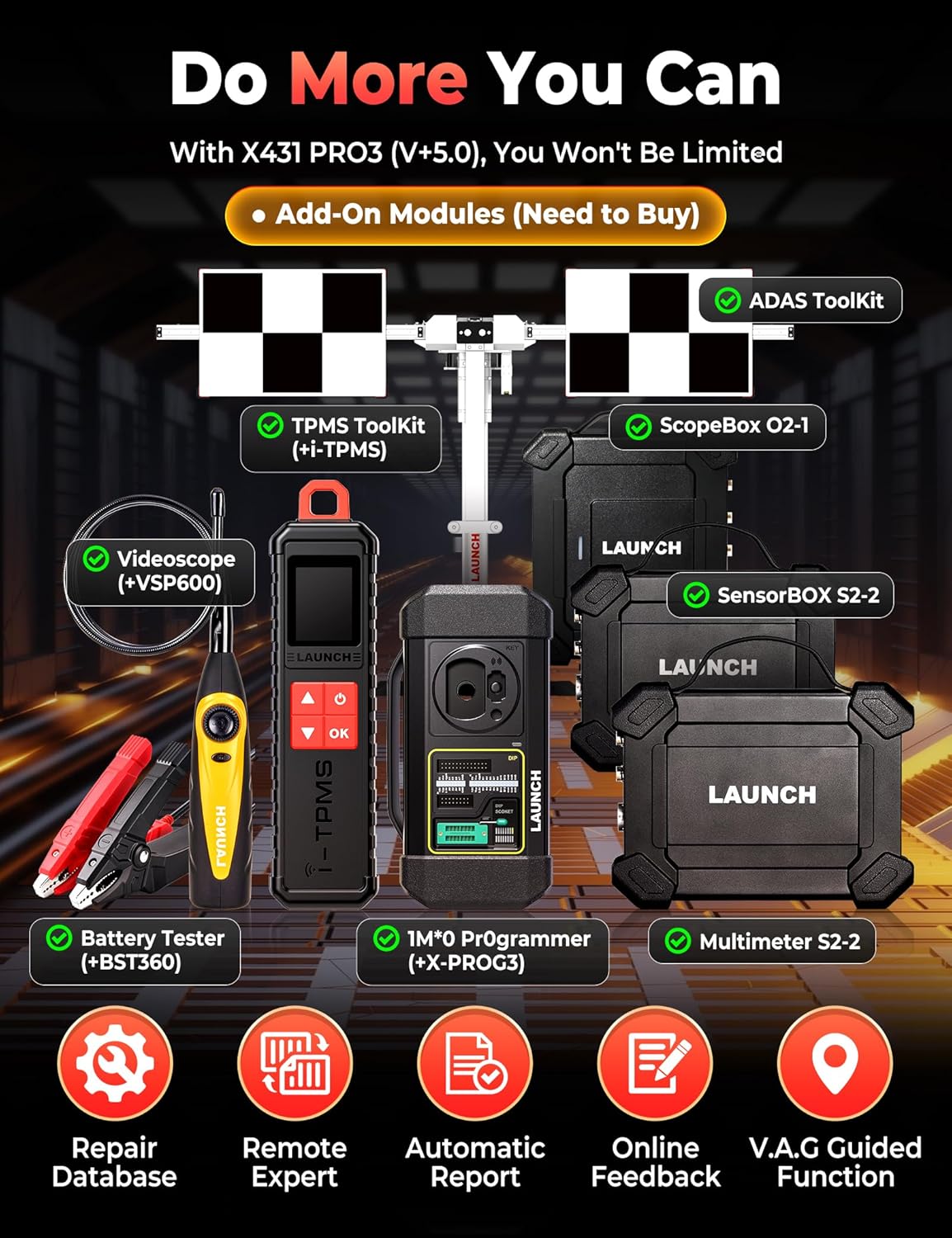
Image: This image displays various add-on modules that can be purchased separately to enhance the LAUNCH X431 V+ PRO 5.0's functionality. These include the ADAS Toolkit, TPMS Toolkit (with i-TPMS), ScopeBox O2-1, Videoscope (VSP600), Battery Tester (BST360), IMMO Programmer (X-PROG3), and Multimeter S2-2.
- ADAS Tool: For Advanced Driver-Assistance Systems calibration.
- TPMS Tool (X431 TSGUN): For comprehensive TPMS services.
- Тэстар акумулятараў (BST360): For battery health analysis.
- Videoscope (VSP600): For visual inspection of hard-to-reach areas.
- IMMO Programmer (X-PROG3): For advanced immobilizer functions.
- ScopeBox: For waveform analysis.
- SensorBOX: For sensor simulation and testing.
Ліквідацыю непаладак
If you encounter issues with your LAUNCH X431 V+ PRO 5.0, refer to the following common troubleshooting steps:
- Прылада не ўключаецца: Ensure the device is fully charged or connected to the power adapter. Check the power button for proper function.
- Няма сувязі з транспартным сродкам: Verify the DBSCar VII connector is securely plugged into the vehicle's OBD-II port. Ensure the vehicle's ignition is on. Check the Bluetooth connection between the main unit and the VCI connector.
- Завісанні/збоі праграмнага забеспячэння: Restart the application or the device. Ensure the software is updated to the latest version. Clear cache if necessary.
- Diagnostic Errors: Confirm the correct vehicle make, model, and year are selected. Ensure all cables and connectors are secure.
- Нізкая прадукцыйнасць: Close unnecessary applications running in the background. Ensure sufficient storage space is available.
For persistent issues, consult the official LAUNCH support resources or contact customer service.
Тэхнічныя характарыстыкі
| Асаблівасць | Дэталь |
|---|---|
| Марка | ЗАПУСК |
| мадэль | X431 V+ |
| Вага прадмета | 4.94 кілаграма |
| Памеры ўпакоўкі | 42.9 х 39.7 х 17.6 см |
| Аперацыйная сістэма | Android 10.0 |
| Памер экрана | 10.1 цалі |
| Працэсар | 2.0 ГГц, 4 ядра |
| RAM + ROM | 4 ГБ + 64 ГБ |
| акумулятар | 6300 мАг |
| Крыніца харчавання | Харчаванне ад батарэі |
| Аўтамабільны тып | Падгонка пад канкрэтны аўтамабіль |
| UPC | 810139303558 |
Інфармацыя аб гарантыі
The LAUNCH X431 V+ PRO 5.0 diagnostic tool typically comes with a manufacturer's warranty. Please refer to the warranty card included in your product packaging or visit the official LAUNCH webпадрабязныя ўмовы гарантыі глядзіце на сайце. Захоўвайце пацвярджэнне пакупкі для прэтэнзій па гарантыі.
Падтрымка кліентаў
For technical assistance, product inquiries, or support, please contact LAUNCH customer service through their official website or the contact information provided in your product documentation. Regular software updates are available to enhance functionality and vehicle coverage; ensure your device is connected to Wi-Fi to receive these updates.