
1. Уводзіны
This manual provides detailed instructions for the installation, operation, and maintenance of your Stiflix 7" Double Din Touchscreen Stereo. This unit features wireless CarPlay and Android Auto, Bluetooth 5.5, a 7-inch HD IPS touchscreen, a 45W USB Type-C charging port, and a built-in DSP for enhanced audio control. Please read this manual thoroughly before use to ensure proper functionality and safety.
2. Інфармацыя па бяспецы
- Не карыстайцеся прыладай такім чынам, каб гэта адцягвала вас ад кіравання. Заўсёды надавайце прыярытэт бяспецы дарожнага руху.
- Ensure all wiring is correctly connected to prevent short circuits or damage. Consult a professional for installation if unsure.
- Не падвяргайце прыладу ўздзеянню экстрэмальных тэмператур, прамых сонечных прамянёў на працягу доўгага часу або празмернай вільгаці.
- Выкарыстоўвайце толькі пазначаны аб'ёмtage and power sources.
- Keep the unit clean and free from dust. Do not use harsh chemicals for cleaning.
3. Што ў скрынцы
Перад тым, як працягнуць усталёўку, пераканайцеся, што ўсе кампаненты наяўныя:
- Stiflix Double Din CarPlay Stereo Unit
- Backup Camera & Cable
- Wiring Harness & Wires
4. Усталёўка і налада
4.1 Агульная ўстаноўка
The Stiflix 7" Double Din Stereo is designed to fit universal double-DIN slots (7" x 4"). Ensure your vehicle's dashboard opening is compatible. The unit features a full black double-DIN chassis with multiple mounting points for secure installation and heat dissipation.

4.2 Правадныя злучэнні
The included wiring harness is color-coded for easy connection. Refer to your vehicle's wiring diagram for specific connections. Common connections include power (constant 12V, accessory 12V, ground), speaker outputs, antenna, and steering wheel control wires.
- Жоўты провад: Пастаяннае напружанне 12 В (батарэя)
- Чырвоны провад: Accessory 12V (Ignition Switched)
- Чорны провад: зямля
- Аранжавы провад: Ілюмінацыя
- Сіні провад: Магутная антэна / AmpДыстанцыйнае ўключэнне lifier
- Правады акустычных сістэм: Typically color-coded (e.g., White/White-Black for Front Left, Gray/Gray-Black for Front Right, Green/Green-Black for Rear Left, Purple/Purple-Black for Rear Right).
- Steering Wheel Control (SWC) Wires: Connect to your vehicle's SWC interface (if applicable).
4.3 Усталёўка камеры задняга віду
The package includes a waterproof night vision AHD backup camera. Follow these steps for installation:
- крок 1: Plug the rear camera into the camera interface on the stereo unit.
- крок 2: Open the side gap of your vehicle's interior trim and insert the camera cable.
- крок 3: Fix the rear camera above the car license plate or in a suitable location.
- крок 4: Падключыце штэкер задняй камеры да гнязда кабеля.
- крок 5: Connect the red wire (12V) of the reversing lamp to the positive wire of the camera.

5. Інструкцыя па эксплуатацыі
5.1 Бесправадны CarPlay і Android Auto
This unit supports wireless CarPlay and Android Auto, allowing seamless integration with your smartphone for navigation, music, calls, and messages. To connect:
- Пераканайцеся, што Bluetooth і Wi-Fi уключаны на вашым смартфоне.
- On the stereo, navigate to the CarPlay or Android Auto application.
- Выконвайце падказкі на экране, каб падключыць тэлефон праз Bluetooth. Пасля падключэння сістэма аўтаматычна ўсталюе злучэнне Wi-Fi для бесправаднога CarPlay/Android Auto.

5.2 Bluetooth Calling & Music Streaming
The unit features upgraded Bluetooth 5.5 for stable hands-free calling and wireless audio streaming.
- Уключыце Bluetooth на тэлефоне і знайдзіце даступныя прылады.
- Select "Stiflix Stereo" (or similar name) from the list on your phone to pair.
- Once connected, you can make/receive calls and stream music from your phone. The built-in microphone and external mic jack ensure clear communication.

5.3 USB Media & Type-C Charging
The unit includes a USB port for media playback and a Type-C port for fast charging.
- Носьбіт USB: Insert a USB flash drive into the USB port to play 1080p videos or MP3 music files.
- Зарадка тыпу C: The USB-C port delivers 45W power, capable of charging compatible devices up to 100% in approximately 30 minutes. Use a compatible USB-C to USB-C cable for optimal charging speed.

5.4 7-Inch HD IPS Touchscreen
The 7-inch capacitive touchscreen offers a 1024x600 resolution and a 178° ultra-wide viewing angle for clear visibility, even in direct sunlight. Operate the unit by touching the icons and controls on the screen.
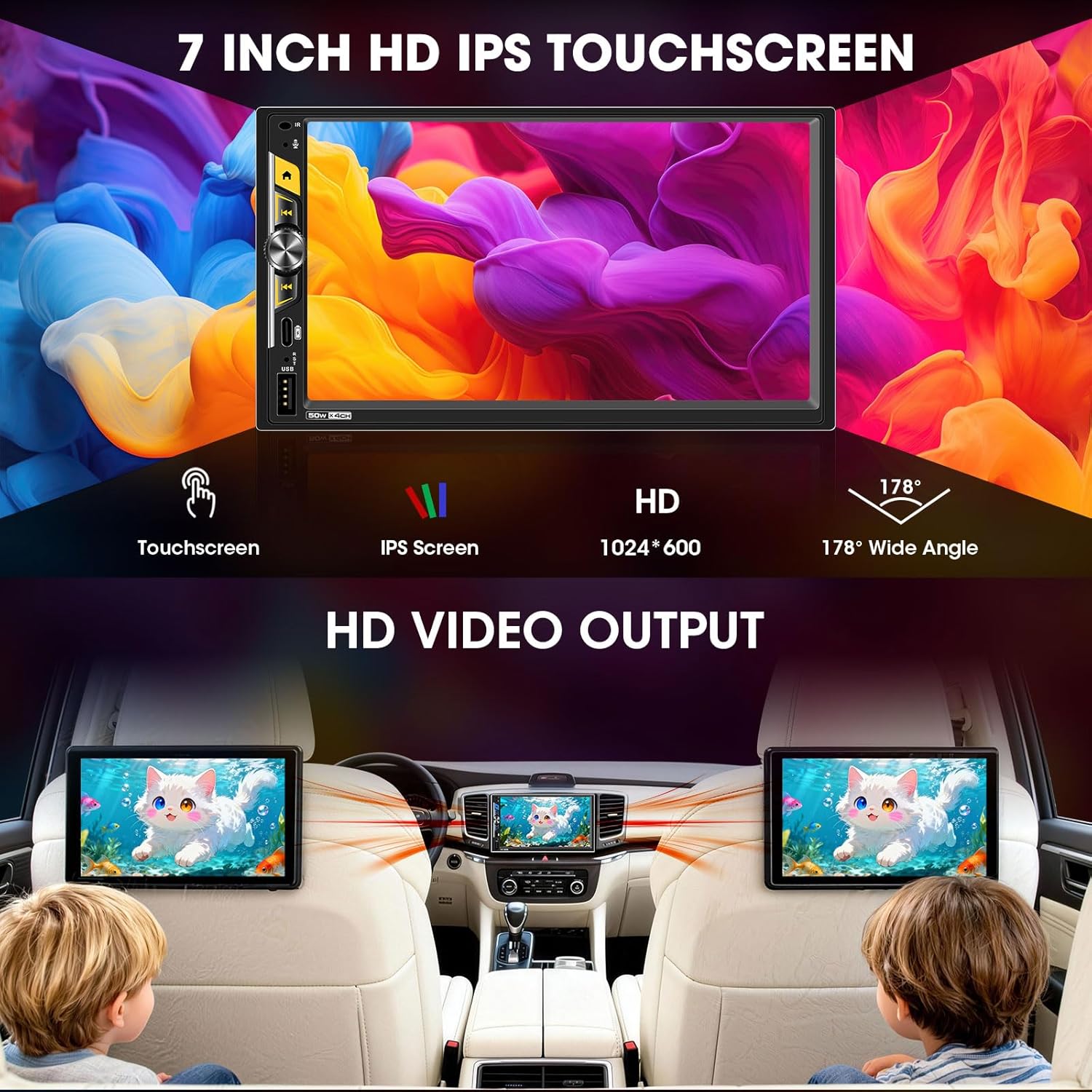
5.5 Audio Outputs & Built-in DSP
The stereo features 4-channel preamp outputs plus 2 separate subwoofer outputs, ideal for upgrading speakers or adding an amplifier. The advanced DSP (Digital Sound Processor) includes a 16-band equalizer and time alignment settings for precise audio adjustment. Integrated HPF/LPF (High-Pass/Low-Pass Filter) technology optimizes speaker performance.

5.6 Кіраванне на рулі (SWC)
If your vehicle supports steering wheel controls, connect the SWC wires during installation. The unit can be configured to recognize your vehicle's steering wheel buttons, allowing you to control volume, track changes, and other functions without taking your hands off the wheel.
5.7 Mirrorlink
The Mirrorlink function allows you to mirror your smartphone's screen onto the stereo display. This feature is typically accessed via a dedicated app on the stereo and requires a wired USB connection for some devices.
5.8 FM/AM Radio Tuner
Access the built-in FM/AM radio tuner to listen to local broadcasts. You can scan for stations, save presets, and switch between FM and AM bands.
6. Тэхнічнае абслугоўванне
- Ачыстка экрана: Выкарыстоўвайце мяккую тканіну без ворса, каб акуратна працерці сэнсарны экран. Для выдалення ўстойлівых плям злёгкуampПрацярыце тканіну вадой або сродкам для ачысткі экрана. Пазбягайце абразіўных матэрыялаў або агрэсіўных хімічных рэчываў.
- Генеральная ўборка: Keep the unit's exterior free from dust and debris. Use a dry cloth for cleaning.
- Абнаўленні праграмнага забеспячэння: Перыядычна правярайце інфармацыю вытворцы webсайт для атрымання даступных абнаўленняў праграмнага забеспячэння, каб забяспечыць аптымальную прадукцыйнасць і доступ да новых функцый.
7. Выпраўленне непаладак
| праблема | Магчымая прычына | Рашэнне |
|---|---|---|
| Няма сілы | Incorrect wiring (power/ground), blown fuse. | Check all power and ground connections. Inspect vehicle's fuse box and the unit's inline fuse. |
| Без гуку | Няправільнае падключэнне дынамікаў, занадта нізкая гучнасць, уключаны рэжым адключэння гуку. ampпраблемы Lifier. | Verify speaker connections. Increase volume. Check if mute is active. Ensure external amplifiers are powered on. |
| CarPlay/Android Auto не падключаецца бесправадным спосабам | Bluetooth/Wi-Fi выключаны на тэлефоне, няправільнае спалучэнне, тэлефон не падтрымліваецца. | Ensure phone's Bluetooth and Wi-Fi are on. Re-pair the device. Check phone compatibility. |
| Не адлюстроўваецца камера задняга віду | Camera not powered, video cable loose, reverse trigger wire not connected. | Check camera power supply (reverse light connection). Ensure RCA video cable is securely connected. Verify reverse trigger wire connection. |
| Touchscreen unresponsive or lagging | Temporary software glitch, excessive heat. | Restart the unit (turn vehicle off and on). Ensure proper ventilation around the unit. |
8. Тэхнічныя характарыстыкі
| Асаблівасць | Дэталь |
|---|---|
| Нумар мадэлі | B0G39538PX |
| Памер экрана | 7 цалі |
| Тып дысплея | Сэнсарны экран HD IPS |
| дазвол | 1024x600 |
| Сувязь | Bluetooth 5.5, USB, Wi-Fi |
| Асаблівасці | Wireless Apple CarPlay, Wireless Android Auto, Built-in DSP, 16-Band EQ, 2 Subwoofer Outputs, 4.2 CHN Audio Outputs, Type-C Fast Charging (45W), Mirrorlink, HD Video Output, Steering Wheel Control, FM/AM Receiver, Front/Rear View Увод з камеры |
| Сумяшчальныя прылады | Amplifier, Speaker, Subwoofer |
| Зарадка USB-C | PD3.0, 45 Вт |
| Памеры прадукту | 4.64" Г x 7" Ш x 3.93" У |
| Вага прадмета | 2 фунта |
9. Гарантыя і падтрымка
This Stiflix product is covered by a standard manufacturer's warranty. For specific warranty details, please refer to the warranty card included with your product or visit the official Stiflix website. For technical support, troubleshooting assistance, or service inquiries, please contact Stiflix customer service through their official channels.
Калі ласка, захавайце доказы пакупкі для прэтэнзій па гарантыі.