
1. Уводзіны
This manual provides essential information for setting up, operating, and maintaining your NiPoGi P2-3300U Mini PC. Please read it thoroughly before using the device to ensure optimal performance and longevity.
Надview відэашоўasing the compact design, AMD Ryzen 3300U processor, memory and storage expansion, multiple display output, various ports, efficient cooling, and diverse usage scenarios of the NiPoGi P2-3300U Mini PC.
Асноўныя характарыстыкі:
- Працэсар: AMD Ryzen 3 3300U (up to 3.5GHz, 4 Cores/4 Threads)
- Аперацыйная сістэма: Windows 11 Pro
- Памяць: 16 ГБ DDR4 (з магчымасцю пашырэння да 32 ГБ)
- захоўванне: 512GB M.2 2280 SSD (expandable up to 4TB)
- Графіка: Integrated Graphics with 4K@60Hz support
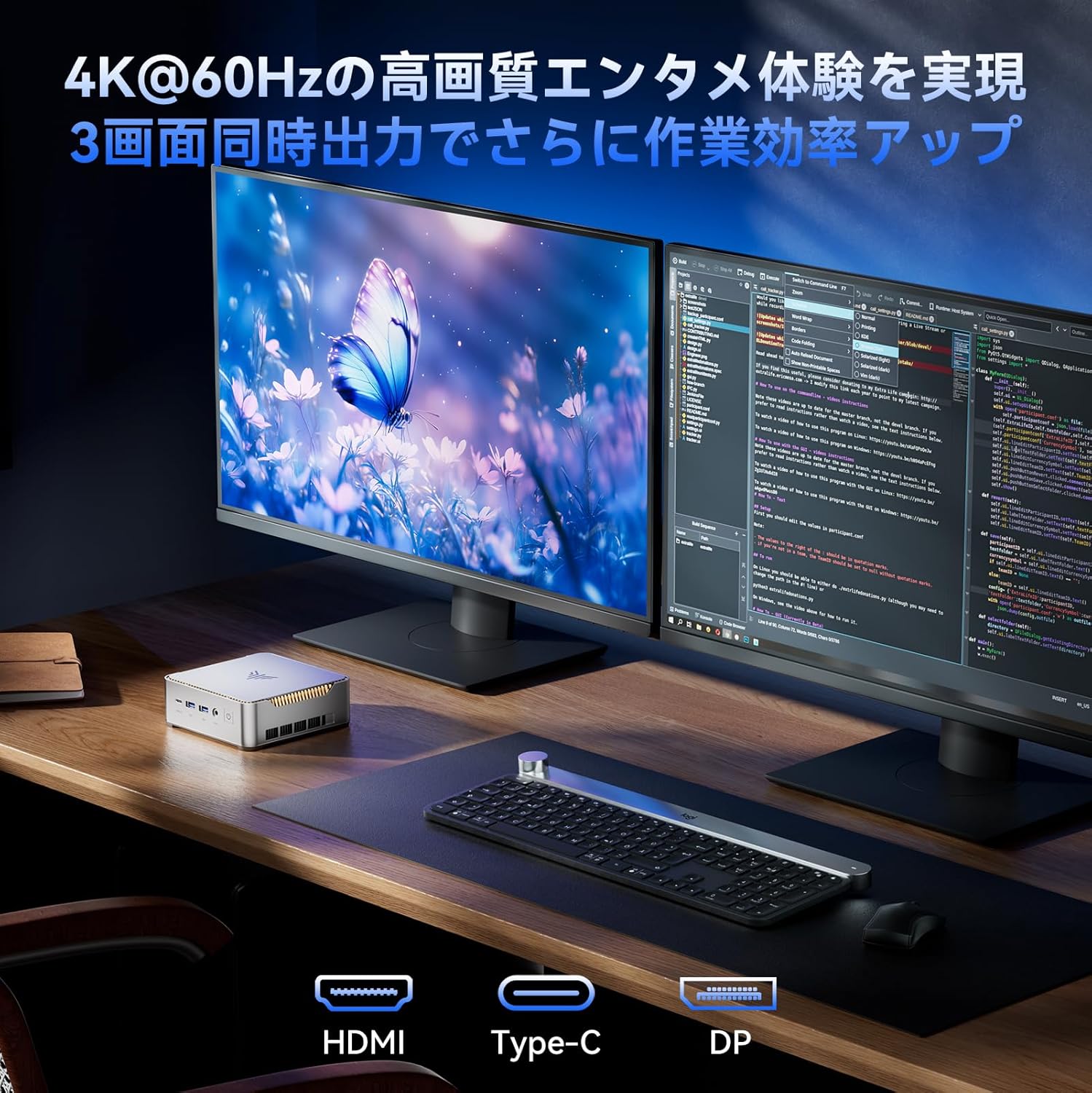
- Вывад дысплея: Supports up to 3 screens simultaneously (HDMI 2.0, DisplayPort 1.4, USB 3.2 Gen1 Type-C)
- Падключэнне: USB 3.2 x6, USB 3.2 Gen1 Type-C x1, 1000Mbps Wired LAN, Wi-Fi 5GHz, Bluetooth 4.2
- Астуджэнне: Efficient and silent cooling fan system
- Бяспека: TPM 2.0 chip for enhanced data protection
- дызайн: Ultra-compact and lightweight (approx. 128.2×128.2×44mm), VESA mount compatible

Diagram showing the compact size and key features like 4K output, Windows 11 Pro, 512GB SSD, 16GB DDR4, LAN, Bluetooth 4.2, and WiFi 5.
2. Змесціва ўпакоўкі
Перад тым, як працягнуць наладу, пераканайцеся, што ўсе пералічаныя ніжэй элементы ўваходзяць у камплект:
- NiPoGi P2-3300U Mini PC
- Адаптар сілкавання
- Кабель HDMI
- VESA Mount
- Шрубы для мацавання VESA
- Кіраўніцтва карыстальніка

Image showing the package contents, including the mini PC, power adapter, HDMI cable, VESA mount, and user manual.
3. Кіраўніцтва па наладцы
3.1 Падключэнне перыферыйных прылад
Identify the various ports on your Mini PC to connect your display, keyboard, mouse, and other devices.

Падрабязны view of the mini PC's ports, including USB, HDMI, DP, LAN, and Type-C.
- Магутнасць: Connect the power adapter to the DC port on the Mini PC and then to a power outlet.
- Дысплей: Connect your monitor(s) using the HDMI 2.0, DisplayPort 1.4, or USB 3.2 Gen1 Type-C ports. The Mini PC supports up to three displays simultaneously.
- Клавіятура і мыш: Connect your USB keyboard and mouse to any of the available USB 3.2 ports.
- Сетка: For a wired connection, connect an Ethernet cable to the RJ45 LAN port. For wireless, the device supports Wi-Fi 5GHz.
- Аўдыё: Падключыце навушнікі або дынамікі да аўдыёраздыма 3.5 мм.
3.2 Усталёўка мацавання VESA
The Mini PC can be mounted on the back of a VESA-compatible monitor to save desk space.
- Attach the VESA mount bracket to the back of your monitor using the provided screws.
- Устаўце міні-ПК у мантажны кранштэйн, пакуль ён надзейна не зафіксуецца.

Mini PC mounted on the back of a monitor using a VESA mount.
3.3 Пачатковая загрузка і ўстаноўка Windows 11 Pro
After connecting all necessary peripherals and power, press the power button to turn on the Mini PC. Follow the on-screen instructions to complete the initial setup of Windows 11 Pro.
4. Інструкцыя па эксплуатацыі
4.1 Асноўныя аперацыі
The NiPoGi P2-3300U Mini PC is designed for smooth performance across various daily tasks:
- Web Прагляд: Enjoy fast and stable internet access with Wi-Fi 5GHz or wired LAN.
- Стварэнне дакумента: Efficiently work on office applications for documents, spreadsheets, and presentations.
- Інтэрнэт-сустрэчы: Participate in video conferences with reliable connectivity.
- Прайграванне відэа: Stream 4K content smoothly.

Various usage scenarios: video conferencing, light gaming, data analysis, and movie watching.
4.2 Multitasking and Multi-Display
The AMD Ryzen 3 3300U processor ensures efficient multitasking, allowing you to run multiple applications simultaneously without significant slowdowns.

Multiple application windows open on a screen, illustrating the mini PC's multitasking capabilities.
With support for up to three 4K@60Hz displays, you can expand your workspace for enhanced productivity.

Mini PC connected to multiple monitors, demonstrating multi-display capability.
4.3 Дадатковыя налады BIOS
The unlocked BIOS provides access to advanced settings, including:
- Auto-boot: Configure the system to automatically power on when connected to power.
- RTC Wake: Schedule the PC to wake up at a specific time.
- Прачынанне па LAN: Power on the PC remotely over a network connection.
5. Тэхнічнае абслугоўванне і мадэрнізацыя
5.1 Эфектыўная сістэма астуджэння
The Mini PC features an efficient and silent cooling fan system to prevent overheating and maintain stable performance even during extended use. The design ensures heat is effectively dissipated from the interior.
Унутраны view of the mini PC highlighting the cooling fan and heat dissipation system.

Image depicting a user working on the mini PC at night while a child sleeps, emphasizing silent operation.
5.2 Пашырэнне памяці і аб'ёму захоўвання
The Mini PC comes with 16GB DDR4 RAM and a 512GB M.2 2280 SSD. Both can be upgraded:
- Памяць: Expandable up to 32GB DDR4 SO-DIMM.
- захоўванне: The M.2 2280 SSD can be replaced with a larger capacity drive, up to 4TB.
For detailed instructions on how to access and upgrade these components, please refer to the technical support section or contact customer service.

Diagram illustrating the internal memory (DDR4) and storage (M.2 2280 SSD) expansion capabilities.
6. Выпраўленне непаладак
If you encounter any issues with your NiPoGi P2-3300U Mini PC, please try the following general troubleshooting steps:
- Няма харчавання: Пераканайцеся, што адаптар сілкавання надзейна падключаны як да міні-ПК, так і да спраўнай разеткі. Пры неабходнасці паспрабуйце іншую разетку.
- Няма дысплея: Verify that the monitor is powered on and the display cable (HDMI, DP, or Type-C) is firmly connected to both the Mini PC and the monitor. Try a different cable or port.
- Перыферыйная прылада не выяўлена: Ensure USB devices are properly plugged into the correct ports. Try connecting them to different USB ports.
- Нізкая прадукцыйнасць: Close unnecessary applications. Check for available Windows updates. Ensure the cooling vents are not obstructed.
- Праблемы з сеткай: For wired connections, check the Ethernet cable and router. For Wi-Fi, ensure you are connected to the correct network and the signal is strong.
Калі праблема не знікне, звярніцеся да раздзела «Гарантыя і падтрымка» для атрымання дадатковай дапамогі.
7. Тэхнічныя характарыстыкі
| Асаблівасць | Дэталь |
|---|---|
| Марка | НіПоГі |
| Нумар мадэлі | P2-3300U-16+512-NEW |
| Памеры прадукту | 128.2 х 128.2 х 44 мм |
| Вага прадмета | 1.11 кілаграма |
| Марка працэсара | AMD |
| Тып працэсара | Ryzen 3 3300U |
| Хуткасць працэсара | 2.1 GHz (up to 3.5 GHz Max Turbo) |
| Колькасць працэсараў | 4 |
| Тып аператыўнай памяці | DDR4 SDRAM |
| Памер усталяванай аператыўнай памяці | 16 ГБ |
| Максімальная падтрымоўваная памяць | 32 ГБ |
| Памер жорсткага дыска | 512 ГБ |
| Тып жорсткага дыска | SSD (M.2 2280) |
| Інтэрфейс жорсткага дыска | eSATA (Note: M.2 is NVMe/SATA, eSATA is an external interface, likely a translation error in source data) |
| Графічны паскаральнік | Інтэграваная графіка |
| Апісанне відэакарты | Інтэграваны |
| VRAM Type | DDR4 SDRAM |
| Інтэрфейс відэакарты | Інтэграваны |
| дазвол | 3840 x 2160 (4K) |
| Парты USB 3.0 | 6 |
| Парты HDMI | 1 |
| Тып аптычнага прывада | Няма |
| Аперацыйная сістэма | Windows 11 Pro |
| Сувязь | Wi-Fi 5, Bluetooth 4.2, 1000Mbps LAN |
| Асаблівасці | VESA Support, TPM 2.0 |
8. Гарантыя і падтрымка
Your NiPoGi P2-3300U Mini PC comes with an Гарантыя 18 месяцаў from the date of purchase. This warranty covers manufacturing defects and malfunctions under normal use. In the event of a defect or malfunction, NiPoGi offers free replacement or return services.
For technical support, warranty claims, or any questions regarding your product, please contact NiPoGi customer service through the official channels provided at the time of purchase or on the NiPoGi website. Please have your product model and purchase information ready when contacting support.