
1. Уводзіны
Thank you for choosing the MARBERO M365 Portable Power Station. This device is designed to provide reliable power for various applications, including outdoor activities, RV travel, and emergency backup. Please read this manual carefully before using the product to ensure safe and optimal performance. Keep this manual for future reference.
Важная інфармацыя па бяспецы
- Не разбірайце, не рамантуйце і не мадыфікуйце прыладу. Няправільная зборка можа прывесці да пажару або траўмаў.
- Не падвяргайце прыладу ўздзеянню агню або экстрэмальных тэмператур (вышэй за 60°C / 140°F).
- Не выкарыстоўвайце і не захоўвайце прыладу ў ваннай пакоі або ў месцы, дзе яна можа падвяргацца ўздзеянню вады ці вільгаці.
- Do not use or store the unit near heat sources such as fires or heaters.
- Выкарыстоўвайце толькі прадастаўленыя або зацверджаныя аксэсуары.
- Трымайце прыладу далей ад дзяцей і хатніх жывёл.
- Не ўстаўляйце староннія прадметы ў парты.
- Забяспечце належную вентыляцыю падчас выкарыстання і зарадкі. Не накрывайце прыладу.
- If the unit emits smoke, strange odors, or any other abnormal phenomena, stop using it immediately and contact customer support.
2. Змесціва ўпакоўкі
Verify that all items listed below are included in your package. If any items are missing or damaged, please contact MARBERO customer support.
- 1 x MARBERO M365 Portable Power Station
- 1 x 15V/2A Power Adapter (Wall Charger)
- 1 х аўтамабільная зарадная прылада
- 1 х адаптар прыпальвальніка
- 1 х Кіраўніцтва карыстальніка
3. Прадукт скончыўсяview
The MARBERO M365 Portable Power Station features multiple output ports to power a wide range of devices. Familiarize yourself with the components below.
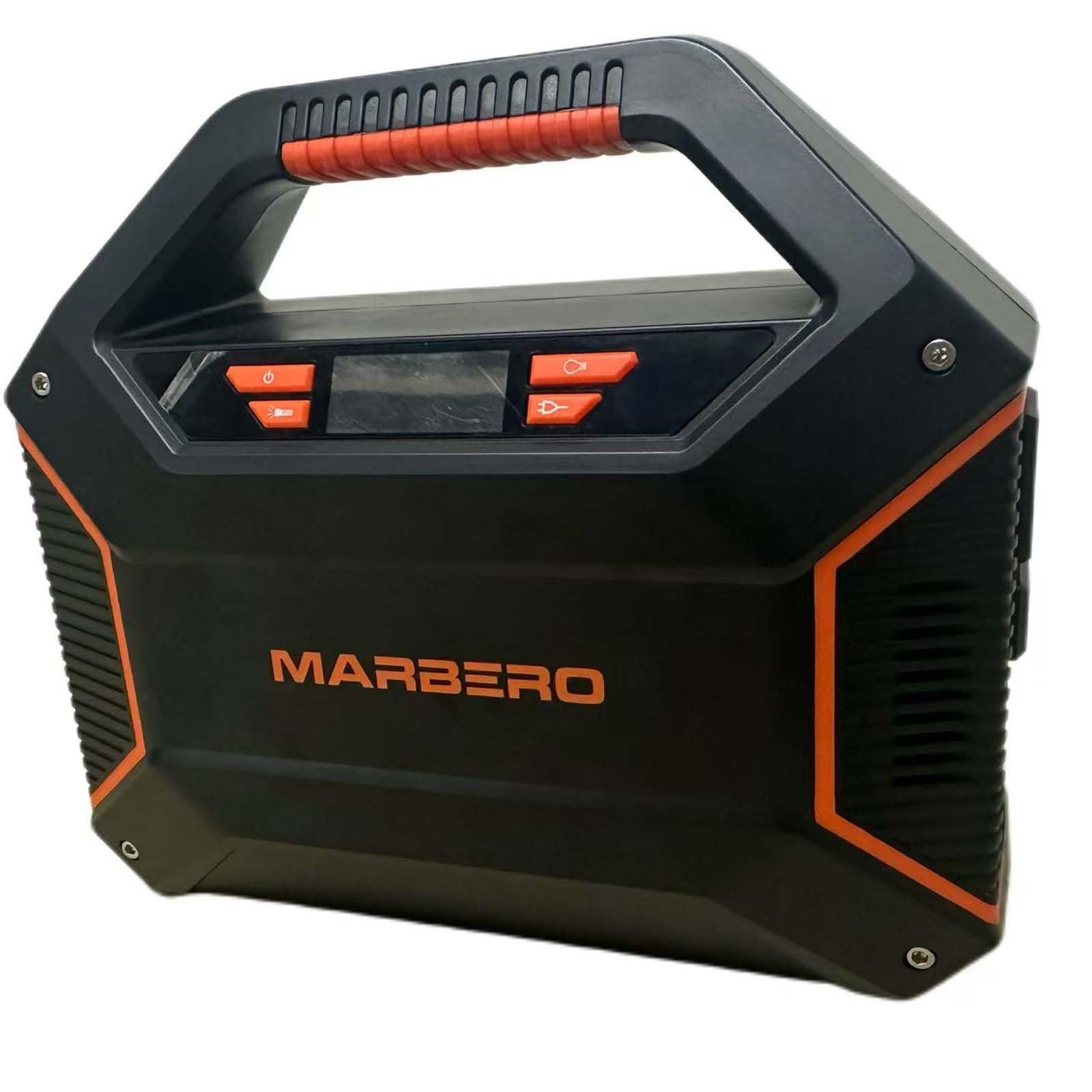
Малюнак 3.1: Фронт view of the MARBERO M365 Portable Power Station, showing the display, AC outlets, USB ports, and DC outputs.
Кампаненты і парты
- ВК-дысплей: Shows battery level, output status, and error indicators.
- AC Output Ports (x2): 110V, 100W (max). For powering household appliances.
- Выхадныя парты USB-A (x2): Standard USB ports for charging smartphones, tablets, etc.
- QC3.0 USB-A Output Port (x1): Quick Charge 3.0 compatible for faster charging of supported devices.
- USB-C Output Port (x1): Для зарадкі прылад, сумяшчальных з USB-C.
- DC Output Ports (x3): 12V, for DC-powered devices.
- Car Port Output (x1): 12V, for car-powered devices.
- Уваходны порт пастаяннага току: Для зарадкі электрастанцыі праз адаптар пераменнага току, аўтамабільную зарадную прыладу або сонечную панэль.
- Кнопка харчавання: Уключае/выключае прыладу.
- Кнопка выхаду пераменнага току: Activates/deactivates AC output.
- Кнопка выхаду пастаяннага току: Activates/deactivates DC output.
- Кнопка выхаду USB: Activates/deactivates USB output.
- Аварыйнае святло: Убудаваная святлодыёдная лямпа для падсветкі.
4. Настройка
Before first use, fully charge the MARBERO M365 Portable Power Station.
Зарадка электрастанцыі
The M365 can be charged using the included AC wall adapter, car charger, or a compatible solar panel (sold separately).
- Насценная зарадка ад пераменнага току:
- Connect the 15V/2A Power Adapter to the DC Input Port of the power station.
- Устаўце другі канец адаптара ў стандартную насценную разетку.
- The LCD display will show a charging indicator, and the battery level will increase.
- Час зарадкі для поўнай зарадкі складае прыблізна 5-6 гадзін.
- Зарадка аўтамабіля:
- Connect the Car Charger to the DC Input Port of the power station.
- Insert the other end into your vehicle's 12V cigarette lighter socket.
- The LCD display will indicate charging.
- Solar Panel Charging (Optional):
- Connect a compatible solar panel (15V-24V, 3A max) to the DC Input Port using the appropriate cable (not included with all solar panels).
- Пастаўце сонечную панэль пад прамыя сонечныя прамяні.
- The LCD display will indicate charging. Charging time varies depending on solar intensity.
It is recommended to fully charge the unit every 3 months if not in regular use to maintain battery health.
5. Інструкцыя па эксплуатацыі
Уключэнне/выключэнне
- Каб уключыць электрастанцыю, націсніце і ўтрымлівайце кнопку Кнопка харчавання for 3 seconds. The LCD display will illuminate.
- Каб выключыць электрастанцыю, націсніце і ўтрымлівайце кнопку Кнопка харчавання на працягу 3 секунд зноў.
Выкарыстанне выхаду пераменнага току
- After turning on the power station, press the Кнопка выхаду пераменнага току to activate the AC outlets. The AC icon will appear on the LCD display.
- Plug your AC-powered device (up to 100W continuous, 150W peak) into one of the AC output ports.
- Пасля завяршэння націсніце Кнопка выхаду пераменнага току again to turn off the AC output and conserve battery.
- Заўвага: If the total power draw exceeds 100W, the unit may automatically shut down to prevent overload.
Выкарыстанне выхаду пастаяннага току
- After turning on the power station, press the Кнопка выхаду пастаяннага току to activate the DC and Car Port outputs. The DC icon will appear on the LCD display.
- Connect your 12V DC device to one of the DC output ports or the car port.
- Пасля завяршэння націсніце Кнопка выхаду пастаяннага току зноў, каб выключыць выхад пастаяннага току.
Выкарыстанне USB-выхаду
- After turning on the power station, press the Кнопка выхаду USB to activate all USB ports (USB-A, QC3.0 USB-A, USB-C). The USB icon will appear on the LCD display.
- Connect your USB-powered device to the appropriate USB port.
- Пасля завяршэння націсніце Кнопка выхаду USB again to turn off the USB outputs.
Аварыйнае святло
- To turn on the emergency light, press the Кнопка аварыйнага святла (often integrated with the Power Button or a dedicated button, refer to physical unit).
- Press again to cycle through different modes (e.g., low, high, SOS flash) or to turn off.
6. Тэхнічнае абслугоўванне
Захоўванне
- Захоўвайце электрастанцыю ў прахалодным, сухім месцы, удалечыні ад прамых сонечных прамянёў і агрэсіўных матэрыялаў.
- Ideal storage temperature is between -10°C to 40°C (14°F to 104°F).
- For long-term storage, charge the unit to approximately 50-80% every 3 months to prolong battery life.
- Avoid storing the unit completely discharged for extended periods.
Уборка
- Use a dry, soft cloth to wipe the exterior of the unit.
- Не выкарыстоўвайце абразіўныя ачышчальнікі або растваральнікі.
- Трымайце вентыляцыйныя адтуліны чыстымі ад пылу і смецця.
7. Выпраўленне непаладак
If you encounter issues with your MARBERO M365, refer to the following common problems and solutions. If the problem persists, contact customer support.
| праблема | Магчымая прычына | Рашэнне |
|---|---|---|
| Прылада не ўключаецца. | Акумулятар цалкам разраджаны. | Зарадзіце прыладу з дапамогай адаптара пераменнага току. |
| No output from AC ports. | AC output not activated. Device power draw exceeds 100W. Занадта нізкі ўзровень зарада батарэі. | Press the AC Output Button. Use devices within the 100W limit. Перазарадзіце электрастанцыю. |
| No output from USB/DC ports. | USB/DC output not activated. Занадта нізкі ўзровень зарада батарэі. | Press the respective USB/DC Output Button. Перазарадзіце электрастанцыю. |
| Прылада не зараджаецца. | Зарадная прылада не падключана належным чынам. Зарадная прылада няспраўная. Прылада занадта гарачая/халодная. | Пераканайцеся, што ўсе злучэнні надзейныя. Try a different charging method. Move unit to a suitable temperature environment. |
| LCD display shows an error code. | Internal fault or protection mode activated. | Turn off the unit, wait a few minutes, then restart. If error persists, contact support. |
8. Тэхнічныя характарыстыкі
Detailed technical specifications for the MARBERO M365 Portable Power Station.
| мадэль | М365 |
| Тып батарэі | Lithium Ion, 12V |
| Выхад пераменнага току | 2 x 110V, 60Hz, 100W (Rated), 150W (Peak) |
| Выхад пастаяннага току | 3 x 12V DC ports, 1 x 12V Car Port |
| USB выхад | 2 x USB-A, 1 x QC3.0 USB-A, 1 x USB-C |
| Уваход (пастаянны ток) | 15V/2A (via AC adapter, car charger, or solar panel) |
| Памеры (Д х Ш х У) | 8.14 цалі х 3.77 цалі х 7.08 цалі (20.68 см х 9.58 см х 17.98 см) |
| Вага | 3.74 фунтаў (1.7 кг) |
| Працоўная тэмпература | -10°C да 40°C (ад 14°F да 104°F) |
| Функцыі абароны | Short Circuit Protection, Over Charge Protection, Overload Protection, Over-Voltage Protection, Automatic Shut Down |
9. Гарантыя і падтрымка
Інфармацыя аб гарантыі
MARBERO provides a Гарантыя 12 месяцаў for the M365 Portable Power Station from the date of purchase. This warranty covers manufacturing defects and workmanship under normal use. It does not cover damage caused by misuse, accidents, unauthorized modifications, or natural disasters.
Калі ласка, захавайце доказы пакупкі для прэтэнзій па гарантыі.
Падтрымка кліентаў
If you have any questions, require technical assistance, or need to make a warranty claim, please contact MARBERO customer service:
- электронная пошта: Refer to your purchase platform or product packaging for the most current contact email.
- Інтэрнэт-падтрымка: Visit the official MARBERO website or the Amazon store page for support options.
Our customer service team is available to assist you with any issues you may encounter.