
1. Уводзіны
1.1 Прадукт скончыўсяview
The LOGO! 230RCE is a compact logic module designed for various automation tasks. It features an integrated display, power supply, and versatile I/O options. This module supports 115V/230V AC power input and includes 8 digital inputs (DI) and 4 relay digital outputs (DO). Key functionalities include Ethernet connectivity, an integrated web server, data logging capabilities, and support for user-defined web pages. It is modularly expandable and compatible with standard microSD cards for use with LOGO! Soft Comfort V8.4 or higher. The module also supports cloud connection and MQTT protocols.
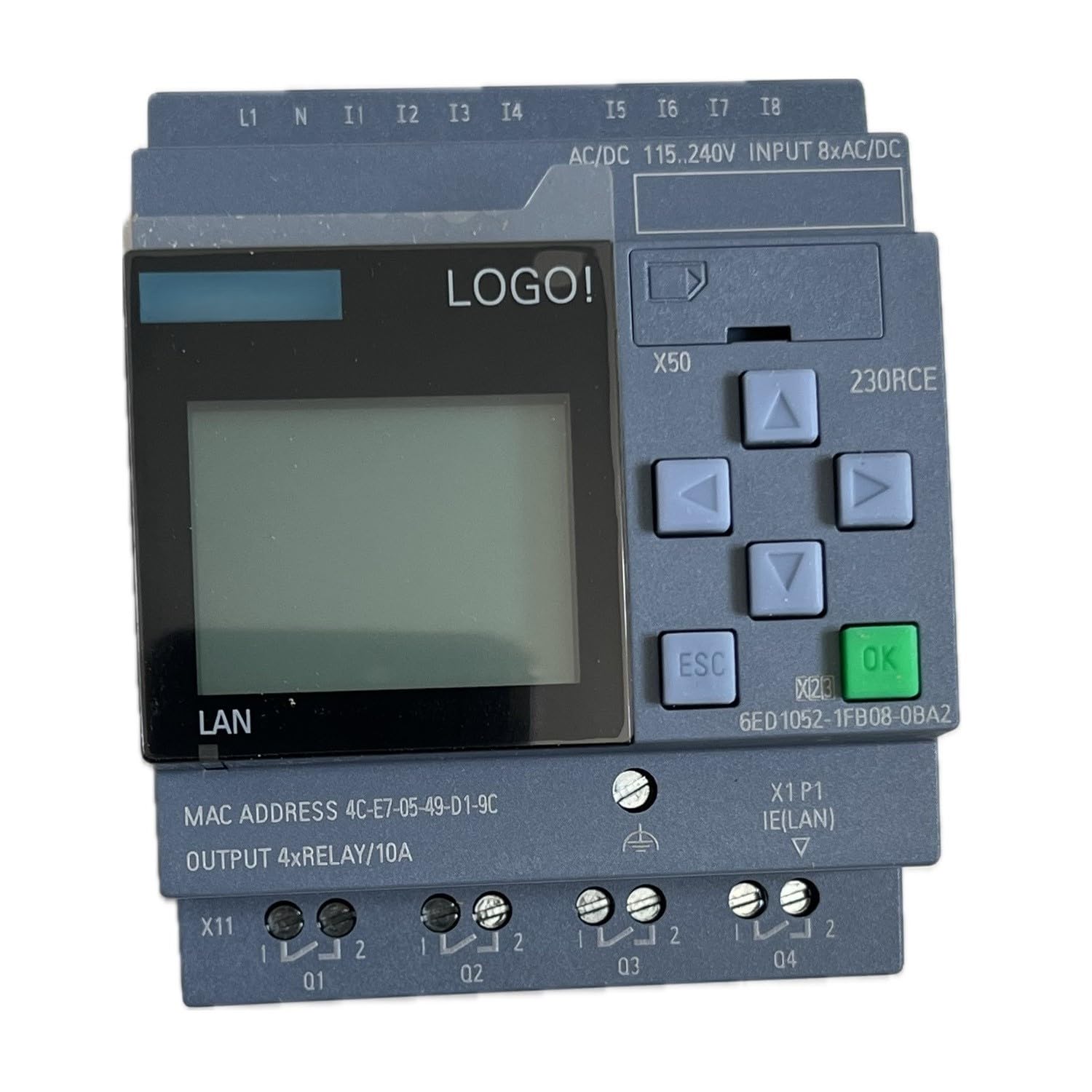
Малюнак 1: Спераду view of the Generic LOGO! 230RCE Logic Module, showing the display, control buttons, and connection terminals.
1.2 Што ўваходзіць у камплект
Пакет звычайна ўключае:
- One (1) LOGO! 230RCE Logic Module (Model: 6ED1052-1FB08-0BA2)
2. Інфармацыя па бяспецы
Read all instructions carefully before installation and operation. Failure to follow these instructions may result in equipment damage, personal injury, or death. This device operates with electrical voltages that can be hazardous. Installation and maintenance should only be performed by qualified personnel.
- Адключыць харчаванне: Always disconnect power to the module and associated equipment before performing any installation, wiring, or maintenance.
- Правільнае зазямленне: Ensure the module and all connected components are properly grounded according to local and national electrical codes.
- Умовы навакольнага асяроддзя: Не падвяргайце модуль уздзеянню вільгаці, экстрэмальных тэмператур або агрэсіўнага асяроддзя.
- Праводка: Use appropriate wire gauges and insulation for the specified voltage and current ratings. Ensure all connections are secure.
- Прызначэнне: Use the module only for its intended purpose as a programmable logic controller.
3. Тэхнічныя характарыстыкі
The following table details the technical specifications of the LOGO! 230RCE Logic Module:
| Асаблівасць | Спецыфікацыя |
|---|---|
| мадэль | 6ED1052-1FB08-0BA2 |
| Power Supply / I/O Voltage | 115 V / 230 V (AC) |
| Лічбавыя ўваходы (DI) | 8 |
| Лічбавыя выхады (DO) | 4 (рэле) |
| Памяць | 400 блокі |
| Магчымасць пашырэння | Modularly expandable |
| Сувязь | Ethernet, Cloud Connection, MQTT |
| Інтэграваныя функцыі | Web Server, Data Log, User-defined Web старонкі |
| Падтрымка карты памяці | Standard microSD card |
| Сумяшчальнасць праграмнага забеспячэння | LOGO! Soft Comfort V8.4 or higher |
| Тып мацавання | Кранштэйн для DIN |
| Тып кантакту | Normally Open (for relay outputs) |
| Мінімальны аб'ём пераключэнняtage | 115 вольт (пераменны ток) |
| Шпулька Voltage | 230 вольт (пераменны ток) |
| Спецыфікацыя Met | IEC / EN 60947 |
| Вага прадмета | 0.27 кілаграма |
4. Настройка і ўстаноўка
4.1 Мантаж
The LOGO! 230RCE module is designed for DIN rail mounting. Ensure the DIN rail is securely fastened within an appropriate enclosure, providing adequate ventilation and protection from environmental factors. Snap the module onto the DIN rail until it clicks into place.
4.2 Электраправодка
Усе падключэнні павінны выконвацца кваліфікаваным электрыкам у адпаведнасці з мясцовымі і нацыянальнымі электрычнымі нормамі. Перад падключэннем пераканайцеся, што электрычнасць адключана.
- крыніца харчавання: Connect the 115V/230V AC power supply to the designated terminals on the module. Refer to the terminal markings on the device for correct polarity and connection points.
- Лічбавыя ўваходы (DI): Connect your input devices (e.g., switches, sensors) to the 8 digital input terminals. The module supports 115V/230V AC input signals.
- Лічбавыя выхады (DO): Connect your output devices (e.g., contactors, indicator lights) to the 4 relay digital output terminals. These are normally open (NO) contacts. Ensure the load current does not exceed the relay's maximum rating.
- Падключэнне Ethernet: Connect a standard Ethernet cable to the RJ45 port for network communication, programming, and web доступ да сервера.
Refer to the wiring diagram printed on the side of the module or in the detailed technical documentation for precise terminal assignments.
5. Аперацыя
5.1 Першапачатковае ўключэнне
After completing all wiring, apply power to the module. The integrated display will illuminate, and the module will perform a self-test. Follow any on-screen prompts for initial configuration.
5.2 Праграмаванне
The LOGO! 230RCE is programmed using LOGO! Soft Comfort software, version 8.4 or higher. Connect the module to your computer via Ethernet. The software allows you to create, simulate, and download logic programs to the module. Older projects are executable on this unit.
- Ўстаноўка праграмнага забеспячэння: Install LOGO! Soft Comfort V8.4 or higher on your PC.
- Канфігурацыя сеткі: Configure the IP address of the LOGO! module and your PC to be on the same subnet for communication.
- Спампаваць праграму: Use the software's interface to transfer your logic program to the module.
5.3 Інтэграваны Web Сервер
The module features an integrated web server, allowing remote monitoring and control via a standard web браўзер. Доступ да web server by entering the module's IP address into your browser. You can create user-defined web pages for customized interfaces.
5.4 Рэгістрацыя дадзеных
The LOGO! 230RCE supports data logging. Insert a standard microSD card into the designated slot to store operational data, trends, and events. Configure data logging parameters through LOGO! Soft Comfort.
5.5 Cloud Connection and MQTT
This module supports cloud connectivity and the MQTT protocol, enabling integration into IoT (Internet of Things) applications. Configure these features using LOGO! Soft Comfort to send data to cloud platforms or communicate with other MQTT-enabled devices.
6. Тэхнічнае абслугоўванне
Regular maintenance helps ensure the longevity and reliable operation of your LOGO! 230RCE module.
- Уборка: Periodically clean the module's exterior with a soft, dry cloth. Do not use abrasive cleaners or solvents. Ensure power is off before cleaning.
- Абнаўленні прашыўкі: Звярніцеся ў службу падтрымкі Siemens website for available firmware updates for your module. Apply updates as recommended to ensure optimal performance and access to new features.
- Праверкі злучэння: Periodically inspect all wiring connections for tightness and signs of wear or corrosion.
- Экалагічная праверка: Забяспечце, каб тэмпература і вільготнасць у рабочым асяроддзі знаходзіліся ў межах зададзеных дыяпазонаў.
7. Выпраўленне непаладак
If you encounter issues with your LOGO! 230RCE module, refer to the following common troubleshooting steps:
- Модуль не ўключаецца:
- Праверце блок харчавання voltage is within the 115V/230V AC range.
- Check all power connections for proper wiring and secure contact.
- Пераканайцеся, што аўтаматычны выключальнік або засцерагальнік, які падае харчаванне, не спрацаваў і не перагарэў.
- Уваходныя дадзеныя не рэагуюць:
- Check the wiring of the input devices to the module's DI terminals.
- Verify the input signal voltage is correct for the module.
- Test the input device (e.g., switch, sensor) independently to ensure it is functioning.
- Review your LOGO! Soft Comfort program to ensure inputs are correctly configured and monitored.
- Выхады не актывуюцца:
- Check the wiring of the output devices to the module's DO terminals.
- Ensure the output device (e.g., contactor, light) is receiving power and is functional.
- Verify that the load current does not exceed the relay's maximum rating.
- Review your LOGO! Soft Comfort program to ensure outputs are correctly configured and activated by logic.
- Communication Issues (Ethernet/Web Сервер):
- Verify the Ethernet cable is securely connected to both the module and the network device.
- Check the IP address configuration of the module and your PC to ensure they are on the same subnet.
- Ping the module's IP address from your PC to confirm network connectivity.
- Ensure no firewall settings are blocking communication.
- Памылкі праграмавання:
- Use the simulation feature in LOGO! Soft Comfort to test your program logic before downloading.
- Check for syntax errors or logical inconsistencies in your program.
- Ensure the correct module type is selected in the software.
If the problem persists after attempting these steps, contact technical support.
8. Гарантыя і падтрымка
8.1 Інфармацыя аб гарантыі
Specific warranty terms for the LOGO! 230RCE module are typically provided by the manufacturer, Siemens, or the authorized reseller at the time of purchase. Please refer to your purchase documentation or contact your supplier for detailed warranty coverage, duration, and conditions. Keep your proof of purchase for warranty claims.
8.2 Тэхнічная падтрымка
For technical assistance, programming queries, or advanced troubleshooting, please contact the manufacturer's official support channels. The manufacturer of this module is Siemens.
- вытворца: Siemens
- Інтэрнэт-рэсурсы: Visit the official Siemens Industry Automation website for product documentation, FAQs, software downloads (LOGO! Soft Comfort), and support forums.
- Кантакты: Звярніцеся да Siemens website for regional contact information for technical support.