
Уводзіны
Дзякуй за пакупкуasing the coioc S18 Portable Bluetooth Speaker. This manual provides essential information for setting up, operating, and maintaining your speaker. Please read it thoroughly before use to ensure optimal performance and longevity of your device.
Змест пакета
Калі ласка, пастаўце галачку для наступных пунктаў:
- coioc S18 Portable Bluetooth Speaker
- Зарадны кабель USB-C
- Аўдыёкабель 3.5 мм AUX
- Папружка
- Кіраўніцтва карыстальніка
Прадукт скончаныview
The coioc S18 features a compact design with intuitive controls and multiple connectivity options.
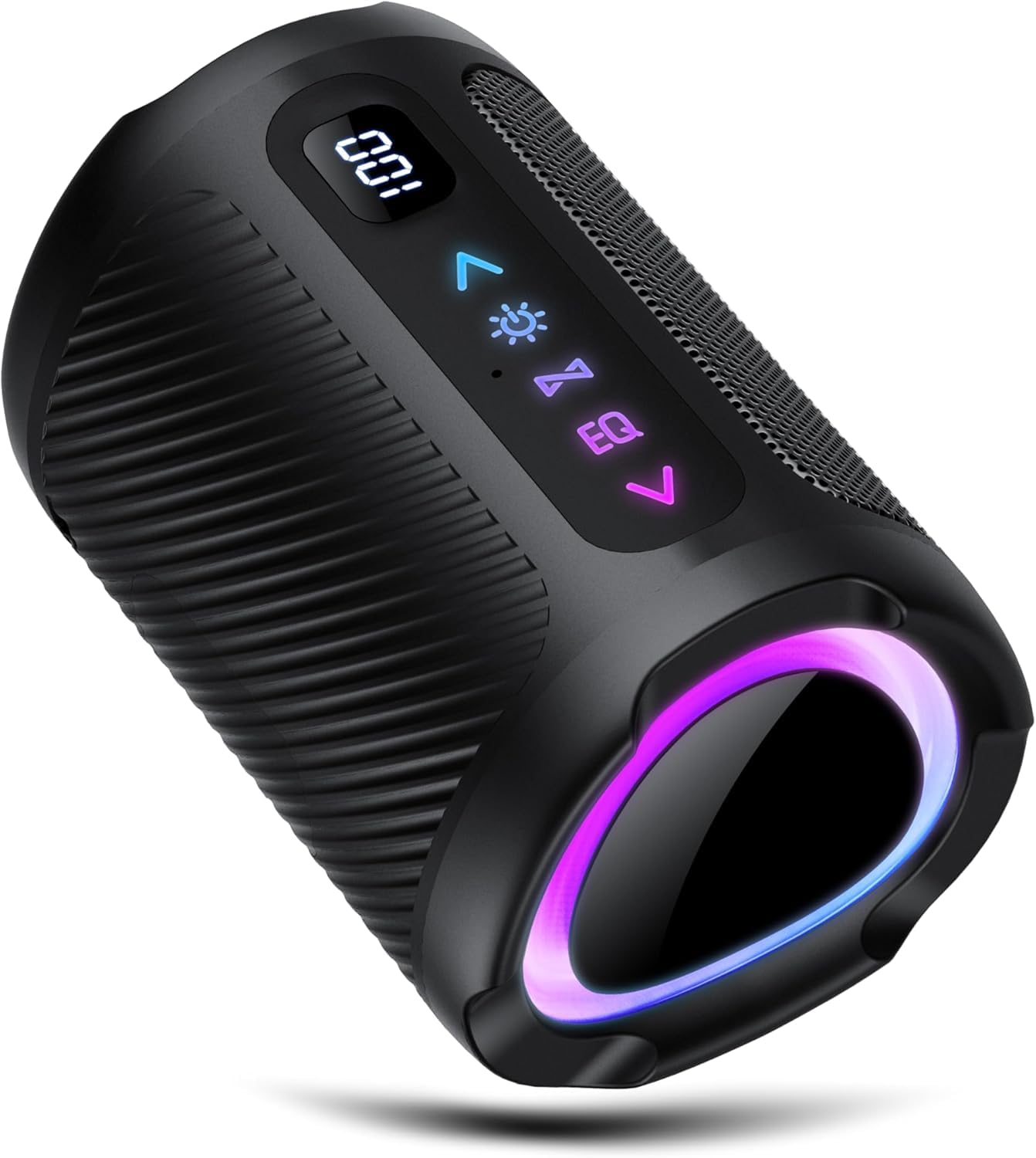
Выява: спераду view of the coioc S18 Portable Bluetooth Speaker. It shows the matte black finish, the control panel with buttons on the top surface, and a small LED display.
Асноўныя характарыстыкі:
- Панэль кіравання: Located on the top surface, featuring physical buttons for power, volume, play/pause, track control, EQ modes, LED light control, and call management.
- Святлодыёдны дысплей: A small display on the front indicates battery status and current operating mode.
- парты: A rubber protective cover on the back conceals the USB-C charging port, TF (MicroSD) card slot, and 3.5mm AUX input.
- Пасіўныя радыятары: Two passive radiators are located on the sides, contributing to enhanced bass response. These may illuminate with RGB lighting.
- Стабільнасць: Two rubber feet on the base ensure stability on flat surfaces.
Настройка
1. Зарадка дынаміка
Before first use, fully charge the speaker. Connect the provided USB-C charging cable to the speaker's USB-C port and the other end to a compatible USB power adapter (not included) or a computer's USB port. The LED display will indicate charging status.
2. Уключэнне/выключэнне харчавання
- Каб уключыць: націсніце і ўтрымлівайце кнопку харчавання (●) for approximately 3 seconds. You will hear an audible prompt, and the LED display will light up.
- Каб выключыць прыладу: націсніце і ўтрымлівайце кнопку харчавання (●) for approximately 3 seconds. You will hear an audible prompt, and the LED display will turn off.
3. Спарванне Bluetooth
- Ensure the speaker is powered on and in Bluetooth pairing mode. The LED display will show "BT" and the side passive radiators may pulse with light.
- На смартфоне, планшэце або іншай прыладзе з падтрымкай Bluetooth перайдзіце ў налады Bluetooth.
- Пошук даступныя прылады і выберыце "S18" са спісу.
- Once connected, the speaker will emit a confirmation sound, and the LED display will indicate a successful connection.
4. Спалучэнне з сапраўдным бесправадным стэрэа (TWS)
TWS allows you to connect two coioc S18 speakers for a stereo sound experience.
- Пераканайцеся, што абедзве калонкі S18 уключаны і не падключаны да іншай прылады Bluetooth.
- На адным з дынамікаў (гэта будзе асноўны дынамік) націсніце і ўтрымлівайце кнопку TWS (часта пазначаецца двума пераплеценымі кружочкамі або падобным значком) на працягу некалькіх секунд.
- The speakers will attempt to pair with each other. Once successfully paired, you will hear a confirmation sound.
- Now, connect your Bluetooth device to the primary speaker as described in step 3 (Bluetooth Pairing). Both speakers will play audio in stereo.
5. AUX рэжым
To use the speaker with a non-Bluetooth device, connect the provided 3.5mm AUX audio cable to the speaker's AUX input and to the audio output of your device. The speaker will automatically switch to AUX mode, or you may need to press the Mode button to select it.
6. Рэжым TF-карты
Устаўце карту TF (MicroSD) з аўдыёфайламі ў фармаце MP3 files into the TF card slot. The speaker will automatically detect the card and begin playing music, or you may need to press the Mode button to select TF card mode.
Інструкцыя па эксплуатацыі
Асноўныя элементы кіравання:
- Прайграванне/Паўза: Націсніце кнопку прайгравання / паўзы (►▮▮) для прайгравання або прыпынення аўдыё.
- Узмацненне гучнасці/наступны трэк: Кароткачасова націсніце кнопку павелічэння гучнасці (+) to increase volume. Long press to skip to the next track.
- Паменшыць гучнасць/Папярэдні трэк: Кароткачасова націсніце кнопку памяншэння гучнасці (-) to decrease volume. Long press to go to the previous track.
- Кнопка рэжыму: Press the Mode button (often labeled "M") to switch between Bluetooth, AUX, and TF Card modes.
Кіраванне званкамі:
- Адказаць на званок: When a call comes in, press the Play/Pause button (►▮▮) адказаць.
- Завяршыць выклік: During a call, press the Play/Pause button (►▮▮), каб завяршыць выклік.
- Адхіліць выклік: When a call comes in, press and hold the Play/Pause button (►▮▮) to reject the call.
Рэжымы эквалайзера (EQ):
The speaker offers different EQ modes to optimize sound for various content. Press the EQ button (if available, or a dedicated button) to cycle through modes such as "Normal" and "Vocals".
Кіраванне святлодыёдным святлом:
The speaker features integrated LED lighting. Press the Light button (if available, or a dedicated button) to change light patterns or to turn the lights off to conserve battery.
Тэхнічнае абслугоўванне
- Уборка: Для чысткі дынаміка выкарыстоўвайце мяккую сухую тканіну. Не выкарыстоўвайце абразіўныя ачышчальнікі, спірт або хімічныя растваральнікі, бо яны могуць пашкодзіць паверхню.
- Воданепранікальнасць: The speaker is waterproof. However, ensure the rubber protective bung covering the ports is securely closed to maintain water resistance. Do not submerge the speaker for extended periods.
- захоўванне: Захоўвайце дынамік у прахалодным, сухім месцы, удалечыні ад прамых сонечных прамянёў і экстрэмальных тэмператур.
- Сыход за батарэяй: To prolong battery life, avoid fully discharging the speaker frequently. If storing for a long period, charge the battery to about 50% every few months.
Ліквідацыю непаладак
| праблема | Рашэнне |
|---|---|
| Дынамік не ўключаецца. | Пераканайцеся, што дынамік зараджаны. Падключыце яго да крыніцы харчавання з дапамогай кабеля USB-C. |
| Немагчыма падключыцца праз Bluetooth. |
|
| Няма гуку або нізкі ўзровень гучнасці. |
|
| Памылка спалучэння TWS. |
|
Тэхнічныя характарыстыкі
| Марка | койок |
| Назва мадэлі | S18 |
| Колер | Матавы чорны |
| Тэхналогія падлучэння | Bluetooth |
| Максімальная выхадная магутнасць дынаміка | 30 ват |
| Рэжым выхаду гуку | Стэрэа |
| Тып мацавання | Стальніца |
| Тып дынаміка | Партатыўны дынамік |
| Рэкамендуемае выкарыстанне | For home, party, outdoor |
| Сумяшчальныя прылады | Смартфон, планшэт, тэлевізар |
| Воданепранікальны | так |
| Памеры прадукту (Д х Ш х У) | 5 см х 5 см х 5 см |
| Метад кантролю | Physical Buttons, App (limited functionality via app) |
Гарантыя і падтрымка
Specific warranty details and support contact information are not provided in this manual. Please refer to the product packaging or the retailer's website for warranty claims and customer support inquiries.