
Memorex MXTAB11
Memorex MXTAB11 11-inch Android 14 Tablet Bundle User Manual
Model: MXTAB11
1. Уводзіны
The Memorex MXTAB11 11-inch Android 14 Tablet Bundle is designed for versatile use, supporting work, streaming, gaming, and learning. This tablet offers premium performance with an A523 ARM 8-core Cortex processor, optimized graphics, and comes with essential accessories for immediate use.

Image 1: The Memorex MXTAB11 tablet set up with its Bluetooth keyboard and wireless headphones on a wooden table, ready for use.
Асноўныя характарыстыкі:
- Высокая прадукцыйнасць: A523 ARM 8-core Cortex processor (up to 2.0GHz) with optimized graphics for smooth multitasking and responsive app performance.
- Яркі дысплей: 11-inch FHD IPS display with 1920 x 1200 pixel resolution for clear visuals.
- AmpЗахоўванне: 128 ГБ убудаванай памяці для праграм, фатаграфій і files.
- Efficient Memory: 4GB RAM for smooth operation.
- Modern OS: Працуе на Android 14.
- Трывалы дызайн: Features a metal body for enhanced durability.
- Падключэнне: Supports 802.11a/b/g/n/ac/ax wireless types.
2. Што ў скрынцы
Your Memorex MXTAB11 Tablet Bundle includes the following items:
- Memorex 11” Tablet
- Bluetooth клавіятура
- Бесправадныя навушнікі
- Ахоўны футляр з падстаўкай
- AC Adapter Charger & Cable
- Кіраўніцтва па эксплуатацыі
- Кароткае кіраўніцтва
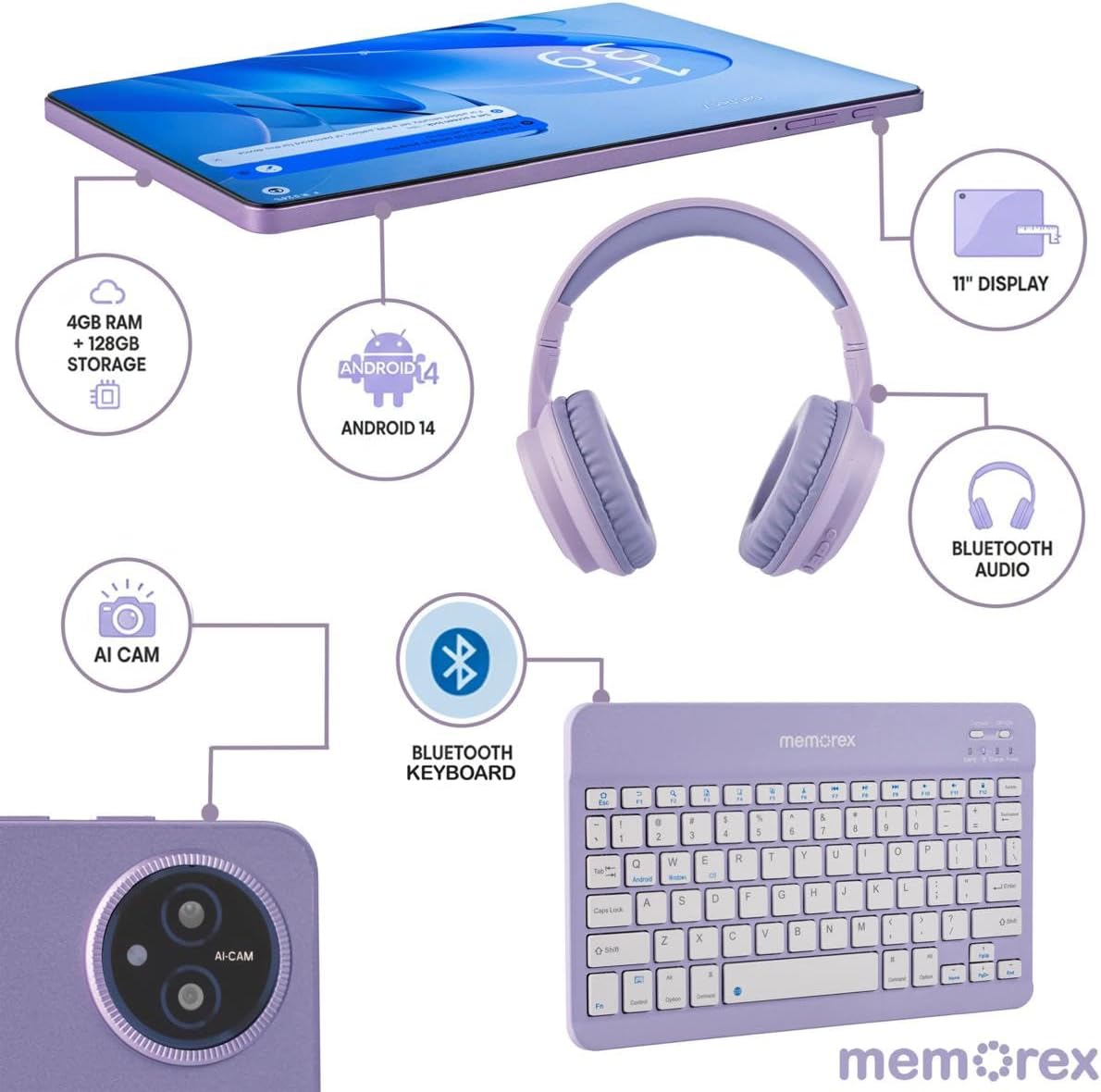
Image 2: A visual breakdown of the Memorex MXTAB11 tablet's features and included accessories, such as 4GB RAM, 128GB storage, Android 14, 11-inch display, AI camera, Bluetooth keyboard, Bluetooth audio, and wireless headphones.
3. Настройка
3.1 Пачатковае ўключэнне і канфігурацыя
- Зарадзіць планшэт: Before first use, connect the tablet to the AC adapter charger and cable provided. Allow it to charge fully.
- Уключэнне: Press and hold the power button (usually located on the side or top edge) until the Memorex logo appears on the screen.
- Выконвайце падказкі на экране: Планшэт правядзе вас праз працэс пачатковай налады, у тым ліку:
- Выбар мовы.
- Падключэнне да сеткі Wi-Fi.
- Signing in with your Google account (or creating one).
- Налада блакавання экрана (PIN-код, ключ, пароль).
3.2 Connecting Bluetooth Keyboard and Wireless Headphones
- Уключыць Bluetooth: On your tablet, swipe down from the top of the screen to open the Quick Settings panel. Tap the Bluetooth icon to turn it on. Alternatively, go to Налады > Падлучаныя прылады > Bluetooth.
- Pair Bluetooth Keyboard:
- Turn on the Bluetooth keyboard (refer to the keyboard's quick start guide for specific instructions).
- On your tablet's Bluetooth settings, tap 'Pair new device'.
- Select the keyboard from the list of available devices. Follow any on-screen prompts to complete pairing.
- Pair Wireless Headphones:
- Put your wireless headphones into pairing mode (refer to the headphones' quick start guide).
- On your tablet's Bluetooth settings, tap 'Pair new device'.
- Select the headphones from the list of available devices. Follow any on-screen prompts to complete pairing.
4. Кіраванне планшэтам
4.1 Асноўная навігацыя
- Галоўны экран: Цэнтральны цэнтр для вашых праграм і віджэтаў.
- Скрыня праграм: Правядзіце пальцам уверх ад ніжняй часткі экрана, каб атрымаць доступ да ўсіх усталяваных праграм.
- Хуткія налады і апавяшчэнні: Swipe down from the top of the screen to access quick settings (Wi-Fi, Bluetooth, brightness) and view апавяшчэнні.
- Назад, Галоўная, Нядаўнія праграмы: Use the navigation buttons at the bottom of the screen to go back, return to the home screen, or view нядаўна адкрытыя праграмы.
4.2 Выкарыстанне праграм
The tablet comes pre-loaded with essential Google applications and allows you to download more from the Google Play Store.
- Крама Google Play: Tap the Play Store icon to browse and download new apps, games, movies, and books.
- Web Прагляд: Use the pre-installed Chrome browser to access the internet.
- Камера: Tap the Camera icon to take photos or record videos using the tablet's dual cameras.
- Каляндар: Кіруйце сваім раскладам і падзеямі.
- Files: Access and organize your documents, images, videos, and other files.

Image 3: A person comfortably using the Memorex MXTAB11 tablet with its Bluetooth keyboard and wireless headphones, demonstrating its suitability for various activities like work or entertainment.
5. Тэхнічнае абслугоўванне
- Уборка: Для чысткі экрана і корпуса планшэта выкарыстоўвайце мяккую тканіну без ворса. Пазбягайце выкарыстання агрэсіўных хімічных рэчываў або абразіўных матэрыялаў.
- Абнаўленні праграмнага забеспячэння: Рэгулярна правярайце наяўнасць абнаўленняў сістэмы і ўсталёўвайце іх, каб забяспечыць аптымальную прадукцыйнасць і бяспеку. Перайдзіце па спасылцы Налады > Сістэма > Абнаўленне сістэмы.
- Сыход за батарэяй: Каб падоўжыць тэрмін службы батарэі, пазбягайце экстрэмальных тэмператур і не дапускайце частай поўнай разрадкі батарэі.
- Кіраванне сховішчам: Перыядычна чысціце непатрэбнае fileі праграмы, каб вызваліць месца для захоўвання і падтрымліваць прадукцыйнасць.
6. Выпраўленне непаладак
6.1 Агульныя праблемы і рашэнні
- Планшэт не ўключаецца: Ensure the tablet is charged. Connect it to the charger and wait a few minutes before attempting to power it on again.
- Нізкая прадукцыйнасць: Close unused applications, clear cache, or restart the tablet. Check for available system updates.
- Праблемы з падключэннем да Wi-Fi: Перазапусціце Wi-Fi-роўтар і планшэт. Забудзьцеся пра сетку ў наладах планшэта і падключыцеся зноў.
- Памылка спалучэння Bluetooth: Ensure both devices are in pairing mode and within range. Restart Bluetooth on the tablet and try pairing again.
- Збоі праграм: Clear the app's cache or data via Settings > Apps > [App Name] > Storage > Clear Cache/Data. Reinstall the app if the issue persists.
7. Тэхнічныя характарыстыкі
| Памер дысплея | 11 цалі |
| Дазвол экрана | 1920 x 1200 пікселяў (FHD IPS) |
| Працэсар | A523 ARM Cortex-A523 Octa-Core Processor, up to 2.0 GHz |
| АЗП | 4 ГБ |
| Памер флэш-памяці | 128 ГБ |
| Аперацыйная сістэма | Android 14 |
| Бесправадны тып | 802.11a, 802.11ac, 802.11ax, 802.11b, 802.11g, 802.11n |
| Вага прадмета | 5 фунта |
| Памеры прадукту | 10 х 4 х 13 цалі |
| Колер | Сіні |
8. Гарантыя і падтрымка
8.1 Палітыка вяртання
Тавар мае права на вяртанне грошай або замену на працягу 30 дзён з моманту пакупкі.
8.2 Планы абароны
Дадатковыя планы абароны даступныя для пашыранага пакрыцця:
- 2-гадовы план абароны: One-time payment of $30.99.
- Поўная абарона: Monthly payment of $16.99, covering all eligible past and future purchases.
For further support or inquiries, please refer to the contact information provided in your Quick Start Guide or visit the official Memorex support webсайт.