
toocki Wi-Fi 6 USB Adapter
Toocki Wi-Fi 6 USB Adapter Instruction Manual
Model: Wi-Fi 6 USB Adapter
Уводзіны
This manual provides detailed instructions for the installation, operation, and maintenance of your Toocki Wi-Fi 6 USB Adapter. This device is designed to provide high-speed wireless internet connectivity and Bluetooth 5.4 functionality to your desktop or laptop computer. Please read this manual thoroughly before using the product to ensure proper setup and optimal performance.
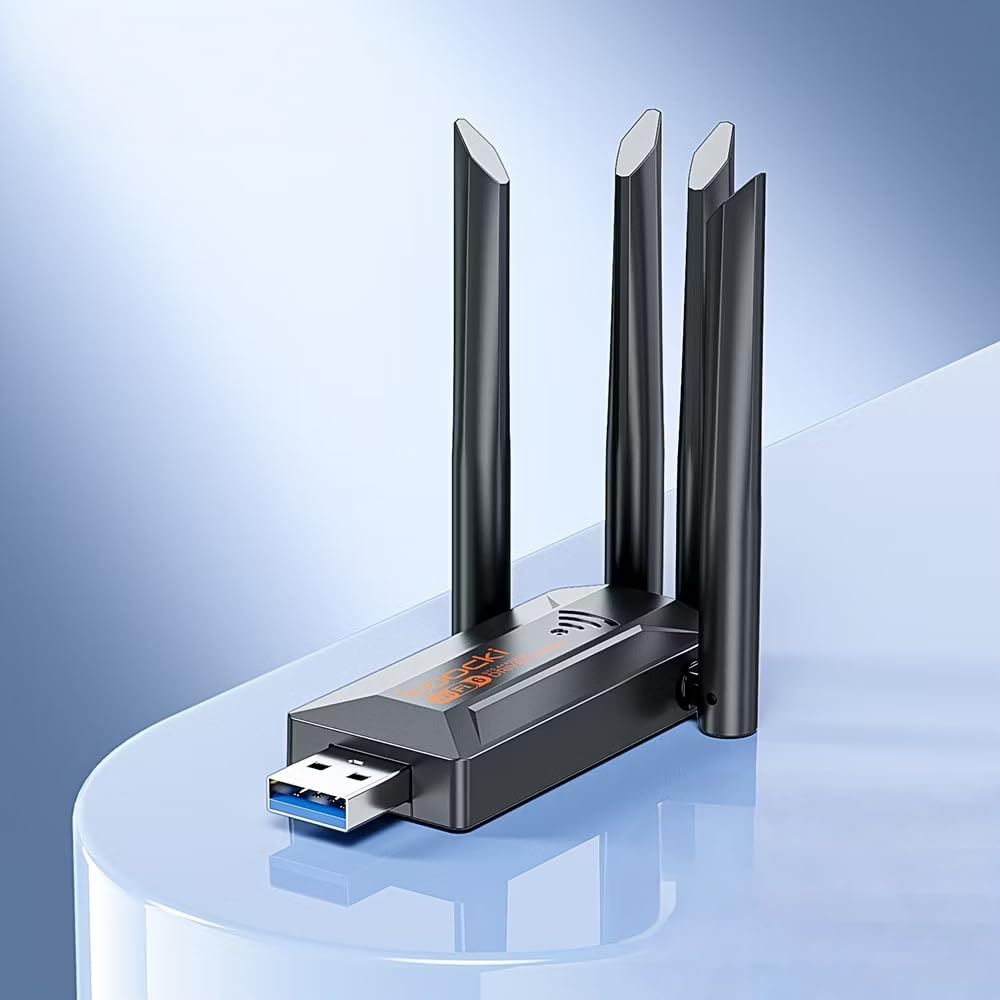
Image: The Toocki Wi-Fi 6 USB Adapter, showcasing its compact design and four adjustable antennas.
Інфармацыя па бяспецы
- Keep the device away from water, fire, high humidity, or hot environments.
- Не спрабуйце разабраць, адрамантаваць або мадыфікаваць прыладу.
- Пазбягайце ўздзеяння прамых сонечных прамянёў або крыніц цяпла на прыладу.
- Use only with compatible USB ports (USB 3.0 recommended for optimal performance).
- Захоўваць у месцах, недаступных дзецям.
Змест пакета
Праверце, ці ёсць усе прадметы ў вашай упакоўцы:
- Toocki Wi-Fi 6 USB Adapter (1 unit)
- Кіраўніцтва карыстальніка (гэты дакумент)
Note: The product is designed for driver-free installation on Windows 10/11. No separate driver CD is included.
Прадукт скончаныview
The Toocki Wi-Fi 6 USB Adapter integrates advanced Wi-Fi 6 technology and Bluetooth 5.4 into a compact USB device. It features four high-gain external antennas for improved signal reception and transmission.

Выява: Унутраная view highlighting the Wi-Fi 6 smart algorithm chip, indicating enhanced signal stability and wider coverage.
Асноўныя характарыстыкі:
- Падтрымка Wi-Fi 6 (802.11ax): Provides stronger signal stability and wider coverage.
- Двухдыяпазонная сувязь: Supports both 2.4GHz and 5GHz frequencies for flexible network options and speeds up to 900Mbps.
- Bluetooth 5.4: Enables stable, multi-device connections for peripherals like mice, keyboards, and headphones.
- Чатыры антэны з высокім каэфіцыентам узмацнення: Enhances signal strength and extends wireless range.
- Інтэрфейс USB 3.0: Ensures rapid data transfer speeds.
- Усталёўка без драйвераў: Plug-and-play compatibility for Windows 10/11.
- Двайная функцыянальнасць: Acts as a Wi-Fi receiver and an AP/Hotspot.
Інструкцыя па наладзе
1. Падключыце адаптар
- Пераканайцеся, што ваш кампутар уключаны.
- Locate an available USB 3.0 port on your desktop or laptop. For optimal performance, use a USB 3.0 port (typically blue inside).
- Carefully insert the Toocki Wi-Fi 6 USB Adapter into the USB port.
- The operating system (Windows 10/11) should automatically detect and install the necessary drivers. A notification may appear indicating successful installation.
2. Adjust Antennas
The adapter features four adjustable antennas. For best signal reception and transmission, position the antennas vertically or at an angle that provides the strongest signal in your environment. Experiment with different orientations to find the optimal setup.

Image: The Toocki Wi-Fi 6 USB Adapter with its four antennas fully extended, ready for use.
Інструкцыя па эксплуатацыі
1. Connecting to Wi-Fi (Receiver Mode)
- After successful driver installation, click on the Wi-Fi icon in your computer's system tray (usually bottom-right corner for Windows).
- З'явіцца спіс даступных бесправадных сетак.
- Select your desired Wi-Fi network (either 2.4GHz or 5GHz band, if both are available).
- Увядзіце ключ бяспекі сеткі (пароль), калі будзе прапанавана.
- Click "Connect". Your computer should now be connected to the internet wirelessly.

Image: Illustration of the adapter functioning as a Wi-Fi receiver, enabling a desktop PC to connect to a wireless network without cables.
2. Using as an AP/Hotspot (Transmission Mode)
The adapter can also create a Wi-Fi hotspot, allowing other devices (phones, tablets) to connect to your computer's internet connection.
- Ensure your computer is connected to the internet via an Ethernet cable or another Wi-Fi adapter.
- On Windows 10/11, go to Налады > Сетка і Інтэрнэт > Мабільная кропка доступу.
- Toggle the "Share my Internet connection with other devices" switch to On.
- You can customize the network name (SSID) and password under "Edit".
- Other devices can now search for and connect to this hotspot.

Image: Illustration demonstrating the adapter's Wi-Fi transmission function, creating a hotspot from a connected PC to share internet with mobile devices.
3. Падключэнне Bluetooth 5.4
The integrated Bluetooth 5.4 allows for stable connections with multiple Bluetooth-enabled devices.
- On Windows 10/11, go to Налады > Прылады > Bluetooth і іншыя прылады.
- Ensure Bluetooth is toggled On.
- Націсніце «Дадаць Bluetooth або іншую прыладу» і абярыце «Bluetooth».
- Перавядзіце прыладу Bluetooth (напрыклад, навушнікі, мыш, клавіятуру) у рэжым спалучэння.
- Выберыце сваю прыладу са спісу і выконвайце падказкі на экране, каб завяршыць спалучэнне.

Image: The Toocki Wi-Fi 6 USB Adapter connected to a laptop, symbolizing its Bluetooth 5.4 capability for multiple device connections.
Тэхнічнае абслугоўванне
- Падтрымлівайце адаптар у чысціні, праціраючы яго мяккай сухой тканінай.
- Пазбягайце выкарыстання вадкіх ачышчальнікаў або растваральнікаў.
- Ensure the adapter is not obstructed to allow for proper heat dissipation.
- When not in use for extended periods, it is recommended to safely remove the adapter from the USB port.
Ліквідацыю непаладак
Няма падключэння да Wi-Fi:
- Праверце USB-порт: Ensure the adapter is firmly inserted into a working USB port. Try a different USB port, preferably a USB 3.0 port.
- Ўстаноўка драйвера: For Windows 10/11, the driver should install automatically. Verify in Device Manager (search "Device Manager" in Windows) under "Network adapters" that the Toocki adapter is listed and has no error symbols. If not, try restarting your computer.
- Размяшчэнне антэны: Адрэгулюйце антэны для аптымальнага прыёму сігналу.
- Налады маршрутызатара: Ensure your Wi-Fi router is powered on and broadcasting a signal. Check if other devices can connect to the same network.
- Network Profile: Forget the network and try reconnecting.
Павольная хуткасць Wi-Fi:
- Порт USB 3.0: Ensure the adapter is connected to a USB 3.0 port for maximum speed. USB 2.0 ports will limit performance.
- Моц сігналу: Check your Wi-Fi signal strength. A weak signal can lead to slower speeds. Move closer to the router or adjust antennas.
- Перагрузка сеткі: Too many devices on the same network or channel can cause slowdowns. Try switching to the 5GHz band if available and less congested.
- Перашкоды: Other electronic devices (microwaves, cordless phones) can interfere with Wi-Fi signals.
Bluetooth не працуе:
- Bluetooth уключаны: Verify Bluetooth is enabled in Windows Settings.
- Спалучэнне прылад: Ensure your Bluetooth device is in pairing mode and within range.
- Перашкоды: Reduce distance between devices and remove any obstructions.
- Перазапуск: Try restarting your computer and re-pairing the device.
Тэхнічныя характарыстыкі

Image: Visual representation emphasizing the 900Mbps dual-band Wi-Fi 6 features for faster, more stable connections.
| Асаблівасць | Дэталь |
|---|---|
| Марка | Тооцкі |
| мадэль | USB-адаптар Wi-Fi 6 |
| Абсталяванне інтэрфейсу | USB 3.0 |
| бесправадной стандарт | Wi-Fi 6 (IEEE 802.11ax), IEEE 802.11ac, IEEE 802.11n, IEEE 802.11g, IEEE 802.11b, IEEE 802.11a |
| Хуткасць перадачы даных | Да 900 мегабіт у секунду |
| Дыяпазоны частот | 2.4 ГГц, 5 ГГц |
| Версія Bluetooth | Bluetooth 5.4 |
| Антэны | 4 High-Gain External Antennas |
| Сумяшчальныя прылады | Настольны кампутар, ноўтбук |
| Падтрымка аперацыйнай сістэмы | Windows 10/11 (Driver-Free) |
| Памеры прадукту | 30L x 20W x 60H Millimeters (approx. 3 x 2 x 6 cm) |
| Вага прадмета | 30 грам |
| Колер | Чорны |
Інфармацыя аб гарантыі
This Toocki Wi-Fi 6 USB Adapter comes with a Гарантыя 6 месяцаў from the date of purchase. This warranty covers manufacturing defects and malfunctions under normal use. It does not cover damage caused by misuse, accidents, unauthorized modifications, or external factors. Please retain your proof of purchase for warranty claims.
Падтрымка кліентаў
If you encounter any issues or have questions regarding your Toocki Wi-Fi 6 USB Adapter that are not addressed in this manual, please contact your retailer or the manufacturer's customer support.
For support inquiries, please refer to the contact information provided with your purchase documentation or visit the official Toocki webсайт.
Ask a question about this manual
Ask about setup, troubleshooting, compatibility, parts, safety, or missing instructions. Manuals+ will review the question and use this page’s manual context to help answer it.