
Уводзіны
The aosu T2 Pro Solar Security Camera is a wireless outdoor surveillance device designed to provide comprehensive home security. Featuring a unique dual-lens system, it combines a 170° fixed wide-angle lens with a 360° Pan-Tilt-Zoom (PTZ) camera to eliminate blind spots. Equipped with 3K resolution, AI-powered human and vehicle tracking, full-color night vision, and solar charging capabilities, this camera offers reliable and efficient monitoring. This manual provides essential information for setting up, operating, and maintaining your aosu T2 Pro camera.
Змест пакета
Перад пачаткам усталёўкі пераканайцеся, што ўсе неабходныя рэчы ёсць у наяўнасці:
- aosu T2 Pro Solar Security Camera
- Мантажны кранштэйн
- Зарадны кабель
- Распорныя шрубы
- Налепкі для пазіцыянавання
Прадукт скончаныview
The aosu T2 Pro integrates advanced features for superior surveillance:
- Dual Camera Technology: Combines a 170° wide-angle fixed lens with a 360° PTZ lens for complete coverage without blind spots.
- Разрозненне 3K: Both lenses capture ultra-clear 3K video, supporting up to 8x digital zoom for detailed viewінж.
- Поўнакаляровы начны бачанне: Enhanced IR-assisted full color night vision ensures clear evidence day and night.
- AI Human & Vehicle Tracking: On-device AI detects people and vehicles, automatically tracking movement with the PTZ camera.
- Two-Way Talk & Siren: Communicate with visitors or deter intruders using two-way audio, lights, and siren.
- На сонечнай энергіі: A high-efficiency solar panel and 9,200mAh battery provide year-round power.
- Устойлівасць да надвор'я IP65: Built to withstand sun, rain, heat, and snow for reliable outdoor performance.
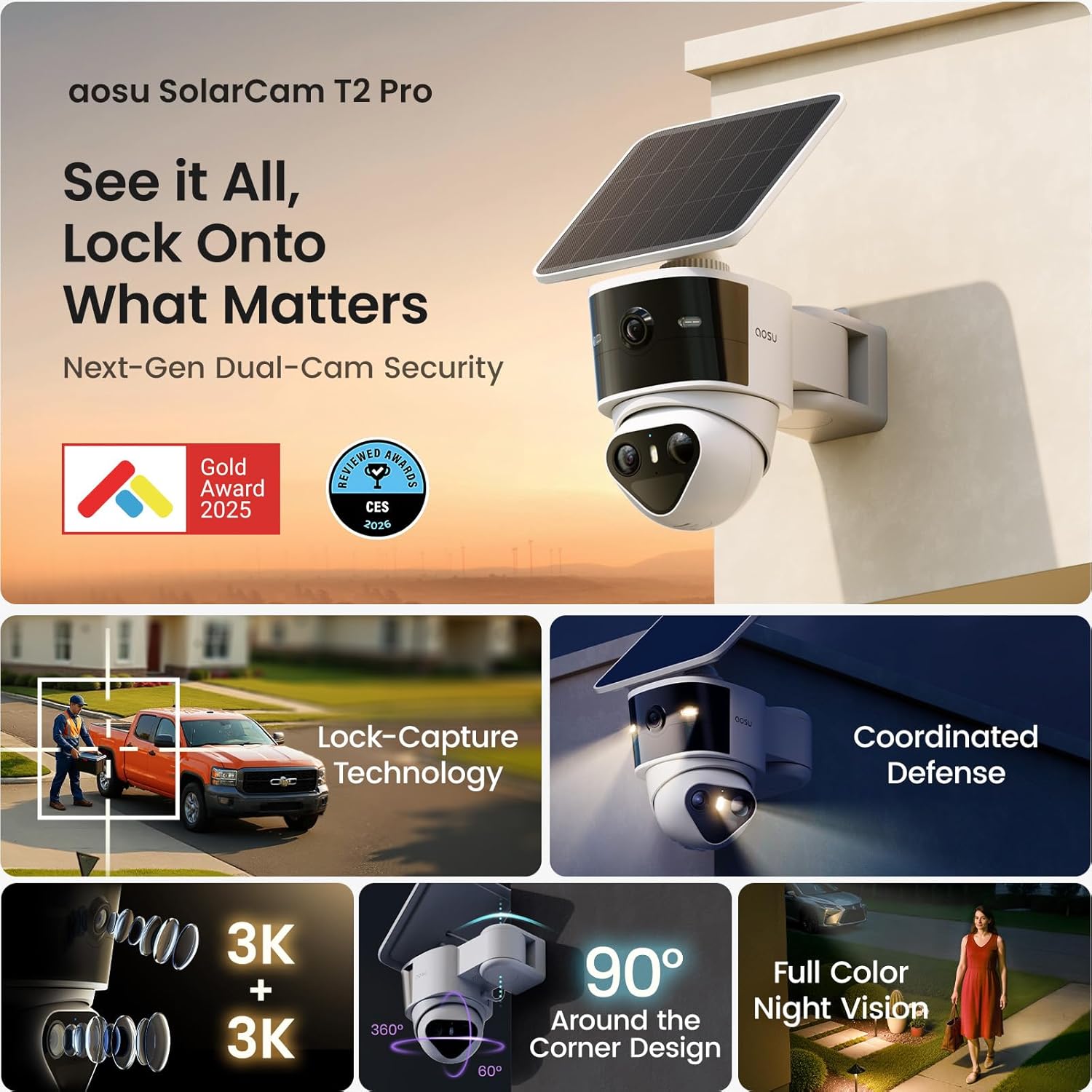
Image: The aosu T2 Pro camera featuring its dual lenses and integrated solar panel for continuous power.
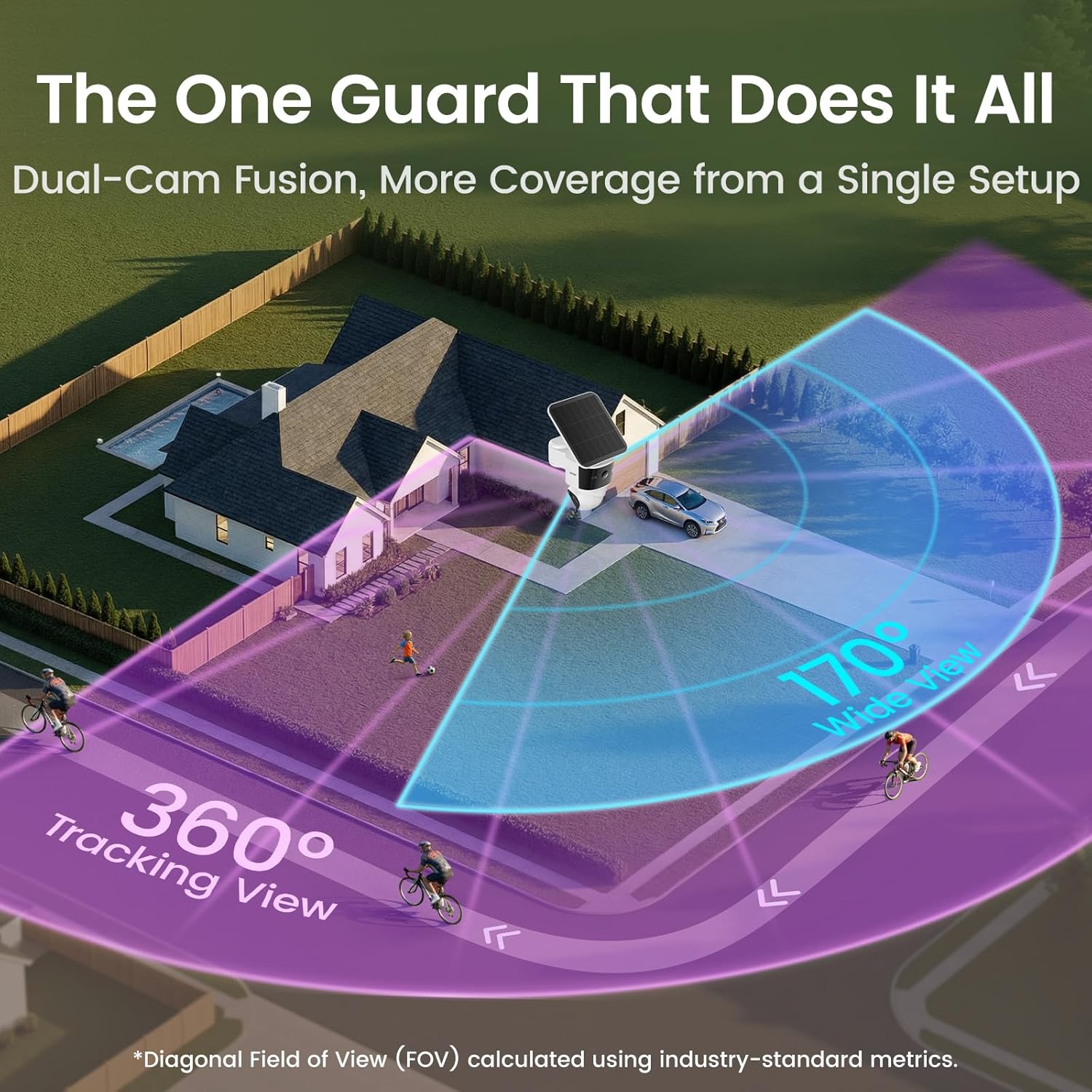
Image: Illustration of the camera's 170-degree wide view and 360-degree tracking view covering a property.
Настройка
The aosu T2 Pro is designed for a simple 3-step wireless installation:
- Устанавіце кранштэйн: Choose an optimal outdoor location, ideally a corner or elevated position for maximum coverage and sunlight exposure for the solar panel. Use the positioning stickers and expansion screws to securely attach the mounting bracket.
- Прымацаваць камеру: Slide the aosu T2 Pro camera onto the mounted bracket. Ensure it clicks securely into place.
- Падключыцеся да праграмы: Download the aosu app on your Android or iOS smartphone. Follow the in-app instructions to connect your camera to your Wi-Fi network using the QR code scan.

Image: The aosu T2 Pro camera mounted on an exterior wall, showcasing its solar panel positioning.
Інструкцыя па эксплуатацыі
Utilize the aosu app to control and monitor your camera:
- жыць View: Access real-time video streams from both the wide-angle and PTZ cameras.
- Кантроль PTZ: Manually pan and tilt the 360° camera directly from the app. Tap anywhere on the wide-angle view to instantly direct the PTZ camera to that spot.
- AI Detection & Tracking: Customize detection zones and set alerts for human and vehicle activity. The Lock-Capture technology ensures continuous recording of events.
- Двухбаковая размова: Use the built-in microphone and speaker for two-way communication.
- Siren & Lights: Activate the integrated siren and spotlights to deter unwanted activity.
- Рэжымы начнога бачання: Switch between enhanced IR-assisted full color night vision and standard black & white night vision as needed.
Video: Official product video demonstrating the aosu T2 Pro Solar Security Camera's features and operation.
Параметры захоўвання
The aosu T2 Pro offers flexible and secure storage solutions:
- Лакальнае сховішча: Supports encrypted local storage and playback with zero subscription fees. Expand storage up to 256GB using a microSD card (sold separately).
- Воблачнае сховішча: Optional cloud storage is available via in-app purchase for automatic backup and remote access.
- aosuBase / aosuCortex: Connect to an aosuBase or aosuCortex (available in March) to scale into a multi-camera home security system and enable cross-camera tracking.

Image: Close-up of the aosu T2 Pro camera showing the microSD card slot for local storage.
Кіраванне харчаваннем
The camera is designed for continuous operation with minimal intervention:
- Сонечная зарадка: The high-efficiency solar panel keeps the 9,200mAh battery charged. Approximately 90 minutes of effective sunlight per day is sufficient for daily needs under typical usage (50 events/day, 20 seconds each).
- Тэрмін службы батарэі: The large battery capacity ensures operation even during periods of low sunlight or overcast weather, with the solar panel providing supplemental power.
- Зарадка USB-C: A USB-C port is available for manual charging if needed, especially in prolonged periods without sufficient sunlight.
Асаблівасці прыкладання
The aosu app provides a user-friendly interface for managing your camera:
- Разумнае прайграванне: Непасрэдна view important clips on a timeline for a daily overview.
- Апавяшчэнні ў рэжыме рэальнага часу: Receive fast, accurate alerts with a synced overview to take quick action.
- Галасавыя абвесткі: Customize pre-recorded voice messages to play automatically or manually.
- Інтэграцыя разумнага дома: Сумяшчальнасць з Amazon Alexa і Google Assistant для галасавога кіравання і інтэграцыі ў вашу экасістэму разумнага дома.
- Сямейны доступ: Grant role-based access to family and friends, allowing them to view фуtage while maintaining control.
Тэхнічныя характарыстыкі
| Асаблівасць | Дэталь |
|---|---|
| Нумар мадэлі | C9P |
| Дазвол відэа | 3K |
| Viewing кут | 170° Wide (fixed), 360° PTZ |
| Лічбавы зум | 8x |
| Дыяпазон начнога бачання | 10 метраў |
| Ёмістасць батарэі | 9,200 мАг |
| Воданепранікальнасць | IP65 |
| Лакальнае сховішча | Up to 256GB microSD (sold separately) |
| Сувязь | Wi-Fi, Bluetooth |
| Сумяшчальныя прылады | Android, iOS, Amazon Alexa, Google Assistant |
| Памеры (Д х Ш х У) | 8.2 х 5.01 х 6.48 цалі |
| Вага прадмета | 3.3 фунта |
Ліквідацыю непаладак
If you encounter issues with your aosu T2 Pro camera, try the following:
- Праблемы з падключэннем: Ensure your camera is within Wi-Fi range and the signal is strong. Restart your router and the camera.
- Праблемы з зарадкай: Verify the solar panel is receiving direct sunlight for at least 90 minutes daily. Check the USB-C connection if charging manually.
- Ілжывыя абвесткі: Adjust AI detection settings, customize detection zones, and refine sensitivity levels in the aosu app to minimize irrelevant motion triggers.
- No Audible Notifications: Check app notification settings and ensure your phone's volume is up. Verify the camera's microphone and speaker are enabled.
Гарантыя і падтрымка
For warranty information, technical assistance, or customer support, please refer to the official aosu website or contact their customer service directly. Online support resources and FAQs are available to help with setup and operation.