
Уводзіны
Thank you for choosing the MEETION C9990 Wireless Bluetooth Keyboard and Mouse combo. This product offers versatile connectivity options (2.4GHz USB and dual Bluetooth channels), an ergonomic design for comfort, and rechargeable batteries for extended use. This manual will guide you through the setup, operation, and maintenance of your new device.
Змест пакета
- MEETION C9990 Wireless Keyboard
- MEETION Wireless Mouse
- USB-прыёмнік (знаходзіцца ў батарэйным адсеку мышы)
- Зарадны кабель USB-C
- Кіраўніцтва карыстальніка
Прадукт скончаныview
Асаблівасці клавіятуры
- Поўнапамерны макет: Includes a numeric pad for comprehensive data entry.
- Low-Noise Scissor-Switch Keys: Provides a quiet and comfortable typing experience.
- Мультымедыйныя ключы: Dedicated function keys for quick access to media controls and system functions.
- Fixed Anti-Slip Stand: Ensures stability and an ergonomic typing angle.
- Звыштонкі дызайн: Эстэтычна зручнаasing and space-efficient.

Image: Close-up of the keyboard keys, illustrating the low-noise scissor-switch design for quiet and comfortable typing.

Image: The keyboard features a fixed-angle anti-slip stand for enhanced stability and typing comfort.
Асаблівасці мышы
- Ergonomic Sculpted Design: Contoured shape supports natural wrist and hand posture.
- Рэгуляваны DPI: Four DPI settings (800-2400) for precise cursor control.
- Tilt-Scroll Wheel: Allows for horizontal and vertical scrolling.
- Пераключальнік рэжымаў: Easily switch between 2.4GHz and Bluetooth modes.

Image: The mouse features an ergonomic sculpted design to provide comfort during extended use.

Image: Detailed diagram of the mouse highlighting its various components and functions, including buttons, scroll wheel, and switches.
Інструкцыя па наладзе
1. Зарадка прылад
Both the keyboard and mouse are equipped with built-in rechargeable batteries. Before first use, or when the battery indicator shows low power, charge both devices using the provided USB-C cable.
- Connect the USB-C end of the charging cable to the charging port on the keyboard and mouse.
- Падключыце канец зараднага кабеля USB-A да крыніцы харчавання USB (напрыклад, да порта USB кампутара, насценнага адаптара USB).
- Індыкатар зарадкі будзе гарэць падчас зарадкі і выключацца пасля поўнай зарадкі.
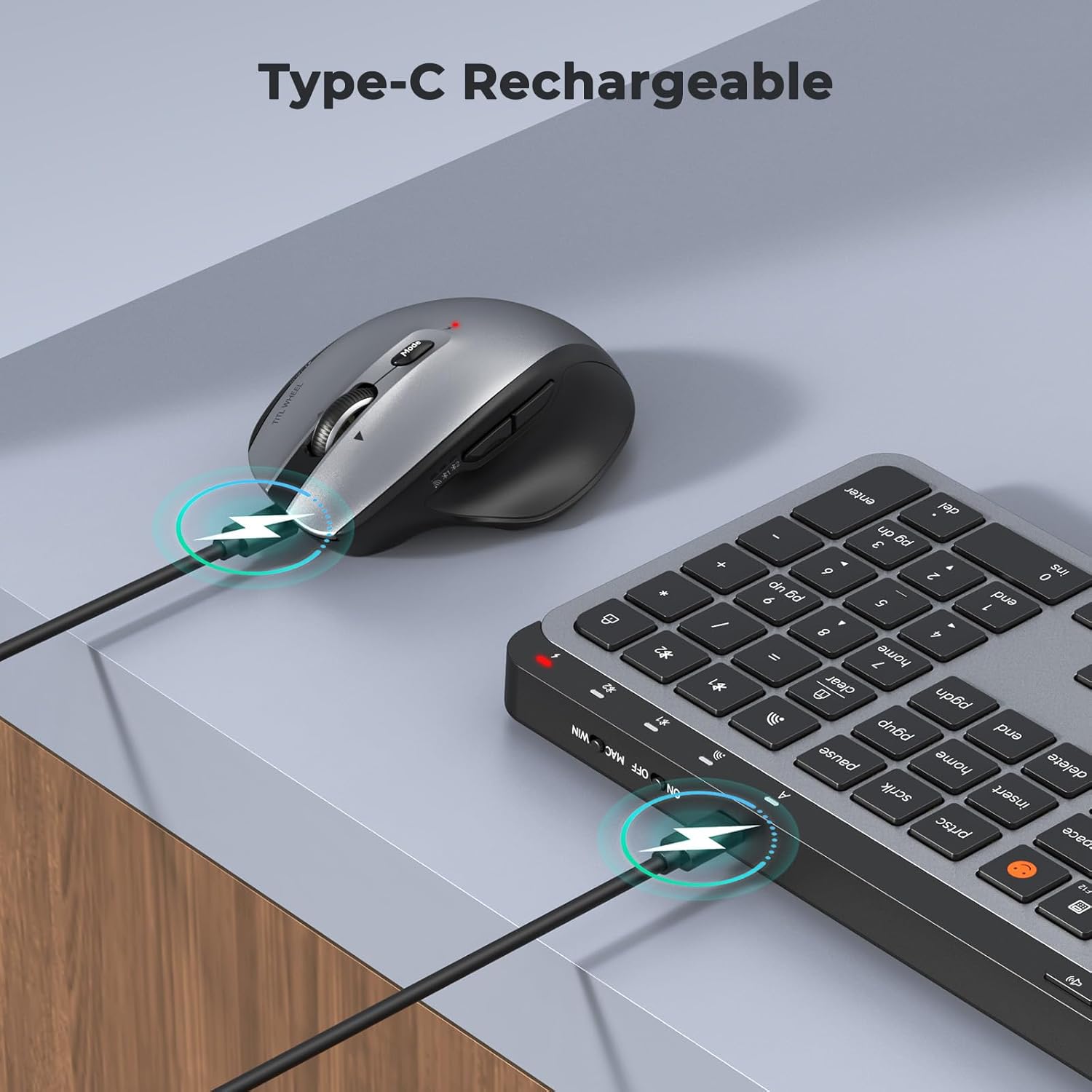
Image: Both the keyboard and mouse are rechargeable via USB-C, ensuring convenience and eliminating the need for disposable batteries.
2. Падключэнне да прылад
The C9990 combo supports three connection modes: 2.4GHz wireless (via USB receiver) and two Bluetooth channels (BT1, BT2).
2.1. Бесправадное злучэнне 2.4 ГГц
- Locate the USB receiver, typically stored in the mouse's battery compartment.
- Падключыце USB-прыёмнік да вольнага порта USB на вашым кампутары.
- Уключыце клавіятуру і мыш, выкарыстоўваючы адпаведныя выключальнікі харчавання.
- Для клавіятуры націсніце 2.4G button (usually indicated by a USB icon) to switch to 2.4GHz mode.
- For the mouse, switch the mode selector to the 2.4G становішча.
- The devices should connect automatically.
2.2. Падключэнне Bluetooth (BT1 / BT2)
- Уключыце клавіятуру і мыш.
- Для клавіятуры: Націсніце і ўтрымлівайце BT1 or BT2 button for 3-5 seconds until the indicator light flashes rapidly, indicating pairing mode.
- Для мышкі: Switch the mode selector to the BT1 or BT2 position, then press and hold the Bluetooth pairing button (often located on the underside) until the indicator light flashes.
- На вашай прыладзе (ноўтбуку, планшэце, смартфоне) перайдзіце ў налады Bluetooth і знайдзіце новыя прылады.
- Select "MEETION Keyboard" and "MEETION Mouse" from the list to pair.
- Паўтарыце для другога канала Bluetooth (BT2), калі падключаецеся да іншай прылады.
3. Пераключэнне паміж прыладамі
The C9990 allows seamless switching between up to three connected devices (one 2.4GHz and two Bluetooth).
- Для клавіятуры: Націсніце спецыяльны 2.4G, BT1, або BT2 button to switch to the desired connected device.
- Для мышкі: Use the mode switch on the underside of the mouse to select 2.4G, BT1, або BT2.

Image: The keyboard and mouse can switch between three devices (PC, tablet, phone) with a single click, indicated by the Bluetooth and 2.4G icons.
Інструкцыя па эксплуатацыі
Функцыі клавіятуры
- Multimedia Keys (F1-F12): These keys provide quick access to functions like brightness control, display window, home, dictation, sleep, app switcher, screen mirroring, screen capture, music player, email, and calculator. Functions may vary slightly depending on the operating system.
- Ключ эмодзі: The dedicated emoji key supports Windows, macOS, iPad (iPadOS), and Android Samsung devices. It does not support iPhone (iOS).

Image: The keyboard features a row of multimedia keys (F1-F12) for quick access to various system functions.
Функцыі мышы
- Рэгуляванне DPI: Press the DPI switch button (usually located near the scroll wheel) to cycle through the available DPI settings (800, 1200, 1600, 2400). Adjust to your preference for cursor speed and precision.
- Tilt-Scroll Wheel: In addition to vertical scrolling, tilt the scroll wheel left or right for horizontal scrolling in applications that support it (e.g., spreadsheets).
- Кнопкі наперад/назад: Выкарыстоўвайце бакавыя кнопкі для хуткай навігацыі web браўзэры і file даследчыкі.
Тэхнічнае абслугоўванне
- Уборка: Выкарыстоўвайце мяккую сухую тканіну для чысткі паверхняў клавіятуры і мышы. Для выдалення ўстойлівага бруду злёгкуampПрацярыце тканіну вадой або мяккім ачышчальным растворам. Пазбягайце агрэсіўных хімічных рэчываў або абразіўных матэрыялаў.
- Сыход за батарэяй: To prolong battery life, avoid fully discharging the devices frequently. Charge them when the low battery indicator appears. If storing for an extended period, charge them to about 50% and recharge every few months.
- захоўванне: Захоўвайце прылады ў прахалодным, сухім месцы, удалечыні ад прамых сонечных прамянёў і экстрэмальных тэмператур.
Ліквідацыю непаладак
Праблемы з падключэннем
- Прылада не падключаецца: Ensure both the keyboard and mouse are powered on and fully charged. Check that the correct connection mode (2.4G, BT1, or BT2) is selected on both devices. For Bluetooth, ensure your host device's Bluetooth is enabled and the devices are in pairing mode.
- Перарывістае падключэнне: Move the devices closer to your computer. Avoid using them near strong electromagnetic interference sources (e.g., Wi-Fi routers, other wireless devices).
- 2.4GHz receiver not recognized: Try plugging the USB receiver into a different USB port. Ensure the receiver is fully inserted.
Праблемы з функцыянальнасцю
- Keys or mouse unresponsive: Recharge the devices. Restart your computer or device. Re-pair the devices if using Bluetooth or re-insert the USB receiver for 2.4GHz.
- Курсор мышы няўстойлівы: Clean the mouse sensor. Ensure you are using the mouse on a suitable surface (not highly reflective or transparent). Adjust DPI settings.
Тэхнічныя характарыстыкі
| Нумар мадэлі | C9990 |
| Тэхналогія падлучэння | Bluetooth, USB (2.4GHz Wireless) |
| Раскладка клавіятуры | QWERTY, Full Size |
| Mouse Movement Detection | Аптычны |
| Налады DPI мышы | 800, 1200, 1600, 2400 |
| Крыніца харчавання | Працуе ад батарэі (зараджаецца праз USB-C) |
| Сумяшчальныя аперацыйныя сістэмы | Windows, macOS, Linux, Chrome OS, Android |
| Вага прадмета | 1.16 Kilograms (combined) |
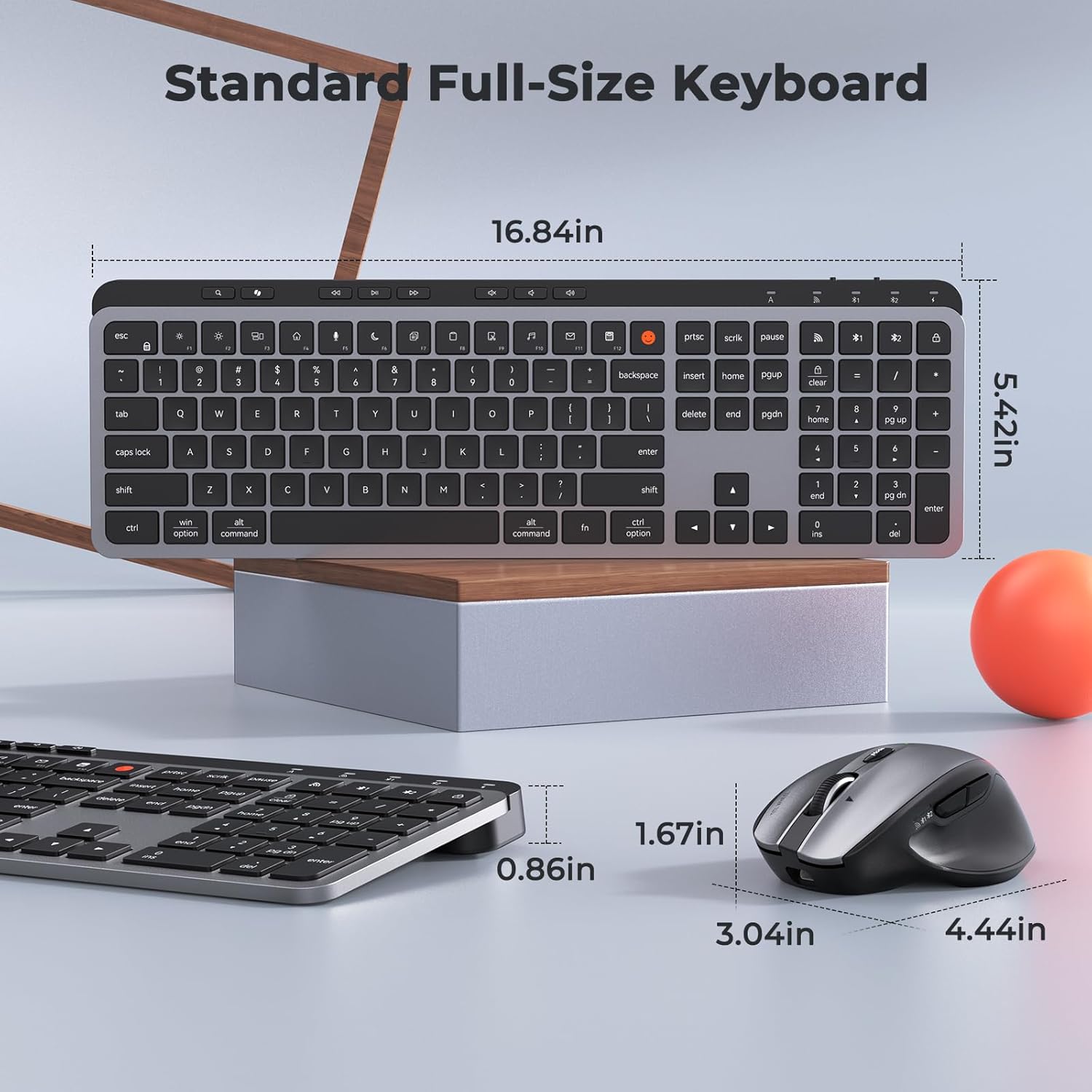
Image: Dimensions of the MEETION C9990 keyboard and mouse for reference.
Гарантыя і падтрымка
The MEETION C9990 Wireless Bluetooth Keyboard and Mouse comes with a Гарантыя 1 год з даты пакупкі. Гэтая гарантыя распаўсюджваецца на вытворчыя дэфекты пры нармальным выкарыстанні.
For technical support, troubleshooting assistance, or warranty claims, please contact MEETION customer service through the retailer where you purchased the product or visit the official MEETION webсайт для кантактнай інфармацыі.
Інфармацыя па бяспецы
- Не падвяргайце прылады ўздзеянню вады, вільгаці або экстрэмальных тэмператур.
- Пазбягайце падзення прылад або моцных удараў.
- Do not attempt to disassemble or repair the devices yourself. Refer to qualified service personnel.
- Захоўваць у месцах, недаступных дзецям.
- Утылізуйце батарэі і электронныя кампаненты адказна ў адпаведнасці з мясцовымі правіламі.