
1. Уводзіны
Thank you for choosing the TOPTRO TP3 4K Google TV Portable Projector. This manual provides essential information for setting up, operating, and maintaining your projector. Please read it thoroughly before use to ensure optimal performance and safety.
The TOPTRO TP3 is designed to deliver a versatile and immersive viewing experience, featuring integrated Google TV, AI-powered image adjustments, and comprehensive connectivity options. Enjoy your content at home, outdoors, or on the go.
2. Прадукт скончыўсяview
2.1 Асноўныя магчымасці
- Інтэграваны Google TV: Access over 10,000 official streaming applications, including Netflix, Prime Video, and YouTube, without additional devices.
- Google Voice Control: Use the remote control's voice assistant button to search for content, adjust settings, and control playback hands-free.
- AI-Powered Image Adjustment: Features automatic focus, automatic keystone correction, obstacle avoidance, and automatic screen adjustment for a perfectly aligned and clear image within seconds.
- Native 1080P Resolution with 4K Decoding: Delivers sharp, detailed images and natural colors, supporting 4K video decoding.
- Short Throw Ratio (0.8:1): Projects a 60-inch image from just one meter distance, ideal for small spaces.
- 90-Degree Rotating Stand: Allows for flexible projection angles, including ceiling projection.
- Пашыраныя магчымасці падлучэння: Equipped with dual-band WiFi 6, Bluetooth 5.3, HDMI ARC, USB, and a 3.5mm audio jack for wide device compatibility.
- Партатыўны дызайн: Weighing only 1.2 kg (2.6 lbs) with a hidden carry handle, making it easy to transport.
2.2 Змест пакета
Пераканайцеся, што ўсе прадметы прысутнічаюць у пасылцы:
- Праектар TOPTRO TP3
- Пульт дыстанцыйнага кіравання
- Кабель HDMI
- Адаптар сілкавання
- Кіраўніцтва карыстальніка
3. Настройка
3.1 Пачатковае размяшчэнне
Place the projector on a stable, flat surface. The 90-degree rotating stand allows for various projection angles, including wall, ceiling, or tabletop. For optimal image quality, ensure the projection surface is smooth and light-colored.

Image: The TOPTRO TP3 projector can be used in diverse environments, from living rooms to outdoor camping, showcasinг яго адаптыўнасць.
3.2 Падключэнне харчавання
- Падключыце адаптар сілкавання да ўваходу сілкавання праектара.
- Plug the power adapter into a suitable electrical outlet (220V).
- Націсніце кнопку харчавання на праектары або пульце дыстанцыйнага кіравання, каб уключыць яго.
3.3 Сеткавае падключэнне
Upon first startup, follow the on-screen prompts to connect to your Wi-Fi network. The projector supports dual-band WiFi 6 for a fast and stable connection.
3.4 Налада Google TV
After connecting to Wi-Fi, sign in with your Google account to access Google TV and download applications from the Google Play Store. This step is crucial for utilizing the integrated streaming services.

Image: The projector's interface showing integrated Google TV with direct access to popular streaming applications.
4. Інструкцыя па эксплуатацыі
4.1 Асноўныя аперацыі
- Уключэнне/выключэнне харчавання: Націсніце кнопку харчавання на пульце дыстанцыйнага кіравання або праектары.
- Навігацыя: Use the directional buttons on the remote to navigate menus.
- выбар: Націсніце кнопку «ОК», каб пацвердзіць выбар.
- Рэгулятар гучнасці: Выкарыстоўвайце кнопкі гучнасці на пульце дыстанцыйнага кіравання.
4.2 Налада відарыса
The TOPTRO TP3 features AI-powered automatic image adjustments:
- аўтафокус: Праектар аўтаматычна рэгулюе выразнасць выявы.
- Аўтаматычная карэкцыя трапецеідальных скажэнняў: Automatically corrects distorted images to a rectangular shape.
- Пазбяганне перашкод: Detects and adjusts the image to avoid objects on the projection surface.
- Auto Screen Adjustment: Optimizes the image to fit the screen area.
These adjustments occur automatically within seconds of powering on or repositioning the projector. Manual digital zoom (80-100%) is also available for fine-tuning image size.

Image: Visual representation of the projector's AI-powered automatic image adjustment features, ensuring a clear and aligned picture.
4.3 Google Voice Control
Press the dedicated voice assistant button on your remote control and speak your command. For example, say "Open YouTube" or "Play music." The projector will respond to your voice commands for quick access to functions and content.
4.4 Screen Mirroring (Google Cast)
Utilize Google Cast technology to wirelessly mirror content from your smartphone or tablet to the projector. For iPhone users, download the "AirScreen" application from the Google Play Store on the projector for wireless screen mirroring.
4.5 Rotating Stand Usage
The integrated 90-degree rotating stand allows you to easily adjust the projection angle. Simply pivot the projector to direct the image onto a wall, screen, or ceiling. This feature is particularly useful for bedroom viewing or creative setups.
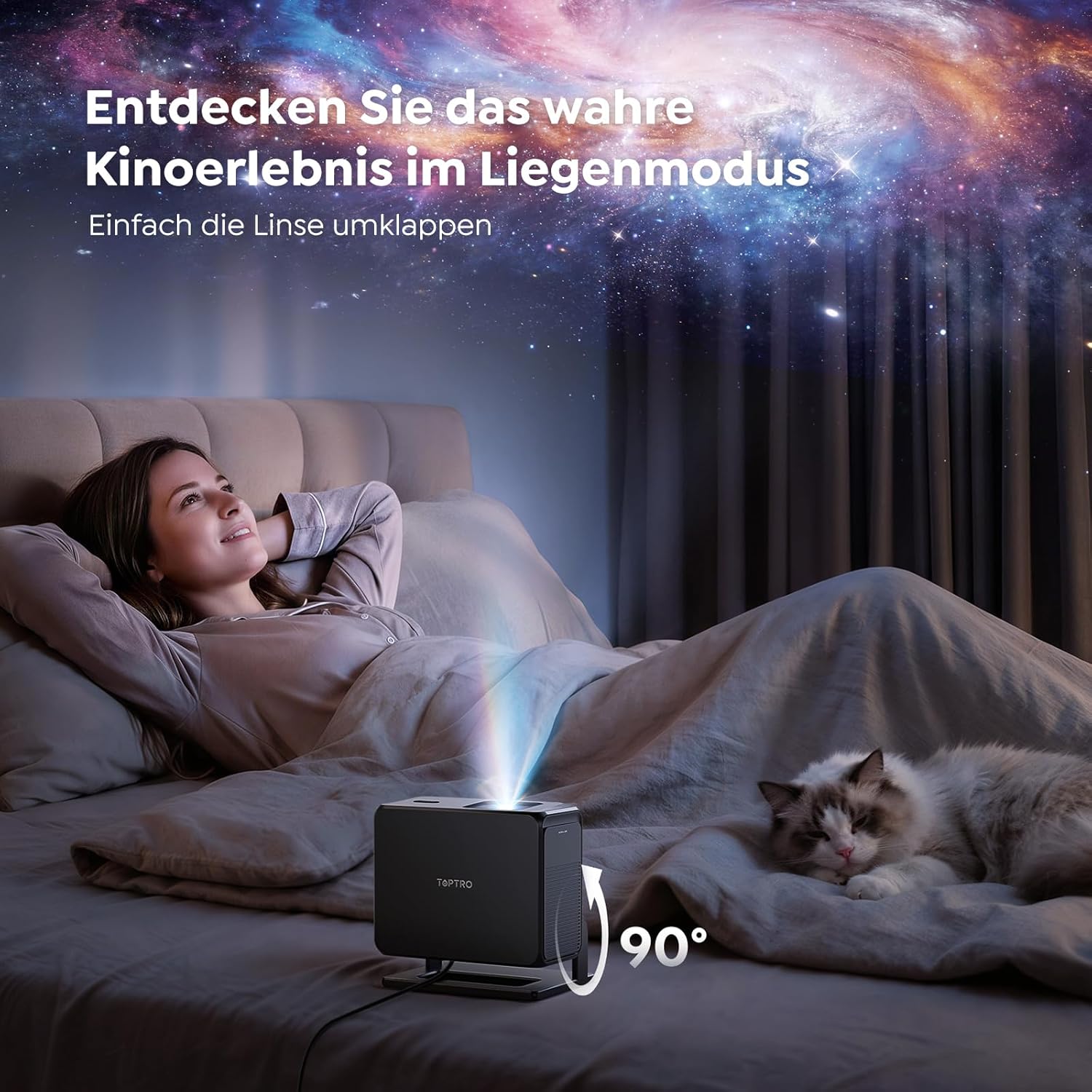
Image: The TOPTRO TP3 projector rotated 90 degrees to project content onto a bedroom ceiling, offering a unique viewвопыту.
5. Сувязь
5.1 Правадныя падключэнні
- HDMI ARC/CEC: Connect external devices like laptops, gaming consoles (Xbox/PlayStation 5), or Blu-ray players. The ARC feature allows audio to be sent back to a compatible sound system.
- USB: Падключыце USB-назапашвальнікі для прайгравання медыяфайлаў.
- 3.5 мм аўдыяраз'ём: Падключыце знешнія правадныя дынамікі або навушнікі.
5.2 Бесправадныя злучэнні
- Wi-Fi 6: Provides faster and more stable wireless connectivity for streaming and online content.
- Bluetooth 5.3: Падключыце навушнікі або дынамікі Bluetooth для палепшанага гукавога досведу.
6. Тэхнічнае абслугоўванне
6.1 Ачыстка аб'ектыва
Gently clean the projector lens with a soft, lint-free cloth designed for optical surfaces. Avoid using abrasive cleaners or excessive force, as this can scratch the lens.
6.2 Генеральная ўборка
Працірайце знешнія паверхні праектара мяккай сухой тканінай. Не выкарыстоўвайце вадкія ачышчальнікі непасрэдна на прыладзе.
6.3 Захоўванне
Калі праектар не выкарыстоўваецца, захоўвайце яго ў прахалодным, сухім месцы, удалечыні ад прамых сонечных прамянёў і экстрэмальных тэмператур. Выкарыстоўвайце арыгінальную ўпакоўку або ахоўны чахол, каб прадухіліць назапашванне пылу і пашкоджанні.
7. Выпраўленне непаладак
7.1 Выява не адлюстроўваецца
- Пераканайцеся, што праектар уключаны і падлучаны да крыніцы харчавання.
- Check all cable connections (HDMI, USB) to external devices.
- Verify the input source selected on the projector matches the connected device.
- Confirm the lens cap is removed.
7.2 Размытае выява
- Allow the auto-focus function to complete its adjustment.
- Пераканайцеся, што паверхня праекцыі роўная, а праектар устойлівы.
- Clean the projector lens if smudges or dust are visible.
7.3 Няма гуку
- Праверце ўзровень гучнасці як на праектары, так і на падлучанай прыладзе-крыніцы.
- Ensure external speakers or headphones are properly connected (wired or Bluetooth).
- If using HDMI ARC, verify your sound system is compatible and correctly configured.
7.4 Пульт дыстанцыйнага кіравання не працуе
- Замяніце батарэйкі ў пульце дыстанцыйнага кіравання.
- Пераканайцеся, што паміж пультам дыстанцыйнага кіравання і ІЧ-прыёмнікам праектара няма перашкод.
For further assistance, refer to the detailed troubleshooting section in the full user manual or contact customer support.
8. Тэхнічныя характарыстыкі
| Асаблівасць | Спецыфікацыя |
|---|---|
| Марка | ТОПТРО |
| Назва мадэлі | TP3 |
| Роднае дазвол | 1920 x 1080 (1080P) |
| Video Decoding Support | 4K |
| Тып дысплея | святлодыёд |
| Асаблівасці | Auto Focus, Auto Keystone Correction, Obstacle Avoidance, Auto Screen Adjustment, Google TV, Google Voice Control |
| Тэхналогія падлучэння | HDMI, USB, Bluetooth 5.3, Wi-Fi 6 |
| Абсталяванне інтэрфейсу | HDMI ARC/CEC, USB, 3.5mm Audio |
| Памеры прадукту (ДxШxВ) | 19.4 х 15.8 х 14.1 см |
| Вага прадмета | 1.2 кг |
| Формаў-фактар | Партатыўны |
| Тып мацавання | Ceiling Mount, Tabletop, Wall |
| Мінімальны памер выявы | 40 цаляў |
| Максімальны памер выявы | 120 цаляў |
| Максімальная адлегласць кідка | 2.13 метраў |
| тtage | 220 вольт |
| Уключаныя кампаненты | Кабель HDMI |
| Колер | Чорны |
| Тып кантролера | Пульт дыстанцыйнага кіравання |
| Сумяшчальныя прылады | Xbox/PlayStation 5, Smartphone, Tablet, Laptop, Speaker, Notebook |
| Рэкамендуемае выкарыстанне | Gaming, Business, Home Cinema, Education |
9. Гарантыя і падтрымка
9.1 Інфармацыя аб гарантыі
Please refer to the warranty card included with your product for specific warranty terms and conditions. Keep your proof of purchase for warranty claims.
9.2 Падтрымка кліентаў
If you encounter any issues or have questions regarding your TOPTRO TP3 projector, please contact our customer service team. We provide prompt, professional, and effective support to ensure a smooth user experience.
Кантактную інфармацыю звычайна можна знайсці на нашым афіцыйным сайце webсайце або ў гарантыйным талоне.