
Уводзіны
This manual provides detailed instructions for the setup, operation, and maintenance of your aosu T2 Ultra 4K Wireless Outdoor Security Camera System. This 4-camera kit offers advanced features including 4K TrueColor Night Vision, AI recognition, 360° motion tracking, and solar power for continuous operation. Please read this manual thoroughly before installation and use to ensure optimal performance and safety.
Што ў скрынцы
Перад пачаткам усталёўкі пераканайцеся, што ўсе кампаненты наяўныя:
- 4 x aosu T2 Ultra 4K Wireless Security Cameras
- 4 x Detachable Solar Panels
- 1 x aosuBase Station
- Мантажныя элементы (шрубы, анкеры)
- USB-кабелі для зарадкі
- Кабель Ethernet
- Кароткае кіраўніцтва

Выява: Зверхуview of the aosu T2 Ultra 4K Security Camera System components, including four cameras, four solar panels, and the central aosuBase station.
Настройка
- Download the aosu App: Пошук "aosu" in your smartphone's app store (iOS or Android) and download the official application.
- Connect the aosuBase Station:
- Place the aosuBase in a central location within your home, ideally near your Wi-Fi router.
- Connect the aosuBase to your router using the provided Ethernet cable.
- Plug the aosuBase into a power outlet.
- Pair Cameras with aosu App:
- Open the aosu app and follow the on-screen instructions to add your new device.
- The app will automatically detect and guide you through pairing each camera. Ensure cameras are powered on during this process.

Image: A smartphone displaying the aosu app interface, confirming a successful one-step connection to the aosuBase station.
- Mounting the Cameras and Solar Panels:
- Choose mounting locations that provide optimal viewing angles and sufficient sunlight exposure for the solar panels.
- The detachable solar panels can be mounted directly onto the camera or separately using the included extension cable for flexible placement to maximize sun exposure.
- Use the provided mounting brackets and screws to securely attach the cameras and solar panels. For outdoor installations, consider adding a small amount of caulk around screw holes to prevent water intrusion.
- For enhanced security, install cameras at a height that is not easily accessible from the ground.

Image: Demonstrates the versatility of the detachable solar panel, allowing it to be mounted directly on the camera or separately for optimal sunlight.

Image: A user demonstrating the simple, DIY installation of an aosu T2 Ultra camera, emphasizing its wireless and zero-maintenance design.
Відэа кіраўніцтва па наладзе
Video: A detailed guide on setting up the aosu T2 Ultra 4K Security Camera System, including base station connection, app pairing, and camera mounting.
Аперацыйная сістэма
4K TrueColor Night Vision
The aosu T2 Ultra cameras provide vivid 4K TrueColor Night Vision, capturing clear and detailed footage in natural color even in low-light conditions, without the need for additional floodlights.

Image: A smartphone screen showing the camera's 4K TrueColor Night Vision, capturing a scene at night with clear, natural colors.

Image: A visual comparison illustrating the difference between standard human night vision and the aosu TrueColor Night Vision, highlighting enhanced clarity and color.
AI Recognition & 360° Motion Tracking
The system utilizes Triple AI Detection (radar, PIR, and AI analysis) to accurately identify people and activity, significantly reducing false alerts. The 360° pan-tilt dome design provides complete coverage with real-time auto tracking, eliminating blind spots.

Image: An illustration demonstrating the camera's triple detection capabilities, highlighting its ability to accurately detect movement within a 35-foot range.
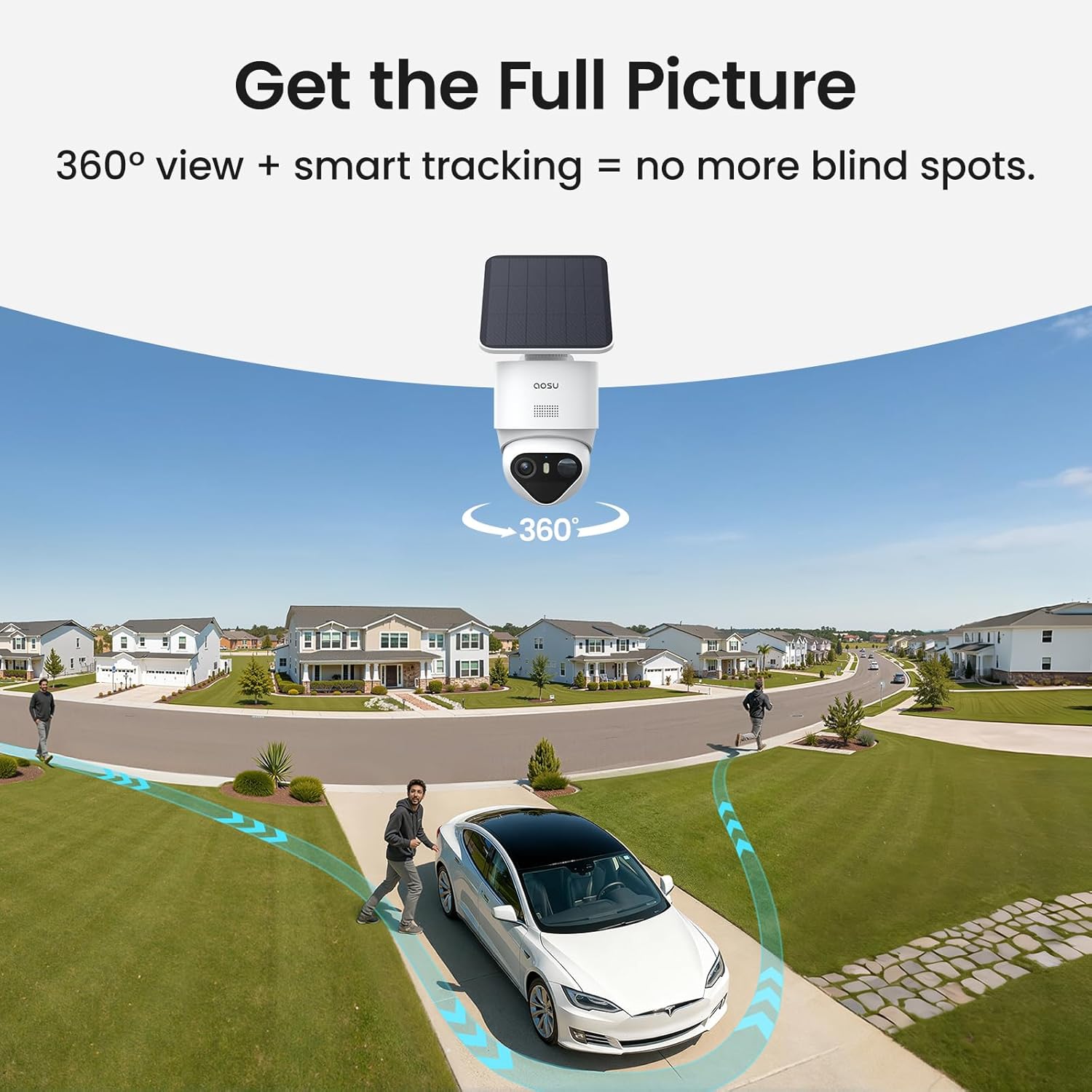
Выява: Над галавой view illustrating the camera's 360-degree pan and tilt functionality, demonstrating its ability to track movement across a wide area.
Бяспечнае лакальнае сховішча
The aosuBase supports up to 1TB of local, encrypted storage, ensuring all video footage is stored securely without monthly subscription fees. This allows for extensive recording capacity and maintains your privacy.

Image: The aosuBase station, emphasizing its expandable storage capacity up to 1TB and the benefit of no monthly fees for local recording.
The system continues to record directly to the aosuBase even during Wi-Fi outages, ensuring no footage згублена.

Image: Illustrates the system's ability to record directly to the aosuBase during Wi-Fi outages, preventing loss of security footage.
Multi-Camera Tracking & All-At-Once Monitoring
The system connects clips from different cameras into a single, complete video for a full overview of events. You can view up to 4 cameras simultaneously with smooth, lag-free streaming through the app.

Image: Depicts multiple cameras collaborating to track movement across a property, ensuring comprehensive coverage without gaps.

Image: A smartphone screen showing simultaneous live feeds from four different aosu cameras, demonstrating the all-at-once monitoring feature.
Two-Way Talk & Family Sharing
Communicate in real-time through the camera with the two-way talk feature. The system also supports family sharing, allowing multiple users to access and monitor the security feeds.

Image: An illustration depicting the two-way talk functionality, enabling real-time communication through the camera.

Image: Illustrates the family sharing feature, allowing multiple family members to access and monitor the camera system from their devices.
Відэа кіраўніцтва па эксплуатацыі
Відэа: Падрабязны аглядview of the aosu T2 Ultra system's operational features, including night vision, AI tracking, and app functionalities.
Тэхнічнае абслугоўванне
Сыход за сонечнымі панэлямі
The detachable solar panels are designed for continuous power. To ensure optimal charging efficiency, regularly clean the surface of the solar panels to remove dust, dirt, or debris that may obstruct sunlight. Position panels to receive maximum direct sunlight throughout the day.

Image: Illustrates the reliable solar charging capability of the cameras, functioning effectively in diverse lighting conditions.
Кіраванне батарэяй
The cameras are equipped with internal Lithium Ion batteries (included). The solar panels continuously charge these batteries. If a camera's battery level drops significantly due to prolonged low sunlight or heavy usage, you may temporarily charge it using a USB cable and a compatible power adapter (not included).
Абнаўленне прашыўкі
Periodically check the aosu app for available firmware updates. Keeping your system's firmware up-to-date ensures you have the latest features, security enhancements, and bug fixes.
Ліквідацыю непаладак
- No Video Feed / Offline Camera:
- Ensure the camera is powered on and its battery is charged.
- Check the Wi-Fi connection between the camera and the aosuBase. Relocate the camera or aosuBase if the signal is weak.
- Verify the aosuBase is connected to your router and has internet access.
- Частыя ілжывыя сігналы трывогі:
- Adjust the sensitivity settings for motion detection in the aosu app.
- Пераканайцеся, што поле зроку камеры view is not obstructed by moving objects like tree branches or flags.
- Utilize the AI detection zones to focus on specific areas and ignore irrelevant motion.
- Дрэнная якасць начнога бачання:
- Ачысціце аб'ектыў камеры, каб выдаліць бруд або плямы.
- Ensure there are no strong light sources directly facing the camera at night, which can cause glare.
- Сонечная панэль не зараджаецца:
- Ачысціце паверхню сонечнай панэлі.
- Ensure the panel is positioned to receive direct sunlight for several hours daily.
- Праверце кабель злучэння паміж сонечнай панэллю і камерай.
Тэхнічныя характарыстыкі
| Асаблівасць | Спецыфікацыя |
|---|---|
| Выкарыстанне ў памяшканні/на вуліцы | На адкрытым паветры |
| Сумяшчальныя прылады | Smartphone (Android, iOS), Amazon Alexa, Google Assistant |
| Крыніца харчавання | Solar Powered (1 Lithium Ion battery included) |
| Пратакол злучэння | Bluetooth, Wi-Fi (2.4 ГГц) |
| Тып мацавання | Насценнае мацаванне |
| Дазвол відэазахопу | 4K |
| Эфектыўнае рашэнне | 8 МП |
| Колер | Белы |
| Number of Items (in kit) | 4 Камеры |
| Памер усталяванай флэш-памяці | 32 GB (expandable up to 1 TB with microSD card in aosuBase) |
| Аптычны зум | 6x |
| Фармат захопу відэа | MP4 |
| Міжнародны рэйтынг абароны | IP65 |
| Памеры прадукту | 16 х 9.5 х 6.5 цалі |
| Вага прадмета | 10.27 фунта |
| Асаблівасці | 4K, TrueColor Night Vision, Triple Detection (Radar, PIR, AI), Automatic Tracking |
Гарантыя і падтрымка
For warranty information, technical support, or further assistance, please refer to the official aosu website or contact aosu customer service directly. Contact details are typically found in the Quick Start Guide included with your product or on the manufacturer's webсайт.


