
1. Уводзіны
Дзякуй за пакупкуasing the Sharp PS-916 Bluetooth Party Speaker System. This system includes two identical portable Bluetooth speakers designed to deliver powerful audio with versatile connectivity options. Please read this manual carefully before using the product to ensure proper operation and to maximize your listening experience.
Змест пакета:
- 2 x Sharp PS-916 Party Speakers
- 1 х зарадны кабель
- 1 х пульт дыстанцыйнага кіравання
- 1 х Кіраўніцтва карыстальніка

Image: The Sharp PS-916 system includes two speakers for a complete stereo experience.
2. Настройка
2.1 Charging the Speakers
The PS-916 speakers are equipped with rechargeable batteries, providing up to 12 hours of playback. Before initial use, fully charge both speakers.
- Connect the charging cable to the DC IN port on the rear of each speaker.
- Plug the other end of the charging cable into a suitable power adapter (not included) or USB power source.
- The charging indicator light will illuminate. It will change color or turn off once charging is complete.
2.2 Уключэнне/выключэнне
To power on or off each speaker, press and hold the ON/STAND BY INPUT кнопка, размешчаная на панэлі кіравання.
2.3 Спалучэнне Bluetooth (адзін дынамік)
- Ensure the speaker is powered on and in Bluetooth mode. The Bluetooth indicator will flash, indicating it is ready for pairing.
- На мабільнай прыладзе ўключыце Bluetooth і знайдзіце даступныя прылады.
- Select "Sharp PS-916" from the list of devices.
- Пасля падключэння індыкатар Bluetooth перастане міргаць і будзе гарэць пастаянна.
2.4 Спалучэнне сапраўднага бесправаднога стэрэа (TWS) (два дынамікі)
TWS allows you to connect two PS-916 speakers wirelessly for a stereo sound experience.
- Power on both PS-916 speakers.
- Ensure neither speaker is currently connected to a Bluetooth device.
- On one of the speakers (this will be the primary speaker), press the TWS button. The speaker will enter TWS pairing mode.
- The primary speaker will automatically search for the secondary speaker. Once connected, you will hear an audible confirmation, and the TWS indicator lights on both speakers will illuminate.
- Цяпер падключыце мабільную прыладу да асноўнага дынаміка праз Bluetooth, як апісана ў раздзеле 2.3. Гук будзе прайгравацца праз абодва дынамікі ў стэрэагуку.
3. Аперацыйная
3.1 Панэль кіравання скончанаview

Image: Main control panel for the Sharp PS-916 speaker.
- ON/STAND BY INPUT: Power on/off, switch input modes (Bluetooth, USB, TF, AUX, FM).
- PLAY/PAUSE (►/∕∕): Прайграць або прыпыніць прайграванне аўдыё.
- PREVIOUS (◀◀): Перайсці да папярэдняга трэка.
- NEXT (▶▶): Перайсці да наступнага трэка.
- РУЧКА ГРОМКА: Павярніце, каб адрэгуляваць агульную гучнасць.
- TWS: Initiate or disconnect True Wireless Stereo pairing.
- ЭКВАЛЯЙЗЕР: Cycle through preset equalizer modes.
- БАС: Activate or deactivate bass boost.
- СВЯТЛО: Change or turn off the LED light effects.
- MIC CONTROL: Adjust microphone volume or echo (if applicable).
3.2 Уваходныя парты
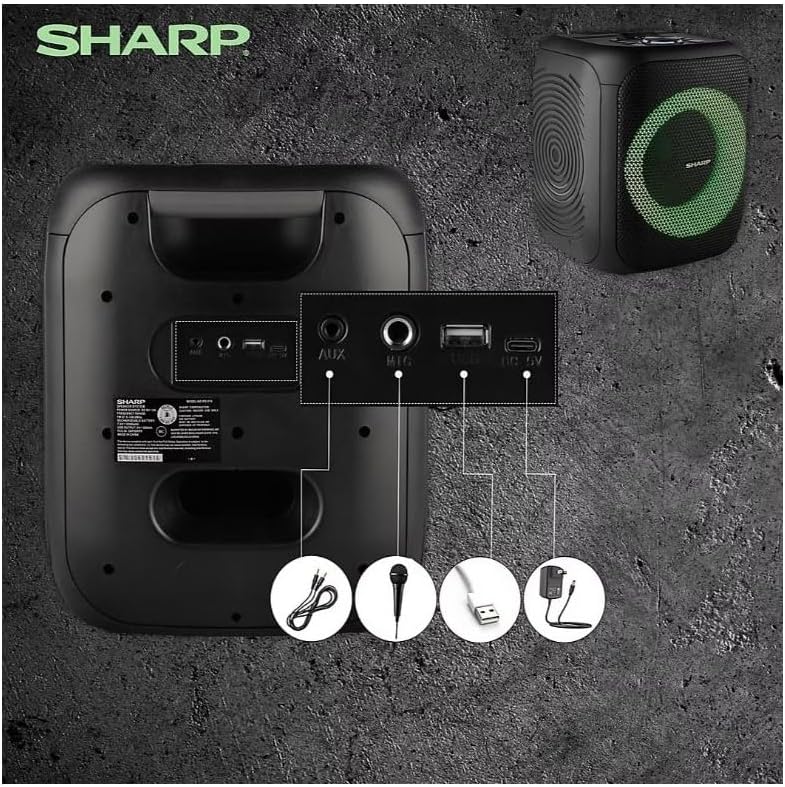
Image: Rear panel with various input and charging ports.
- AUX IN: Падключыце знешнія аўдыёпрылады з дапамогай аўдыёкабеля 3.5 мм.
- УХОД мікрафона: Connect a microphone (sold separately) for karaoke or announcements.
- USB: Устаўце флэш-назапашвальнік USB для прайгравання аўдыё.
- TF КАРТА: Insert a TF (microSD) card for audio playback.
- DC IN: Connect the charging cable to power and charge the speaker.
3.3 Playing Audio from USB/TF Card
- Insert a USB flash drive or TF card into the corresponding port.
- Націсніце ON/STAND BY INPUT button repeatedly until the display shows the USB or TF mode.
- Playback will begin automatically. Use the ПРАЙГРАЦЬ/Паўза, ПАПЕРАДНІ, і ДАЛЕЙ кнопкі для кіравання прайграваннем.
3.4 Выкарыстанне ўваходу AUX
- Connect one end of a 3.5mm audio cable to the AUX IN port on the speaker.
- Падключыце другі канец да раздыма для навушнікаў або аўдыёвыхаду вашай знешняй прылады.
- Націсніце ON/STAND BY INPUT button repeatedly until the display shows AUX mode.
- Кіруйце прайграваннем і гучнасцю з вашай знешняй прылады.
Праца з радыё 3.5 FM

Image: The PS-916 features an integrated FM Tuner.
- Націсніце ON/STAND BY INPUT button repeatedly until the display shows FM mode.
- Націсніце і ўтрымлівайце ПРАЙГРАЦЬ/Паўза кнопку для аўтаматычнага сканавання і захавання даступных FM-станцый.
- Выкарыстоўвайце ПАПЕРАДНІ і ДАЛЕЙ кнопкі для навігацыі па захаваных станцыях.
3.6 святлодыёдных светлавых эфектаў
Націсніце СВЯТЛО button to cycle through different LED light modes or to turn the lights off.
4. Тэхнічнае абслугоўванне
4.1 Ачыстка
- Заўсёды выключайце дынамік і адключайце яго ад крыніцы сілкавання перад чысткай.
- Выкарыстоўвайце мяккую, сухую тканіну для працірання вонкавых паверхняў.
- Не выкарыстоўвайце вадкія ачышчальнікі, аэразолі або растваральнікі, бо яны могуць пашкодзіць пакрыццё або ўнутраныя кампаненты.
4.2 Захоўванне
- Захоўвайце дынамікі ў прахалодным, сухім месцы, удалечыні ад прамых сонечных прамянёў і экстрэмальных тэмператур.
- Калі вы захоўваеце акумулятар працяглы час, зараджайце яго прыкладна да 50% кожныя некалькі месяцаў, каб падтрымліваць яго ў працоўным стане.
5. Выпраўленне непаладак
If you encounter issues with your Sharp PS-916 speakers, please refer to the following common problems and solutions:
| праблема | Магчымае рашэнне |
|---|---|
| Дынамік не ўключаецца. | Пераканайцеся, што акумулятар зараджаны. Падключыце зарадны кабель і паспрабуйце яшчэ раз. |
| Няма гуку з дынаміка. | Праверце ўзровень гучнасці як на дынаміку, так і на падлучанай прыладзе. Пераканайцеся, што выбраны правільны рэжым уваходу. |
| Прылада Bluetooth не можа быць спалучана. | Ensure the speaker is in Bluetooth pairing mode (indicator flashing). Move your device closer to the speaker. Disconnect from other Bluetooth devices. |
| Памылка спалучэння TWS. | Ensure both speakers are powered on and not connected to any other Bluetooth devices. Try initiating TWS pairing again. |
| Скажоны гук. | Reduce the volume on both the speaker and your connected device. Ensure the audio source is not distorted. |
6. Тэхнічныя характарыстыкі
| Асаблівасць | Дэталь |
|---|---|
| Марка | Востры |
| Назва мадэлі | ПС-916 |
| Канфігурацыя дынаміка | 8" Woofer, 1" Tweeter (per speaker) |
| Пікавая выхадная магутнасць | 400 Watts (per speaker) |
| Выходная магутнасць | 40 Watts (per speaker) |
| Тэхналогія падлучэння | Bluetooth |
| Дадатковыя ўваходы | USB, TF Card, 3.5mm AUX, Microphone Input |
| Тэрмін службы батарэі | Да 12 гадзін |
| Асаблівасці | True Wireless Stereo (TWS) Pairing, Bass Boost, LED Light Effects, FM Tuner |
| Колер | Чорны |
| Вага прадмета | 6.5 фунтаў (на дынамік) |
| UPC | 728434122111 |
| GTIN | 728434122111 |
7. Гарантыя і падтрымка
7.1 Інфармацыя аб гарантыі
This Sharp PS-916 product comes with a 90-day limited warranty. This warranty covers manufacturing defects under normal use. It does not cover damage caused by misuse, accidents, unauthorized modifications, or normal wear and tear.
7.2 Падтрымка кліентаў
For technical assistance, warranty claims, or further inquiries, please refer to the contact information provided with your purchase documentation or visit the official Sharp support webсайт.