
Уводзіны
This manual provides essential information for setting up, operating, maintaining, and troubleshooting your REDMI Note 15 Pro+ 5G smartphone. Please read this guide thoroughly to ensure optimal performance and longevity of your device.
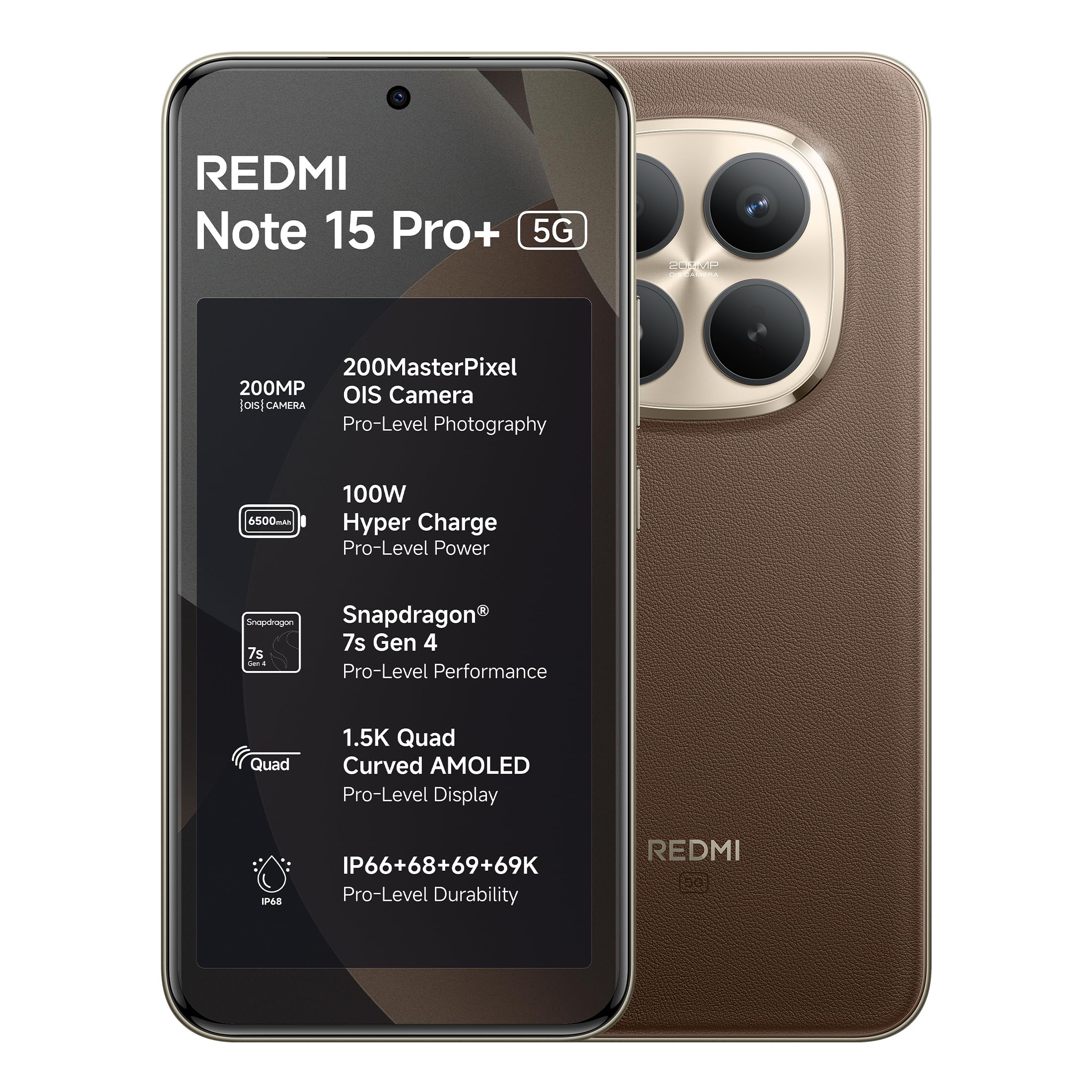
Figure 1: REDMI Note 15 Pro+ 5G (Coffee Mocha)
1. Настройка
1.1 Змест скрынкі
Праверце наяўнасць усіх прадметаў ва ўпакоўцы прадукту:
- REDMI Note 15 Pro+ 5G Smartphone
- Зарадная прылада
- USB-кабель Type-C
- Інструмент для вымання SIM-карты
- Кіраўніцтва карыстальніка (гэты дакумент)
- Гарантыйны талон
- Ахоўны футляр
1.2 Устаўка SIM-карты
- Знайдзіце латок для SIM-карты на бакавой панэлі прылады.
- Устаўце інструмент для выцягвання SIM-карты ў невялікую адтуліну побач з латком і акуратна націсніце, пакуль латок не выскочыць.
- Устаўце карту (карты) Nano-SIM у латок залатымі кантактамі ўніз. Забяспечце правільную арыентацыю.
- Асцярожна ўстаўце латок назад у слот, пакуль ён не будзе ўпоравень з прыладай.
1.3 Пачатковае ўключэнне і канфігурацыя
- Press and hold the Power button until the REDMI logo appears.
- Выконвайце інструкцыі на экране, каб выбраць мову, рэгіён і падключыцца да сеткі Wi-Fi.
- Увайдзіце ў свой уліковы запіс Google або стварыце новы.
- Complete the setup process, including setting up security features like fingerprint or face unlock.
2. Кіраванне прыладай
2.1 Дысплей і навігацыя
The device features a 6.83-inch Quad curved 1.5K Ultra QHD AMOLED display with up to 3200 nits peak brightness. It supports a 120Hz adaptive refresh rate for smooth scrolling and interaction. Eye Protect 2.0 with Triple TÜV Certifications helps reduce eye strain.

Figure 2: Immersive AMOLED Display
2.2 Сістэма камеры
Your REDMI Note 15 Pro+ 5G is equipped with an advanced 200MP ultimate clarity camera system featuring OIS (Optical Image Stabilization) and an HPE 1/1.4" sensor. This camera is designed for capturing detailed photos and 4K videos with natural depth and steady motion.
- Capture Ultra-Sharp Details: Utilize the 200MP mode for maximum resolution.
- Steady Videos: OIS ensures stable video recording, even when moving.
- Партрэты: Use portrait mode for natural depth-of-field effects.

Figure 3: 200MasterPixel Camera System
2.3 Прадукцыйнасць і гульні
Powered by the Snapdragon 7s Gen 4 processor, the device offers smooth performance for daily tasks and gaming. IceLoop cooling technology helps maintain optimal temperatures during intensive use.

Figure 4: Snapdragon 7s Gen 4 Processor
2.4 Акумулятар і зарадка
The 6500mAh Silicon-Carbon battery supports 100W HyperCharge, allowing for rapid charging. It also features 22.5W reverse charging. The battery is designed for advanced 1600 lifecycles, ensuring long-term reliability.

Figure 5: 6500mAh Silicon-Carbon Battery
2.5 Функцыі гуку
Experience enhanced audio with symmetric stereo speakers and Dolby Atmos® support. The speakers deliver clear sound, suitable for music and calls.

Figure 6: Ultra-Loud, Ultra-Clear Sound
2.6 Xiaomi HyperOS and AI Features
The device runs on Android 15 with Xiaomi HyperOS, offering intelligent AI features and seamless cross-device connectivity. Key features include:
- Offline Communication: Enables device-to-device calling even without cellular or Wi-Fi network coverage, ideal for travel or areas with poor signal.
- Інструменты штучнага інтэлекту: Integrated AI features like Circle to Search and Gemini Assistance enhance user interaction and productivity.

Figure 7: Powered by Xiaomi HyperOS

Figure 8: Smarter Help with AI Tools

Figure 9: Xiaomi Offline Communication
3. Тэхнічнае абслугоўванне
3.1 Ачыстка прылады
To clean your device, use a soft, lint-free cloth. Avoid using abrasive cleaners, solvents, or aerosol sprays directly on the phone. For stubborn marks, slightly dampпрацярыце тканіну вадой або сродкам для чысткі экранаў, прызначаным для электронікі.
3.2 Сыход за акумулятарам
The 6500mAh Silicon-Carbon battery is designed for extended longevity with 1600 lifecycles. To maximize battery life:
- Пазбягайце экстрэмальных тэмператур.
- Use the provided 100W HyperCharge charger and cable for optimal charging.
- Пазбягайце частай поўнай разрадкі акумулятара.
3.3 Абнаўленне праграмнага забеспячэння
Your device will receive regular software updates, including OS updates for up to 4 years and security patches for up to 6 years. Ensure your device is connected to Wi-Fi and has sufficient battery before initiating updates.
4. Даўгавечнасць і абарона
The REDMI Note 15 Pro+ 5G features a fiberglass back panel and Corning Gorilla Glass Victus 2 for enhanced durability. It boasts an IP69K rating, providing high-level protection against dust and water ingress, including high-pressure water jets and steam cleaning. AI Wet Touch 2.0 ensures screen responsiveness even when wet.

Figure 10: Built-in Protection Features
5. Выпраўленне непаладак
Калі ў вас узніклі праблемы з прыладай, паспрабуйце выканаць наступныя асноўныя дзеянні па ліквідацыі непаладак:
- Прылада не адказвае: Націсніце і ўтрымлівайце кнопку харчавання каля 10 секунд, каб прымусова перазагрузіць кампутар.
- Праблемы з сеткай: Check if your SIM card is properly inserted. Try toggling Airplane Mode on and off.
- Няспраўнасць праграмы: Зачыніце і зноў адкрыйце праграму. Калі праблема не знікне, ачысціце кэш праграмы або пераўсталюйце яе.
- Праблемы з зарадкай: Ensure the charger and cable are securely connected and undamaged. Try a different power outlet.
- Праграмныя збоі: Пераканайцеся, што праграмнае забеспячэнне вашай прылады абноўлена.
For more complex issues, refer to the support section or contact customer service.
6. Тэхнічныя характарыстыкі
| Асаблівасць | Дэталь |
|---|---|
| Марка | Redmi |
| мадэль | Заўвага 15 Pro+ 5G |
| Аперацыйная сістэма | Android 15, Xiaomi HyperOS |
| Памер усталяванай аператыўнай памяці | 12 ГБ |
| Ёмістасць памяці | 256 ГБ |
| Памер экрана | 6.83 цалі (17.35 см) |
| Тып дысплея | AMOLED |
| Колер | Кава Мокко |
| Тып раздыма | USB тыпу C |
| Узровень воданепранікальнасці | Воданепранікальны (IP69K) |
| Rear Facing Camera Photo Sensor Resolution | 200 МП |
| Ёмістасць батарэі | 6500 Міліamp Гадзіны |
| Вага прадмета | 208 грам |
| Памеры прадмета (Д х Ш х У) | 16.3 х 7.8 х 0.8 сантыметраў |
| Пастаўшчык бесправадной сувязі | Разблакіравана для ўсіх аператараў |
| Сотавая тэхналогія | 5G |
| Змесціва скрынкі | Charger, cable, SIM eject tool, Warranty card, User guide, Protective case |
7. Інфармацыя аб гарантыі
Your REDMI Note 15 Pro+ 5G comes with a Гарантыя ад вытворцы 1 год для прылады з даты пакупкі. На аксэсуары, якія ўваходзяць у камплект, у тым ліку батарэі, распаўсюджваецца гарантыя Гарантыя ад вытворцы 6 месяцаў з дня пакупкі.
Калі ласка, захавайце доказы пакупкі для прэтэнзій па гарантыі.
8. Падтрымка і абслугоўванне
For technical assistance, service, or warranty claims, please contact Redmi customer support. You can find contact information on the official Redmi webна сайце або праз прадастаўлены гарантыйны талон.
Інфармацыя пра вытворцу:
DBG Technology (India) Pvt Ltd
PLOT NO-2, BAWAL, SECTOR-8, Rewari, Haryana, 123501.
Інфармацыя пра імпарцёра:
Xiaomi Technology India Private Limited
Building Orchid. Block E, Embassy Tech Village, Marathahalli Outer Ring Road, Devarabisanahalli, Bengaluru 560103
Redmi aims for efficient service, with many issues resolved quickly. For more details on repair services, refer to the official Redmi support channels.

Figure 11: Support and Repair Services
For information on potential benefits and subscriptions, please scan the QR code provided in your product packaging or visit the official Redmi webсайт для дэталяў. Scan for benefits