
1. Уводзіны
This manual provides essential instructions for the safe and efficient operation, maintenance, and troubleshooting of your AIPER Scuba V3 Robotic Pool Cleaner. Please read this manual thoroughly before using the device and retain it for future reference.

Figure 1: AIPER Scuba V3 Robotic Pool Cleaner
2. Інфармацыя па бяспецы
Заўсёды выконвайце асноўныя меры бяспекі, каб знізіць рызыку пажару, паражэння электрычным токам і траўмаў.
- Перад пачаткам працы прыбора прачытайце ўсе інструкцыі.
- Do not operate the cleaner if the power cord or charging station is damaged.
- Ensure the charging station is placed in a dry, shaded area, away from direct sunlight and water.
- Keep children and pets away from the pool area when the cleaner is in operation or charging.
- Only use accessories and parts recommended or sold by the manufacturer.
- Do not attempt to repair the cleaner yourself. Contact authorized service personnel for assistance.
3. Кампаненты прадукту
The AIPER Scuba V3 package includes the following components:
- AIPER Scuba V3 Robotic Pool Cleaner
- Станцыя бесправадной зарадкі
- Адаптар сілкавання
- Кіраўніцтва карыстальніка
- Фільтр-кошык (папярэдне ўсталяваны)
- MicroMesh Filter (optional, for fine debris)
4. Настройка
4.1 Першапачатковая зарадка
Before first use, fully charge the Scuba V3.
- Place the wireless charging station on a flat, dry surface near a power outlet.
- Connect the power adapter to the charging station and plug it into the outlet.
- Place the Scuba V3 onto the charging station. Ensure the charging contacts align. The indicator light on the cleaner will show charging status.
- Allow approximately 4 hours for a full charge. The indicator light will change when charging is complete.
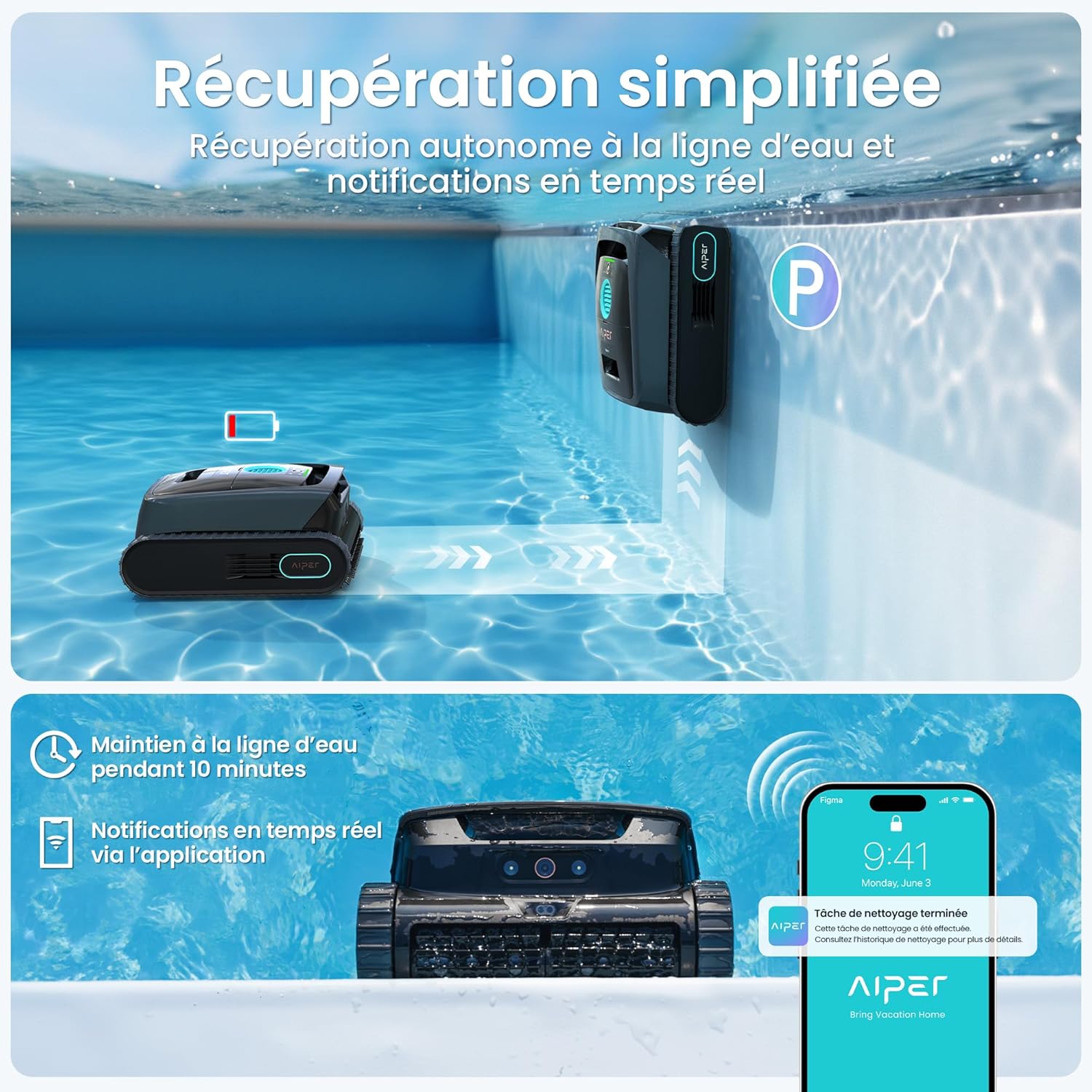
Figure 2: Placing the Scuba V3 on its wireless charging station.
4.2 Усталёўка і спалучэнне праграм
Download the AIPER app from your smartphone's app store (iOS or Android). Follow the in-app instructions to pair your Scuba V3. This enables advanced features like Cognitive AI Navium mode and scheduled cleanings.
5. Інструкцыя па эксплуатацыі
5.1 Размяшчэнне пыласоса ў басейне
Gently lower the Scuba V3 into the pool. Ensure it sinks to the bottom. The cleaner will automatically activate once submerged.

Figure 3: Scuba V3 in operation, detecting debris with AI vision.
5.2 Рэжымы ачысткі
The Scuba V3 offers various cleaning modes, accessible via the AIPER app:
- Стандартная ўборка: For general pool cleaning, covering floor and walls.
- Cognitive AI Navium Mode: Plans weekly cleanings based on weather and pool conditions for 24/7 autonomy.
- Ачыстка плям: For targeted cleaning of specific areas.
- Wall-only Cleaning: Focuses on scrubbing pool walls and waterline.

Figure 4: Cognitive AI Navium mode for automated cleaning schedules.
5.3 Дастанне пыласоса
Upon completion of a cleaning cycle or when the battery is low, the Scuba V3 will automatically return to the waterline. You will receive an alert via the app.
- Gently pull the cleaner out of the water using its handle.
- Allow excess water to drain before placing it on the charging station or storing it.

Figure 5: Automatic waterline retrieval and app notification.
6. Тэхнічнае абслугоўванне
6.1 Ачыстка фільтруючага кошыка
Regularly clean the filter basket after each use to maintain optimal cleaning performance.
- Open the cleaner's top cover.
- Зніміце кошык фільтра.
- Empty debris from the basket.
- Rinse the basket thoroughly with a garden hose.
- If using the MicroMesh filter, carefully rinse it to remove fine particles.
- Устаўце чысты фільтр-кошык назад і шчыльна зачыніце вечка.

Figure 6: MicroMesh filtration system for capturing fine debris.
6.2 Абслугоўванне шчотак
Inspect the cleaning brushes periodically for wear and tear. Replace them if they become excessively worn to ensure effective scrubbing.

Figure 7: Dual brush system for deep cleaning.
6.3 Апрацоўка і захоўванне
The Scuba V3 is designed to be lightweight (8.2 kg) for easy handling. When not in use for extended periods, store the cleaner in a cool, dry place, away from direct sunlight. Ensure the battery is partially charged (around 50%) before storage.

Figure 8: The Scuba V3's lightweight design allows for easy one-handed handling.
7. Выпраўленне непаладак
| праблема | Магчымая прычына | Рашэнне |
|---|---|---|
| Ачышчальнік не ўключаецца. | Нізкі ўзровень зарада батарэі; выключэнне харчавання. | Charge the cleaner; ensure power switch is on. |
| Слабая эфектыўнасць уборкі. | Clogged filter basket; worn brushes. | Clean the filter basket; inspect and replace brushes if necessary. |
| Cleaner stuck or moving erratically. | Obstruction; low battery; pool shape complexity. | Remove obstructions; charge the cleaner; try a different cleaning mode or manual intervention for complex areas. |
| Праблемы з падключэннем да праграмы. | Bluetooth/Wi-Fi interference; app not updated. | Ensure cleaner is within range; restart app/device; update app to latest version. |
For further assistance, refer to the LED indicator lights on the device for error codes or contact customer support.

Figure 9: Smart LED indicator lights for status and troubleshooting.
8. Тэхнічныя характарыстыкі
| Асаблівасць | Дэталь |
|---|---|
| мадэль | Scuba V3 (PRN31-FR) |
| Памеры (Д х Ш х У) | 44.4 х 38 х 21.8 см |
| Вага | 8.2 кг |
| Тып батарэі | Літый-іённы (у камплекце) |
| Крыніца харчавання | DC |
| Тонкасць фільтра | 3 µm (MicroMesh) |
| Максімальная плошча басейна | Да 200 м² |
| Час зарадкі | Прыбл. 4 гадзіны |
| Час выканання | Да 180 хвілін (3 гадзін) |
9. Гарантыя і падтрымка
The AIPER Scuba V3 comes with a Гарантыя 2 год. For any product inquiries, technical support, or warranty claims, please contact AIPER customer service.
- Сусветная падтрымка: AIPER offers 24/7 support through its network of 20 global service centers.
- Кантактная інфармацыя: Refer to the AIPER official webсайт або кантактную інфармацыю, указаную на ўпакоўцы прадукту, каб атрымаць найбольш актуальную інфармацыю аб падтрымцы.

Figure 10: TÜV certified data privacy ensures local processing of all images.