
1. Уводзіны
This manual provides detailed instructions for the setup, operation, maintenance, and troubleshooting of your GMKtec G3 Pro Mini PC. Please read this guide thoroughly before using your device to ensure optimal performance and longevity.
The GMKtec G3 Pro is a compact desktop computer designed for various applications, including office work, business, multimedia, and online learning. It features an Intel Core i3-10110U processor, 16GB DDR4 RAM, and a 512GB PCIe M.2 SSD, offering efficient performance in a small form factor.
2. Што ў скрынцы
Праверце наяўнасць усіх прадметаў у камплекце:
- GMKtec Nucbox G3 Pro Mini PC (16GB RAM, 512GB SSD)
- Кабель HDMI
- Адаптар сілкавання
- Кіраўніцтва карыстальніка
- Мацаванне VESA з дапамогай шруб

3. Прадукт скончыўсяview
The GMKtec G3 Pro Mini PC is designed for compact and efficient computing. It features a robust set of ports and internal components to support various tasks.
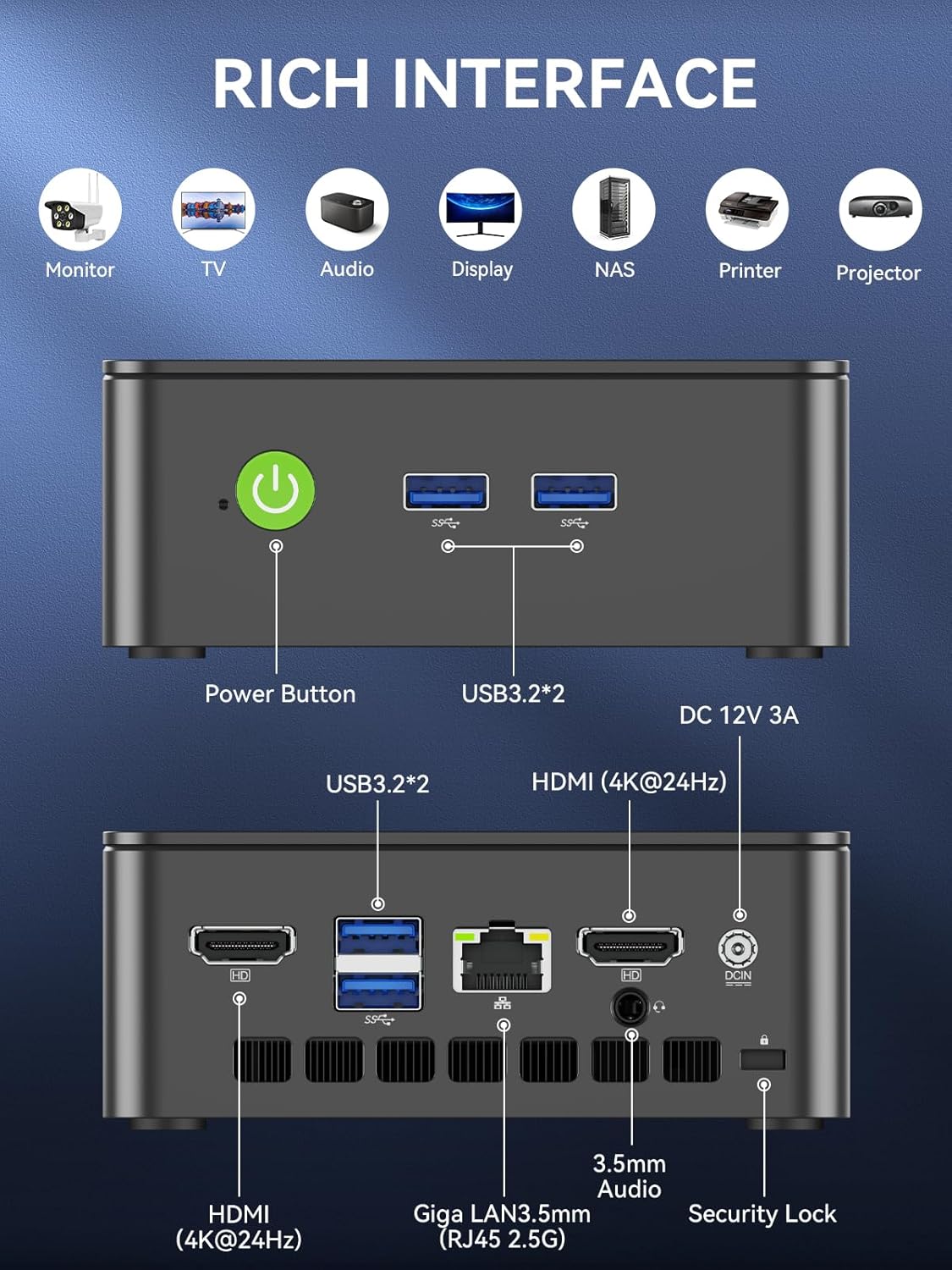
Пярэдняя панэль
- Кнопка харчавання: Каб уключыць/выключыць прыладу.
- 2 раздымы USB 3.2: Для падключэння перыферыйных прылад, такіх як клавіятуры, мышы або знешнія носьбіты інфармацыі.
Задняя панэль
- HDMI (4K@60Hz) x 2: For connecting to displays, supporting dual 4K output.
- 2 раздымы USB 3.2: Дадатковыя парты для перыферыйных прылад.
- 3.5 мм аўдыяраз'ём: Для падлучэння навушнікаў або знешніх дынамікаў.
- Giga LAN (RJ45 2.5GbE): Для падключэння да правадной сеткі.
- DC IN: Порт ўводу харчавання.
- Слот для замка бяспекі: For securing the device to a desk.
Унутраныя кампаненты
- Dual DDR4 RAM Slots: Supports up to 64GB RAM.
- M.2 2280 PCIe Gen3*4 Slot: For NVMe SSDs, supporting up to 8TB.
- M.2 2242 SATA3.0 Slot: For SATA SSDs, supporting up to 1TB.
- Вентылятар астуджэння і вентыляцыйныя адтуліны: Integrated cooling system to maintain optimal operating temperatures.

4. Кіраўніцтва па наладцы
Выканайце наступныя дзеянні для першапачатковай налады:
- Падключэнне перыферыйных прылад: Connect your keyboard, mouse, and any other necessary USB devices to the available USB 3.2 ports.
- Падключэнне дысплея: Use an HDMI cable to connect your monitor(s) to the HDMI ports on the rear panel. The device supports dual 4K@60Hz displays.
- Падключыце харчаванне: Plug the power adapter into the DC IN port on the mini PC, then plug the adapter into a power outlet.
- Уключэнне: Націсніце кнопку харчавання на пярэдняй панэлі, каб уключыць міні-ПК.
- Initial Operating System Setup: Выконвайце інструкцыі на экране, каб завяршыць наладу Windows 11 Pro.
- Падключэнне да сеткі: For faster setup, avoid connecting to a wired LAN initially. Connecting LAN might trigger long updates, delaying desktop access. Connect to Wi-Fi 6 or connect to the 2.5GbE LAN port after initial setup is complete.

5. Інструкцыя па эксплуатацыі
Уключэнне/выключэнне харчавання
- Каб уключыць: Націсніце кнопку харчавання адзін раз.
- Каб выключыць: У аперацыйнай сістэме абярыце «Выключыць сістэму». Акрамя таго, для прымусовага выключэння націсніце і ўтрымлівайце кнопку харчавання на працягу 5 секунд (выкарыстоўвайце толькі пры неабходнасці).
BIOS Settings and Performance Modes
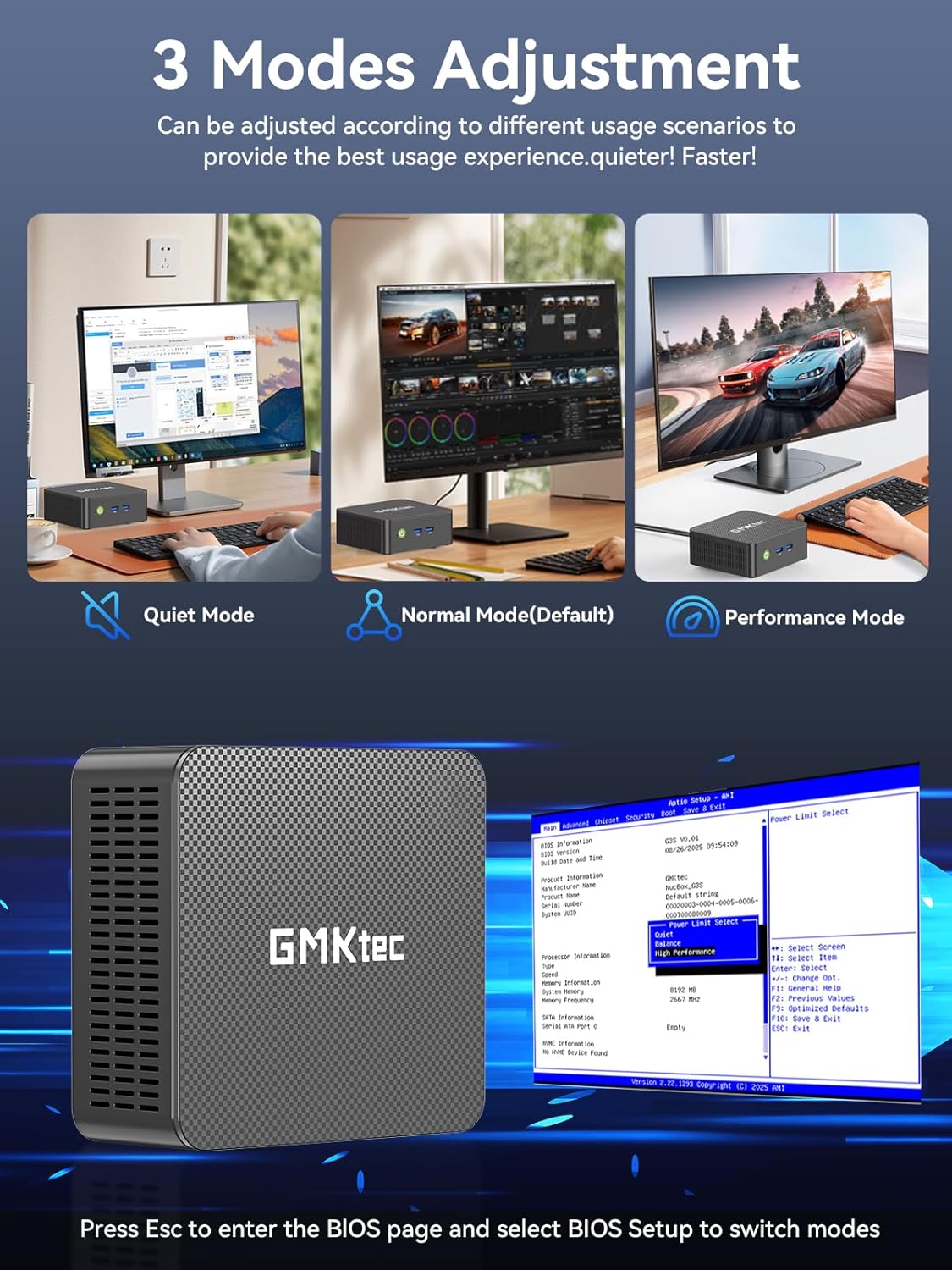
The GMKtec G3 Pro supports different performance modes that can be adjusted via the BIOS settings to optimize for quiet operation, normal use, or maximum performance.
- Доступ да BIOS: Press the 'Esc' key repeatedly during startup to enter the BIOS page.
- Рэжымы налады: Navigate to the BIOS Setup and select your desired mode (Quiet Mode, Normal Mode, Performance Mode) based on your usage scenario.
6. Пашырэнне сховішча
The GMKtec G3 Pro offers flexible storage expansion options:
- M.2 2280 NVMe PCIe Slot: Supports high-speed NVMe SSDs up to 8TB for primary storage or additional high-performance storage.
- M.2 2242 SATA Slot: Supports SATA SSDs up to 1TB for additional storage capacity.
To install or upgrade storage, refer to the detailed instructions in the full user manual or consult a qualified technician.
7. Сувязь
The Mini PC provides comprehensive connectivity options:
- Wi-Fi 6 (802.11ax): Offers high-speed wireless internet access up to 600Mbps.
- Bluetooth 5.2: For connecting wireless devices such as keyboards, mice, and headphones.
- 2.5GbE Ethernet (RJ45): Provides ultra-fast wired network speeds, up to 2.5 times faster than standard Gigabit Ethernet.

8. Налада двух дысплеяў
The GMKtec G3 Pro supports connecting two 4K@60Hz displays simultaneously via its two HDMI 2.0 ports. This allows for an extended desktop experience, enhancing productivity for multitasking, content creation, or entertainment.
Simply connect two monitors using HDMI cables to the respective ports on the rear of the mini PC. The operating system will automatically detect the displays, and you can configure their arrangement and resolution through the display settings.

9. Сістэма астуджэння
The GMKtec G3 Pro is equipped with a smart quiet cooling fan and strategically placed cooling vents to ensure efficient heat dissipation. This design allows for ultra-quiet operation, typically below 38dB, even under load, providing a comfortable working environment.

10. Тэхнічныя характарыстыкі
| Асаблівасць | Спецыфікацыя |
|---|---|
| Марка | GMKtec |
| Назва мадэлі | G3Pro |
| Аперацыйная сістэма | Windows 11 Pro |
| Мадэль працэсара | Intel Core i3-10110U |
| Хуткасць працэсара | Да 4.1 Ггц |
| Графічны супрацэсар | Intel UHD Graphics 1200MHz |
| RAM Memory Installed | 16 GB DDR4 (Dual Channel) |
| Максімальны памер аператыўнай памяці | 64 ГБ |
| Апісанне жорсткага дыска | 512 GB M.2 2280 PCIe Gen3*2 + 1*M.2 2242 SATA |
| Тэхналогія падлучэння | Bluetooth 5.2, WiFi 6, Ethernet (2.5GbE), HDMI (4K@60Hz) |
| Відэавыхад | HDMI х 2 |
| Максімальнае дазвол дысплея | 4096 × 2160 пікселяў |
| Усяго партоў USB | 4 (USB 3.2) |
| Энергаспажыванне | 6 Вт (тыповая) |
| Асаблівасці | Абуджэнне па лакальнай сетцы, загрузка PXE, абуджэнне RTC, аўтаматычнае ўключэнне |
11. Тэхнічнае абслугоўванне
To ensure the longevity and optimal performance of your GMKtec G3 Pro Mini PC, consider the following maintenance tips:
- Захоўваць у чысціні: Regularly clean the exterior of the mini PC with a soft, dry cloth. Ensure cooling vents are free from dust and obstructions.
- Абнаўленні праграмнага забеспячэння: Абнаўляйце аперацыйную сістэму і драйверы да апошніх версій для павышэння бяспекі і прадукцыйнасці.
- Правільнае выключэнне: Заўсёды правільна выключайце міні-ПК праз аперацыйную сістэму, каб прадухіліць пашкоджанне дадзеных.
- Умовы навакольнага асяроддзя: Выкарыстоўвайце міні-ПК у добра вентыляваным памяшканні, удалечыні ад прамых сонечных прамянёў, празмернага цяпла і вільгаці.
12. Выпраўленне непаладак
If you encounter issues with your GMKtec G3 Pro Mini PC, try the following basic troubleshooting steps:
- Няма харчавання: Пераканайцеся, што адаптар сілкавання надзейна падключаны як да міні-ПК, так і да спраўнай разеткі. Пры неабходнасці паспрабуйце іншую разетку.
- Няма дысплея: Verify that the HDMI cables are securely connected to both the mini PC and the monitor(s). Ensure monitors are powered on and set to the correct input source.
- Няма падключэння да Інтэрнэту: For Wi-Fi, check your router and network settings. For wired Ethernet, ensure the cable is properly connected and the network adapter is enabled in the operating system.
- Нізкая прадукцыйнасць: Close unnecessary applications, check for background processes, and ensure sufficient free storage space. Consider adjusting performance modes in BIOS.
- Праблемы з перыферыйнымі прыладамі: Try connecting USB devices to different ports. Ensure drivers are installed correctly for specialized peripherals.
Для больш складаных праблем звярніцеся да раздзела па ліквідацыі непаладак у поўным кіраўніцтве карыстальніка або звярніцеся ў службу падтрымкі кліентаў.
13. Гарантыя і падтрымка
Your GMKtec G3 Pro Mini PC comes with a 1-гадовая абмежаваная гарантыя з даты пакупкі, пакрываючы дэфекты, выкліканыя канструкцыяй і вырабам.
For any questions, technical assistance, or warranty claims, please utilize the following support channels:
- Падтрымка па электроннай пошце: Contact the professional after-sales team at support@gmktec.com.
- Інтэрнэт-падтрымка: Visit the GMKtec store on Amazon or the official GMKtec webсайт з часта задаванымі пытаннямі і дадатковымі рэсурсамі.
- Кругласутачная падтрымка кліентаў: Dedicated support is available to assist you with your needs.