
Уводзіны
Thank you for choosing the Yaheetech Corner Desk with Drawers and USB Ports. This instruction manual provides essential information for the safe assembly, operation, and maintenance of your new desk. Please read this manual thoroughly before beginning assembly and keep it for future reference.
Інфармацыя па бяспецы
Важныя меры бяспекі:
- Заўсёды збірайце стол на мяккай, чыстай паверхні, каб пазбегнуць драпін.
- Перад зборкай пераканайцеся, што ўсе кампаненты ёсць у наяўнасці і не пашкоджаны.
- Не перацягвайце шрубы падчас зборкі, бо гэта можа пашкодзіць матэрыял.
- Although the desk is robust, it is recommended to place it away from walls or high-traffic areas to ensure stability.
- No anchoring hardware or instructions are provided for wall mounting. If you choose to anchor the desk, consult a professional.
- Падчас зборкі трымайце дробныя дэталі далей ад дзяцей, каб пазбегнуць небяспекі ўдушша.
- Do not exceed the weight capacity of the desk or its shelves.
Ўстаноўка і зборка
Your Yaheetech Corner Desk is designed for straightforward assembly. A detailed assembly instruction manual is included in the packaging. Please follow the step-by-step diagrams and instructions provided in that manual for proper construction.
Асноўныя характарыстыкі зборкі:
- Reversible Layout: The side shelf unit and drawer unit can be configured on either the left or right side of the main desk, allowing you to adapt the desk to your room layout and preferences. Refer to the assembly manual for specific steps on reversing the layout.
- Integrated Power Hub: The desk includes a built-in power strip with AC outlets and USB ports. Ensure the power cable is routed safely and connected to a suitable power source after assembly.
- Падтрымка манітора: The elevated monitor stand is integrated into the desk design to promote ergonomic viewінж.
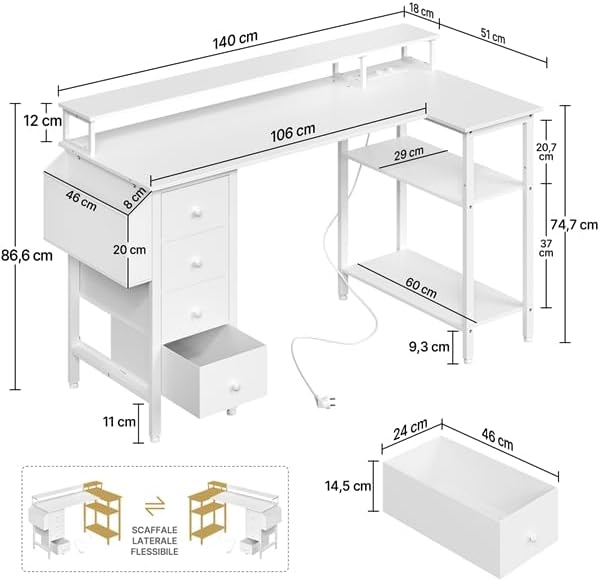
Figure 1: Desk Dimensions. This diagram illustrates the overall dimensions of the desk (140 x 68 x 86.5 cm) and the measurements of its various components, including the main desktop, shelves, and drawers.

Figure 2: Reversible Layout. This image demonstrates the flexibility of the desk's design, allowing users to choose whether the storage shelves and drawers are positioned on the left or right side during assembly.
Інструкцыя па эксплуатацыі
This section details how to effectively use the features of your Yaheetech Corner Desk.
Integrated Power and USB Ports
The desk is equipped with a convenient power hub to keep your devices charged and organized.
- Разеткі пераменнага току: Two 125V/12A AC power outlets are integrated into the desktop. Use these for powering laptops, monitors, or other electronic devices.
- Парты USB: Two 5V/2A USB ports are available for charging smartphones, tablets, or other USB-powered accessories.
- Сілавы кабель: The integrated power cable is 2 meters long. Ensure it is fully extended and connected to a grounded wall outlet.
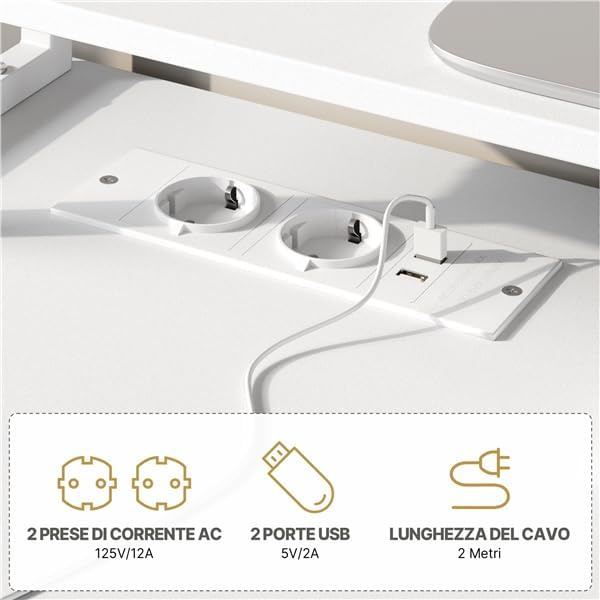
Figure 3: Integrated Power Hub. This image highlights the two AC power outlets and two USB charging ports built directly into the desk surface, providing convenient access to power for electronic devices.
Рашэнні для захоўвання дадзеных
Utilize the various storage options to maintain an organized workspace.
- высоўныя скрыні: Four spacious drawers provide enclosed storage for office supplies, documents, and personal items.
- Адкрытыя паліцы: The two-level side shelf offers open storage for books, decorative items, or computer towers.
- Fabric Pocket: A convenient fabric pocket is included for quick access to magazines, notebooks, or other frequently used items.

Figure 4: Smart Storage Solutions. This image displays the desk's diverse storage capabilities, including four pull-out drawers, open shelving for electronics or decor, and a practical side fabric pocket for easy access items.
Ergonomic Monitor Support
The elevated monitor stand helps promote a comfortable and ergonomic posture.
- Place your monitor on the elevated stand to position the screen at eye level, reducing neck and eye strain.
- The space beneath the monitor stand can be used for storing keyboards, mice, or other accessories when not in use.
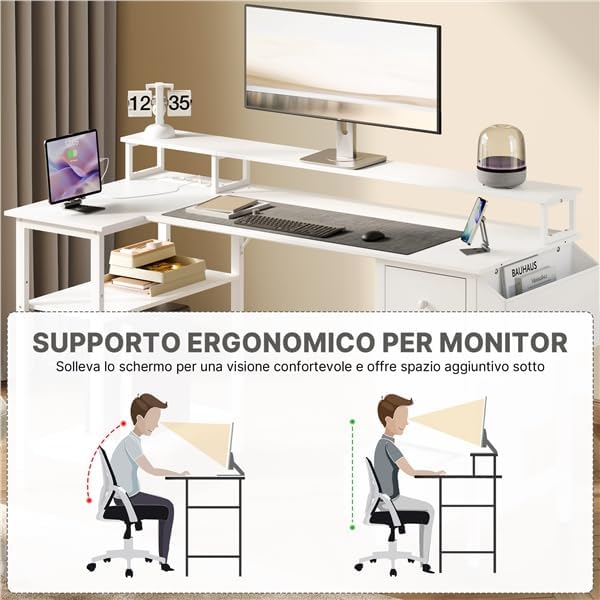
Figure 5: Ergonomic Monitor Support. This diagram demonstrates how the elevated monitor stand helps achieve an ergonomic viewing angle, promoting better posture and reducing strain on the neck and eyes during prolonged use.
Рэгуляваныя ножкі
The desk features adjustable feet to ensure stability on uneven surfaces and protect your flooring.
- Rotate the adjustable feet at the bottom of the desk legs to level the desk and prevent wobbling.
- The non-slip design also helps prevent scratches on your floor.

Figure 6: Adjustable Anti-Slip Feet. This image shows a detailed view of the desk's adjustable feet, which can be rotated to stabilize the desk on uneven floors and protect surfaces from scratches.
Тэхнічнае абслугоўванне
To ensure the longevity and appearance of your Yaheetech Corner Desk, follow these simple maintenance guidelines:
- Уборка: Wipe the desk surfaces with a dry cloth. For stubborn marks, use a slightly damp тканінай з мяккім неабразіўным ачышчальнікам, а затым неадкладна высушыце.
- Пазбягайце вільгаці: Do not allow liquids to sit on the surface for extended periods, especially near the power outlets.
- Праверце злучэнні: Перыядычна правярайце ўсе шрубы і крапежныя элементы, каб пераканацца, што яны зацягнуты. Пры неабходнасці падцягвайце.
- Абараніць ад спёкі: Не кладзіце гарачыя прадметы непасрэдна на паверхню стала без абароны.
Ліквідацыю непаладак
Калі ў вас узніклі праблемы са сталом, звярніцеся да наступных распаўсюджаных рашэнняў:
- Стол хісткі: Ensure all assembly screws are tightened. Adjust the leveling feet at the bottom of the desk legs to compensate for uneven flooring.
- Не працуюць разеткі/USB-парты: Verify that the desk's main power cable is securely plugged into a functional wall outlet. Check if the wall outlet itself is receiving power. Avoid overloading the outlets.
- Drawers Stick or Don't Close Properly: Check for any obstructions inside the drawer or along the slides. Ensure the drawer slides are correctly aligned and installed according to the assembly instructions.
- Адсутныя часткі: Калі падчас зборкі вы выявіце, што якія-небудзь дэталі адсутнічаюць, неадкладна звярніцеся ў службу падтрымкі кліентаў.
Тэхнічныя характарыстыкі
| Нумар мадэлі | YA4gqe0001001 |
| Марка | Yaheetech |
| Габарытныя памеры (Д х Ш х У) | 140 х 68 х 86.5 см (55.1 х 26.8 х 34.1 цалі) |
| Вага | 22 кг (48.5 фунтаў) |
| Матэрыял | Інжынерная драўніна, метал |
| Колер | Белы |
| Розеткі пераменнага току | 2 (125 В/12 А) |
| Парты USB | 2 (5 В/2 А) |
| Даўжыня кабеля сілкавання | 2 метраў (6.56 футы) |
| Патрабуецца зборка | так |
Інфармацыя аб гарантыі
Specific warranty details for the Yaheetech Corner Desk are typically provided with your purchase documentation or on the product packaging. Please refer to those materials for information regarding warranty coverage, terms, and conditions. If you cannot locate this information, please contact the retailer or Yaheetech customer support.
Падтрымка кліентаў
For further assistance, missing parts, or inquiries regarding your Yaheetech Corner Desk, please contact:
- Ваш прадавец: The store or online platform where you purchased the product.
- Yaheetech Customer Service: Refer to the official Yaheetech webна сайце або ўпакоўцы прадукту для атрымання кантактнай інфармацыі.
Please have your model number (YA4gqe0001001) and purchase date ready when contacting support.