
Уводзіны
This manual provides detailed instructions for the operation and maintenance of your PUSOKEI MP3 Player. Please read this manual thoroughly before using the device to ensure proper functionality and to maximize your user experience. Keep this manual for future reference.
Змест пакета
Праверце, ці ўсе пералічаныя ніжэй прадметы ўваходзяць у вашу ўпакоўку:
- 1 x PUSOKEI MP3 Player
- 1 х USB-кабель
- 1 пара навушнікаў
- 1 х Ахоўны чахол
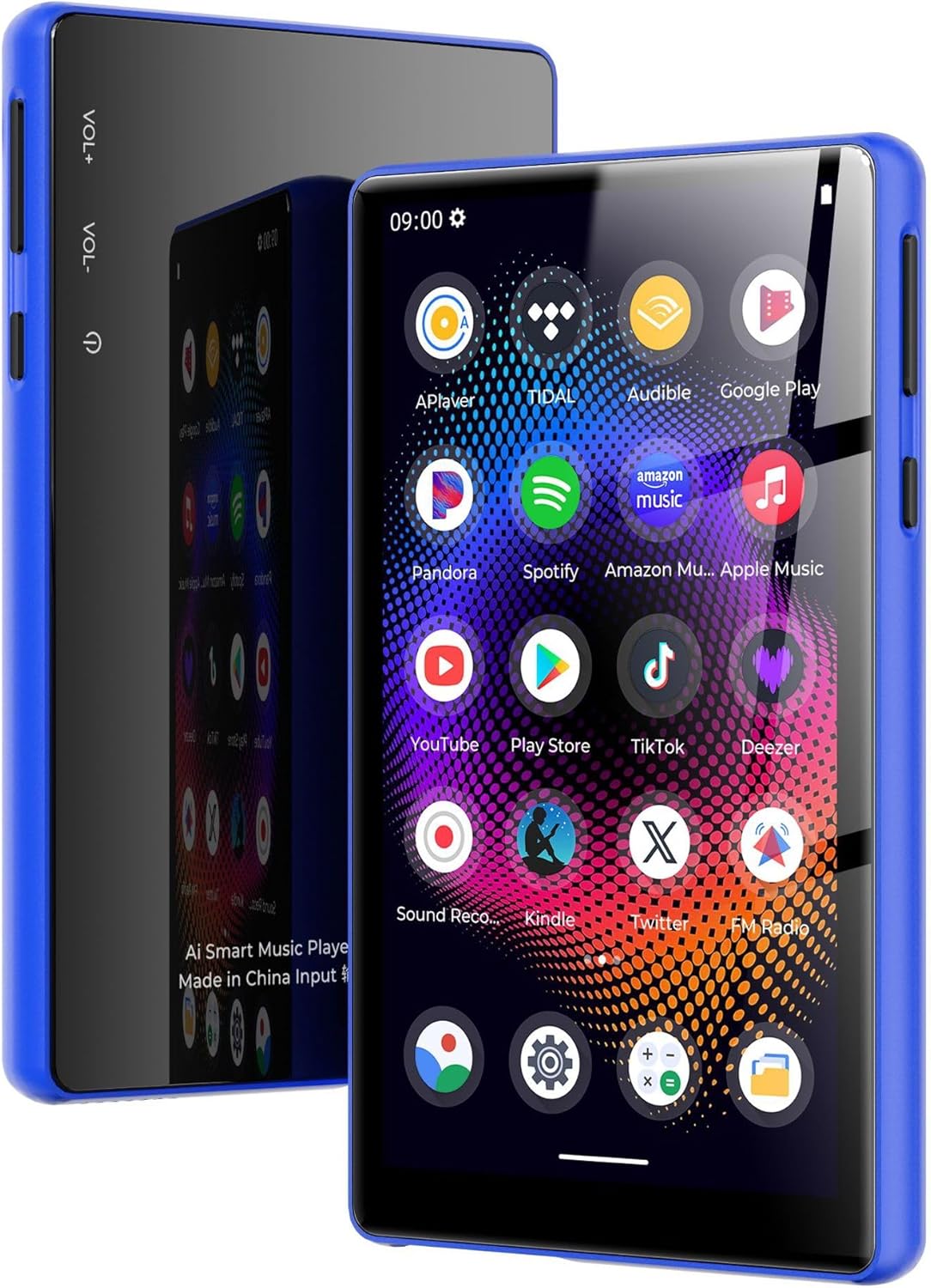
Image: PUSOKEI MP3 Player with its included accessories: USB cable, headphones, and protective cover.
Прадукт скончаныview
The PUSOKEI MP3 Player features a 5.0-inch full touchscreen, an 8-core processor, 4GB RAM, and 64GB internal storage, expandable up to 256GB with a microSD card. It supports Bluetooth 5.0 and dual-band Wi-Fi (2.4G/5G) for versatile connectivity.

Image: The PUSOKEI MP3 Player shown in different lifestyle settings, highlighting its portability and versatility for music and entertainment.

Выява: Падрабязны view of the device's 5-inch full touchscreen, emphasizing its high-definition display for an immersive viewвопыту.
Настройка
1. Зарадка прылады
Before first use, fully charge the MP3 player. Connect the provided USB cable to the device's charging port and the other end to a USB power adapter (not included) or a computer's USB port. The charging indicator will show the charging status.

Image: An illustration depicting the 2500mAh battery capacity and estimated usage times for music and video playback, as well as standby time.
2. Уключэнне/выключэнне харчавання
- Каб уключыць: Press and hold the Power button (usually located on the side) until the screen lights up.
- Каб выключыць: Press and hold the Power button, then select "Power Off" from the options that appear on the screen.
- Каб перазапусціць: Націсніце і ўтрымлівайце кнопку харчавання, затым абярыце з опцый «Перазагрузка».
3. Пачатковая канфігурацыя
Пасля першага ўключэння выканайце падказкі на экране, каб наладзіць прыладу:
- Выберыце жаданую мову.
- Connect to a Wi-Fi network (if available) to access online features and app downloads.
- Усталюйце дату і час.
4. Перадача Files
Каб перадаць музыку, відэа ці іншыя files from your computer to the MP3 player:
- Падключыце MP3-плэер да кампутара з дапамогай кабеля USB, які ўваходзіць у камплект.
- On your computer, the device should appear as a removable storage drive.
- Open the device's storage and drag-and-drop your desired files into the appropriate folders (e.g., "Music", "Videos").
- Перад адключэннем USB-кабеля бяспечна выміце прыладу з кампутара.
5. Inserting/Removing a MicroSD Card
The device supports microSD cards up to 256GB for expanded storage.
- Каб уставіць: Locate the microSD card slot. Gently push the card into the slot until it clicks into place.
- Каб выдаліць: Gently push the inserted microSD card until it springs out, then pull it out.
Інструкцыя па эксплуатацыі
1. Базавая навігацыя
The device operates using a full touchscreen interface. Swipe left/right/up/down to navigate between screens and menus. Tap icons to open applications or select options.
2. Прайграванне музыкі
Open the "Music" application. You can browse your music by artist, album, song, or playlist. The player supports various audio formats including WAV, MP3, MP2, AAC, APE, FLAC, WMA.

Image: The MP3 player screen showing a vibrant music playback interface, indicating support for various audio formats and online/offline listening.
3. Прайграванне відэа
Access the "Video" application to play stored video files. The device supports 720p or 1080p resolution and formats such as RM, AVI, 3GP, FLV, MP4, DAT, MKV, MPG, MOV, TS without conversion.

Image: The MP3 player screen displaying a high-definition video of an astronaut, demonstrating its 1080P full touchscreen capabilities.
4. Злучэнне Bluetooth
To connect to Bluetooth headphones, speakers, or car audio systems:
- Перайдзіце ў «Налады» > «Bluetooth».
- Уключыце Bluetooth.
- Пераканайцеся, што ваш аксэсуар Bluetooth знаходзіцца ў рэжыме спалучэння.
- Выберыце аксэсуар са спісу даступных прылад для спалучэння.
The device features Bluetooth 5.0 with bidirectional transmit support.
5. Злучэнне Wi-Fi
To connect to a Wi-Fi network for online services:
- Go to "Settings" > "Network & Internet" > "Wi-Fi".
- Уключыце Wi-Fi.
- Выберыце патрэбную сетку са спісу і ўвядзіце пароль, калі будзе прапанавана.
The device supports dual-band Wi-Fi (2.4GHz and 5GHz).

Image: The MP3 player screen surrounded by icons representing wireless connectivity options like Bluetooth headphones, car audio, and Wi-Fi, emphasizing its wide connectivity.
6. FM-радыё
To use the FM Radio function:
- Connect the headphones (they act as an antenna).
- Open the "FM Radio" application.
- Scan for available stations within the 87MHz-108MHz frequency range.

Image: The MP3 player screen showing the FM Radio interface tuned to 99.1, with visual representations of sound waves.
7. Чыталка электронных кніг
The device includes an e-book reader application. Supported formats include PDF, TXT, EPUB, FB2. Transfer your e-book files to the device and open them through the e-book app.
8. Using Pre-installed Applications
The MP3 player comes with pre-installed applications such as Spotify and Audible. Ensure you are connected to Wi-Fi to use these online services. You may need to log in to your existing accounts or create new ones.
Тэхнічнае абслугоўванне
- Уборка: Для ачысткі экрана і корпуса прылады выкарыстоўвайце мяккую сухую тканіну. Пазбягайце выкарыстання агрэсіўных хімікатаў або абразіўных матэрыялаў.
- Сыход за батарэяй: To prolong battery life, avoid fully discharging the battery frequently. Charge the device regularly and store it in a cool, dry place when not in use for extended periods.
- Абнаўленні праграмнага забеспячэння: Перыядычна правярайце наяўнасць абнаўленняў сістэмы ў наладах прылады, каб забяспечыць аптымальную прадукцыйнасць і доступ да найноўшых функцый.
Ліквідацыю непаладак
If you encounter issues with your PUSOKEI MP3 Player, refer to the following common solutions:
- Прылада не ўключаецца: Пераканайцеся, што акумулятар зараджаны. Падключыце прыладу да зараднай прылады як мінімум на 30 хвілін, перш чым спрабаваць зноў уключыць яе.
- Экран не рэагуе: Паспрабуйце перазагрузіць прыладу, утрымліваючы кнопку харчавання. Калі прылада не рэагуе, дайце батарэі цалкам разрадзіцца, а затым зарадзіце яе.
- Немагчыма падключыцца да Wi-Fi/Bluetooth: Ensure Wi-Fi/Bluetooth is enabled in settings. Check if other devices can connect to the network/accessory. Restart the MP3 player and the router/Bluetooth accessory.
- Няма гуку ў навушніках: Check if headphones are properly plugged in. Ensure volume is not muted or too low. Test with different headphones if possible.
- Files not appearing: Забяспечыць files are transferred to the correct folders. Check file фарматы для сумяшчальнасці.
- Device is slow or freezing: Close unnecessary background applications. Clear cache for frequently used apps. Consider a factory reset if issues persist (Note: A factory reset will erase all data on the device. Back up important files першы.).
Тэхнічныя характарыстыкі
| Асаблівасць | Спецыфікацыя |
|---|---|
| Марка | ПУСОКЕЙ |
| Назва мадэлі | PUSOKEI23zwimn9ak-14 |
| Аперацыйная сістэма | Android 11 |
| Галоўны чып | МТК МТ6762 |
| Памяць (RAM) | 4 ГБ |
| Унутраная памяць | 64GB (with 128GB pre-installed memory card) |
| Сховішча з магчымасцю пашырэння | Падтрымлівае карту MicroSD да 256 ГБ (не ўваходзіць у камплект) |
| Памер экрана | 5.0 цаляў |
| Дазвол экрана | 720x1280 (supports 720p/1080p video playback) |
| акумулятар | Літый-іённы акумулятар ёмістасцю 2500 мАг |
| Версія Bluetooth | 5.0 (bidirectional transmit) |
| Wi-Fi | 2.4G, 5G |
| FM Output Frequency | 87MHz-108MHz |
| Аўдыё фарматы | WAV, MP3, MP2, AAC, APE, FLAC, WMA |
| Відэа фарматы | RM, AVI, 3GP, FLV, MP4, DAT, MKV, MPG, MOV, TS (third-party player) |
| Фарматы малюнкаў | JPG, BMP, GIF, PNG |
| Фарматы электронных кніг | PDF, TXT, EPUB, FB2 |
Гарантыя і падтрымка
This PUSOKEI MP3 Player is covered by a manufacturer's warranty for 90 days from the date of purchase.
For technical support, warranty claims, or further assistance, please contact PUSOKEI customer service through the retailer's platform or the official PUSOKEI website. Please have your model number (PUSOKEI23zwimn9ak-14) and proof of purchase ready when contacting support.