
1. Уводзіны
The YUNZII C98 is a 98-key wireless mechanical keyboard designed for versatility and a premium typing experience. It features a compact 96% layout, tri-mode connectivity (Bluetooth 5.0, 2.4GHz wireless, and USB-C wired), a gasket-mounted structure for enhanced acoustics, and hot-swappable switches for easy customization. The keyboard also includes vibrant RGB backlighting and durable PBT MOA keycaps. This manual provides detailed instructions for setting up, operating, and maintaining your YUNZII C98 keyboard.
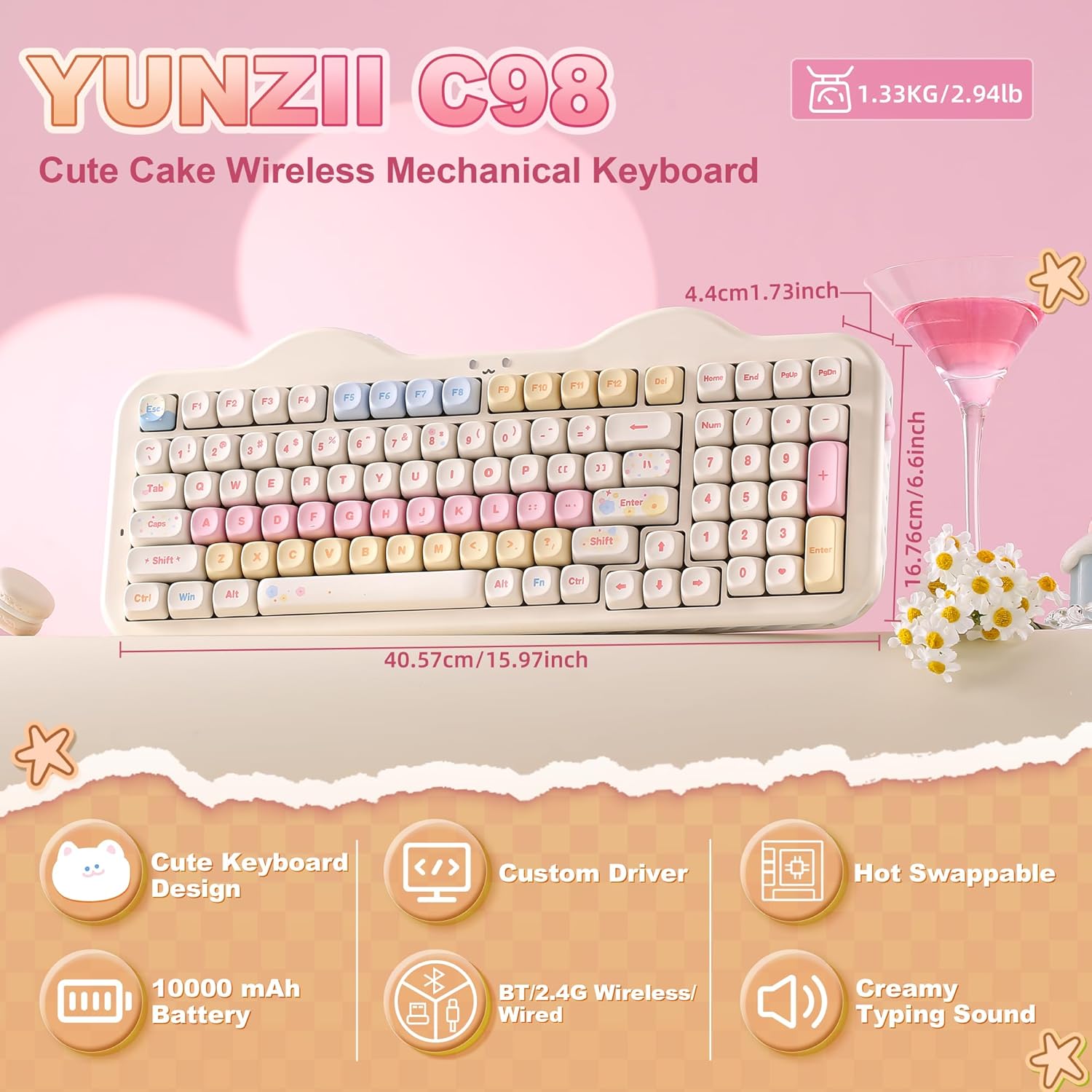
Image: YUNZII C98 Wireless Mechanical Keyboard showcasing its compact 96% layout and overall design with dimensions.
Відэа: Оверview of the YUNZII C98 Wireless Mechanical Keyboard, highlighting its design and features.
2. Змесціва ўпакоўкі
Калі ласка, пераканайцеся, што ў вашай упакоўцы ёсць усе наступныя прадметы:
- YUNZII C98 Keyboard
- Ключ 2.4G
- Дадатковыя клавішы і пераключальнікі
- Здымальнік клавішнай шапкі
- Кабель USB (тып C)
- Кіраўніцтва карыстальніка
- Дыванок для мышы
- Віншавальная паштоўка
- Пылаахоўны чахол
- Cute Cat Stickers

Image: A visual representation of all items included in the YUNZII C98 keyboard package.
3. Налада і падключэнне
The YUNZII C98 keyboard supports three connection modes: Bluetooth 5.0, 2.4GHz wireless, and USB-C wired. It is compatible with PC, Mac, iOS, and Android systems.
3.1. Правадны рэжым (USB-C)
Connect the provided USB-C cable from the keyboard to your computer's USB port. The keyboard will automatically switch to wired mode and begin charging.
3.2. Бесправадны рэжым 2.4 ГГц
- Locate the 2.4G dongle, typically stored in a dedicated slot on the keyboard.
- Toggle the mode switch on the keyboard to the 2.4G position.
- Plug the 2.4G dongle into an available USB port on your device.
- The keyboard will automatically pair. RGB backlights will restore to normal mode upon successful pairing.

Image: Step-by-step guide for connecting the YUNZII C98 keyboard using 2.4G wireless mode.
3.3. Рэжым Bluetooth 5.0
The keyboard can connect to up to 3 Bluetooth devices.
- Toggle the mode switch on the keyboard to the Bluetooth (BT) position.
- Кароткі націск Fn + 1/2/3 to select a Bluetooth channel. The selected channel key will flash blue slowly, indicating pairing mode.
- On your device, search for Bluetooth devices and select "YUNZII C98 BT3.0" or "YUNZII C98 BT5.0" to pair.
- Upon successful pairing, the RGB backlights will return to normal mode.

Image: An illustration of the three connectivity modes: Bluetooth, 2.4GHz wireless, and USB-C wired.

Image: Step-by-step instructions for connecting the YUNZII C98 keyboard via Bluetooth.
3.4. Сумяшчальнасць сістэмы
To switch between Windows and macOS layouts:
- Для Windows: Націсніце fn + A
- For macOS: Press Fn + S

Image: The YUNZII C98 keyboard supporting various operating systems and devices, including PC, laptop, tablet, Switch, Xbox, PlayStation, and phone.
4. Інструкцыя па эксплуатацыі
4.1. Налада падсветкі RGB
The YUNZII C98 features 16.8 million RGB backlight colors and various effects. Use the following Fn key combinations to customize your lighting:
- Fn + Backspace: Падсвятленне ON/OFF
- Fn + Enter: Change Backlight Color
- Fn + \|: Change Backlight Effect
- Fn + ↑: Increase Brightness
- Fn + ↓: Decrease Brightness
- Fn + ←: Decrease Blinking Speed
- Fn + →: Increase Blinking Speed
Additionally, control the Smiley Light and Side Light:
- Fn + Паўза: Smiley Light ON/OFF
- Fn + Print: Change Smiley Light Effect
- Fn + правы Shift: Change Smiley Light Color
- Fn + Del: Side Light ON/OFF
- Fn + Галоўная: Change Side Light Effect
- Fn + Канец: Change Side Light Color
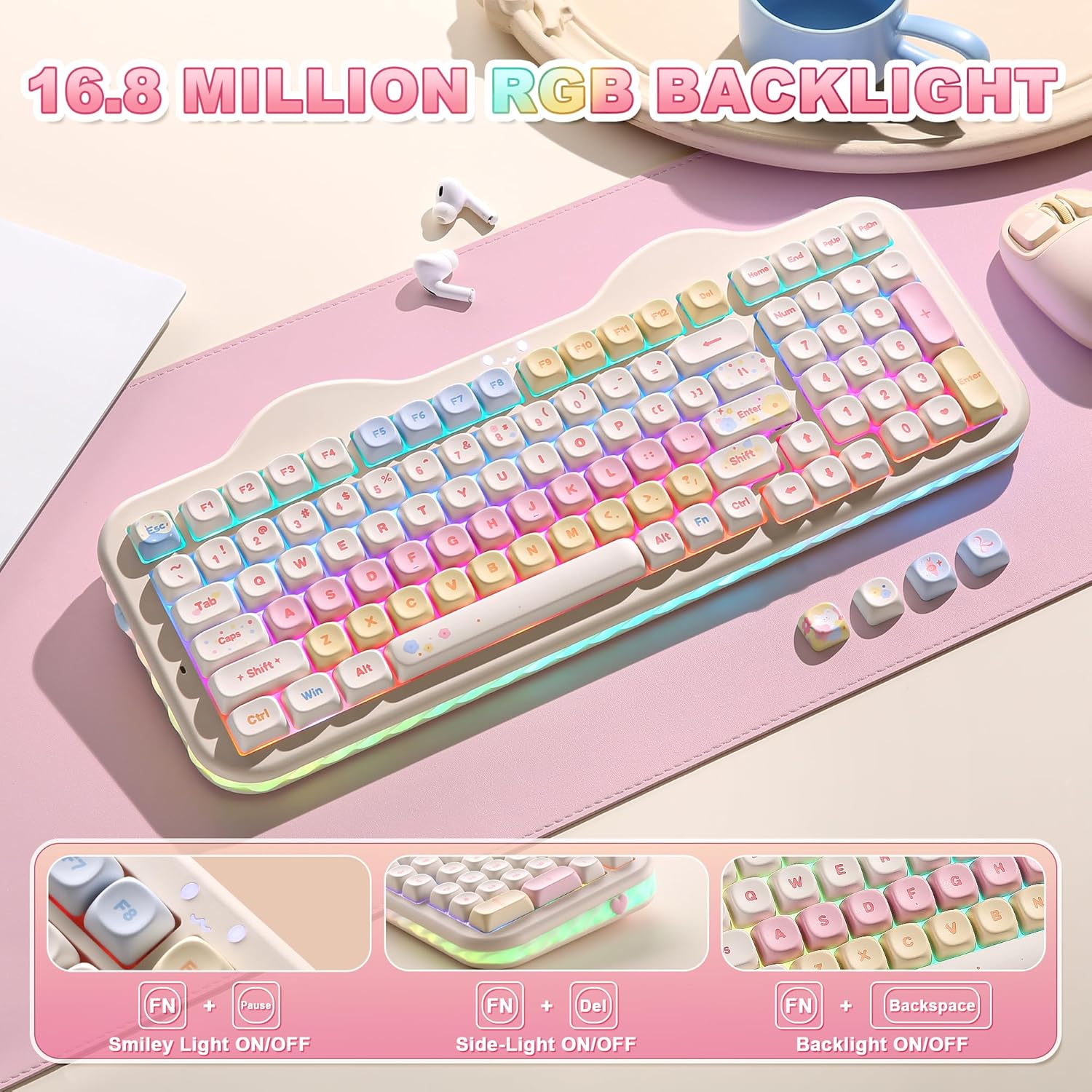
Image: The YUNZII C98 keyboard displaying various RGB backlight effects.

Image: Visual guide to RGB backlight control functions using Fn key combinations.

Image: Visual guide to Smiley Light and Side Light control functions using Fn key combinations.
Video: Demonstrates how to switch RGB lighting effects on a YUNZII keyboard (C75 model shown, similar functionality for C98).
4.2. Multimedia and System Functions
Выкарыстоўвайце Fn key in combination with the F-row keys for various functions:
- Windows (Fn + A) Functions:
- Fn+F1 = Computer
- Fn+F2 = Browser
- Fn+F3 = электронная пошта
- Fn+F4 = Калькулятар
- Fn+F5 = Player
- Fn+F6 = Стоп
- Fn+F7 = Previous Track
- Fn+F8 = Прайграванне/Паўза
- Fn+F9 = Next Track
- Fn+F10 = адключэнне гуку
- Fn+F11 = Volume Down
- Fn+F12 = Volume Up
- macOS (Fn + S) Functions:
- F1 = Screen Brightness Down
- F2 = Screen Brightness Up
- F3 = Цэнтр кіравання палётамі
- F4 = Панэль запуску
- F5 = No Function
- F6 = No Function
- F7 = Папярэдні трэк
- F8 = Прайграванне/Паўза
- F9 = наступны трэк
- F10 = Выключыць гук
- F11 = Volume Down
- F12 = Volume Up

Image: A comprehensive list of Fn key combinations for both Windows and macOS operating systems.
5. Пашыраныя магчымасці
5.1. Gasket Mount Structure
The YUNZII C98 features a premium gasket mount design, incorporating multiple sound-absorbing layers, stabilizers, and silicone padding. This construction effectively minimizes unwanted noise and rattle, providing a quiet, consistent, and exceptionally smooth typing experience with a creamy acoustic profile.

Выява: Выбухнула view diagram illustrating the multi-layer gasket mount structure of the YUNZII C98 keyboard.
Video: A sound test of the YUNZII C75 keyboard with Milk V2 switches, demonstrating the creamy typing sound (similar to C98).
5.2. Камутатары з магчымасцю гарачай замены
The C98 keyboard features a hot-swappable PCB, allowing you to easily change mechanical switches without soldering. It supports both 3-pin and 5-pin switches, offering flexibility for personalizing your typing feel and sound.

Выява: Крупны план view of the hot-swappable sockets and switches on the YUNZII C98 keyboard.
5.3. PBT MOA Keycaps
The keyboard comes with durable PBT MOA keycaps, known for their resistance to shine and wear, ensuring a long-lasting aesthetic and comfortable typing experience.

Image: Details of the comfortable PBT MOA keycaps and the 96% layout of the YUNZII C98 keyboard.
6. Кіраванне батарэяй
The YUNZII C98 is equipped with a large 10000mAh battery for extended use. It supports fast charging and features an auto-sleep function to conserve power.
- Ёмістасць батарэі: 10000 мАг
- Brightest Light Usage: Да 62 гадзін
- Backlight Off Usage: Да 34 дзён
- Аўтаматычны сон: Пасля 5 хвілін бяздзейнасці
- Час зарадкі: Прыкладна 19 гадзіны для поўнай зарадкі

Image: Visual information regarding the keyboard's 10000mAh battery capacity and usage times.

Image: Details on the fast charging capability and battery life indicators (low, charging, full).
7. Customization Software
The YUNZII C98 supports intuitive web-based software (compatible with Windows and Mac) for advanced customization. This software allows you to:
- Пераназначце ключы
- Assign macros
- Customize dynamic lighting profiles
Заўвага: The customization software and driver can only be used when the keyboard is connected in wired (USB-C) mode.

Image: An illustration of the custom web driver interface for key remapping, macro recording, and backlight customization.
8. Тэхнічнае абслугоўванне
To ensure the longevity and optimal performance of your YUNZII C98 keyboard, follow these maintenance guidelines:
- Чыстка клавіш: Выкарыстоўвайце прыкладзеную здымніцу для зняцця каўпачкоў клавіш. Працярыце іх мяккай тканінай.ampпрамыйце іх мяккім мылам і вадой. Перад тым, як зноў прымацаваць іх, пераканайцеся, што яны цалкам высахлі.
- Cleaning Keyboard Body: Выкарыстоўвайце мяккую сухую тканіну, каб працерці корпус клавіятуры. Для ўстойлівага бруду злёгкуamp можна выкарыстоўваць тканіну, але пазбягайце празмернай вільгаці.
- Прадухіленне пылу: Выкарыстоўвайце ўваходзіць у камплект ахоўны чахол, калі клавіятура не выкарыстоўваецца, каб прадухіліць назапашванне пылу і смецця.
- Пазбягайце вадкасці: Трымайце вадкасці далей ад клавіятуры, каб пазбегнуць пашкоджання ўнутраных кампанентаў.
- Асцярожна звяртайцеся: Пазбягайце падзення клавіятуры і моцных удараў.
9. Выпраўленне непаладак
If you encounter issues with your YUNZII C98 keyboard, try the following solutions:
- Клавіятура не адказвае:
- Пераканайцеся, што клавіятура зараджана.
- Check the connection mode switch (wired, 2.4G, Bluetooth) is set correctly.
- Для 2.4G пераканайцеся, што адаптар надзейна падключаны.
- Для Bluetooth паўторна спалучыце прыладу.
- Try connecting via USB-C cable to rule out wireless issues.
- Ключы не працуюць:
- Remove the keycap and switch using the puller. Reinsert the switch firmly to ensure proper contact.
- Test with a different switch if available.
- Падсветка не працуе/няправільная:
- Ensure the backlight is turned ON using Fn + Backspace.
- Адрэгулюйце яркасць з дапамогай Fn + ↑/↓.
- Reset RGB settings via the customization software if issues persist.
- Connectivity Issues (Lag/Disconnection):
- Ensure the keyboard is within range of the receiver (2.4G) or paired device (Bluetooth).
- Мінімізуйце перашкоды ад іншых бесправадных прылад.
- Пераканайцеся, што батарэя клавіятуры дастаткова зараджана.
10. Тэхнічныя характарыстыкі
| Асаблівасць | Дэталь |
|---|---|
| Марка | ЮНЗІІ |
| Нумар мадэлі | C98 |
| Тэхналогія падлучэння | Bluetooth/2.4G/USB-C |
| Сумяшчальныя прылады | Mac/PC/Laptop/Tablet/Smartphone |
| Колькасць ключоў | 99 |
| Тып перамыкача | Linear (Milk V2 Linear Switch) |
| Раскладка клавіятуры | QWERTY |
| Падсвятленне клавіятуры | RGB |
| Асаблівасці | Backlit, Ergonomic, 3 Modes, Customizable Display Keys, Hot-Swappable |
| Вага прадмета | 1.1 кілаграма |
| Матэрыял | Пластыкавыя |
| Крыніца харчавання | Харчаванне ад батарэі |

Image: Detailed specifications for the Milk V2 Linear Switch, including operating force, pretravel, end force, and total travel.
11. Гарантыя і падтрымка
The YUNZII C98 Wireless Mechanical Keyboard comes with a 1 гады гарантыі ад вытворцы.
For technical support, warranty claims, or further assistance, please refer to the contact information provided in your product packaging or visit the official YUNZII webсайт.