
Samsung Galaxy S26 Ultra
Кіраўніцтва карыстальніка Samsung Galaxy S26 Ultra 5G
Мадэль: Galaxy S26 Ultra
1. Прадукт скончыўсяview
The Samsung Galaxy S26 Ultra 5G is a high-performance smartphone designed for advanced users, featuring a built-in privacy display, advanced AI capabilities, a 200MP camera system, and a powerful Snapdragon 8 Elite Gen 5 processor. This manual provides essential information for setting up, operating, and maintaining your device.
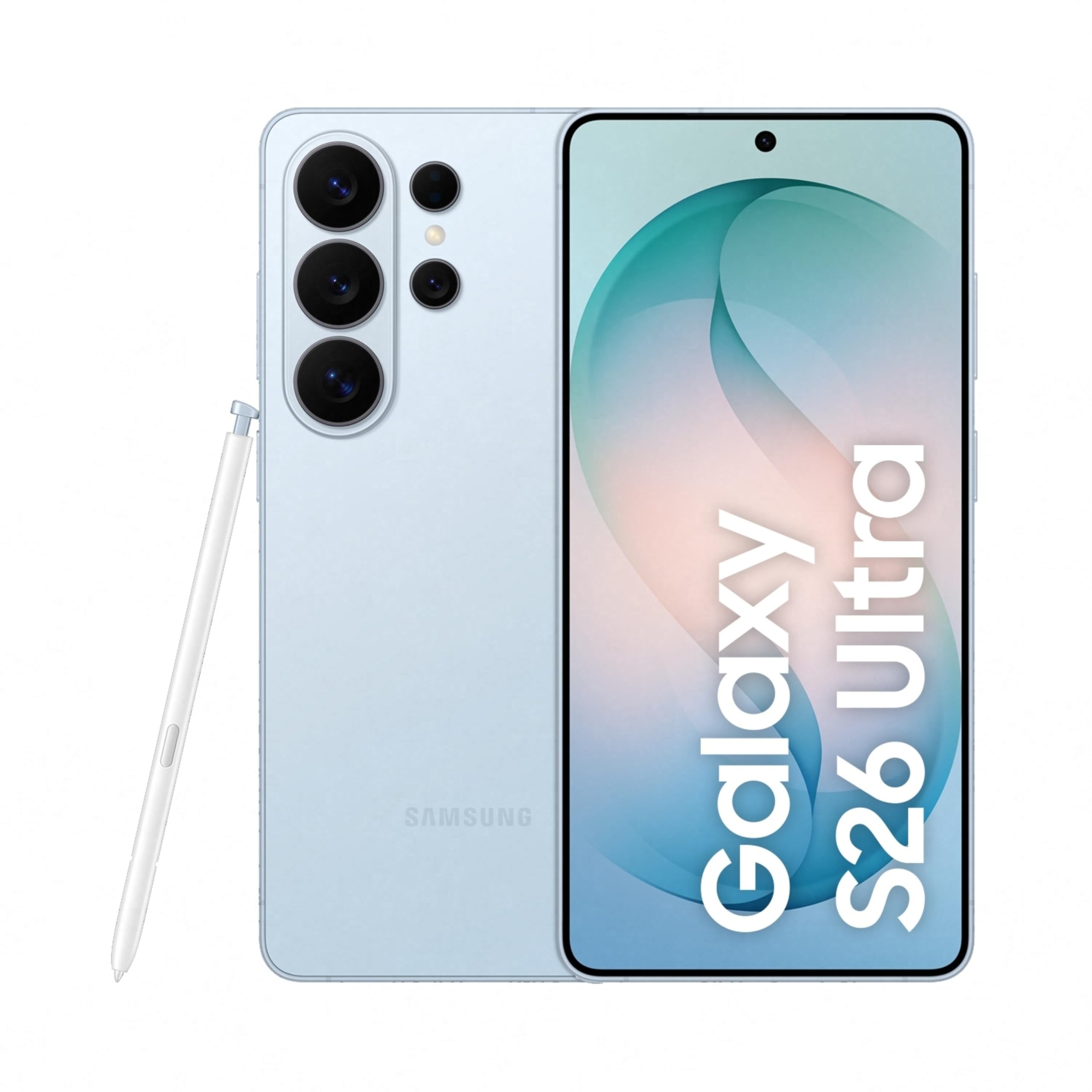
Image: Samsung Galaxy S26 Ultra 5G smartphone in Sky Blue, showcasinяго элегантны дызайн і модуль камеры.
2. Пачатковая налада
2.1. Што ў скрынцы
Your Samsung Galaxy S26 Ultra 5G package includes the following items:
- Smartphone (Samsung Galaxy S26 Ultra 5G)
- Data Cable (Type C to C)
- Штыфт для выцягвання SIM-карты
- Кароткае кіраўніцтва
- S Pen
2.2. Устаўка SIM-карты
- Знайдзіце латок для SIM-карты на бакавой частцы прылады.
- Устаўце штыфт для выкіду SIM-карты ў невялікую адтуліну побач з латком, каб адкрыць яго.
- Place your Nano SIM card(s) into the tray with the gold contacts facing down. The device supports Dual SIM.
- Акуратна ўстаўце латок назад у слот, пакуль ён не зафіксуецца пачуўшы пстрычку.
2.3. Пачатковае ўключэнне і канфігурацыя
- Націсніце і ўтрымлівайце кнопку харчавання, пакуль не з'явіцца лагатып Samsung.
- Выконвайце інструкцыі на экране, каб выбраць мову, падключыцца да Wi-Fi і наладзіць свой уліковы запіс Google.
- Configure biometric security features such as fingerprint recognition.
3. Кіраванне прыладай
3.1. Базавая навігацыя
The Galaxy S26 Ultra operates on Android 16 with One UI 8.5. Use the touchscreen with stylus support for navigation. Swipe gestures and on-screen buttons are standard for Android devices.

Image: Screenshot of the One UI 8.5 interface, showing various app icons and widgets.
3.2. Privacy Display
The Galaxy S26 Ultra features a built-in Privacy Display. When activated, the screen's pixels dynamically adjust to keep the display visible when viewed straight on, but appear dimmed when seen from the side. This feature helps protect your personal information in public places.
- To activate: Navigate to Налады and locate the Privacy Display options.
- Наладзіць viewability settings to suit your preferences.
- You can choose to hide the full screen from side view or activate it only for notifications or specific applications.

Image: A demonstration of the Privacy Display, showing how content is visible from the front but obscured from the side.
3.3. Асаблівасці камеры
Прылада абсталявана універсальнай сістэмай камер:
- Заднія камеры: 200 MP Wide, 50 MP Ultra Wide, 50 MP Telephoto (5x Optical Zoom), 10 MP Telephoto (3x Optical Zoom).
- Пярэдняя камера: 12 дэпутатаў.
- Рэжымы здымкі: Dual Recording, Food, Hyperlapse, Night, Panorama, Photo, Portrait, Portrait Video, Pro, Pro Video, Single Take, Slow Motion, Video.
- Начная фатаграфія: Capture clear and detailed videos even in low-light environments.
- Horizontal Lock: Maintain a steady frame during video recording, even when moving.
- Space Zoom: Utilize 100x AI-powered Space Zoom for enhanced clarity at a distance.

Image: Diagram illustrating the camera specifications and lens capabilities of the Galaxy S26 Ultra.

Малюнак: Example photos demonstrating the clarity and detail captured using the Nightography feature in low-light conditions.
3.4. Функцыі штучнага інтэлекту
The Galaxy S26 Ultra integrates advanced AI features to enhance user experience:
- Памочнік па фота: Edit photos using simple prompts.
- Creative Studio: Generate personalized stickers from photos with ease.
- Now Nudge: Receive intelligent, real-time suggestions and reduce steps in daily tasks.
- Шукальнік: Quickly search for information on your home screen without opening specific apps.

Image: A phone screen displaying the Photo Assist feature, showing options to edit an image of a dog.

Image: A phone screen demonstrating the sticker generation feature, creating various stickers from a single photo of a dog.
4. Прадукцыйнасць і батарэя
4.1. Processor and Cooling
The Galaxy S26 Ultra is powered by the Snapdragon 8 Elite Gen 5 processor, customized for Galaxy devices. It features an improved NPU, GPU, and CPU for smoother graphics and faster AI performance. A newly designed Vapor Chamber efficiently dissipates heat, ensuring sustained performance during demanding tasks like gaming.

Image: Diagram showing the NPU, GPU, and CPU components of the customized Snapdragon processor, highlighting performance improvements.
4.2. Тэрмін службы батарэі і зарадка
The device is equipped with a 5000 mAh battery, optimized for all-day use. It supports Super Fast Charging 3.0 (up to 60W) and Super Fast Wireless Charging (up to 25W). You can achieve up to 75% charge in approximately 30 minutes with Super Fast Charging 3.0.

Image: Graphic indicating that the device can charge up to 75% in approximately 30 minutes.
5. Тэхнічнае абслугоўванне і догляд
To ensure the longevity and optimal performance of your Galaxy S26 Ultra, follow these maintenance guidelines:
- Уборка: Для чысткі экрана і корпуса выкарыстоўвайце мяккую тканіну без ворса. Пазбягайце абразіўных матэрыялаў або агрэсіўных хімічных рэчываў.
- Воданепранікальнасць: The device is water-resistant. However, avoid intentional submersion in water or exposure to high-pressure water jets. Dry thoroughly if it gets wet.
- Абнаўленні праграмнага забеспячэння: Рэгулярна правярайце наяўнасць абнаўленняў праграмнага забеспячэння і ўсталёўвайце іх, каб карыстацца найноўшымі функцыямі, патчамі бяспекі і паляпшэннямі прадукцыйнасці.
- Сыход за батарэяй: Пазбягайце экстрэмальных тэмператур. Для аптымальнага стану акумулятара старайцеся падтрымліваць узровень зарада ў межах ад 20% да 80%, калі гэта магчыма.
- захоўванне: Перыядычна чысціце непатрэбнае files and apps to maintain optimal storage and performance.
6. Ліквідацыю распаўсюджаных праблем
Калі ў вас узніклі праблемы з прыладай, паспрабуйце наступныя рашэнні:
- Прылада не адказвае: Націсніце і ўтрымлівайце адначасова кнопку харчавання і кнопку памяншэння гучнасці каля 7-10 секунд, каб прымусова перазагрузіць прыладу.
- Хуткая разрадка батарэі:
- Праверце выкарыстанне батарэі ў наладах, каб вызначыць праграмы, якія спажываюць шмат энергіі.
- Зменшце яркасць экрана або ўключыце рэжым энергазберажэння.
- Зачыніце праграмы, якія не выкарыстоўваюцца ў фонавым рэжыме.
- Праблемы з падключэннем да сеткі:
- Уключэнне і выключэнне рэжыму палёту.
- Перазапусціце прыладу.
- Check your SIM card is properly inserted.
- Reset network settings in Налады > Агульнае кіраванне > Скінуць > Скінуць налады сеткі.
- Збой або завісанне праграмы:
- Ачысціце кэш і дадзеныя праграмы ў Налады > Праграмы > [Назва праграмы] > Сховішча.
- Выдаліце і пераўсталюйце праграму.
- Пераканайцеся, што праграма абноўлена да апошняй версіі.
- Не працуе датчык адбіткаў пальцаў:
- Пераканайцеся, што ваш палец і датчык чыстыя і сухія.
- Перарэгістраваць адбіткі пальцаў у Налады > Біяметрыя і бяспека > Адбіткі пальцаў.
Для больш падрабязнай інфармацыі аб ліквідацыі непаладак або пастаянных праблемах звярніцеся ў афіцыйную службу падтрымкі Samsung. webсайт або звярніцеся ў службу падтрымкі.
7. Тэхнічныя характарыстыкі
| Асаблівасць | Спецыфікацыя |
|---|---|
| Марка | Samsung |
| мадэль | Galaxy S26 Ultra |
| Аперацыйная сістэма | Android 16 |
| Працэсар | Snapdragon 8 Elite Gen 5 (4.74 GHz) |
| АЗП | 12 ГБ |
| Ёмістасць захоўвання | 256 ГБ |
| Дысплей | 6.9 Inches AMOLED, 3120 x 1440 Resolution, 120Hz Refresh Rate, 499 PPI |
| Раздзяленне задняй камеры | 200 МП, 50 МП, 50 МП, 10 МП |
| Раздзяленне франтальнай камеры | 12 МП |
| Ёмістасць батарэі | 5000 Міліamp Гадзіны |
| Зарадка | Super Fast Charging 3.0 (up to 60W), Super Fast Wireless Charging (up to 25W) |
| Тып SIM-карты | Дзве SIM-карты Nano |
| Сувязь | 5G, Bluetooth, NFC, USB Type C, Wi-Fi |
| Біяметрычная бяспека | Распазнаванне адбіткаў пальцаў |
| Воданепранікальнасць | Водатрывалы |
| Памеры | 8 х 78 х 164 міліметраў |
| Вага | 214 грам |
| Змесціва скрынкі | Smartphone, Data Cable (Type C to C), SIM Ejection Pin, Quick Start Guide, S Pen |
8. Гарантыя і падтрымка
8.1. Інфармацыя аб гарантыі
Your Samsung Galaxy S26 Ultra 5G comes with a 1-year manufacturer warranty for the device and 6 months for in-box accessories from the date of purchase. Please retain your proof of purchase for warranty claims.
8.2. Падтрымка кліентаў
For technical assistance, service, or warranty inquiries, please contact Samsung Customer Support:
- вытворца: Samsung India Electronics Pvt ltd
- Адрас: 6th Floor, DLF Centre, Sansad Marg, New Delhi - 110001, India
- электронная пошта: support.india@samsung.com
- Наведайце афіцыйную службу падтрымкі Samsung webсайт з часта задаванымі пытаннямі і дадатковымі рэсурсамі.

Image: Samsung Knox Vault logo, representing the device's robust security features.
Ask a question about this manual
Ask about setup, troubleshooting, compatibility, parts, safety, or missing instructions. Manuals+ will review the question and use this page’s manual context to help answer it.