
1. Важныя інструкцыі па бяспецы
Калі ласка, уважліва прачытайце ўсе інструкцыі перад выкарыстаннем гэтай прылады і захавайце іх для далейшага выкарыстання. Невыкананне гэтых інструкцый можа прывесці да паражэння электрычным токам, пажару або сур'ёзных траўмаў.
- Заўсёды стаўце вентылятар на ўстойлівую, роўную паверхню, каб пазбегнуць яго перакульвання.
- Do not operate the fan with a damaged cord or plug. If the supply cord is damaged, it must be replaced by the manufacturer, its service agent, or similarly qualified persons to avoid a hazard.
- Трымайце вентылятар далей ад вады ці іншых вадкасцей. Не апускайце вентылятар у ваду.
- Do not insert fingers or foreign objects into the fan grille during operation.
- Адключайце вентылятар ад разеткі, калі ён не выкарыстоўваецца, перад чысткай або перад перамяшчэннем.
- Гэты прыбор не прызначаны для выкарыстання асобамі (уключаючы дзяцей) з абмежаванымі фізічнымі, сэнсарнымі або разумовымі здольнасцямі або з адсутнасцю вопыту і ведаў, за выключэннем выпадкаў, калі яны знаходзяцца пад наглядам або праінструктаваныя адносна выкарыстання прыбора асобай, адказнай за іх бяспеку.
- За дзецьмі трэба сачыць, каб яны не гулялі з прыборам.
- Do not use the fan near curtains, plants, or other objects that could be drawn into the fan.
- Забяспечыць абtage indicated on the fan matches the local power supply voltage перад падключэннем.
2. Змесціва ўпакоўкі
Пасля адкрыцця ўпакоўкі пераканайцеся, што ўсе прадметы ёсць у наяўнасці і ў добрым стане.
- 1 x DREO Tower Fan (DR-HTF024S)
- 1 x Remote Control (includes 2 x AAA Batteries)
- 1 х Кіраўніцтва карыстальніка
- A Set of Accessories (for base assembly)
3. Схема прадукту
Familiarize yourself with the components of your DREO Smart Tower Fan.

Выява: Агульная view of the DREO Smart Tower Fan, highlighting its sleek design and powerful airflow.

Image: The fan demonstrating its adjustable height feature, extending from 40 to 45 inches.
The fan features a control panel on top, a main tower body with air outlets, and a stable circular base. The adjustable height mechanism is located at the base of the tower.
4. Настройка
Follow these steps to assemble and prepare your tower fan for use.
- База зборкі: Take the two halves of the circular base. Align them and rotate until they securely snap together to form a single unit.
- Attach Tower: Carefully place the main tower fan body onto the assembled base. Ensure it is firmly seated and locked into position. The cord can be routed through designated channels underneath the base.
- Падключэнне сілкавання: Падключыце шнур сілкавання да звычайнай электрычнай разеткі.

Image: Illustration of the fan's one-step height adjustment, allowing it to extend from 40 to 45 inches.
5. Інструкцыя па эксплуатацыі
Your DREO Smart Tower Fan offers multiple ways to control its functions.
5.1 Панэль кіравання
The intuitive control panel located on the top of the fan allows for direct operation.
- Кнопка харчавання: Уключае/выключае вентылятар.
- Кнопка рэжыму: Cycles through Normal, Natural, Sleep, and Auto modes.
- Кнопкі хуткасці (+/-): Adjusts fan speed from 1 to 9.
- Кнопка ваганняў: Уключае/выключае ваганне на 90°.
- Кнопка таймера: Усталёўвае таймер аўтаматычнага адключэння (да 12 гадзін).
5.2 Пульт дыстанцыйнага кіравання
The included remote control provides convenient access to all fan functions from a distance.
- Ensure the remote control batteries (2 x AAA) are correctly installed.
- Point the remote control directly at the fan's receiver for optimal response.
5.3 DREO App Control & Smart Integration
For enhanced control and smart features, download the DREO app and connect your fan.
- Download the DREO app from your smartphone's app store.
- Follow the in-app instructions to pair your fan via Bluetooth or Wi-Fi.
- Once connected, you can control all fan functions, set schedules, and customize modes from your phone.
- The fan is compatible with Google Assistant and Amazon Alexa for voice control. Refer to the DREO app for instructions on linking your fan to these smart home platforms.

Image: A user controlling the DREO Smart Tower Fan via the DREO mobile application.

Image: Screenshot of the DREO app demonstrating customizable sleep modes and scheduling options.
5.4 Рэжымы і хуткасці
The fan offers 4 distinct modes and 9 speed settings for personalized comfort.
- Звычайны рэжым: Provides a constant airflow at your selected speed.
- Натуральны рэжым: Імітуе натуральны ветрык, змяняючы хуткасць вентылятара.
- Рэжым сну: Operates at a lower speed with reduced noise for undisturbed rest.
- Аўтаматычны рэжым: Аўтаматычна рэгулюе хуткасць вентылятара ў залежнасці ад тэмпературы навакольнага асяроддзя ў памяшканні.
- 9 хуткасцяў: Fine-tune the airflow intensity from a gentle breeze (Speed 1) to powerful cooling (Speed 9).
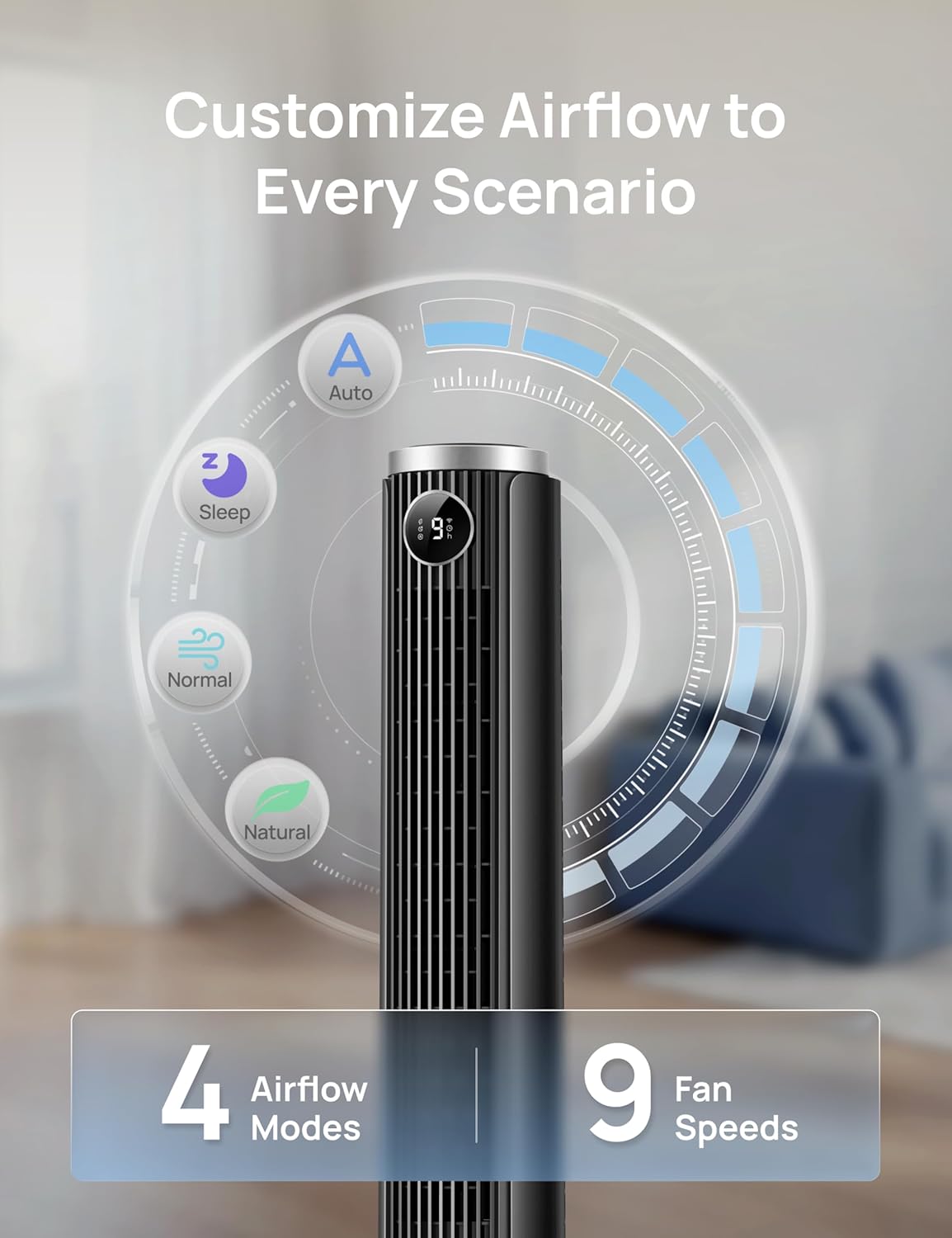
Image: Visual representation of the fan's 4 airflow modes (Auto, Sleep, Normal, Natural) and 9 speed settings.
5.5 Ваганне
Activate oscillation for wider air distribution.
- The fan oscillates 90° to cover a larger area, ensuring even air circulation throughout the room.

Image: The DREO Smart Tower Fan demonstrating its 90-degree oscillation feature, distributing air across a wide area.
5.6 Таймер
Усталюйце вентылятар на аўтаматычнае выключэнне праз пэўны перыяд часу.
- The timer can be set for up to 12 hours, allowing you to conserve energy and enjoy cooling as you fall asleep.
5.7 Adjustable Height
Customize the fan's height to suit your needs.
- The fan's height can be adjusted from 40 inches to 45 inches by pressing the foot pedal at the base. This allows you to direct airflow effectively whether you are sitting or standing.
6. Тэхнічнае абслугоўванне
Рэгулярнае тэхнічнае абслугоўванне забяспечвае аптымальную прадукцыйнасць і даўгавечнасць вашага вентылятара.
6.1 Ачыстка
- Заўсёды адключайце вентылятар перад чысткай.
- Выкарыстоўвайце мяккі, damp тканінай для працірання вонкавых паверхняў. Не выкарыстоўвайце абразіўныя ачышчальнікі або растваральнікі.
- Use a vacuum cleaner with a brush attachment to gently remove dust from the air intake and outlet grilles.
- Не дапускайце траплення вады ўнутр вентылятара.
6.2 Захоўванне
- Калі вентылятар захоўваецца працяглы час, старанна яго ачысціце.
- Store the fan in its original packaging or a suitable box in a cool, dry place.
- Avoid placing heavy objects on top of the fan during storage.
7. Выпраўленне непаладак
Звярніцеся да гэтага раздзела, каб знайсці рашэнні распаўсюджаных праблем.
| праблема | Магчымая прычына | Рашэнне |
|---|---|---|
| Вентылятар не ўключаецца. | Няма крыніцы харчавання. Шнур харчавання не падключаны належным чынам. Батарэі пульта дыстанцыйнага кіравання селі. | Праверце, ці працуе разетка. Ensure the power cord is securely plugged into the outlet and the fan. Заменіце батарэі дыстанцыйнага кіравання. |
| Слабы струмень паветра. | Хуткасць вентылятара занадта нізкая. Паветразаходныя/выхадныя адтуліны заблакіраваны. | Павялічце хуткасць вентылятара. Clean any dust or obstructions from the grilles. |
| Шумны вентылятар. | Fan is on a high speed setting. Вентылятар не стаіць на ўстойлівай паверхні. Унутраная абструкцыя. | Паменшыце хуткасць вентылятара. Пастаўце вентылятар на роўную ўстойлівую паверхню. Unplug and check for any foreign objects inside the grilles. |
| Не працуе пульт дыстанцыйнага кіравання. | Батарэйкі разраджаныя або няправільна ўстаўленыя. Перашкода паміж пультам і вентылятарам. | Замяніце батарэйкі і пераканайцеся ў правільнай палярнасці. Ensure a clear line of sight between the remote and the fan. |
| Кіраванне праграмамі не працуе. | Fan not connected to Wi-Fi/Bluetooth. Праграма патрабуе абнаўлення. | Check app for connection status and re-pair if necessary. Ensure Wi-Fi is active. Update the DREO app to the latest version. |
8. Тэхнічныя характарыстыкі
Detailed technical specifications for the DREO Smart Tower Fan (DR-HTF024S).
| Асаблівасць | Спецыфікацыя |
|---|---|
| Марка | DREO |
| Назва мадэлі | DR-HTF024S |
| Колер | Чорны |
| Дызайн электрычнага вентылятара | Floor Fan (Tower) |
| Крыніца харчавання | Правадная электрычная |
| Памеры прадукту (Д х Ш х У) | 33 Г х 33 Ш х 115 В сантыметраў |
| Рэгуляваная вышыня | 40" - 45" |
| Асаблівасці | App Operable, Oscillating, Portable, Quiet Operation, Remote Controlled |
| Рэкамендуемае выкарыстанне | Air Circulation, Cooling, Ventilating |
| Тып кантролера | App Control, Remote Control, Touchpad Control |
| Колькасць хуткасцяў | 9 |
| Узровень шуму | 20 дэцыбел (мінімум) |
| Ватtage | 50 ват |
| Ёмістасць паветранага патоку | 1473 кубічных футаў у хвіліну |
| Вугал ваганняў | 90° |
| Таймер | 12 гадзін |
| Тып матэрыялу | Пластыкавыя |
| Вага прадмета | 7.92 фунта |
| Атэстацыя | ETL |
9. Гарантыя і падтрымка
DREO provides a warranty for this product. Please refer to the official DREO website or your purchase documentation for the most current and detailed warranty information.
- Гарантыйны тэрмін: Typically, DREO products come with a 1-year limited warranty from the date of purchase.
- Вяртае: Products purchased from Amazon.ca generally have a 30-day return policy for refund or replacement.
- Падтрымка кліентаў: For technical assistance, warranty claims, or general inquiries, please contact DREO customer support through their official webсайт або кантактную інфармацыю, указаную на ўпакоўцы прадукту.
- Інтэрнэт-рэсурсы: Visit the official DREO webсайт з часта задаванымі пытаннямі, рэгістрацыяй прадуктаў і дадатковымі рэсурсамі падтрымкі.