
1. Уводзіны
Thank you for choosing the Sharp 40HF2265E Full HD Google TV. This manual provides essential information for setting up, operating, and maintaining your television. Featuring integrated Google TV, HDR10 support, Dolby Digital audio, and Bluetooth connectivity, your new TV offers a rich entertainment experience. Please read this manual thoroughly before use to ensure proper operation and to maximize your viewзадавальненне.

Выява 1.1: Спераду view of the Sharp 40HF2265E Full HD Google TV.
2. Што ў скрынцы
Акуратна распакуйце тэлевізар і праверце, ці ёсць усе наступныя рэчы:
- Sharp 40HF2265E Television
- Сілавы кабель
- Remote Control (requires 2 AAA batteries, not always included)
- Кіраўніцтва карыстальніка (гэты дакумент)
- Гарантыйны талон
If any items are missing or damaged, please contact your retailer or Sharp customer support immediately.
3. Настройка
3.1 Устаноўка падстаўкі
To install the TV stand, place the TV screen-down on a soft, flat surface to prevent scratches. Align the stand feet with the corresponding slots on the bottom of the TV and secure them with the provided screws. Ensure the stand is firmly attached before placing the TV upright.

Выява 3.1: Спераду view of the TV with stand feet attached.
3.2 Насценны мантаж
If you prefer to wall-mount your TV, you will need a VESA-compatible wall mount (not included). The Sharp 40HF2265E supports a VESA mounting standard of 200 x 200 mm. Refer to the wall mount's instructions for installation. Always ensure the wall can support the weight of the TV and the mount.

Малюнак 3.2: ззаду view of the TV, highlighting VESA mounting points and ports.
3.3 Падключэнне перыферыйных прылад
Connect your external devices to the appropriate ports on the back and side of the TV. The TV features multiple HDMI, USB, and other connectivity options.
- Парты HDMI: Для падключэння Blu-ray прайгравальнікаў, гульнявых прыставак, тэлевізійных прыставак і г.д.
- Парты USB: Для падключэння USB-назапашвальнікаў для прайгравання мультымедыя або абнаўлення праграмнага забеспячэння.
- Ethernet порт: Для праваднога падключэння да Інтэрнэту.
- Уваход для антэны/кабеля: Для падключэння антэны або кабельнага тэлебачання.
- Аўдыявыхад: Для падлучэння знешніх аўдыёсістэм.
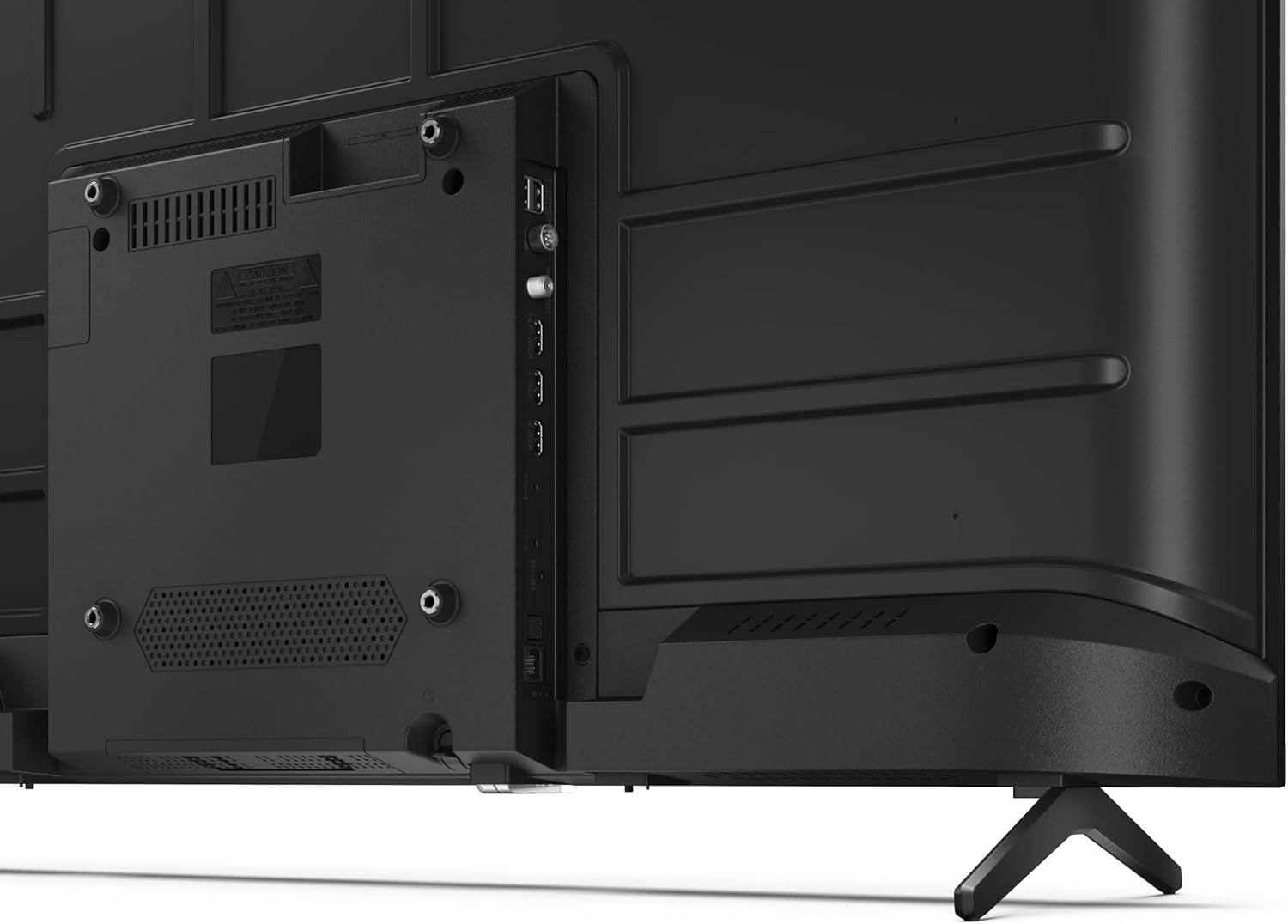
Малюнак 3.3: Падрабязны view з партоў падключэння тэлевізара.
3.4 Пачатковае ўключэнне і налада Google TV
After connecting all necessary cables, plug the power cable into an electrical outlet. Press the power button on the remote control or on the TV. Follow the on-screen instructions to complete the initial setup, including network connection, Google account login, and channel scanning.
4. Аперацыйная
4.1 Функцыі дыстанцыйнага кіравання
The remote control allows you to navigate the TV's features. Common buttons include Power, Volume Up/Down, Channel Up/Down, Input Source, Home (Google TV), Navigation (directional arrows, OK), Back, and Google Assistant.
4.2 Інтэрфейс Google TV
Your Sharp TV runs on Google TV, providing a personalized home screen with content recommendations from your subscriptions. Use the remote's navigation buttons to browse movies, shows, apps, and your library.

Image 4.1: The Google TV home screen on the Sharp 40HF2265E.
4.3 Выбар уводу
To switch between connected devices (e.g., HDMI 1, HDMI 2, TV tuner), press the 'Input' or 'Source' button on your remote control and select the desired input from the on-screen menu.
4.4 Налады выявы і гуку
Access the TV's settings menu to adjust picture modes (Standard, Vivid, Cinema, Game), brightness, contrast, color, and sound modes (Standard, Music, Movie, Speech). The TV supports HDR10 for enhanced contrast and color, and Dolby Digital for rich audio.

Image 4.2: Visual representation of HDR (High Dynamic Range) technology.
4.5 Google Assistant and Chromecast
Use the built-in Google Assistant for voice control. Press the Google Assistant button on your remote and speak your commands, such as searching for content, controlling smart home devices, or getting information. Chromecast allows you to cast content directly from compatible devices like smartphones or tablets to your TV.

Image 4.3: Google Assistant integration for voice commands.
4.6 Злучэнне Bluetooth
Pair Bluetooth-enabled devices such as headphones or soundbars with your TV for a wireless audio experience. Navigate to the TV's settings menu, select 'Remotes & Accessories', and then 'Pair new device' to connect.
5. Тэхнічнае абслугоўванне
5.1 Чыстка тэлевізара
Always unplug the TV before cleaning. Use a soft, dry cloth to wipe the screen and TV body. For stubborn marks, lightly dampПрацярыце тканіну вадой або спецыяльным сродкам для чысткі экранаў. Ніколі не выкарыстоўвайце абразіўныя ачышчальнікі, воск або растваральнікі.
5.2 Абнаўленне праграмнага забеспячэння
Your Google TV may receive automatic software updates. Ensure your TV is connected to the internet to receive these updates, which can improve performance and add new features. You can also manually check for updates in the settings menu.
6. Выпраўленне непаладак
Калі ў вас узніклі праблемы з тэлевізарам, звярніцеся да наступных распаўсюджаных рашэнняў:
- Няма харчавання: Check if the power cable is securely plugged into both the TV and the wall outlet. Ensure the outlet is functional.
- Няма выявы/гуку: Verify that the correct input source is selected. Check all cable connections (HDMI, antenna). Try restarting the TV.
- Пульт дыстанцыйнага кіравання не працуе: Замяніце батарэйкі (2 батарэйкі тыпу AAA). Пераканайцеся, што паміж пультам дыстанцыйнага кіравання і ІЧ-датчыкам тэлевізара няма перашкод.
- Праблемы з падключэннем да сеткі: For Wi-Fi, check your router and ensure the TV is within range. For wired connections, check the Ethernet cable. Try restarting your router and the TV.
- Праблемы з якасцю выявы: Адрэгулюйце параметры выявы (яркасць, кантраснасць, рэзкасць). Пераканайцеся, што крыніца ўваходнага сігналу забяспечвае высокую якасць сігналу.
For more complex issues, consult the comprehensive troubleshooting section in the full digital manual or contact Sharp customer support.
7. Тэхнічныя характарыстыкі
Below are the technical specifications for the Sharp 40HF2265E Full HD Google TV:

Image 7.1: Dimensions of the Sharp 40HF2265E TV.
| Асаблівасць | Спецыфікацыя |
|---|---|
| Марка | Востры |
| Нумар мадэлі | 40HF2265E |
| Назва мадэлі | ВЧ серыял |
| Мадэльны год | 2025 |
| Памер экрана | 40 цаляў (81 сантыметраў) |
| Тэхналогія адлюстравання | святлодыёд |
| дазвол | 1080p (поўны HD) |
| Частата абнаўлення | 60 Гц |
| Суадносіны бакоў | 16:9 |
| Каэфіцыент кантраснасці | 100000:1 |
| Screen Finish | Матавы |
| Час водгуку | 8 мілісекунд |
| Тэхналогія падсвятлення | святлодыёд |
| Supported HDR Format | HDR10, HLG |
| Павышэнне якасці выявы | Dynamic Contrast, HDR10, HLG |
| Motion Enhancement Technology | Motion Interpolation |
| Аперацыйная сістэма | Google TV |
| Internet Applications | Apple TV, Google TV, Hulu, Prime Video, YouTube |
| Асаблівасці | Bluetooth, Chromecast, Dolby Digital, HD Tuner |
| Тэхналогія падлучэння | Ethernet, USB, Wi-Fi |
| Бесправадныя тэхналогіі | Bluetooth |
| Версія Bluetooth | 5.0 |
| Screen Mirroring Technology | Chromecast, Google Cast |
| Усяго партоў HDMI | 3 |
| Total USB 2.0 Ports | 2 |
| Number of Composite Video Inputs | 1 |
| Аўдыё ўваход | Mini composite/CVBS + audio input |
| Total Audio Output Ports | 2 |
| Рэжым выхаду гуку | Стэрэа |
| Кадзіроўка аўдыё | DD |
| Integrated Surround Sound Format | Dolby AC-4, Dolby Digital, Dolby Digital Plus |
| Максімальная выходная магутнасць дынаміка | 16 Вт (2x8 Вт) |
| Колькасць аўдыёканалаў | 2.0 |
| Сістэма вяшчання | DVB-T2/C/S/S2 |
| Кадзіроўка відэа | MKV |
| Памеры прадукту (ДxШxВ) | 8.4 см (Ш x Ш x В) |
| Вага прадмета | 5.4 кілаграма |
| Вага без падстаўкі | 5.4 кілаграма |
| Шырыня падставы | 765 міліметра |
| Стандарт мацавання VESA | 200 х 200 мм |
| Энергаспажыванне | 37 ват |
| тtage | 230 Вольт |
| Remote Control Battery Size | ААА |
| Remote Control Battery Quantity | 2 |
| Parental Control Technology | Kindersicherung Über Google Tv |
| Наяўнасць запасных частак у ЕС | 7 гады |
8. Гарантыя і падтрымка
8.1 Гарантыя на выраб
The Sharp 40HF2265E television comes with a 2-year manufacturer's warranty. Please refer to the included Warranty Card for detailed terms and conditions regarding coverage and service. Keep your proof of purchase for warranty claims.
8.2 Падтрымка кліентаў
If you require further assistance, have questions not covered in this manual, or need technical support, please contact Sharp customer service. Contact information can typically be found on the Warranty Card or the official Sharp webсайт.