
1. Уводзіны
This manual provides essential instructions for setting up, operating, maintaining, and troubleshooting your Nothing Phone (4a) Pro smartphone. Please read this guide thoroughly before using your device to ensure proper functionality and safety.
2. Змесціва ўпакоўкі
Пераканайцеся, што ваш пакет змяшчае наступныя элементы:
- Nothing Phone (4a) Pro Handset
- Гарнітура
- USB-кабель Type-C
- Інструмент выцягвання SIM-карты
- Кароткае кіраўніцтва
- Інфармацыя па бяспецы
3. Схема прылады
Familiarize yourself with the physical features of your Nothing Phone (4a) Pro.
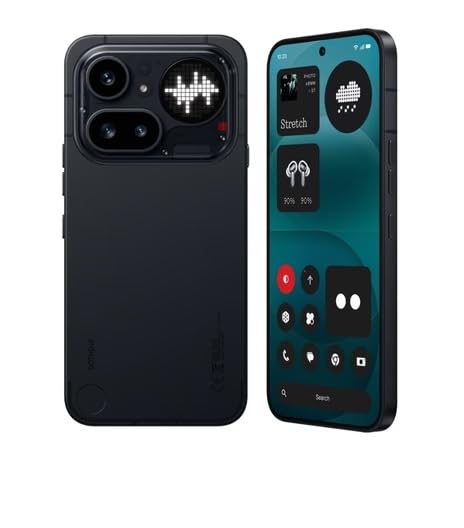
Малюнак 3.1: Задняя частка View of Nothing Phone (4a) Pro. This image displays the back of the device, highlighting the dual camera system, LED flash, and the unique Glyph Interface. The Nothing brand logo is visible at the bottom.

Малюнак 3.2: Пярэдняя і бакавая часткі View of Nothing Phone (4a) Pro. This image shows the device from the front and a slight angle, revealing the display with its punch-hole camera, and the power and volume buttons located on the sides.
3.1. Пярэдняя панэль
- Дысплей: AMOLED screen for visual output and touch interaction.
- Пярэдняя камера: Для сэлфі і відэазванкоў.
- Наушнік: Для аўдыё падчас званкоў.
3.2. Задняя панэль
- Асноўны модуль камеры: Contains primary and secondary cameras.
- Святлодыёдны ўспышка: Provides illumination for photos and as a flashlight.
- Інтэрфейс гліфаў: Unique LED lighting system for notifications and alerts.
3.3. Side Panels
- Кнопка харчавання: Размешчана з правага боку, выкарыстоўваецца для ўключэння/выключэння і блакіроўкі/разблакіроўкі экрана.
- Кнопкі гучнасці: Размешчана злева, выкарыстоўваецца для рэгулявання гучнасці мультымедыя і выклікаў.
- Латок для SIM-карты: Located on the left side, for inserting SIM cards.
3.4. Top and Bottom Panels
- Порт USB Type-C: Размешчаны ўнізе, для зарадкі і перадачы дадзеных.
- Мікрафон: For voice input during calls and recordings.
- Дакладчык: Для выхаду гуку.
4. Настройка
4.1. Устаўка SIM-карты
- Знайдзіце латок для SIM-карты на левай баку прылады.
- Устаўце інструмент для выцягвання SIM-карты ў невялікую адтуліну побач з латком і моцна націсніце, пакуль латок не выскочыць.
- Устаўце карту (карты) Nano-SIM у латок залатымі кантактамі ўніз. Забяспечце правільную арыентацыю.
- Акуратна ўстаўце латок назад у слот, пакуль ён не зафіксуецца пачуўшы пстрычку.
4.2. Пачатковае ўключэнне
- Націсніце і ўтрымлівайце Кнопка харчавання on the right side of the device until the Nothing logo appears on the screen.
- Выконвайце падказкі на экране, каб выбраць мову, падключыцца да сеткі Wi-Fi і наладзіць свой уліковы запіс Google.
4.3. Зарадка акумулятара
Before first use, it is recommended to fully charge the device. Connect the USB Type-C cable to the phone's charging port and the other end to a compatible power adapter (sold separately) or a computer's USB port.
5. Кіраванне прыладай
5.1. Уключэнне/выключэнне і перазагрузка
- Уключэнне: Press and hold the Power Button until the device vibrates and the Nothing logo appears.
- Выключэнне: Press and hold the Power Button, then tap "Power off" on the screen.
- Перазапуск: Press and hold the Power Button, then tap "Restart" on the screen.
5.2. Базавая навігацыя
- Націсніце: Дакраніцеся да экрана адзін раз, каб адкрыць праграмы, выбраць элементы або націснуць кнопкі.
- Правядзіце пальцам: Правядзіце пальцам па экране, каб пракручваць, пераключаць экраны або адхіляць апавяшчэнні.
- Дробка: Выкарыстоўвайце два пальцы, каб павялічваць або памяншаць маштаб фатаграфій і web старонкі.
5.3. Здзяйсненне званкоў
- Адкрыйце Тэлефон дадатак.
- Увядзіце нумар тэлефона з дапамогай клавіятуры набору або выберыце кантакт.
- Націсніце Тэлефануйце значок, каб пачаць званок.
5.4. Выкарыстанне камеры
- Адкрыйце Камера дадатак.
- Скампануйце свой здымак.
- Націсніце Аканіца кнопку, каб зрабіць фота ці Запіс кнопка для пачатку/спынення відэазапісу.
5.5. Сувязь
- Wi-Fi: Перайсці да Налады > Сетка і інтэрнэт > Wi-Fi падключыцца да даступных сетак.
- Bluetooth: Перайсці да Налады > Падлучаныя прылады > Bluetooth для спалучэння з іншымі прыладамі Bluetooth.
- Мабільныя дадзеныя: Перайсці да Налады > Сетка і Інтэрнэт > Мабільная сетка to manage cellular data usage.
6. Тэхнічнае абслугоўванне
6.1. Ачыстка прылады
Выкарыстоўвайце мяккую тканіну без ворса для чысткі экрана і корпуса тэлефона. Пазбягайце выкарыстання агрэсіўных хімічных рэчываў або абразіўных матэрыялаў.
6.2. Абнаўленне праграмнага забеспячэння
Рэгулярна правярайце наяўнасць абнаўленняў праграмнага забеспячэння і ўсталёўвайце іх, каб забяспечыць аптымальную прадукцыйнасць і бяспеку. Перайдзіце па спасылцы Налады > Сістэма > Абнаўленне сістэмы.
6.3. Сыход за батарэяй
To prolong battery life, avoid extreme temperatures and do not let the battery completely drain frequently. Use only approved chargers and cables.
7. Выпраўленне непаладак
If you encounter issues with your Nothing Phone (4a) Pro, try the following solutions:
- Прылада не ўключаецца: Пераканайцеся, што акумулятар зараджаны. Падключыце зарадную прыладу як мінімум на 15 хвілін, а затым паспрабуйце ўключыць.
- Збоі або завісанні праграм: Close and reopen the app. If the issue persists, restart your phone.
- Слабы сігнал сеткі: Check your SIM card insertion. Move to an area with better network coverage.
- Акумулятар хутка разраджаецца: Зменшце яркасць экрана, зачыніце невыкарыстоўваныя праграмы і адключыце непатрэбныя функцыі, такія як GPS або Bluetooth, калі яны не выкарыстоўваюцца.
- Сэнсарны экран не рэагуе: Restart the device. If the problem continues, contact support.
8. Тэхнічныя характарыстыкі
| Асаблівасць | Дэталь |
|---|---|
| Марка | нічога |
| мадэль | Phone (4a) Pro |
| Аперацыйная сістэма | Android 14 |
| Аператыўная памяць | 8 ГБ |
| Унутраная памяць | 128 GB (Flash Memory Supported Size Maximum) |
| Мадэль працэсара | G4 |
| Хуткасць працэсара | 2.5 ГГц |
| Колер | Чорны |
| Тып раздыма | USB Type C (USB 2.0) |
| Ёмістасць батарэі | 5000 Міліamp Hours (Lithium-Ion) |
| Вага прадмета | 250 грам |
| Памеры прадмета | 16.4 х 7.8 х 0.8 сантыметраў |
| Тып дысплея | AMOLED |
| Максімальнае разрозненне дысплея | 1920 х 1080 |
| Сотавая тэхналогія | 5G |
| Бесправадныя сеткавыя тэхналогіі | LTE |
9. Гарантыя і падтрымка
9.1. Інфармацыя аб гарантыі
Your Nothing Phone (4a) Pro comes with a 1 год manufacturer's warranty from the date of purchase. This warranty covers manufacturing defects under normal use conditions. Please retain your proof of purchase for warranty claims.
For detailed warranty terms and conditions, please refer to the warranty card included in your package or visit the official Nothing webсайт.
9.2. Падтрымка кліентаў
If you require technical assistance, have questions about your device, or need to report an issue, please contact Nothing customer support.
- Інтэрнэт-падтрымка: Visit the official Nothing support webсайт з часта задаванымі пытаннямі, інструкцыямі па ліквідацыі непаладак і варыянтамі кантакту.
- Сэрвісныя цэнтры: Information on authorized service centers can be found on the Nothing webсайт.
Manufacturer: Nothing
Packer/Importer Contact Information: Essentially Nothing


