
Уводзіны
Thank you for choosing the GOBOULT Y1 v2.0 Wireless Earbuds. This manual provides essential information for setting up, operating, and maintaining your earbuds to ensure optimal performance and longevity. Please read it carefully before use.
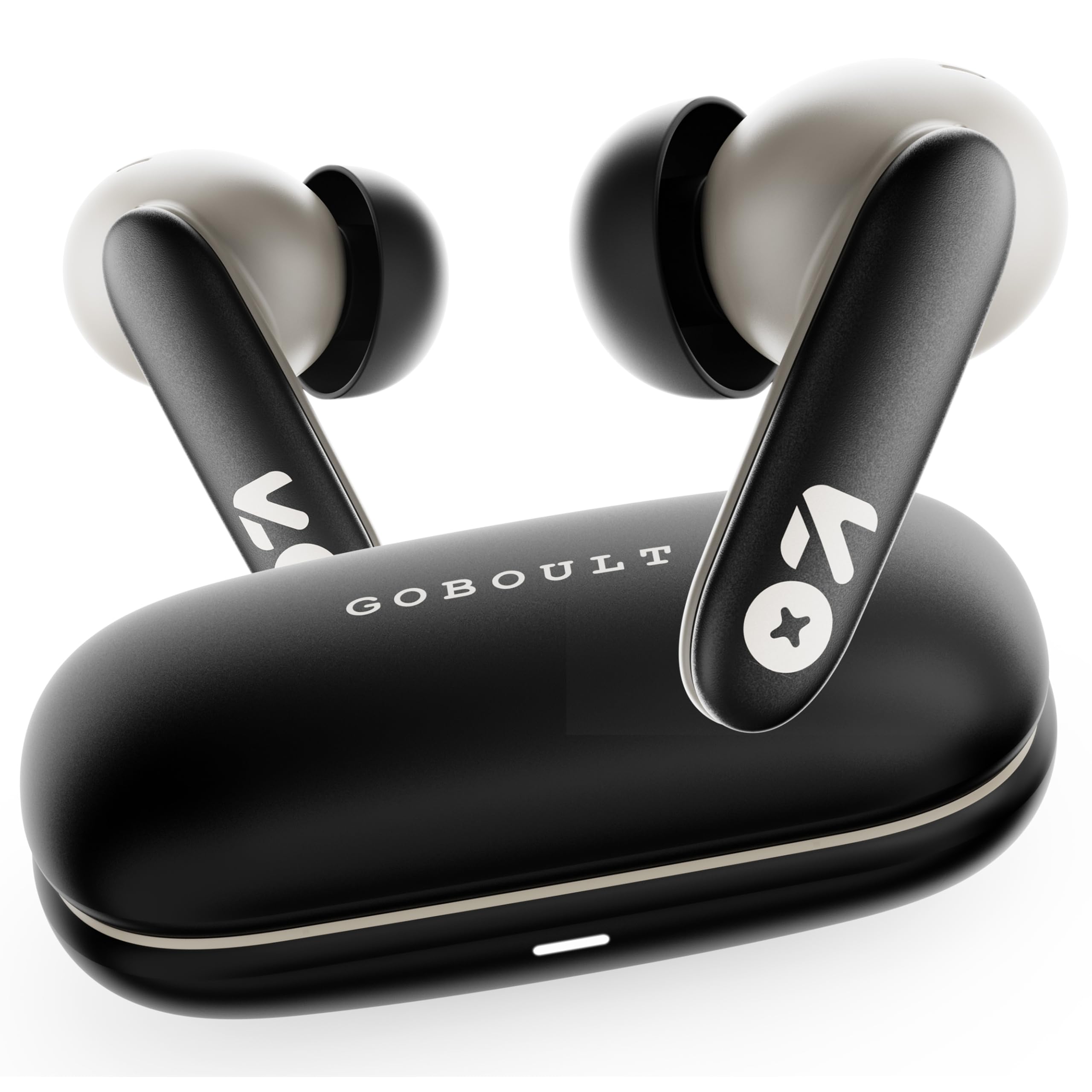
Image: GOBOULT Y1 v2.0 Wireless Earbuds and their charging case, showcasinг элегантны дызайн.
Што ў скрынцы
- GOBOULT Y1 v2.0 Wireless Earbuds
- Чахол для зарадкі
- Зарадны кабель USB Type-C
- Амбушуры (розныя памеры)
- Кіраўніцтва карыстальніка
- Гарантыйны талон
Асаблівасці прадукту
The GOBOULT Y1 v2.0 earbuds are designed with advanced features for an enhanced audio experience:
- Падоўжаны час прайгравання: Да 60 гадзін агульнага часу прайгравання з зарадным чахлом.
- Bluetooth 6.0: Ensures fast, stable, and efficient wireless connectivity.
- Zen Quad Mic ENC: Environmental Noise Cancellation with four microphones for clear calls.
- Нізкая затрымка: 45ms ultra-low latency for gaming and video synchronization.
- Сэнсарнае кіраванне: Intuitive touch sensors for managing music, calls, and voice assistant.
- Спалучэнне двух прылад: Connect and switch seamlessly between two devices.
- 13mm Bass Driver: Забяспечвае магутныя басы і чысты гук.
- AMP Падтрымка прыкладанняў: Customize audio settings and controls via the dedicated application.
- Воданепранікальнасць IPX5: Абарона ад поту і лёгкіх пырскаў.
- Хуткая зарадка: Type-C port for quick charging of the case.

Выява: Зверхуview of GOBOULT Y1 v2.0 features including sleek design, AMP App support, Bluetooth 6.0, 60 hours battery life, and dual device pairing.
Кіраўніцтва па ўстаноўцы
1. Зарадка навушнікаў і чахла
Перад першым выкарыстаннем цалкам зарадзіце навушнікі і зарадны футляр.
- Змесціце навушнікі ў зарадны футляр. Пераканайцеся, што яны правільна ўсталяваныя.
- Падключыце зарадны кабель USB Type-C да порта зарадкі на корпусе і да крыніцы харчавання.
- The LED indicator on the case will show charging status. A full charge typically takes approximately 1.5-2 hours.

Image: The GOBOULT Y1 v2.0 earbuds and charging case, highlighting the 60-hour battery life and Type-C fast charging capability.
2. Initial Pairing (Single Device)
- Адкрыйце зарадны кейс. Навушнікі аўтаматычна пяройдуць у рэжым спалучэння.
- На вашай прыладзе (смартфоне, планшэце і г.д.) уключыце Bluetooth.
- Пошук available Bluetooth devices and select "GOBOULT Y1 v2.0".
- Пасля падключэння вы пачуеце гук пацверджання.
3. Спалучэнне двух прылад
The Y1 v2.0 supports connecting to two devices simultaneously.
- Pair the earbuds with your first device as described in "Initial Pairing".
- Адключыце Bluetooth на першай прыладзе. Навушнікі зноў пяройдуць у рэжым спалучэння.
- Падключыце навушнікі да другой прылады.
- Зноў уключыце Bluetooth на першай прыладзе. Навушнікі павінны аўтаматычна падключыцца да абедзвюх прылад.
- Каб пераключыцца паміж прыладамі, проста прайграйце аўдыё на патрэбнай прыладзе.

Image: The GOBOULT Y1 v2.0 earbuds connected to both a laptop and a smartphone, illustrating the dual device pairing feature.
Інструкцыя па эксплуатацыі
1. Сэнсарныя элементы кіравання
The earbuds feature intuitive touch controls on their stems:
| Дзеянне | Функцыя |
|---|---|
| Адно націсканне (злева/справа) | Прайграванне/прыпыненне музыкі, адказ/завяршэнне выкліку |
| Двойчы націсніце (правым націскам) | Наступны трэк |
| Двойчы націсніце (злева) | Папярэдні трэк |
| Трайное націсканне (злева/справа) | Актывуйце галасавой памочнік |
| Доўгі націск (улева/управа) | Адхіліць выклік |
| Доўгі націск (права) | Павялічыць гучнасць |
| Доўгі націск (злева) | Памяншэнне гучнасці |

Image: Visual representation of touch controls for music playback and call management, along with the IPX5 water resistance rating.
2. Галасавы памочнік
Activate your device's voice assistant (Siri, Google Assistant) by triple-tapping either earbud. You can then issue commands like making calls or playing music.

Image: The GOBOULT Y1 v2.0 earbuds highlighting Bluetooth 6.0 for stable connection and integration with AI voice assistants like Siri and Google Assistant.
3. Гульнявы рэжым (нізкая затрымка)
For an optimized gaming experience, activate the 45ms ultra-low latency gaming mode. Refer to the AMP App or specific touch control gestures (if available) for activation.

Image: The GOBOULT Y1 v2.0 earbuds illustrating the 45ms ultra-low latency Gaming Mode.
4. AMP Падтрымка прыкладанняў
Download the GOBOULT AMP App to unlock advanced customization options:
- Наладзьце параметры эквалайзера (EQ) для персаналізаванага гуку.
- Наладзьце сэнсарнае кіраванне.
- Access additional features like Water Ejection mode.

Image: Screenshot of the GOBOULT AMP App interface, demonstrating equalizer adjustments and other customization features.
Тэхнічнае абслугоўванне
1. Уборка
Рэгулярная ўборка дапамагае падтрымліваць якасць гуку і гігіену.
- Выкарыстоўвайце мяккую, сухую тканіну без ворса, каб праціраць навушнікі і зарадны футляр.
- Gently remove any earwax or debris from the ear tips and speaker mesh using a small brush or cotton swab.
- Не выкарыстоўвайце абразіўныя ачышчальнікі, спірт або хімічныя растваральнікі.
2. Воданепранікальнасць (IPX5)
The GOBOULT Y1 v2.0 earbuds are rated IPX5 water resistant, meaning they are protected against low-pressure water jets from any direction. This makes them suitable for workouts and light rain.
- Не апускайце навушнікі ў ваду.
- Чахол для зарадкі не з'яўляецца воданепранікальным.
- Перад тым, як змясціць навушнікі назад у зарадны футляр, пераканайцеся, што яны сухія, каб пазбегнуць пашкоджанняў.
Ліквідацыю непаладак
| праблема | Рашэнне |
|---|---|
| Навушнікі не спалучаюцца | Пераканайцеся, што навушнікі зараджаныя. Выключыце і ўключыце Bluetooth на прыладзе. Забудзьцеся пра прыладу ў наладах Bluetooth і зноў падключыце яе. |
| Працуе толькі адзін навушнік | Place both earbuds back in the case, close it, then open again. Ensure both are charged. Reset earbuds if issue persists. |
| Нізкая гучнасць або дрэнная якасць гуку | Clean earbud speaker mesh. Adjust volume on both earbuds and connected device. Try different ear tip sizes for a better seal. |
| Чахол для зарадкі не зараджаецца | Check USB Type-C cable and power adapter. Ensure connections are secure. |
Тэхнічныя характарыстыкі
| Асаблівасць | Дэталь |
|---|---|
| Марка | ГОБАЛТ |
| Назва мадэлі | Y1 v2.0 (Airbass) |
| Размяшчэнне вушэй | У вуха |
| Кантроль шуму | Падаўленне экалагічнага шуму (ENC) |
| Версія Bluetooth | 6.0 |
| Дыяпазон Bluetooth | 10 метраў |
| Тэрмін службы батарэі (агульны) | Да 60 гадзін |
| Памер аўдыё драйвера | 13 міліметраў |
| Затрымка аўдыя | 45 мілісекунд (гульнявы рэжым) |
| АЧХ | 20 Гц - 20 000 Гц |
| Узровень воданепранікальнасці | IPX5 |
| Метад кантролю | Touch Control, App |
| Сумяшчальныя прылады | Android, iOS, Desktops, Laptops, Tablets |
| Вага прадмета | 50 грам |

Image: A detailed comparison table showing the specifications of GOBOULT Y1 v2.0 versus the previous Y1 model, highlighting improvements.
Гарантыя і падтрымка
The GOBOULT Y1 v2.0 Wireless Earbuds come with a 1-гадовая гарантыя вытворцы з даты пакупкі. Гэтая гарантыя распаўсюджваецца на вытворчыя дэфекты.
For warranty claims, technical support, or any product-related inquiries, please refer to the contact information provided on your warranty card or visit the official GOBOULT support webсайт.