
1. Уводзіны
The SKY TOPPOWER PS305H is a professional, adjustable, regulated DC power supply designed for various applications including laboratory testing, electronic maintenance, product development, and battery charging. It features a high-precision 4-digit backlit LED display for accurate voltagе і бягучыя паказанні.
This device offers both Constant Voltage (CV) and Constant Current (CC) modes, automatically switching based on load conditions. Its compact and lightweight design makes it suitable for various work environments.
2. Інфармацыя па бяспецы
Please follow these tips below when operating this unit:
- Гэта прылада прызначана толькі для выкарыстання ў памяшканні.
- Do not open or repair the device. Unauthorized repairs will void the warranty.
- Keep the device away from heat or water.
- Keep the device and all loose parts out of reach of children, pets, and unauthorized persons.
- Don't damage, bend, cut, stretch, knot, or step on the power cord.
- Disconnect by pulling on the power cord, rather than the plug.
Anti-Reverse Connection Protection
The PS305H DC power supply incorporates anti-reverse connection protection to safeguard both the device and the connected load from damage due to incorrect polarity. This feature enhances safety and reliability during operation.

Image: Diagram showing the anti-reverse connection protection circuit with diodes and a battery load.
| Пункт | SKY TOPPOWER Power Supplies | Other Brand Power Supplies |
|---|---|---|
| Anti-Reverse Connection Protection | ТАК | НЯМА |
- ✓ Safer To Use
- ✓ Protection Of The Load
- ✓ Protection Of The Power Supply
- ✓ Increased Safety And Reliability Of Equipment
3. Прадукт скончыўсяview і кампаненты
The SKY TOPPOWER PS305H DC Power Supply is designed for precision and ease of use. Below is a detailed description of its front and rear panel components.

Image: Front panel of the PS305H showing Voltage Output Display, Current Output Display, Current Output Fine/Coarse knobs, Voltage Output Fine/Coarse knobs, Constant Current (CC) Indicator, Constant Voltage (CV) Indicator, Power Switch, Output Negative (-), Ground Terminal (GND), and Output Positive (+).
Элементы кіравання і індыкатары на пярэдняй панэлі:
- тtage Output Display: Паказвае бягучы аб'ём выхаднога сігналуtage у вольтах (В).
- Current Output Display: Shows the current output in AmpЭрэс (А).
- Current Output Fine/Coarse Knobs (CC): Adjusts the output current. Use 'Coarse' for large adjustments and 'Fine' for precise adjustments.
- тtage Output Fine/Coarse Knobs (CV): Рэгулюе гучнасць выхадуtage. Use 'Coarse' for large adjustments and 'Fine' for precise adjustments.
- Constant Current (CC) Indicator: LED illuminates when the unit is operating in Constant Current mode.
- Канстанта Voltage (CV) Indicator: LED illuminates when the unit is operating in Constant Voltagэлектронны рэжым.
- Выключальнік сілкавання: Уключае або выключае прыладу.
- Выхадныя тэрміналы: Red (+) for positive, Black (-) for negative, and Yellow (GND) for ground.
Асаблівасці задняй панэлі:

Image: Rear panel of the PS305H showing the Smart Cooling Fan, AC Power input, and Fuse Box.
- Разумны вентылятар астуджэння: Activates automatically when the internal temperature rises to a certain level, ensuring stable and reliable operation and prolonging product life.
- Улада пераменнага току: Connects the power cord to the AC mains supply (110V ±10%, 60Hz).
- Блок засцерагальнікаў: Змяшчае ахоўны засцерагальнік для прылады.
4. Настройка
Follow these steps to set up your SKY TOPPOWER PS305H DC Power Supply:
- Распакуйце прыладу: Carefully remove the power supply and all accessories from its packaging. Inspect for any damage.
- Падключыце шнур сілкавання: Ensure the power switch is in the OFF position. Connect the provided power cord to the AC Power Input on the rear panel of the power supply and then to a suitable AC outlet.
- Prepare Output Cables: Attach the provided alligator clip wires to the output terminals. Connect the red wire to the positive (+) terminal, the black wire to the negative (-) terminal, and if required, the yellow wire to the ground (GND) terminal.
- Initial Knob Settings: Before turning on the unit, ensure both the Current and Voltage coarse and fine adjustment knobs are turned fully counter-clockwise to their minimum settings.
5. Інструкцыя па эксплуатацыі
5.1. Presetting Constant Current Value (CC)
- Уключыце электрасілкаванне.
- Уключыце абtage coarse and fine knobs to their maximum (fully clockwise).
- Short the positive (+) and negative (-) terminals using the leads.
- Adjust the current to the desired amperage by turning the coarse or fine current knobs. The CC indicator will illuminate.
- Turn off the device and remove the shorting leads.
Note: Do not adjust the current knobs once the current limit has been set as above. Current limiting has now been set for the whole range of output voltagэс.
5.2. Presetting Constant Voltage Value (CV)
- Уключыце электрасілкаванне.
- Адрэгулюйце выходнае аб'ёмtage by turning the coarse or fine voltage knobs to the desired voltage. The CV indicator will illuminate.
- Выключыце прыладу.
Note: Do not adjust the voltagэлектронныя ручкі адзін раз абtage быў усталяваны, як паказана вышэй.
5.3. Connecting Your Load
After presetting the desired current and voltage, connect your load (device to be powered) to the output terminals. Ensure positive to positive and negative to negative connections. Then turn on the power supply.
Note: If the display shows CC, either your preset current limiting value is too low or your load requires more voltagе або ток. Вам трэба наладзіць бягучы і аб'ёмtagэлектронныя налады, выкарыстоўваючы апісаныя вышэй дзеянні.
5.4. Constant Voltage (CV) and Constant Current (CC) Automatic Conversion
Блок харчавання функцыянуе як пастаянная абtage source (CV) as long as the load current is less than the preset current limiting value. If the load current becomes equal to or greater than the preset current limit, the power supply will automatically switch over to the constant current mode (CC), and the voltage will drop. The LED panel will display the CC indicator. If the load current drops below the preset current limit, the power supply returns to constant voltagрэжым e (CV).
5.5. Practical Applications

Image: A collage demonstrating the versatile applications of the power supply in teaching, laboratory work, engineering development, electronic maintenance, and battery charging.
Зарадка акумулятара
The PS305H can be used to charge various types of batteries. Ensure you set the charging voltage higher than the present battery voltage before connecting the battery. Keep the power supply on during charging.
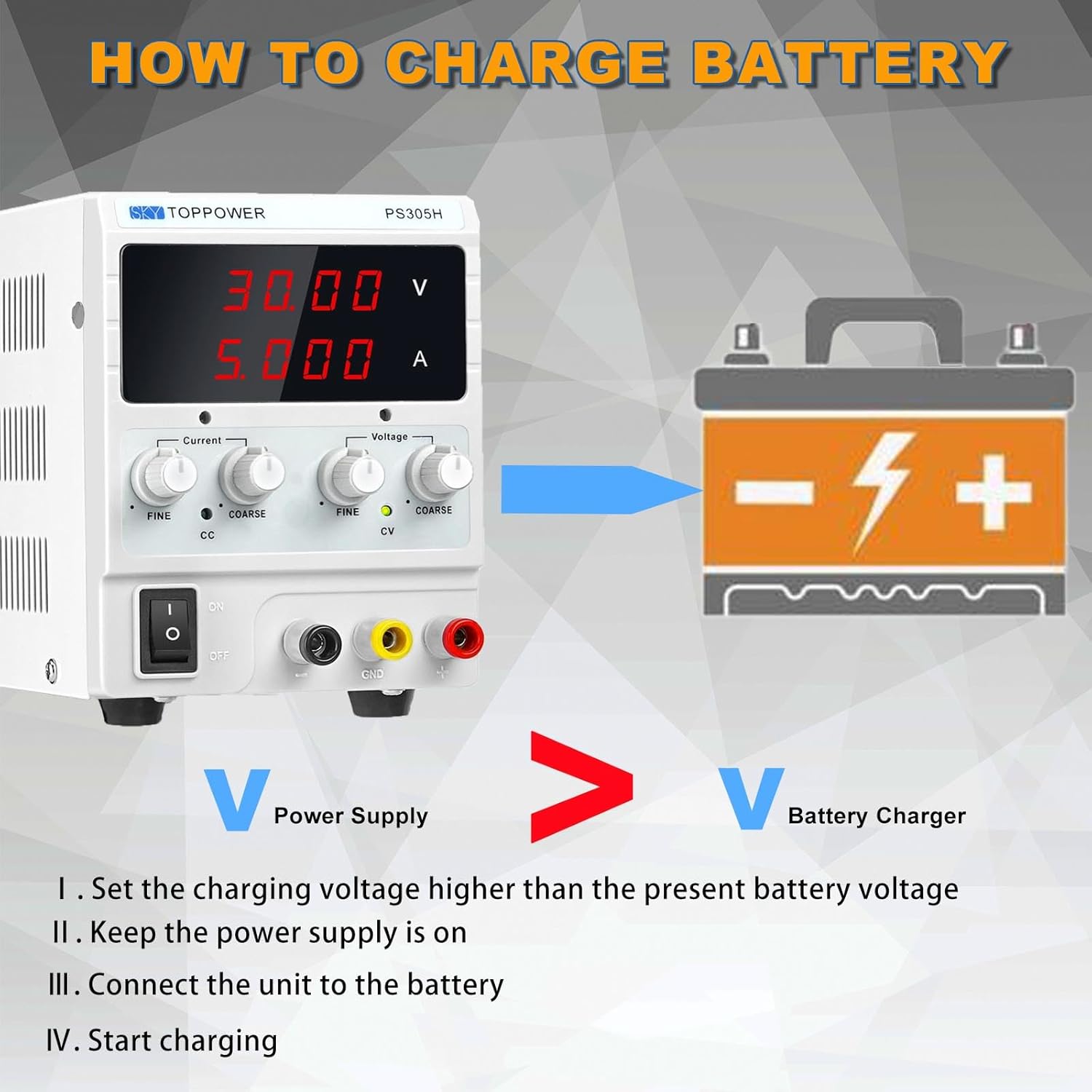
Image: Visual guide on how to charge a battery using the power supply, emphasizing setting voltage вышэй, чым аб'ём батарэіtage and connecting correctly.
Video: Demonstrates battery charging, electrolysis, powering an LED strip, and a DIY electric motor using the power supply.
Powering LEDs and Circuit Boards
The power supply can be used to power LED strips or various circuit boards. Adjust the voltage and current settings according to the requirements of the LED or circuit board. The video above demonstrates powering an LED strip and adjusting its brightness by controlling the current.

Image: The PS305H power supply integrated into a workbench setup with an oscilloscope and other electronic testing equipment.
6. Тэхнічныя характарыстыкі
| Асаблівасць | Specification (PS305H) |
|---|---|
| Уваходны кнtage | 110 VAC ±10%, 60Hz |
| Выхад Voltage | 0-30В |
| Выхадны ток | 0-5А |
| Працоўная тэмпература | 0-40°C |
| Адносная вільготнасць | <80% адноснай вільготнасці |
| тtage Regulation (Load) | ≤ 0.05% + 5 мВ |
| тtage Regulation (Line) | ≤ 0.05% + 5 мВ |
| Ripple & Noise (Voltage) | ≤ 50mV (peak-to-peak) |
| Current Regulation (Load) | ≤ 0.1% + 1mA |
| Current Regulation (Line) | ≤ 0.1% + 1mA |
| Ripple & Noise (Current) | ≤ 30mA (peak-to-peak) |
| Дысплей | 4-значны святлодыёд |
| Дакладнасць адлюстравання | ±0.5% + 1 лічба |
| Ахова | Short Circuit, Overload, Over Temperature, Overvoltage, Anti-reverse connection |
| Памеры (Д×Ш×У) | 221x138x104 mm (8.70x5.43x4.09 inches) |
| Вага | 1.33 кг (2.93 фунтаў) |

Image: The compact dimensions of the PS305H power supply, highlighting its small footprint and light weight.
7. Тэхнічнае абслугоўванне
- Трымайце прыладу ў чысціні і без пылу. Выкарыстоўвайце для чысткі мяккую сухую тканіну.
- Ensure proper ventilation by keeping the cooling fan clear of obstructions.
- Захоўвайце прыладу ў сухім месцы, удалечыні ад прамых сонечных прамянёў і экстрэмальных тэмператур.
- Regularly check the power cord and output leads for any signs of wear or damage.
8. Пошук і ліквідацыя няспраўнасцей (часта задаваныя пытанні)
- Q: When power is on, the current display shows 0.000 A. Is it normal?
- A: Yes, it's normal if no load is connected. The power supply measures current only when a load is drawing current. If you connect a load and the current still shows 0.000 A, check your connections and the load itself.
- Q: Is it possible to set the current value without load connecting?
- A: Yes, you can preset the current limit. Turn the voltage knobs fully clockwise, short the output terminals, then adjust the current knobs to your desired limit. The CC indicator will light up. Then remove the shorting leads.
- Q: Can I remember the last settings when turned off and back on again?
- A: The PS305H does not have a memory function for settings. Each time it is powered on, the output will start from 0V and 0A, requiring manual adjustment.
- Q: How to switch between Constant Voltage (CV) і пастаянны ток (CC)?
- A: The power supply will automatically switch between CV and CC modes based on the load. If the load current is less than the preset current limit, it operates in CV mode. If the load current reaches or exceeds the preset limit, it switches to CC mode, and the voltage will drop to maintain the current limit.
9. Што ў скрынцы
Your SKY TOPPOWER PS305H DC Power Supply package includes:
- 1 x SKY TOPPOWER PS305H DC Bench Power Supply
- 1 х амерыканскі шнур харчавання
- 1 set x Alligator Clip Test Leads
- 1 х Кіраўніцтва карыстальніка (гэты дакумент)

Image: The complete contents of the PS305H product packaging, including the power supply unit, power cord, alligator clip leads, and the instruction manual.
Відэа: Кароткі аглядview of the SKY TOPPOWER DC Variable Power Supply, showcasing its features and components.
10. Гарантыя і тэхнічная падтрымка
SKY TOPPOWER is committed to providing high-quality products and excellent customer service. With over 20 years of experience in design, manufacturing, and selling DC power supplies, our technical team is available to provide professional support.
If you have any questions about your power supply, require technical assistance, or need warranty support, please feel free to contact us:
- электронная пошта: skytop@skytop-power.com
- тэлефон: +86-755-2304-7771
- Адрас: 3rd Floor, Building B, Rixing Industrial Park, No. 10, Yabian Road, Heping Community, Fuhai Street, Baoan District, Shenzhen, China.
For more information and product videos, please visit our official webсайт або канал YouTube.