
Уводзіны
This manual provides essential information for the safe and efficient use of your Xiaomi 55-inch 4K UHD Smart Quantum MagiQ S Mini LED Google TV. Please read these instructions thoroughly before operating the device and retain them for future reference.
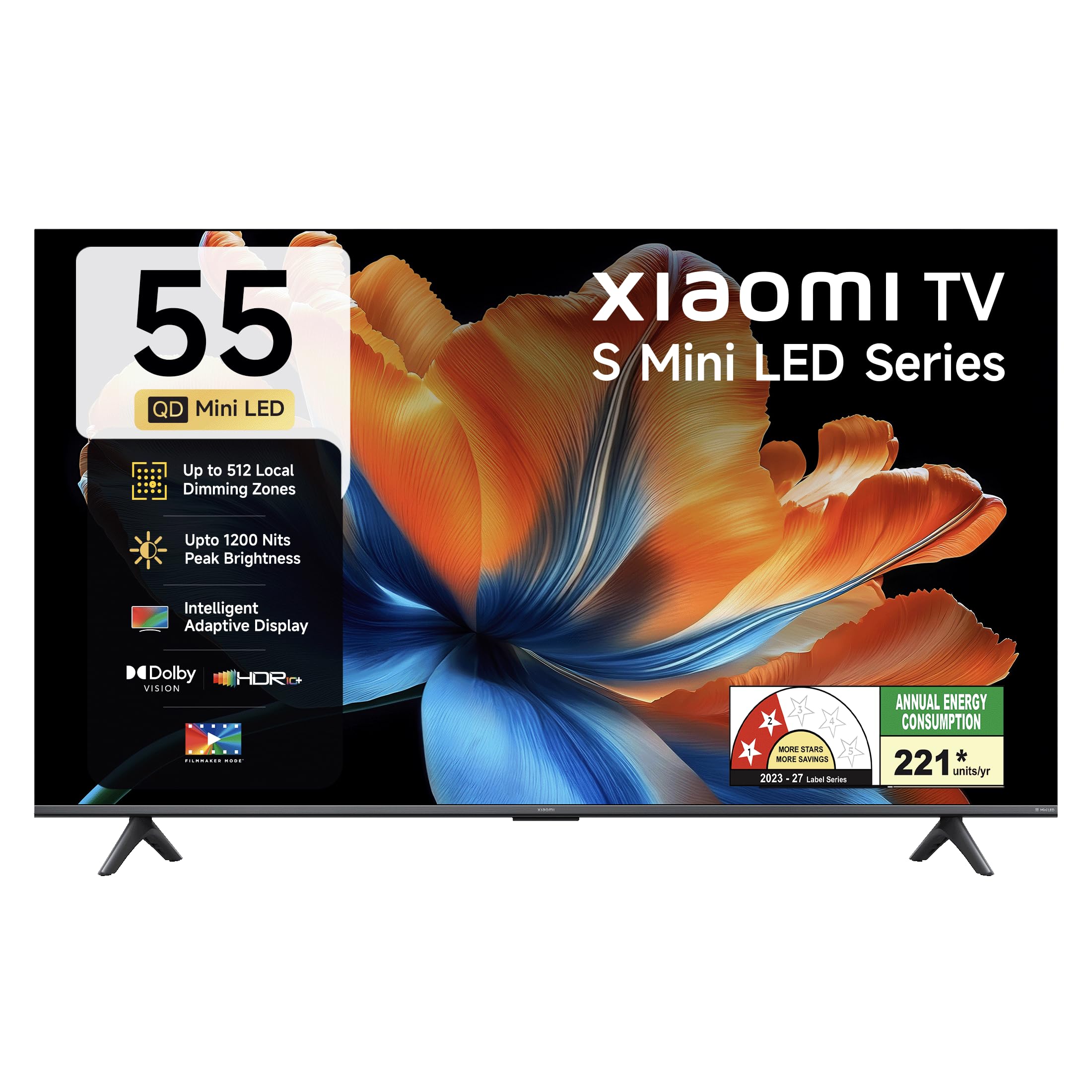
Выява: спераду view of the Xiaomi 55-inch 4K UHD Smart Quantum MagiQ S Mini LED Google TV, showcasinг яго тонкі дызайн рамкі.
Кіраўніцтва па ўстаноўцы
1. Распакоўка і камплектуючыя кампаненты
Carefully remove all items from the packaging. Ensure all components listed below are present and undamaged.

Image: Contents of the product box, including the TV unit, remote control, user manual, two stand units, four screws, two AAA batteries, and a power cord.
- 1 святлодыёдны тэлевізар
- 1 Пульт дыстанцыйнага кіравання
- 1 Кіраўніцтва карыстальніка (гэты дакумент)
- 2 Stand Units
- 4 Screws for stand installation
- 2 батарэйкі тыпу ААА (для пульта дыстанцыйнага кіравання)
- 1 шнур сілкавання
2. Усталёўка на падстаўку або мацаванне на сцяну
Your television supports both table-top stand installation and wall mounting. Choose the method suitable for your environment.
- Для ўстаноўкі стэнда: Attach the two provided stand units to the bottom of the TV using the four screws. Ensure they are securely fastened.
- Для насценнага мантажу: Use a compatible VESA wall mount (sold separately). Follow the instructions provided with your wall mount kit. Ensure the wall can support the TV's weight.
3. Падключэнне знешніх прылад
Connect your external devices such as set-top boxes, gaming consoles, or audio systems to the TV's ports.

Выява: Задняя частка view of the TV highlighting connectivity ports: Optical, Earphone, AV In, 3 HDMI ports (one with eARC), 2 USB 2.0 ports, Antenna, and Ethernet.
- Парты HDMI (3): Connect gaming consoles, Blu-ray players, or set-top boxes. One port supports eARC for enhanced audio return channel functionality.
- USB-парты (x2): Падключыце USB-назапашвальнікі для прайгравання медыяфайлаў.
- Ethernet порт: Для праваднога падключэння да Інтэрнэту.
- Аптычны выхад: Для падлучэння да знешніх аўдыёсістэм.
- AV-уваход: Для падлучэння старых прылад з выкарыстаннем кампазітнага відэа і стэрэаўдыё.
- Антэна: Для падключэння эфірнай або кабельнай антэны.
4. Пачатковае ўключэнне і налада
After connecting all necessary cables, plug the power cord into an electrical outlet. Press the power button on the remote control or the TV to turn it on. Follow the on-screen instructions for initial setup, which typically includes:
- Выбар мовы
- Сеткавае падключэнне (Wi-Fi або Ethernet)
- Уваход у ўліковы запіс Google
- Сканаванне каналаў
Operating Your Xiaomi Smart TV
1. Функцыі дыстанцыйнага кіравання
The included remote control provides access to all TV functions. Insert the two AAA batteries into the remote control, ensuring correct polarity.

Image: Xiaomi remote control, featuring dedicated quick access buttons for popular streaming services and Google Assistant voice control.
- Кнопка харчавання: Уключае або выключае тэлевізар.
- Кнопка Памочніка Google: Актывуе галасавое кіраванне для пошуку кантэнту, кіравання прыладамі разумнага дома і іншага.
- Навігацыйная панэль: Выкарыстоўваецца для навігацыі па меню і выбару элементаў.
- Павялічыць/паменшыць гучнасць: Рэгулюе гучнасць гуку.
- Канал уверх/уніз: Змяняе тэлеканалы.
- Кнопкі хуткага доступу: Dedicated buttons for Netflix, Prime Video, YouTube, Disney+ Hotstar, SonyLIV, and Live TV.
- Кнопка адключэння: Выключае гук тэлевізара.
2. Google TV Interface and Applications
Your TV runs on the Android 14 OS with Google TV, offering a personalized content experience. Access a wide range of applications from the Google Play Store.

Image: The PatchWall interface, providing customized content recommendations and curation from various streaming platforms.
- Інтэрфейс "Спачатку кантэнт": Арганізуе кантэнт з усіх вашых струменевых сэрвісаў у адным месцы.
- Personal Profiles: Стварыце індывідуальны праfileдля персаналізаваных рэкамендацый.
- Праграмы, якія падтрымліваюцца: Pre-installed and downloadable apps include Netflix, Prime Video, YouTube, Zee5, JioCinema, SonyLiv, and more.
- Памочнік Google: Use voice commands for navigation, search, and smart home control.
3. Налады выявы і гуку
Аптымізуйце свой viewing and listening experience through various picture and sound modes.
Налады малюнка:
- Рэжым рэжысёра: Disables post-processing effects to display content as intended by the director.
- Dolby Vision: Enhances HDR content with dynamic metadata for optimized image quality frame by frame.
- HDR10+: Uses dynamic data to enhance every frame, providing an immersive viewвопыту.
- Рэжым камфорту для вачэй: Зніжае сіняе святло і мігценне для больш камфортнага прагляду viewвопыту.
- MEMC Engine: Motion Estimation, Motion Compensation technology for smoother motion in fast-paced scenes.
- AI Picture Optimization Engine: Advanced AI algorithms analyze content in real-time to enhance clarity, contrast, and color reproduction.

Image: Filmmaker Mode, designed to preserve original colors, contrast, and motion for an authentic cinematic experience.

Image: Dolby Vision technology, optimizing image quality with deeper blacks and brighter highlights.

Image: HDR10+ dynamic frame-by-frame tuning, ensuring consistent detail across dark and bright scenes.

Image: Eye Care Mode, providing flicker-free visuals with DC Dimming and reduced blue light for comfortable viewінж.
Налады гуку:
- Выхадная магутнасць 34 Вт: Powerful built-in box speakers.
- Dolby Audio: Delivers rich, clear, and powerful sound.
- DTS-X і DTS Virtual:X: Забяспечвае захапляльнае, шматмернае аўдыё.
- Гук Xiaomi: Preset audio configurations developed for optimal sound quality.

Image: Xiaomi Sound, offering tailored audio experiences through expert-developed configurations.
4. Падключэнне і струменевая перадача
Your TV offers versatile connectivity options for seamless streaming and device integration.
- Двухдыяпазонны Wi-Fi: Connects to 2.4GHz and 5GHz wireless networks.
- Bluetooth: Падключыце бесправадныя навушнікі, калонкі або іншыя аксэсуары Bluetooth.
- Google Cast Built-in: Stream content directly from compatible apps on your smartphone or tablet.
- Apple AirPlay 2: Трансляцыя кантэнту з прылад Apple.
- Miracast: Mirror your Android device's screen wirelessly.

Image: Stream content from your phone using Google Cast or Apple AirPlay 2.
Догляд і абслугоўванне
Правільны догляд забяспечвае даўгавечнасць і аптымальную працу вашага тэлевізара.
- Ачыстка экрана: Акуратна працярыце экран мяккай тканінай без ворса. Для выдалення ўстойлівых плям выкарыстоўвайце спецыяльны раствор для чысткі экранаў, нанесены на тканіну, а не непасрэдна на экран.
- Ачышчэнне цела: Wipe the TV's frame and back panel with a soft, dry cloth. Avoid abrasive cleaners or solvents.
- Вентыляцыя: Забяспечце дастатковую цыркуляцыю паветра вакол тэлевізара. Не блакуйце вентыляцыйныя адтуліны.
- Выключэнне: Заўсёды выключайце тэлевізар і адключайце яго ад электрычнай разеткі перад чысткай або калі ён не будзе выкарыстоўвацца працяглы час.
- Абнаўленні праграмнага забеспячэння: Periodically check for and install software updates to ensure optimal performance and security.
Ліквідацыю распаўсюджаных праблем
Refer to this section for solutions to common operational problems.
| праблема | Рашэнне |
|---|---|
| Тэлевізар не ўключаецца | Ensure the power cord is securely plugged into both the TV and a working electrical outlet. Check if the power outlet is active. Try pressing the power button on the TV itself. |
| Няма выявы, але гук ёсць | Check the input source. Ensure the connected device (e.g., set-top box) is turned on and functioning. Try a different HDMI cable or port. |
| Няма гуку, але выява ёсць | Check the volume level and ensure the TV is not muted. Verify audio output settings (e.g., internal speakers, external sound system). Check audio cables for external devices. |
| Пульт дыстанцыйнага кіравання не адказвае | Replace the AAA batteries in the remote control. Ensure there are no obstructions between the remote and the TV. Re-pair the Bluetooth remote if necessary (refer to TV settings). |
| Немагчыма падключыцца да Wi-Fi | Ensure your Wi-Fi router is on and working. Re-enter the Wi-Fi password. Try restarting both the TV and the router. Check if other devices can connect to the Wi-Fi network. |
Тэхнічныя характарыстыкі
Detailed specifications for the Xiaomi 55-inch 4K UHD Smart Quantum MagiQ S Mini LED Google TV (Model L55MC-IN).

Image: Physical dimensions and weight of the Xiaomi 55-inch TV, both with and without the stand.
| Асаблівасць | Спецыфікацыя |
|---|---|
| Нумар мадэлі | L55MC-IN |
| Памер экрана | 55 цалі (138 см) |
| Тэхналогія адлюстравання | Міні святлодыёд |
| дазвол | 4K Ultra HD (3840 x 2160) |
| Частата абнаўлення | 60 Hz (DLG 120 Hz) |
| Пікавая яркасць | Да 1200 ніт |
| Аперацыйная сістэма | Android 14 OS with Google TV |
| АЗП | 2 ГБ |
| ПЗУ (унутраная памяць) | 32 ГБ |
| Гукавы выхад | 34 ват |
| Аўдыётэхналогіі | Dolby Audio, DTS-X, DTS Virtual:X |
| Сувязь | Dual Band Wi-Fi, Bluetooth, 3 HDMI (1 eARC), 2 USB, Optical, Ethernet, AV In |
| Адлюстраванне экрана | Google Cast, Apple AirPlay 2, Miracast |
| Асаблівасці | Filmmaker Mode, MEMC, Eye Comfort Mode, AI Picture Optimization Engine |
| Памеры прадукту (Д х Ш х У) | 31.2D x 31.2W x 76.9H Centimeters (with stand) |
| Item Weight Without Stand | 11.6 кілаграма |
| Энергаспажыванне | 230 ват |
| Краіна паходжання | Індыя |
Інфармацыя аб гарантыі
Your Xiaomi TV comes with a comprehensive warranty provided by the brand from the date of purchase.
- Стандартная гарантыя: 3-year comprehensive warranty for non-prebook customers (purchases between April 22nd - May 31st).
- Pre-book Customer Warranty: 4-year comprehensive warranty for pre-book customers (purchases between April 22nd - April 30th).
Warranty claims can be made using your Amazon invoice as proof of purchase. For detailed terms and conditions, please refer to the official Xiaomi warranty policy or contact customer support.
Падтрымка кліентаў
For any assistance, service requests, or queries regarding your Xiaomi TV, please contact Xiaomi customer support.

Выява: Зверхуview of Xiaomi's customer support commitments, including quick installation, prompt call-backs, and swift doorstep solutions.
- Паслугі ўстаноўкі: New TV installations are typically completed within 3 hours of your appointment.
- Service Requests: Expect a call back from the support team within 60 minutes for any service request.
- On-site Support: Experts aim to arrive at your home within 24 hours of your service request.
Please visit the official Xiaomi India webсайт або звярніцеся да кантактнай інфармацыі, указанай на ўпакоўцы прадукту, каб атрымаць найбольш актуальную інфармацыю аб падтрымцы.