
Уводзіны
The artika Eclipse Solar 20 LED Bulb String Light with Remote is designed to illuminate outdoor spaces such as patios and fences. This solar-powered, weather-resistant lighting solution features 20 LED bulbs across a 42-foot total length, providing extensive coverage. It includes a 10-foot extension cable for optimal solar panel placement and supports USB-C charging for convenience. Users can select from four distinct lighting modes: Fade, Jump, Flash, and Steady.
Што ў скрынцы
- 1 x 42ft String Light
- 20 x LED Bulbs (S14 type)
- 1 x Monocrystalline Solar Panel
- 1 х кабель USB-C
- 1 падаўжальны кабель даўжынёй 10 футаў
- Мантажнае абсталяванне
- Кіраўніцтва па эксплуатацыі
Настройка
1. Размяшчэнне сонечных панэляў
Position the monocrystalline solar panel in an area that receives direct sunlight for at least 6-8 hours daily to ensure optimal charging. Use the included 10-foot extension cable to place the solar panel away from the string lights if necessary, allowing for maximum sun exposure.

This image illustrates how the main string light connects to the extension cable, which then connects to the solar panel, ensuring a secure and weather-resistant connection.
2. Усталёўка гірлянд
Uncoil the 42-foot string light. Utilize the provided mounting hardware to secure the string lights. Options include mounting to walls, ground stakes, or panels. Ensure the string is taut but not overly stressed. The design allows for flexible installation in various outdoor environments.
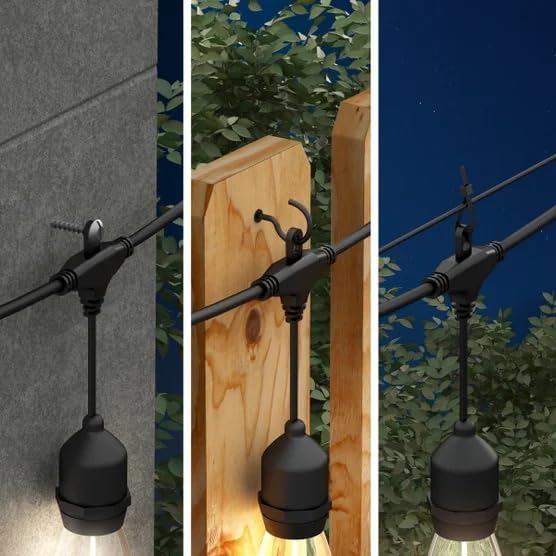
Візуальны эксamples demonstrating various ways to install the string lights, including using screws for wall mounting, hooks for overhead suspension, and clips for flexible attachment.
3. Bulb Installation
Carefully screw each of the 20 LED bulbs into the sockets along the string light. Ensure they are finger-tight to create a secure, weather-resistant seal. The bulbs are designed to be shatterproof.

На гэтым малюнку паказана падрабязная view of three individual LED bulbs attached to the string light cable. Each bulb is designed for outdoor use and provides warm white illumination.
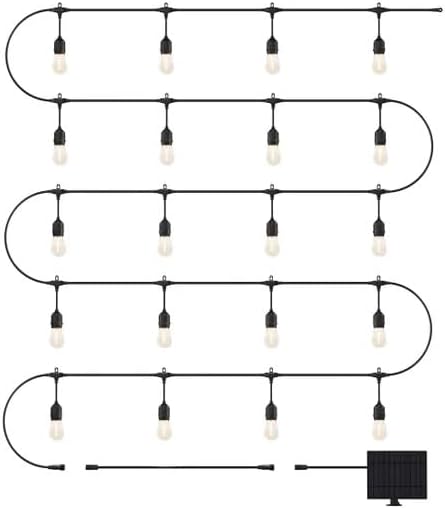
A diagram illustrating the complete 42-foot string light with 20 LED bulbs, connected to the solar panel via an extension cable. This provides an overview of the product's total length and components.
Інструкцыя па эксплуатацыі
1. Уключэнне / выключэнне харчавання
The string lights are designed to automatically turn on at dusk and off at dawn when the solar panel is sufficiently charged. A remote control is included for manual operation and mode selection.
2. Рэжымы асвятлення
Use the remote control to cycle through the four available lighting modes:
- Знікае: Святло павольна цьмянее і ярчэе.
- скачок: Lights change abruptly between brightness levels.
- Успышка: Lights blink on and off.
- Стабільны: Lights remain continuously on at a constant brightness.
3. Зарадка
The primary charging method is via the monocrystalline solar panel. Ensure the panel is clean and exposed to direct sunlight. For situations with insufficient sunlight, the solar panel also features a USB-C port for alternative charging using the provided USB-C cable.
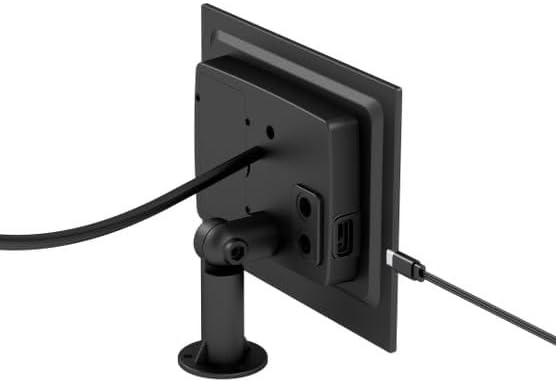
This image displays the back of the monocrystalline solar panel, highlighting the USB-C charging port for alternative power input and the adjustable mounting bracket.
Тэхнічнае абслугоўванне
1. Уборка
Перыядычна чысціце паверхню сонечнай панэлі мяккай губкайamp cloth to remove dust, dirt, or debris that may obstruct sunlight and reduce charging efficiency. Clean the LED bulbs and string with a damp тканіна па меры неабходнасці.
2. Замена батарэі
The unit utilizes 18650 Lithium Ion rechargeable/replaceable batteries. If the lights' performance diminishes significantly over time, the batteries may need replacement. Refer to the specific instructions provided with the product for safe battery access and replacement procedures.
Ліквідацыю непаладак
- Не ўключаецца святло: Ensure the solar panel is receiving adequate direct sunlight. Check if the remote control battery needs replacement. Verify all bulb connections are secure.
- Lights dim or short operating time: The solar panel may not be fully charging. Relocate the panel to an area with more direct sunlight or use the USB-C charging option. Ensure the solar panel surface is clean.
- Пульт дыстанцыйнага кіравання не працуе: Check the remote control battery. Ensure there are no obstructions between the remote and the solar panel receiver.
Тэхнічныя характарыстыкі
| Марка | артыка |
| Нумар мадэлі | OUT-ECSOR-C2BL |
| Агульная даўжыня | 42 футаў |
| Колькасць цыбулін | 20 LED Bulbs (S14) |
| Даўжыня падаўжальнага кабеля | 10 футаў |
| Крыніца харчавання | Сонечная батарэя, зарадка праз USB-C |
| Тып батарэі | 18650 Lithium Ion Rechargeable/Replaceable |
| Светлы колер | Цёплы белы (2700 Кельвінаў) |
| Яркасць | 150 люмен |
| тtage | 3 вольт |
| Асаблівасці | Dimmable, Remote Controlled, Shatterproof, Weather-resistant (IP44) |
| Матэрыял | Plastic (Bulbs), Rubber/Copper (Cable) |
Гарантыя
This product is covered by a manufacturer's warranty. For detailed information regarding warranty terms, conditions, and duration, please refer to the documentation included with your purchase or contact artika customer support directly.
Падтрымка
For further assistance, technical support, or inquiries regarding your artika Eclipse Solar 20 LED Bulb String Light, please visit the official artika webсайт або звярніцеся ў аддзел абслугоўвання кліентаў. Кантактную інфармацыю звычайна можна знайсці на ўпакоўцы прадукту або на імёнах вытворцы. webсайт.