Уводзіны
This manual provides instructions for the setup, operation, and maintenance of your Logitech Wingman Force Joystick, model 963155-0403. This device is designed to enhance your PC gaming experience with force feedback technology and programmable controls.
Змест пакета
Пераканайцеся, што ваш пакет змяшчае наступныя элементы:
- Logitech Wingman Force Joystick
- Адаптар сілкавання
- USB Cable (integrated or separate)
- Software CD (if applicable, for WingMan Software)
- Кіраўніцтва карыстальніка (гэты дакумент)
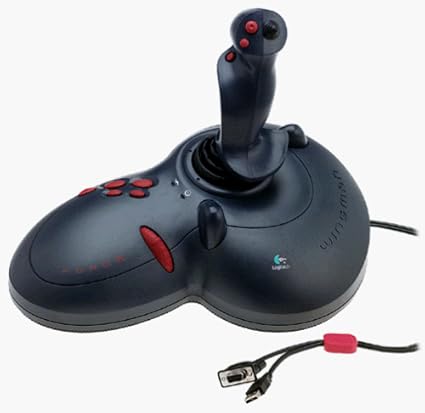
Figure 1: The Logitech Wingman Force Joystick packaging, showing the joystick and its features.
Настройка
- Падключыце харчаванне: Plug the power adapter into the joystick and then into a standard electrical outlet.
- Падключэнне да ПК: Connect the joystick's USB cable to an available USB port on your computer. The joystick also supports serial interfaces.
- Усталяваць праграмнае забеспячэнне: Insert the WingMan Software CD (if provided) into your computer's CD-ROM drive and follow the on-screen instructions to install the drivers and WingMan Software. If no CD is provided, drivers may be automatically installed by your operating system or available for download from the Logitech support webсайт.
- Сістэмныя патрабаванні: Ensure your computer runs a compatible Windows operating system.
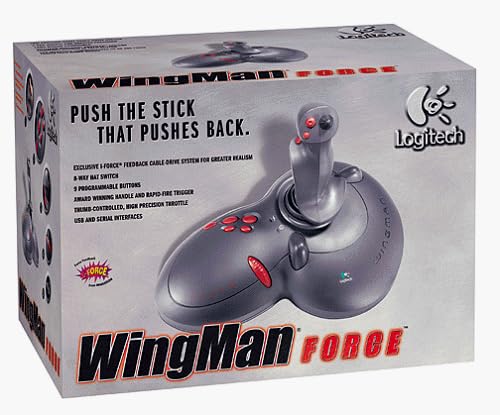
Figure 2: The Logitech Wingman Force Joystick, illustrating its ergonomic design and button layout.
Інструкцыя па эксплуатацыі
Кантроль надview
- Joystick Handle: Provides precise control for in-game movement.
- 9 праграмуемых кнопак: Customize these buttons using the WingMan Software for various in-game actions.
- 8-Way Hat Switch: Located on top of the joystick, this switch allows for quick camera views or directional commands.
- Thumb-Controlled Throttle: Adjust speed or thrust with the integrated throttle control.
Force Feedback Technology
The Wingman Force Joystick utilizes Logitech's exclusive I-Force force feedback technology with a cable-drive system. This system provides realistic tactile feedback, such as vibrations from impacts, recoil from weapons, and resistance during maneuvers, enhancing immersion in compatible games.
Using WingMan Software
The WingMan Software allows you to:
- Program the 9 buttons for specific game functions.
- Стварыць і захаваць некалькі прафесіяналаўfiles для розных гульняў.
- Adjust force feedback intensity settings.
- Calibrate the joystick for optimal performance.
Refer to the WingMan Software's help documentation for detailed instructions on customization and profile кіравання.
Тэхнічнае абслугоўванне
To ensure the longevity and optimal performance of your joystick:
- Уборка: Use a soft, dry cloth to wipe the surface of the joystick. Avoid using abrasive cleaners or solvents.
- захоўванне: Store the joystick in a clean, dry environment away from extreme temperatures and direct sunlight.
- Сыход за кабелем: Avoid bending or crimping the cables excessively.
Ліквідацыю непаладак
- Problem: Joystick not recognized by computer.
- рашэнне:
- Ensure the USB cable is securely connected to both the joystick and the computer.
- Паспрабуйце падключыцца да іншага порта USB.
- Verify that the power adapter is properly connected and the joystick is receiving power.
- Reinstall the WingMan Software drivers.
- Problem: Inconsistent or absent force feedback.
- рашэнне:
- Check the force feedback settings within the WingMan Software and ensure they are set to an appropriate level.
- Ensure the game you are playing supports force feedback and that it is enabled in the game's settings.
- Restart your computer and the game.
- Пераканайцеся, што ўсе злучэнні надзейныя.
- Problem: Buttons or controls are unresponsive.
- рашэнне:
- Calibrate the joystick using the WingMan Software.
- Ensure the joystick drivers are up to date.
- Test the joystick in a different game or application to determine if the issue is game-specific.
Тэхнічныя характарыстыкі
| Асаблівасць | Дэталь |
|---|---|
| Нумар мадэлі | 963155-0403 |
| Марка | Logitech |
| Тып кантролера | Джойстык |
| Тэхналогія падлучэння | USB, паслядоўны |
| Сумяшчальныя прылады | ПК з Windows |
| Памеры прадукту | 13.5 х 9.63 х 9.25 цалі |
| Вага прадмета | 4.14 фунта |
| Сілавая зваротная сувязь | I-Force feedback cable-drive system |
| Гузікі | 9 праграмуемыя кнопкі |
| Пераключальнік капелюша | 8-баковы перамыкач |
| Дросель | Thumb-controlled, high precision throttle |
Гарантыя і падтрымка
Каб атрымаць інфармацыю аб гарантыі і тэхнічнай падтрымцы, звярніцеся да дакументацыі, якая пастаўляецца з вашым прадуктам, або наведайце афіцыйны сайт падтрымкі Logitech. webсайт. Звычайна там можна знайсці драйверы, часта задаваныя пытанні і кантактную інфармацыю службы падтрымкі кліентаў.
Служба падтрымкі Logitech Webсайт: www.logitech.com/support


