1. Уводзіны
Thank you for choosing the Sony SDM-HS75/B 17-inch LCD Monitor. This manual provides essential information for the safe and efficient use of your new display. The SDM-HS75/B features a 17-inch active matrix TFT LCD panel, offering a crisp 1280 x 1024 resolution, a 500:1 contrast ratio, and 250 cd/m² brightness. Its 16 ms response time ensures smooth motion, while ErgoBright technology optimizes brightness for various lighting conditions, reducing eye strain. This monitor is designed for simple plug-and-play setup and is compatible with both PC and Mac operating systems.
2. Інфармацыя па бяспецы
- Крыніца харчавання: Use only the specified power supply. Ensure the power cord is securely connected.
- Вентыляцыя: Не блакуйце вентыляцыйныя адтуліны. Пакіньце дастатковую прастору вакол манітора для належнай цыркуляцыі паветра.
- Ўздзеянне вадкасці: Keep the monitor away from water or excessive moisture. Do not spill liquids on the monitor.
- Уборка: Адключыце шнур харчавання ад разеткі перад чысткай. Выкарыстоўвайце мяккую сухую тканіну. Пазбягайце выкарыстання абразіўных ачышчальных сродкаў.
- Размяшчэнне: Place the monitor on a stable, level surface. Avoid direct sunlight or heat sources.
- Абслугоўванне: Не спрабуйце абслугоўваць манітор самастойна. Звяртайцеся па любыя паслугі да кваліфікаванага персаналу.
3. Змесціва ўпакоўкі
Праверце наяўнасць усіх прадметаў у камплекце:
- Sony SDM-HS75/B 17-inch LCD Monitor
- Шнур сілкавання
- HD15 Video Signal Cable (VGA cable)
- Кароткае кіраўніцтва па ўстаноўцы
- CD-ROM with Windows and Macintosh Utility Files
- Гарантыйны талон
4. Настройка
4.1. Фізічная ўстаноўка
Place the monitor on a stable, flat surface. The integrated stand allows for a tilt range of 0 to 20 degrees for optimal viewing. For wall mounting, the monitor is compatible with optional VESA-standard brackets (not included).
4.2. Падключэнне да кампутара
- Пераканайцеся, што і манітор, і камп'ютар выключаны.
- Connect one end of the supplied HD15 video signal cable (VGA) to the 15-pin mini D-sub port on the back of the monitor.
- Connect the other end of the video cable to the corresponding VGA port on your computer. Secure the connection by tightening the screws on the cable connector.
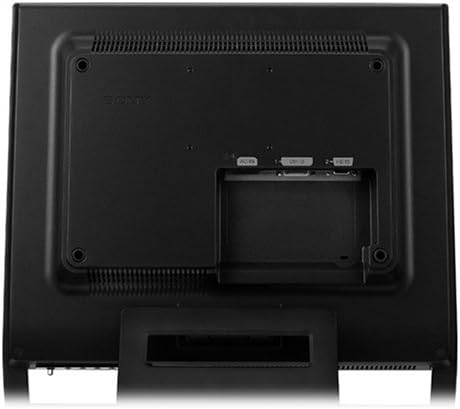
Малюнак 1: Тыл view of the Sony SDM-HS75/B monitor. This image displays the rear panel of the Sony SDM-HS75/B monitor. Visible are the power input, a 15-pin mini D-sub (VGA) port for video input, and mounting holes for VESA-compatible wall mounts or alternative stands. The design allows for cable management.
4.3. Уключэнне
- Connect the AC power cord to the monitor's power input.
- Падключыце другі канец шнура харчавання пераменнага току да заземленай электрычнай разеткі.
- Power on your computer, then press the power button on the front of the monitor. The monitor is plug-and-play compatible and should automatically detect the input signal.
5. Аперацыйная
5.1. Асноўныя элементы кіравання
The monitor features an On-Screen Display (OSD) menu, accessible via buttons typically located on the front or bottom bezel. These buttons allow you to navigate and adjust various display settings.
5.2. Рэгуляванне налад дысплея
Use the OSD menu to fine-tune your viewвопыт:
- Яркасць: Адрэгулюйце агульную яркасць экрана.
- Кантраст: Кантралюйце розніцу паміж самымі светлымі і самымі цёмнымі ўчасткамі выявы.
- дазвол: For optimal image quality, set your computer's display resolution to 1280 x 1024 pixels.
- ErgoBright Technology: This feature automatically optimizes screen brightness based on ambient lighting conditions, aiming to reduce eye strain and improve viewing comfort. You can typically enable or disable this feature through the OSD menu.
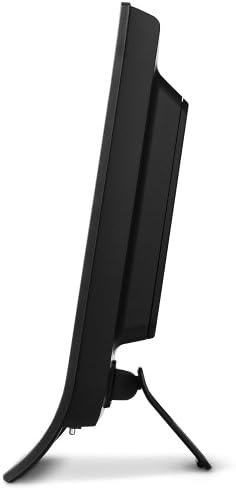
Малюнак 2: Бокавы профіfile of the Sony SDM-HS75/B monitor. This image shows the Sony SDM-HS75/B monitor from a side angle, emphasizing its slender profile. The integrated stand is visible, which allows for tilt adjustments to optimize viewing angles. The overall design is compact, suitable for various desktop environments.
6. Тэхнічнае абслугоўванне
6.1. Уборка
To clean the monitor, first disconnect the power cord. Use a soft, dry, lint-free cloth to gently wipe the screen and exterior surfaces. Do not use liquid cleaners, aerosol sprays, or abrasive materials, as these can damage the monitor's finish or screen coating.
6.2. Захоўванне
If storing the monitor for an extended period, ensure it is powered off and disconnected from all cables. Store it in a cool, dry place, away from direct sunlight and extreme temperatures. It is recommended to keep the original packaging for protection during storage or transport.
7. Выпраўленне непаладак
Калі ў вас узніклі праблемы з маніторам, звярніцеся да наступных распаўсюджаных рашэнняў:
- Няма выявы на экране:
- Ensure the monitor's power cord is securely connected to both the monitor and a working electrical outlet.
- Verify that the video cable (HD15 D-sub) is firmly connected to both the monitor and your computer.
- Пераканайцеся, што манітор уключаны.
- Праверце, ці ўключаны камп'ютар і ці не знаходзіцца ён у рэжыме сну.
- Poor Image Quality (Blurry, Distorted, Incorrect Colors):
- Пераканайцеся, што дазвол дысплея вашага кампутара ўсталяваны на роднае дазвол манітора 1280 x 1024.
- Adjust the brightness and contrast settings using the OSD menu.
- Праверце відэакабель на наяўнасць пашкоджанняў або аслабленых злучэнняў.
- Monitor Flickers:
- Пераканайцеся, што відэакабель надзейна падключаны.
- Check for strong electromagnetic interference from other electronic devices nearby.
8. Тэхнічныя характарыстыкі
| Асаблівасць | Спецыфікацыя |
|---|---|
| Нумар мадэлі | SDM-HS75/B |
| Памер экрана | 17 цалі |
| Тып дысплея | LCD (Active Matrix TFT) |
| Роднае дазвол | 1280 x 1024 (SXGA) |
| Суадносіны бакоў | 5:4 |
| Яркасць | 250 кд/м² |
| Каэфіцыент кантраснасці | 500:1 |
| Час водгуку | 16 мілісекунд |
| ViewВугал павароту (Г/В) | 160 Degrees / 160 Degrees |
| Крок пікселяў | 0.264 мм |
| Сувязь | 15-pin mini D-sub (VGA) |
| Рэгуляванне нахілу | Ад 0 да 20 градусаў |
| Тып мацавання | Насценнае мацаванне (сумяшчальнае з VESA) |
| Вага прадмета | 12.6 фунта |
| Колер | Чорны |
9. Гарантыя і падтрымка
The Sony SDM-HS75/B monitor comes with a трохгадовая абмежаваная гарантыя covering parts, labor, and the backlight. This warranty protects against defects in materials and workmanship under normal use.
For technical support, warranty claims, or service inquiries, please contact Sony customer support. Refer to the warranty card included in your package for specific terms and contact information.


