Уводзіны
Welcome to the user manual for your new LG 410G Flip Phone. This guide provides essential information on setting up, operating, and maintaining your device. The LG 410G is a compact flip phone designed for reliable communication on the TracFone network, featuring Bluetooth connectivity and a built-in camera.
Пачатак працы: Налада
1. Распакоўка і камплектуючыя аксэсуары
Upon opening your LG 410G package, verify that all components are present:
- LG 410G Flip Phone
- акумулятар
- Зарадная прылада
- Гарнітура гучнай сувязі
- Аўтамабільная зарадная прылада
- Чахол для тэлефона
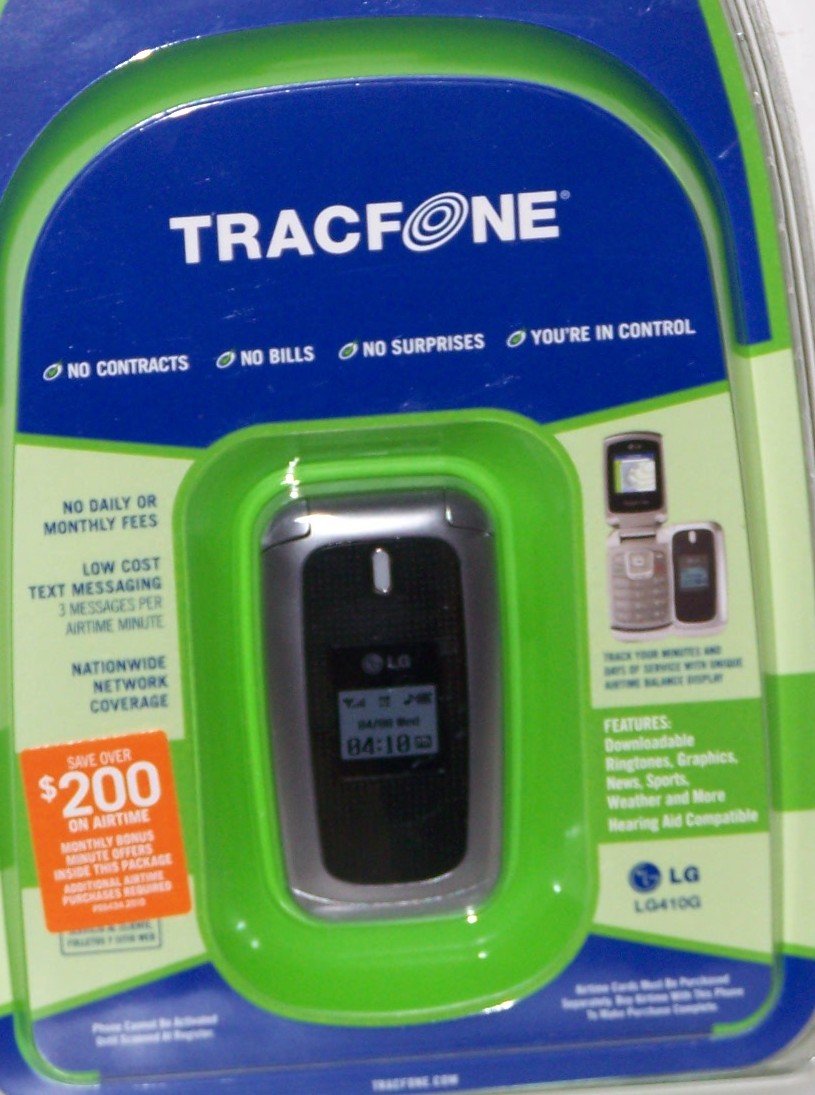
Image: The LG 410G Flip Phone. This image displays the compact design of the phone, highlighting its external screen and the flip mechanism.
2. Устаўка SIM-карты і акумулятара
- Пераканайцеся, што тэлефон выключаны.
- Зніміце заднюю крышку тэлефона, акуратна пацягнуўшы яе за пазначаную выемку.
- Locate the SIM card slot. Insert your TracFone SIM card with the gold contacts facing down and the cut corner aligned correctly.
- Insert the battery, ensuring the contacts align with those in the phone compartment.
- Устаўце заднюю крышку на месца, моцна націскаючы, пакуль яна не зашчапіцца.
3. Зарадка тэлефона
Before initial use, fully charge the phone's battery. Connect the charger to the Micro USB port on the phone and plug it into a power outlet. The charging indicator will illuminate. A full charge typically takes a few hours.
4. Activating Your TracFone Service
Your LG 410G operates on the TracFone network. To activate your service and receive your initial 20 minutes of starter airtime, visit the official TracFone website or call TracFone customer service. Follow the on-screen or spoken instructions to complete the activation process.
Асноўныя аперацыі
1. Уключэнне і выключэнне
- Каб уключыць: Адкрыйце фліп і націсніце і ўтрымлівайце Канец/Улада key until the screen illuminates.
- Каб выключыць: Націсніце і ўтрымлівайце Канец/Улада key until the power-off options appear, then select "Power Off".
2. Здзяйсненне і прыём званкоў
- Здзяйсненне званка: Open the flip, enter the phone number using the keypad, and press the Адправіць ключ.
- Прыём званка: When the phone rings, open the flip or press the Адправіць key to answer.
- Завяршэнне выкліку: Націсніце Канец/Улада ключ.
- Hands-Free Speaker: During a call, press the designated speaker key (often a soft key) to activate the hands-free speaker.
3. Тэкставыя паведамленні
Navigate to the "Messages" menu. Select "Create New Message" or "New Text Message." Enter the recipient's number and type your message using the keypad. Press "Send" when complete.
4. Выкарыстанне камеры
The LG 410G features a built-in VGA camera. Access the camera from the main menu. Frame your shot using the screen as a viewfinder and press the designated camera button (or center navigation key) to capture the image. Photos are saved to the phone's memory.
5. Злучэнне Bluetooth
To connect to Bluetooth devices like the included hands-free headset:
- Перайсці да Menu > Settings > Bluetooth.
- Turn Bluetooth On.
- Выберыце "Пошук new devices" or "Add new device".
- Select your desired device from the list and follow the pairing instructions, entering a passcode if prompted (e.g., 0000).
6. Мабільны Web Доступ
Access basic mobile web services through the phone's browser. Navigate to the "Browser" or "Internet" option in the main menu. Data usage will consume airtime minutes or data bundles, depending on your TracFone plan.
7. Функцыя ліхтарыка
The LG 410G includes a flashlight feature. This can typically be activated via a shortcut key or through the "Tools" or "Utilities" menu.
Тэхнічнае абслугоўванне
1. Чыстка тэлефона
Use a soft, lint-free cloth to clean the phone's screen and body. Avoid using harsh chemicals or abrasive materials, which can damage the device. Do not expose the phone to excessive moisture.
2. Сыход за батарэяй
- Avoid extreme temperatures, as they can reduce battery life.
- Не праколвайце і не пашкоджвайце акумулятар.
- If the phone will not be used for an extended period, store it with a partial charge (around 50%) in a cool, dry place.
3. Абнаўленне праграмнага забеспячэння
Periodically check for any available software updates through the phone's settings menu, if applicable. Updates can improve performance and security.
Ліквідацыю непаладак
| праблема | Магчымае рашэнне |
|---|---|
| Тэлефон не ўключаецца. | Ensure the battery is correctly inserted and fully charged. Try connecting the charger to see if it responds. |
| Нельга рабіць або прымаць званкі. | Check for network signal strength. Verify that your TracFone service is active and you have sufficient airtime. Ensure the SIM card is properly inserted. |
| Прылада Bluetooth не спалучаецца. | Ensure Bluetooth is enabled on both devices and they are within range. Make sure the other device is in pairing mode. Try restarting both devices. |
| Дрэнная якасць выявы камеры. | Ensure the camera lens is clean and free of smudges. Take photos in well-lit environments. |
| Тэлефон завісае або не рэагуе. | Выміце батарэю, пачакайце некалькі секунд і зноў устаўце яе, каб выканаць мяккі скід. |
If problems persist after attempting these solutions, please contact TracFone customer support for further assistance.
Тэхнічныя характарыстыкі
| Асаблівасць | Дэталь |
|---|---|
| Назва мадэлі | LG 410G |
| Марка | LG |
| Аператар бесправадной сувязі | Tracfone |
| Формаў-фактар | Перавярнуць |
| Памер экрана | 3.46 цалі |
| Тэхналогія падлучэння | Bluetooth, мікра-USB |
| Бесправадныя сеткавыя тэхналогіі | GSM |
| Колькасць слотаў для SIM-карт | Адна SIM-карта |
| Апісанне батарэі | Літый-іённы |
| Убудаваны медыя | Camera (VGA) |
| Асаблівасці | Hands-free speaker, Flashlight, Auto redial, Mobile web, Text messaging, Voice mail, Free caller ID, Free call waiting |
Гарантыя і падтрымка
Інфармацыя аб гарантыі
Your LG 410G Flip Phone is covered by a limited manufacturer's warranty. Please refer to the warranty card included in your original packaging for specific terms, conditions, and duration. Keep your proof of purchase for warranty claims.
Падтрымка кліентаў
For technical assistance, service inquiries, or warranty support, please contact TracFone Wireless customer service. You can typically find their contact information on the TracFone website or by dialing *611 from your TracFone device.
- TracFone Webсайт: www.tracfone.com
- TracFone Customer Service: Refer to your TracFone documentation or webсайт з самымі актуальнымі кантактнымі нумарамі.