1. Уводзіны
This manual provides comprehensive instructions for the setup, operation, and maintenance of your Geemarc CL100 Amplified Big Button Corded Phone. Please read this manual carefully to ensure proper use and to maximize the benefits of your new telephone.
The Geemarc CL100 is designed for ease of use, featuring large buttons, adjustable amplification, and visual indicators, making it suitable for individuals with hearing or visual impairments. This telephone is line-powered and does not require an external power source.
Важная заўвага: This telephone does not include a built-in answering machine, speakerphone, caller display, talking caller ID, talking keypad, or voice assist functionality.
2. Прадукт скончыўсяview
2.1 Змест пакета
- Geemarc CL100 Corded Telephone Base
- Трубка
- Скручаны шнур трубкі
- Тэлефонны шнур
- Кіраўніцтва карыстальніка (гэты дакумент)
2.2 Telephone Layout
Familiarize yourself with the key components and controls of your Geemarc CL100 phone.

Малюнак 1: Зверху ўніз view of the Geemarc CL100 phone, illustrating the large numeric keypad, function buttons, and memory slots.
- Тэлефонная трубка: For speaking and listening during calls.
- Лічбавая клавіятура: Large, easy-to-read buttons for dialing numbers.
- P1, P2, P3 Buttons: Priority memory buttons for frequently called numbers.
- Кнопкі M1-M9: One-touch memory buttons for storing additional numbers.
- Кнопка паўторнага набору: Набірае апошні выкліканы нумар.
- Кнопка ўспышкі: Выкарыстоўваецца для сеткавых паслуг (напрыклад, чаканне выкліку).
- Кнопка захоўвання: Used for programming memory numbers.
- Кнопка адключэння: Temporarily mutes your microphone during a call.
- Перамыкач рэгулявання тону: Adjusts the audio tone for clearer conversations.
- Пераключальнік рэгулявання гучнасці: Adjusts the receiving volume during a call.
- Visual Ringer Indicator: Flashes when an incoming call is received.
- Memory Index Card: Pull-out card for noting stored memory numbers.

Малюнак 2: Збоку view of the phone, illustrating the ringer ON/OFF switch and the telephone line connection port.
3. Настройка
3.1 Connecting the Telephone
- Падключыце тэлефон: Plug one end of the coiled handset cord into the handset and the other end into the handset jack on the side of the telephone base.
- Падключыце тэлефонную лінію: Plug one end of the telephone line cord into the jack labeled with a telephone icon on the back or side of the phone base. Plug the other end into your wall telephone jack.
- Крыніца харчавання: The Geemarc CL100 is powered by the telephone line and does not require an external power adapter.
- Ringer Switch: Ensure the ringer switch (located on the side) is set to "Low" or "High" for audible ringing.
3.2 Першапачатковыя праверкі
- Падніміце слухаўку і прыслухайцеся да гудка. Калі гудка няма, праверце ўсе злучэнні.
- Make a test call to ensure proper functionality.
4. Інструкцыя па эксплуатацыі
4.1 Здзяйсненне выкліку
- Падніміце слухаўку.
- Дачакайцеся сігналу набору.
- Dial the required number using the numeric keypad.
- Upon completion of the call, carefully replace the handset in the cradle to disconnect.
4.2 Адказ на званок
When an incoming call is received, the phone will ring and the visual indicator will flash.
- Падніміце трубку, каб адказаць на званок.
- Upon completion of the call, carefully replace the handset in the cradle.
4.3 Паўторны набор апошняга нумара
- Падніміце слухаўку.
- Дачакайцеся сігналу набору.
- Націсніце Паўторнае набранне button. The previously dialed number will be automatically redialed.
- Note: This function does not apply to numbers dialed from memory buttons.
4.4 Функцыя адключэння гуку
The Mute button allows you to speak privately without your caller overhearing.
- Падчас размовы націсніце Адключыць гук button. You will still hear the caller, but they will not hear you.
- Націсніце Адключыць гук button again to resume normal conversation.
4.5 Storing Telephone Numbers (Memory Dialing)
Your telephone can store 12 direct memory numbers: 3 priority numbers (P1, P2, P3) and 9 standard memory numbers (M1-M9). Priority memories can store up to 24 digits, and M1-M9 can store up to 32 digits.
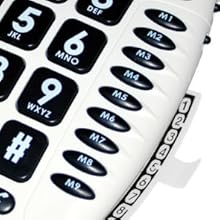
Малюнак 3: Detail of the memory buttons (M1-M9) and the integrated memory index card.
- Падніміце слухаўку.
- Націсніце Крама кнопка.
- Dial the telephone number you wish to store.
- Націсніце Крама кнопку зноў.
- Press the desired memory button (P1, P2, P3, or M1-M9) where you want to save the number.
- Замяніце слухаўку.
- Note: Use the index card located under the base to record your stored numbers for easy reference. Stored memories are protected even if the phone line is unplugged.
4.6 Dialing Stored Numbers
- Падніміце слухаўку.
- Дачакайцеся сігналу набору.
- Press the appropriate memory button (P1, P2, P3, or M1-M9). The stored number will be dialed automatically.
4.7 Recall (R), * & # Buttons
These buttons are used in conjunction with new services provided on digital exchanges. For specific details on their use, please contact your network operator.
4.8 Сумяшчальнасць са слыхавымі апаратамі
If you are using this telephone with a hearing aid, set your hearing aid to the "T" (Telecoil) setting for optimal audio quality.
5. Тэхнічнае абслугоўванне
- Уборка: Clean the telephone with a soft, damp тканіна. Не выкарыстоўвайце абразіўныя ачышчальнікі або растваральнікі.
- захоўванне: Захоўвайце тэлефон у прахалодным, сухім месцы, удалечыні ад прамых сонечных прамянёў і экстрэмальных тэмператур.
- Пазбягайце вадкасці: Do not expose the telephone to water or other liquids.
- Сыход за шнуром: Ensure the handset and line cords are not tangled or pinched to prevent damage.
6. Выпраўленне непаладак
| праблема | Магчымая прычына | Рашэнне |
|---|---|---|
| Няма сігналу набору | Тэлефонны шнур падключаны няправільна. | Check that both ends of the telephone line cord are securely plugged in. |
| Не чую абанента / Абанент не чуе мяне | Volume settings are too low or Mute is active. | Adjust the Volume control. Ensure the Mute button is not pressed. |
| Тэлефон не званіць | Ringer switch is set to "Off". | Set the ringer switch (on the side) to "Low" or "High". |
| Stored memory numbers are lost | This phone protects stored memories even if the phone line is unplugged. If numbers are lost, they may not have been stored correctly. | Re-store the numbers following the instructions in Section 4.5. |
| Difficulty dialing quickly | Some older phone systems may require a slower dialing pace. | Try dialing at a slightly slower pace. Consider using the memory dial function for frequently called numbers. |
7. Тэхнічныя характарыстыкі
- мадэль: Geemarc CL100
- Тып: Правадной тэлефон
- Ampвызваленне: Up to 30 dB receiving volume
- Гучнасць званка: Adjustable up to 85 dB
- Памяць: 3 Priority (P1-P3), 9 One-touch (M1-M9)
- Крыніца харчавання: Line-powered (no external adapter required)
- Сумяшчальнасць са слыхавым апаратам: Yes (T-coil setting)
- Памеры: Прыкладна 7.5 х 8 х 3 цалі (19 х 20.3 х 7.6 см)
- Вага: Прыкладна 2.25 фунта (1.02 кг)
- колер: Белы
8. Гарантыя і падтрымка
8.1 Інфармацыя аб гарантыі
For information regarding the warranty period and terms for your Geemarc CL100 telephone, please refer to the warranty card included with your purchase or visit the official Geemarc webсайт. Захоўвайце пацвярджэнне пакупкі для прэтэнзій па гарантыі.
8.2 Падтрымка кліентаў
If you encounter any issues not covered in the troubleshooting section or require further assistance, please contact Geemarc customer support. Contact details can typically be found on the Geemarc webсайце або на ўпакоўцы прадукту.
Каб знайсці анлайн-рэсурс, наведайце: www.geemarc.com


