Уводзіны
Дзякуй за пакупкуasing the GPX Weatherx WR282B Weather and Alert Radio. This portable radio is designed to provide you with AM/FM radio reception and access to all 7 NOAA weatherband channels, ensuring you stay informed during various conditions. It offers flexible power options, operating on either AC power or D-size batteries, making it suitable for both indoor and outdoor use.
Please read this manual thoroughly before operating the device to ensure proper use and to maximize its performance and longevity.
Важная інфармацыя па бяспецы
- Прачытайце інструкцыі: Перад пачаткам эксплуатацыі прадукту неабходна прачытаць усе інструкцыі па тэхніцы бяспекі і эксплуатацыі.
- Захаваць інструкцыі: Інструкцыі па бяспецы і эксплуатацыі павінны быць захаваны для выкарыстання ў будучыні.
- Звярніце ўвагу на папярэджанні: Неабходна прытрымлівацца ўсіх папярэджанняў на вырабе і ў інструкцыі па эксплуатацыі.
- Выконвайце інструкцыі: Неабходна выконваць усе інструкцыі па эксплуатацыі і выкарыстанні.
- Вада і вільгаць: Do not use this product near water (e.g., near a bathtub, washbowl, kitchen sink, laundry tub, in a wet basement, or near a swimming pool).
- Уборка: Чысціце толькі сухой анучай.
- Вентыляцыя: Не блакуйце вентыляцыйныя адтуліны. Усталюйце ў адпаведнасці з інструкцыямі вытворцы.
- Цяпло: Не ўстанаўлівайце побач з крыніцамі цяпла, такімі як радыятары, абагравальнікі, пліты або іншыя прылады (у тым ліку ampLifiers), якія вырабляюць цяпло.
- Абарона шнура харчавання: Абараняйце сеткавы шнур ад наступання або заціскання, асабліва ў месцах вілкі, разеткі і месца выхаду з прылады.
- Маланка: Адключайце гэты прыбор ад сеткі падчас навальніцы або калі ён не выкарыстоўваецца на працягу доўгага часу.
- Абслугоўванне: Звяртайцеся да кваліфікаванага абслугоўваючага персаналу. Тэхнічнае абслугоўванне патрабуецца, калі прылада была пашкоджана якім-небудзь чынам, напрыклад, пашкоджаны шнур сілкавання або вілка, была праліта вадкасць або ў прыладу ўпалі прадметы, прылада падвяргалася ўздзеянню дажджу або вільгаці, не працуе належным чынам , або быў адкінуты.
Асаблівасці
- AM/FM-радыё цюнэр
- Weatherband - All 7 NOAA Channels
- Swivel Telescopic Antenna
- Рэгулятар гучнасці
- Audio Line Input (Auxiliary Input)
- Інтэграваная ручка для пераноскі
- Dual Power Options: AC/DC Adapter or 3 x 'D' Batteries
Змест пакета
- GPX Weatherx WR282B Weather and Alert Radio
- Адаптар сілкавання пераменнага/пастаяннага току
- Кіраўніцтва карыстальніка (гэты дакумент)
Элементы кіравання і індыкатары
Familiarize yourself with the various controls and indicators on your WR282B radio.
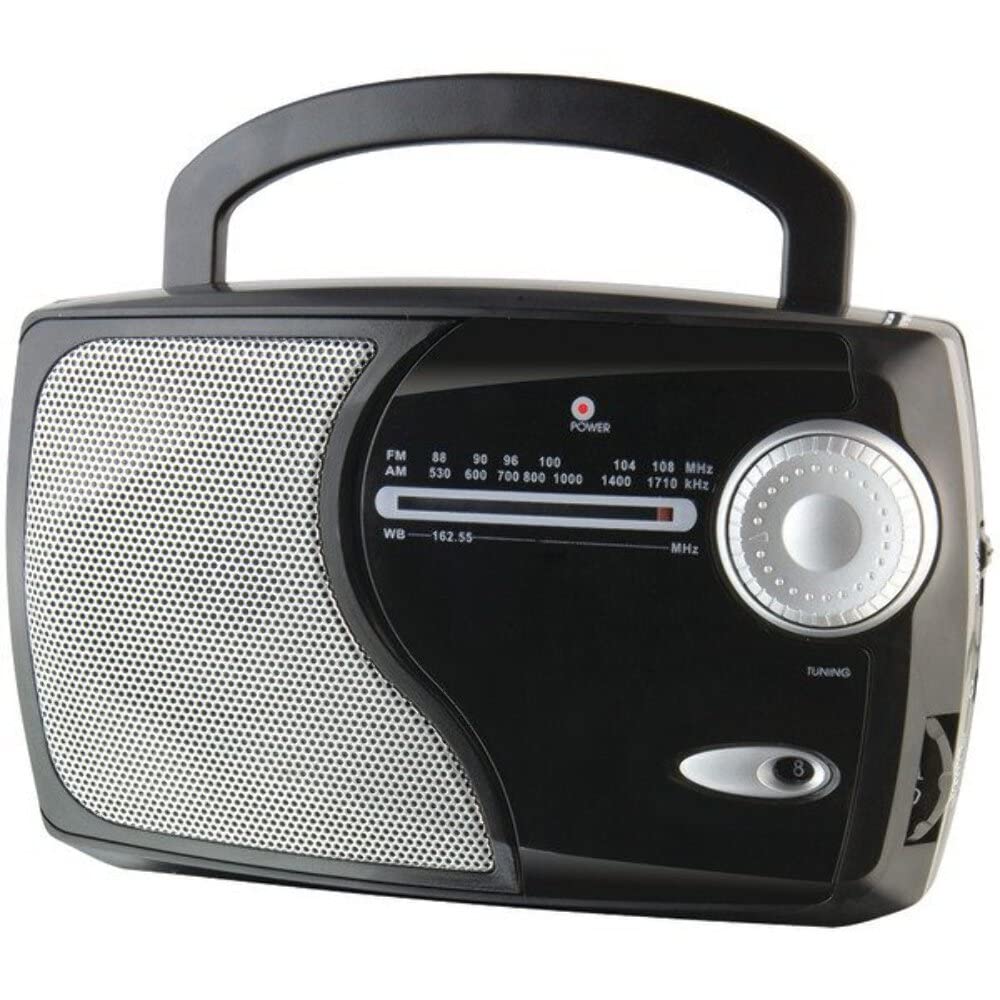
Выява: спераду view of the GPX Weatherx WR282B radio, showing the speaker, tuning dial, and control knobs.
- Ручка харчавання/гучнасці: Turns the radio on/off and adjusts the audio output level.
- Пераключальнік дыяпазону: Selects between AM, FM, and Weatherband (WB) modes.
- Ручка налады: Adjusts the frequency to tune into desired radio stations or weather channels.
- Tuning Indicator: Illuminates when a strong signal is received.
- Набор частаты: Адлюстроўвае бягучую радыёчастоту.
- Тэлескапічная антэна: Extendable antenna for improved FM and Weatherband reception.
- Auxiliary Input (AUX IN): 3.5-мм раз'ём для падлучэння знешніх аўдыёпрылад.
- Улада пераменнага току: Jack for connecting the included AC/DC power adapter.
- Батарэйны адсек: Located on the back, holds 3 'D' size batteries.
- Ручка для пераноскі: Для зручнасці пераноскі.
Настройка
Харчаванне радыё
The WR282B radio can be powered using either the included AC/DC power adapter or three 'D' size batteries.
1. AC Power Operation
- Ensure the radio is turned off by rotating the Power/Volume knob counter-clockwise until it clicks.
- Insert the small plug of the AC/DC power adapter into the AC Power Input jack on the radio.
- Plug the other end of the AC/DC power adapter into a standard wall outlet (AC 120V~60Hz).
- The radio is now ready for use with AC power.
Заўвага: When the AC adapter is connected, battery power is automatically disconnected.
2. Battery Power Operation
- Пераканайцеся, што радыё выключана.
- Знайдзіце батарэйны адсек на задняй панэлі радыё.
- Адкрыйце крышку батарэйнага адсека.
- Insert three (3) 'D' size batteries (not included) into the compartment, observing the correct polarity (+/-) as indicated inside the compartment.
- Надзейна зачыніце крышку батарэйнага адсека.
- The radio is now ready for use with battery power.
Важна: Выміце батарэйкі, калі радыёстанцыя не будзе выкарыстоўвацца працяглы час, каб прадухіліць уцечку і пашкоджанне.
Інструкцыя па эксплуатацыі
1. Turning On and Adjusting Volume
- Павярнуць Ручка харчавання/гучнасці clockwise to turn on the radio. Continue rotating to increase the volume to a comfortable listening level.
- Каб выключыць радыё, павярніце Ручка харчавання/гучнасці супраць гадзіннікавай стрэлкі, пакуль не пачуеце пстрычку.
2. Selecting a Radio Band (AM/FM/Weatherband)
- Выкарыстоўвайце Пераключальнік дыяпазону to choose your desired listening mode:
- AM: Для Amplitude Modulation radio stations.
- FM: For Frequency Modulation radio stations.
- WB: For NOAA Weatherband channels.
3. Tuning to a Station or Channel
- Пашырыць Тэлескапічная антэна fully for optimal FM and Weatherband reception. For AM reception, the radio has a built-in antenna, and adjusting the radio's position may improve reception.
- Павярнуць Ручка налады to scan through frequencies on the Набор частаты.
- When a strong signal is received, the Індыкатар налады загарыцца святло.
- For Weatherband (WB) mode, tune to one of the 7 NOAA weather channels (162.400 MHz to 162.550 MHz).
4. Using the Auxiliary Input (AUX IN)
- Connect a 3.5mm audio cable (not included) from your external audio device (e.g., MP3 player, smartphone) to the Дапаможны ўваход (AUX IN) jack on the radio.
- Ensure the radio is turned on and the volume is adjusted.
- The audio from your external device will now play through the radio's speaker. Control playback and track selection from your external device.
Тэхнічнае абслугоўванне
- Уборка: Працірайце знешнія паверхні радыёпрыёмніка мяккай сухой тканінай. Не выкарыстоўвайце абразіўныя ачышчальнікі, воск або растваральнікі.
- Замена батарэі: Replace all three 'D' batteries when the radio's performance diminishes or if the unit will not be used for an extended period. Always replace with new batteries of the same type.
- захоўванне: When storing the radio for a long time, remove the batteries to prevent leakage. Store in a cool, dry place away from direct sunlight and extreme temperatures.
- Сыход за антэнай: Акуратна звяртайцеся з тэлескапічнай антэнай, каб пазбегнуць згінання або паломкі.
Ліквідацыю непаладак
| праблема | Магчымая прычына | Рашэнне |
|---|---|---|
| Няма ўлады |
|
|
| Дрэнны прыём радыё |
|
|
| Няма гуку з AUX IN |
|
|
Тэхнічныя характарыстыкі
- мадэль: WR282B
- Дыяпазоны радыё: AM, FM, Weatherband (7 NOAA channels)
- Крыніца харчавання: AC 120V~60Hz (via included adapter) or 3 x 'D' Batteries (not included)
- Падключэнне: Дапаможны ўваход 3.5 мм
- Антэна: Telescopic (FM/WB), Built-in Ferrite Bar (AM)
- Памеры прадукту: 8.86" L x 2.76" W x 5.51" H (approximately)
- Вага прадмета: 1.06 pounds (without batteries)
Гарантыя і падтрымка
For detailed warranty information and customer support, please refer to the warranty card included with your product or visit the official GPX webсайт. Захоўвайце чэк аб куплі як пацвярджэнне пакупкі ў выпадку любых гарантыйных прэтэнзій.
If you experience issues not covered in the troubleshooting section, please contact GPX customer service for assistance.


