Уводзіны
This manual provides essential information for the installation, operation, and maintenance of your HP M2N68-LA Motherboard (Part No. 462798-001). Please read this manual thoroughly before proceeding with installation to ensure proper functionality and to prevent damage to the component or other system parts.
The HP M2N68-LA is a robust motherboard designed for personal computer and server applications, supporting a range of AMD processors.
Прадукт скончаныview
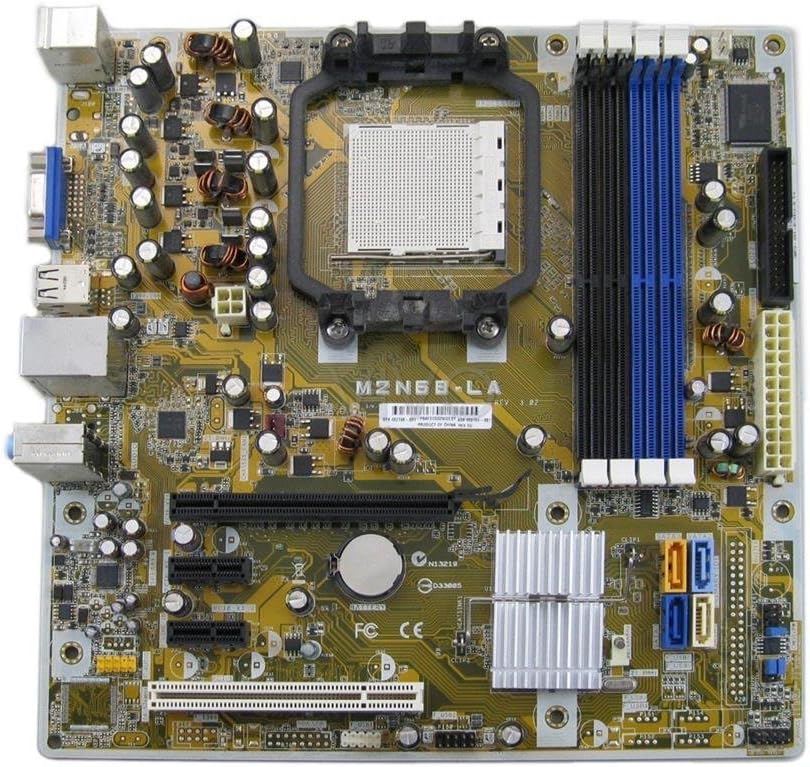
Малюнак 1: Зверху ўніз view of the HP M2N68-LA Motherboard. Key components visible include the CPU socket (center), four DDR2/DDR3 RAM slots (blue and black, right), PCI Express and PCI slots (bottom), SATA ports (orange/blue, bottom right), and various power connectors and headers.
The M2N68-LA motherboard features a Socket AM2 CPU socket, supporting AMD Athlon 64, Athlon 64 X2, Athlon 64 FX, Athlon II, Phenom, Phenom II, and Sempron processors. It is equipped with an AMD 785E chipset and provides 2 memory slots, supporting up to 8 GB of RAM. The board includes a 24-Pin main power connector and a PCI Express graphics card interface.
Настройка і ўстаноўка
Before beginning installation, ensure your computer is powered off and disconnected from the main power supply. Always handle the motherboard by its edges to avoid static discharge.
1. Падрыхтоўка шасі
Ensure your computer case is compatible with ATX form factor motherboards. Install the I/O shield provided with your chassis or the motherboard into the rear opening of the case.
2. Усталёўка працэсара
- Знайдзіце раз'ём працэсара (Socket AM2) на матчынай плаце.
- Lift the load lever on the side of the CPU socket.
- Carefully align the CPU with the socket, ensuring the triangular marker on the CPU matches the marker on the socket. Do not force the CPU into place.
- Апусціце рычаг нагрузкі, каб замацаваць працэсар.
- Нанесці тонкі, роўны пласт цеплапасты на верхнюю частку працэсара.
- Усталюйце кулер працэсара ў адпаведнасці з інструкцыямі вытворцы, забяспечыўшы належны кантакт і надзейнае мацаванне.
3. Installing Memory Modules
The motherboard has 2 memory slots. For optimal performance, refer to your system's memory configuration guidelines.
- Адкрыйце зашчапкі з абодвух канцоў слота памяці.
- Сумясціце выемку на модулі памяці з ключом у слоце памяці.
- Моцна націсніце на абодва канцы модуля, пакуль зашчапкі не зафіксуюцца.
4. Усталёўка матчынай платы
- Install standoffs in the chassis at the locations corresponding to the motherboard's mounting holes.
- Carefully place the motherboard into the chassis, aligning it with the standoffs and the I/O shield.
- Замацуйце матчыну плату шрубамі, не перацягваючы іх.
5. Падключэнне харчавання і перыферыйных прылад
- Падключыце 24-кантактны раз'ём асноўнага харчавання ATX ад блока харчавання да адпаведнага раздыма на матчынай плаце.
- Connect the 4-pin or 8-pin CPU power connector (if applicable) to the motherboard.
- Падключыце кабелі перадачы дадзеных SATA ад вашых назапашвальнікаў (HDD/SSD) да партоў SATA на матчынай плаце.
- Connect front panel headers (power button, reset button, HDD LED, power LED, USB ports, audio jacks) to their respective pins on the motherboard. Refer to the motherboard's silkscreen labels for correct orientation.
- Install any expansion cards (e.g., graphics card in the PCI Express slot) and secure them.
Інструкцыя па эксплуатацыі
Once all components are installed and connected, you can proceed with system startup.
1. Пачатковае ўключэнне
- Пераканайцеся, што ўсе кабелі надзейна падключаны.
- Connect the power cord to your power supply and a wall outlet.
- Націсніце кнопку харчавання на корпусе кампутара.
- Observe for POST (Power-On Self-Test) beeps and display output.
2. Канфігурацыя BIOS/UEFI
Upon initial boot, you may need to enter the BIOS/UEFI setup to configure boot order, system time, and other settings. Typically, you press Дэл, F2, або F10 during startup to access the setup utility.
3. Усталёўка аперацыйнай сістэмы
Install your preferred operating system (e.g., Windows, Linux) from a bootable USB drive or optical disc. Follow the on-screen prompts for installation.
4. Ўстаноўка драйвера
After OS installation, install the necessary drivers for the motherboard's chipset, audio, network, and any integrated graphics. These drivers are typically available on the HP support website or included with your operating system.
Тэхнічнае абслугоўванне
Рэгулярнае абслугоўванне дапамагае забяспечыць даўгавечнасць і стабільную працу вашай матчынай платы.
- Выдаленне пылу: Перыядычна чысціце матчыну плату і кампаненты ад пылу сціснутым паветрам. Перад чысткай пераканайцеся, што сістэма выключана і адключана ад сеткі.
- Праверка кампанентаў: Ensure all cables and expansion cards are securely seated.
- Абнаўленні BIOS: Праверце службу падтрымкі HP website for BIOS updates. Only update the BIOS if necessary and follow the instructions carefully. Incorrect BIOS updates can render the motherboard inoperable.
- Тэрмапаста: If replacing the CPU cooler, reapply thermal paste to the CPU.
Ліквідацыю непаладак
У гэтым раздзеле прадстаўлены рашэнні распаўсюджаных праблем, з якімі вы можаце сутыкнуцца.
| праблема | Магчымая прычына | Рашэнне |
|---|---|---|
| Сістэма не ўключаецца. | Няспраўныя раздымы харчавання, няспраўны блок харчавання, няправільная праводка пярэдняй панэлі. | Check 24-pin and CPU power connectors. Verify front panel power switch wiring. Test power supply. |
| Няма вываду дысплея. | Loose graphics card, faulty monitor cable, incorrect display input. | Reseat graphics card. Check monitor cable and input source. Test with another monitor. |
| System beeps repeatedly. | Memory issue, graphics card issue, CPU issue. | Reseat RAM modules. Try one RAM module at a time. Reseat graphics card. Consult motherboard beep codes for specific diagnosis. |
| Аперацыйная сістэма не загружаецца. | Няправільны парадак загрузкі, пашкоджаная аперацыйная сістэма, няспраўны назапашвальнік. | Check BIOS boot order. Attempt OS repair or reinstallation. Test storage drive. |
Тэхнічныя характарыстыкі
| Асаблівасць | Дэталь |
|---|---|
| Назва мадэлі | M2N68-LA |
| Нумар дэталі | 462798-001 |
| Марка | HP |
| Гняздо працэсара | Гняздо AM2 |
| Сумяшчальныя працэсары | AMD Athlon 64, Athlon 64 X2, Athlon 64 FX, Athlon II, Phenom, Phenom II, Sempron |
| Тып чыпсэта | AMD 785E |
| Даступныя слоты памяці | 2 |
| Ёмістасць памяці (макс.) | 8 ГБ |
| Асноўны тып раздыма харчавання | 24-кантактны |
| Інтэрфейс відэакарты | PCI Express |
| Сумяшчальныя прылады | Personal Computer, Server |
| Дата першай даступнасці | 25 лютага 2013 г |
Гарантыя і падтрымка
This HP M2N68-LA Motherboard is typically covered by a warranty period. For specific warranty details and support, please refer to the original vendor or HP's official support channels.
The product description mentions a 180-day warranty from the seller. For direct manufacturer support or updated drivers, visit the official Крама HP or their support webсайт.
For returns or issues with the item purchased, please follow the quick and simple return process offered by your vendor.