Уводзіны
This manual provides instructions for the Samsung Gear Live R382 smartwatch. The Gear Live operates on the Android Wear platform and is designed for use with Android smartphones running Android 4.3 (Jelly Bean) or higher. It offers features such as app notifications, personal information display, voice commands, and health monitoring.

Малюнак 1: Спераду view of the Samsung Gear Live R382 smartwatch.
Настройка
1. Распакоўка і першапачатковая аплата
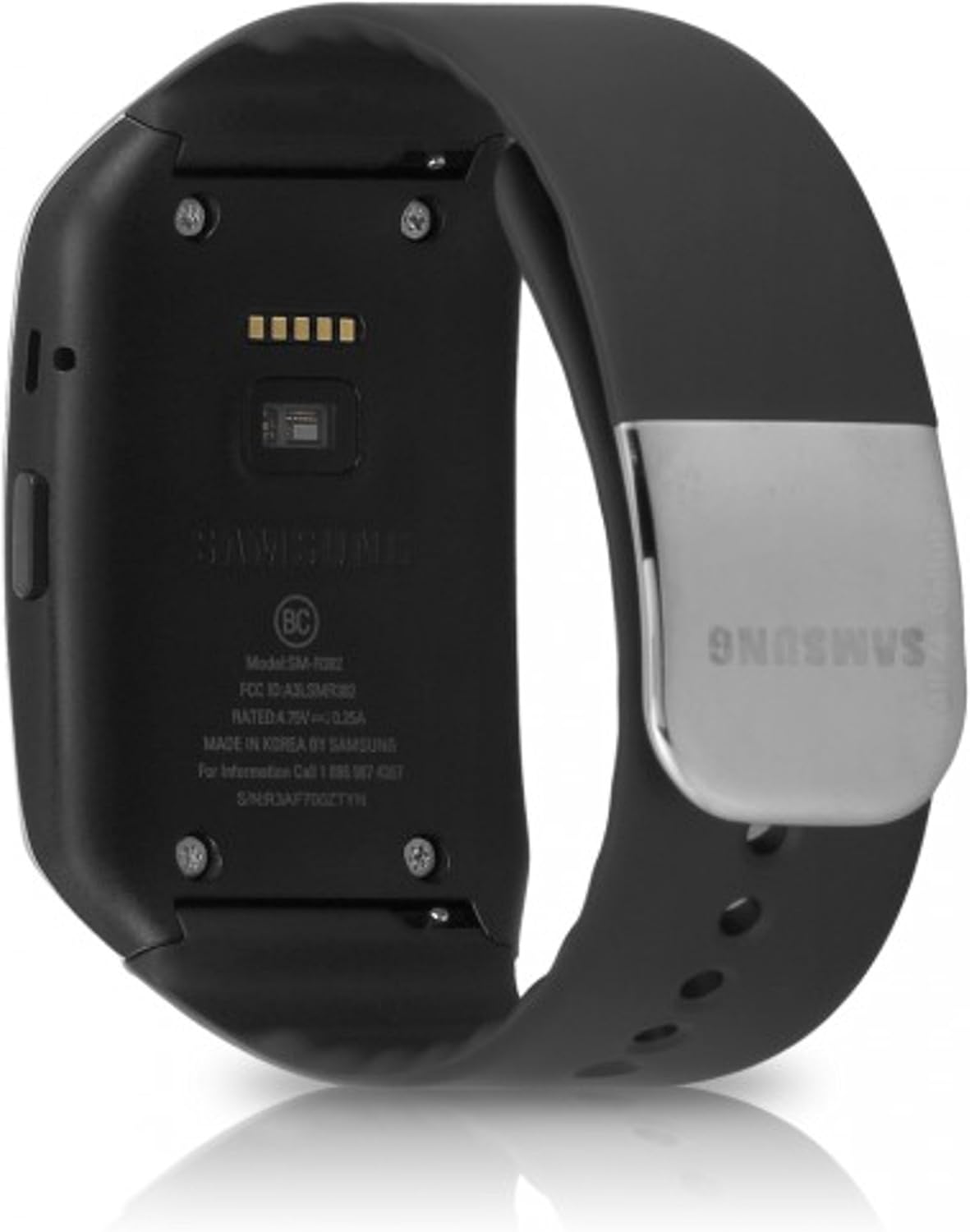
Upon opening the package, ensure all components are present: the Samsung Gear Live smartwatch, charging cradle, and USB cable. Before first use, fully charge the device. Connect the charging cradle to the smartwatch, then connect the USB cable to the cradle and a power source.

Малюнак 2: Задняя частка view of the Samsung Gear Live R382, highlighting charging contacts and sensors.
2. Спалучэнне са смартфонам
- Ensure your Android smartphone is running Android 4.3 or higher and has Bluetooth enabled.
- Download and install the "Android Wear" application from the Google Play Store on your smartphone.
- Turn on your Samsung Gear Live.
- Open the Android Wear app on your smartphone and follow the on-screen instructions to pair your device. The app will guide you through selecting your Gear Live from a list of available devices and confirming the pairing code.
- Once paired, the smartwatch will synchronize with your phone and display the current time and notifications.
Інструкцыя па эксплуатацыі
Базавая навігацыя
- Правядзіце пальцам уніз: Access quick settings (e.g., mute, brightness).
- Правядзіце пальцам уверх: View апавяшчэнні.
- Правядзіце пальцам улева/управа: Navigate through cards and actions.
- Націсніце: Выберыце элемент або адкрыйце праграму.
- Націсніце бакавую кнопку: Return to the watch face or access the app list.
Voice Commands ("OK Google")
To activate voice commands, say "OK Google" or tap the watch face when it's active. You can then ask questions or issue commands such as:
- "Show me my steps"
- "Set a timer for 10 minutes"
- "Navigate to [address]"
- "Send a text to [contact name]"
Апавяшчэнні
Notifications from your paired smartphone will appear on your Gear Live. Swipe up from the watch face to view them. You can swipe left or right on a notification to dismiss it or access actions like replying to messages.
Маніторынг здароўя
The Gear Live includes a built-in heart rate monitor and can track your steps. Access these features through the appropriate apps on your smartwatch or via voice command.
Малюнак 3: бок view of the Samsung Gear Live R382, showing the physical button.
Тэхнічнае абслугоўванне
Ачыстка прылады
To clean your Gear Live, gently wipe the screen and body with a soft, lint-free cloth. For stubborn smudges, slightly dampen the cloth with water. Avoid using harsh chemicals or abrasive materials. Regularly clean the charging contacts on the back of the watch and the charging cradle to ensure proper connection.
Воданепранікальнасць
The Samsung Gear Live is water resistant. It is designed to withstand splashes and brief immersion in shallow water. However, it is not recommended for swimming, showering, or diving. Avoid exposing the device to high-pressure water or soap.
Замена дыяпазону
The silicone band on your Gear Live can be replaced. Refer to Samsung's official accessories or authorized retailers for compatible replacement bands and instructions on how to safely remove and attach them.
Ліквідацыю непаладак
- Прылада не ўключаецца/не зараджаецца:
Ensure the charging cradle is correctly aligned with the watch's charging pins and the USB cable is securely connected to a power source. Try a different USB port or power adapter. If the battery is completely drained, it may take a few minutes for the charging indicator to appear.
- Праблемы спалучэння:
Verify that Bluetooth is enabled on your smartphone and the Android Wear app is installed and updated. Restart both your smartphone and the Gear Live. If issues persist, try unpairing the device from your phone's Bluetooth settings and re-initiating the pairing process through the Android Wear app.
- Апавяшчэнні не з'яўляюцца:
Check that the Gear Live is properly paired and connected to your smartphone. Ensure notifications are enabled for the relevant apps in the Android Wear app settings on your phone. Also, check if the watch is in "Do Not Disturb" mode.
- "OK Google" Not Responding:
Ensure the watch's microphone is not obstructed. Check if the "OK Google" detection is enabled in the Android Wear app settings. Speak clearly and at a normal volume.
- Кароткі тэрмін службы батарэі:
Frequent use of GPS, continuous heart rate monitoring, and high screen brightness can reduce battery life. Adjust settings to optimize battery usage. Ensure background apps are not excessively draining power.
- Скід да заводскіх налад:
If you encounter persistent software issues, a factory reset may resolve them. Navigate to Settings > System > Disconnect & Reset on your Gear Live. This will erase all data on the watch and unpair it from your phone.
Тэхнічныя характарыстыкі
| Асаблівасць | Дэталь |
|---|---|
| Нумар мадэлі | SM-R382 |
| Аперацыйная сістэма | Android Wear |
| Ёмістасць памяці | 4 ГБ |
| Памер экрана | 1.56 цалі |
| Тып дысплея | AMOLED |
| дазвол | 240x135 |
| Тэхналогія падлучэння | Bluetooth |
| Асаблівасці | GPS, Notifications, Heart Rate Monitor |
| Склад батарэі | Літый-іённы |
| Узровень воданепранікальнасці | Водатрывалы |
| Тып матэрыялу раменьчыка | Сілікон |
| Памеры прадмета (ДxШxВ) | 2.22 х 1.49 х 0.35 цалі |
| Вага прадмета | 0.13 фунта |
Гарантыя і падтрымка
Абмежаваная гарантыя
The Samsung Gear Live R382 comes with a limited warranty. For specific terms and conditions, including coverage details and duration, please refer to the warranty card included with your product or visit the official Samsung webсайт. Захоўвайце пацвярджэнне пакупкі для прэтэнзій па гарантыі.
Падтрымка кліентаў
For technical assistance, troubleshooting beyond this manual, or service inquiries, please contact Samsung Customer Support. You can find contact information, including phone numbers and online support resources, on the official Samsung webсайт (www.samsung.com/us/support/).


