Уводзіны
This manual provides essential instructions for the safe and efficient operation of your Yamaha HTR-2067 5.1 Channel AV Receiver. Please read this manual thoroughly before using the unit to ensure proper setup and performance. Keep this manual in a safe place for future reference.
Інфармацыя па бяспецы
- Крыніца харчавання: Падключайце прыладу толькі да разеткі пераменнага токуtage паказана на задняй панэлі.
- Вентыляцыя: Забяспечце належную вентыляцыю. Не блакуйце вентыляцыйныя адтуліны.
- Вада і вільгаць: Не падвяргайце прыладу ўздзеянню дажджу або вільгаці. Не стаўце на прыладу прадметы, напоўненыя вадкасцямі.
- Іншародныя прадметы: Не ўстаўляйце староннія прадметы ў адтуліны прылады.
- Абслугоўванне: Не спрабуйце абслугоўваць гэту прыладу самастойна. Звяртайцеся па любыя паслугі па абслугоўванні да кваліфікаванага персаналу.
- Супраціў дынаміка: Ensure connected speakers have an impedance of 6 ohms or higher. Refer to the "CAUTION: SEE INSTRUCTION MANUAL FOR CORRECT SETTING" label near the speaker terminals.
Настройка
Задняя панэль скончанаview
The following image illustrates the rear panel of the Yamaha HTR-2067 receiver, highlighting various connection points for audio, video, and speakers.
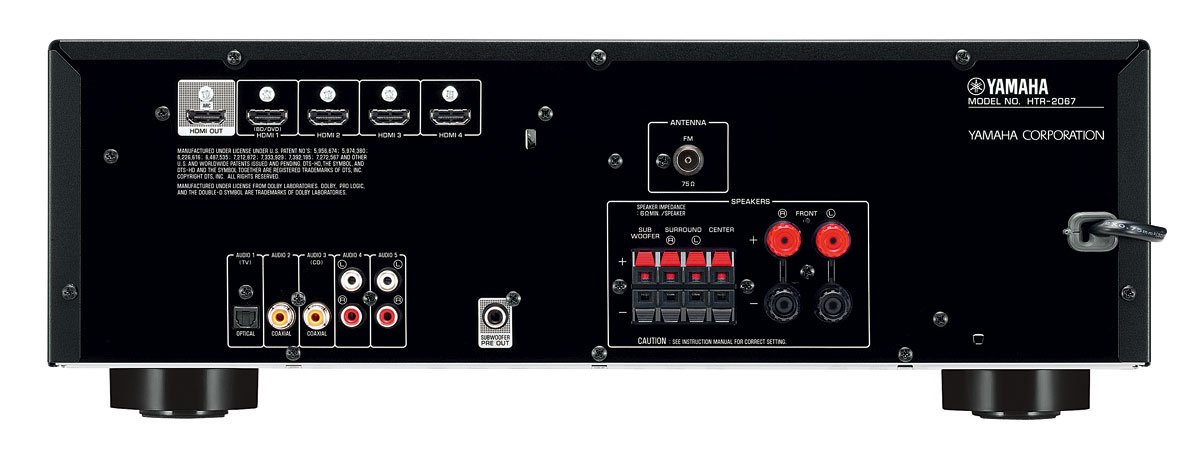
Figure 1: Rear Panel of Yamaha HTR-2067 AV Receiver
1. Распакаванне
Carefully remove the receiver and all accessories from the packaging. Retain the packaging materials for future transport or storage.
2. Падключэнне дынамікаў
Connect your speakers to the corresponding terminals on the rear panel. Ensure correct polarity (+ to + and - to -) for each speaker. The HTR-2067 supports a 5.1 channel setup.
- Пярэднія дынамікі (Л/П): Connect to the "FRONT" terminals.
- Цэнтральны дынамік: Connect to the "CENTER" terminal.
- Гучнагаварыцелі аб'ёмнага гуку (л/п): Connect to the "SURROUND" terminals.
- сабвуфер: Connect a powered subwoofer to the "SUBWOOFER PRE OUT" RCA jack.
Refer to the speaker impedance warning on the rear panel, which states "SPEAKER IMPEDANCE 6Ω MIN / SPEAKER".
3. Падключэнне аўдыё/відэапрылад
Use the appropriate cables to connect your source devices (e.g., Blu-ray player, game console, TV) to the receiver.
- Падключэнні HDMI:
- HDMI OUT (ARC): Connect to your TV's HDMI input (preferably one supporting ARC for audio return).
- HDMI 1 (BD/DVD), HDMI 2, HDMI 3, HDMI 4: Connect your video source devices here.
- Лічбавыя аўдыяпадключэнні:
- OPTICAL (AUDIO 1 (TV)): For optical digital audio from a TV or other device.
- COAXIAL (AUDIO 2): For coaxial digital audio from a CD player or other device.
- Аналагавыя аўдыяпадключэнні:
- AUDIO 3 (CD), AUDIO 4, AUDIO 5: For analog audio devices using RCA cables.
4. Падключэнне антэн
For FM radio reception, connect the supplied FM antenna to the "ANTENNA FM 75Ω" terminal on the rear panel.
5. Падключэнне сілкавання
Пасля выканання ўсіх астатніх падключэнняў падключыце шнур харчавання да разеткі пераменнага току.
Інструкцыя па эксплуатацыі
1. Уключэнне/выключэнне харчавання
Націсніце УЛАДА button on the front panel or remote control to turn the receiver on or off.
2. Выбар уводу
Select the desired input source using the input selector buttons on the front panel or the remote control. For exampле, прэс BD / DVD for a Blu-ray player connected to HDMI 1.
The СЦЭНА buttons (BD/DVD, TV, CD, Radio) provide one-touch power-on and input selection, along with pre-set sound programs.
3. Рэгуляванне гучнасці
Адрэгулюйце агульную гучнасць з дапамогай вялікай ручкі на пярэдняй панэлі або ГУЧКА +/- кнопкі на пульце.
4. Sound Modes (CINEMA DSP)
The HTR-2067 features CINEMA DSP with 17 DSP programs. Use the ПРАГРАМА buttons on the remote control to cycle through different sound fields and enhance your listening experience.
5. Рэжым ECO
Activate the ECO mode to reduce power consumption by approximately 20%. This setting can be toggled via the remote control or system menu.
Тэхнічнае абслугоўванне
- Уборка: Wipe the unit with a soft, dry cloth. Do not use chemical cleaners or abrasive materials.
- Вентыляцыя: Перыядычна правярайце, ці не заблакаваныя вентыляцыйныя адтуліны пылам або смеццем.
- Шнур харчавання: Рэгулярна правярайце сеткавы шнур на наяўнасць пашкоджанняў.
Ліквідацыю непаладак
| праблема | Магчымая прычына | Рашэнне |
|---|---|---|
| Няма ўлады | Power cord disconnected; unit in standby mode. | Ensure power cord is securely plugged in; press POWER button. |
| Няма гуку | Няправільны ўваходны сігнал; дынамікі не падключаны; гучнасць занадта нізкая; уключаны рэжым адключэння гуку. | Выберыце правільны ўваход; праверце падключэнне дынамікаў; павялічце гучнасць; адключыце гук без гуку. |
| Няма відэа | Няправільны уваход; кабель HDMI не падключаны або пашкоджаны; няправільны ўваход тэлевізара. | Select correct input; check HDMI connections; ensure TV is on correct input. |
| Дрэнны прыём радыё | Антэна не падключана або няправільна размешчана. | Connect FM antenna; adjust antenna position for better reception. |
If the problem persists, consult a qualified service technician.
Тэхнічныя характарыстыкі
| Асаблівасць | Дэталь |
|---|---|
| Марка | Yamaha |
| мадэль | HTR-2067 |
| Каналы | Аб'ёмны гук 5.1 канала |
| 4K Pass-through | Yes (4K 24/30p) |
| DSP Programs | CINEMA DSP (17 programs) |
| Рэжым ЭКА | Yes (approx. 20% less power consumption) |
| Сувязь | HDMI, Optical, Coaxial, Analog RCA, FM Antenna |
| Імпеданс дынаміка | 6 Ом мінімум |
| Вага прадмета | 8.72 кг |
| Памеры (прыбл.) | 55.7 x 41.4 x 22.4 см (памеры ўпакоўкі) |
Гарантыя і падтрымка
Каб атрымаць інфармацыю аб гарантыі і падтрымцы кліентаў, звярніцеся да гарантыйнага талона, які ўваходзіць у камплект пастаўкі прадукту, або наведайце афіцыйны сайт Yamaha. webсайт. Захоўвайце чэк аб куплі як пацверджанне пакупкі.
For technical assistance or service inquiries, contact your authorized Yamaha dealer or service center.


