1. Уводзіны
This manual provides comprehensive instructions for the Monoprice MS-WN513N2 Wireless N300 4-Port Broadband Router. This device is designed to provide a high-speed wireless network connection for your home or small office, offering reliable internet access and advanced security features. Please read this manual thoroughly before operating the device.
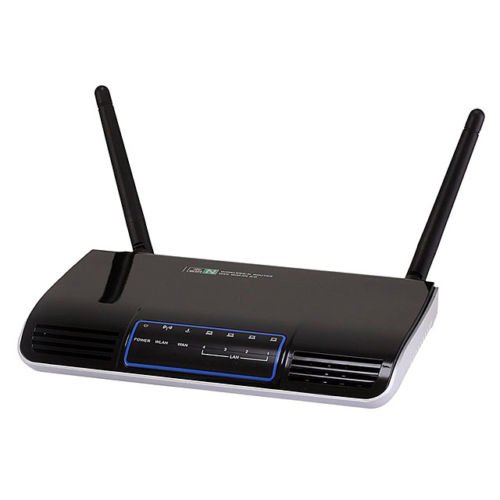
Выява 1.1: Спераду view of the Monoprice MS-WN513N2 Wireless N300 Router. The router is black with indicator lights on the front panel.
2. Асаблівасці
The Monoprice MS-WN513N2 router offers a range of features to enhance your network experience:
- Wireless N300 Performance: Complies with 802.11b/g/n standards, offering wireless transmission speeds up to 300 Mbps.
- 4-Port Broadband Router: Includes four (4) LAN ports for wired connections.
- Палепшаная бяспека: Supports 64-bit/128-bit WEP, WPA/WPA2, and WPA-PSK/WPA2-PSK authentication.
- Падтрымка IPv6: Compatible with Internet Protocol Version 6.
- Якасць абслугоўвання (QoS): Bandwidth control for prioritizing network traffic.
- WPS (абароненая ўстаноўка Wi-Fi): Simplifies wireless security configuration.
- Некалькі рэжымаў працы: Can be configured as a Gateway, Wireless Bridge, or Wireless ISP (WISP).
- Дынамічны DNS (DDNS): Supports dynamic domain name system configuration.
- UPnP Support: Universal Plug and Play for easy device discovery.
- Брандмаўэр: Integrated firewall for network protection.
- Automatic MDI/MDIX: Automatic cable detection for Ethernet ports.
3. Змесціва ўпакоўкі
Калі ласка, пераканайцеся, што ўсе прадметы прысутнічаюць у вашай упакоўцы:
- Monoprice MS-WN513N2 Wireless N300 Router
- Адаптар харчавання (пастаянны ток 5 В)
- Кабель Ethernet
- Кіраўніцтва па хуткай усталёўцы (калі ў камплекце)
4. Фізічны канецview
4.1 Індыкатары пярэдняй панэлі
На пярэдняй панэлі размешчаны святлодыёдныя індыкатары, якія паказваюць інфармацыю пра стан:
- Святлодыёд харчавання: Паказвае, ці ўключаны маршрутызатар.
- Святлодыёд WAN: Паказвае стан падключэння да Інтэрнэту.
- Святлодыёды лакальнай сеткі (1-4): Паказвае актыўнасць на адпаведных партах правадной лакальнай сеткі.
- Святлодыёд WLAN: Паказвае актыўнасць бесправадной сеткі.
4.2 Парты і кнопкі на задняй панэлі
The rear panel contains all physical connection points:
- Порт харчавання пастаяннага току 5 В: Падключаецца да адаптара харчавання, які ўваходзіць у камплект.
- WAN порт: Падключаецца да вашага мадэма або сеткі пастаўшчыка інтэрнэт-паслуг.
- Парты LAN (1-4): Connect to wired devices such as computers, gaming consoles, or switches.
- Кнопка WPS: Initiates Wi-Fi Protected Setup for easy wireless connection.
- Адтуліну для скіду: Used to restore the router to factory default settings. Insert a paperclip and hold for 5-10 seconds.
- Парты антэны: Two (2) ports for connecting the external antennas.
5. Настройка
5.1 Падлучэнне абсталявання
- Падключыце антэны: Screw the two external antennas onto the antenna ports on the rear panel.
- Падключэнне мадэма: Connect one end of an Ethernet cable to your modem's LAN port and the other end to the WAN порт маршрутызатара.
- Падключыце харчаванне: Падключыце адаптар харчавання да маршрутызатара Порт харчавання пастаяннага току 5 В and plug the adapter into a power outlet.
- Уключэнне: Wait for the router to power on. The Power LED should illuminate. Allow a few minutes for the router to boot up and establish a connection.
- Connect Computer (Optional): For initial configuration, it is recommended to connect a computer directly to one of the router's лакальная сетка парты з дапамогай кабеля Ethernet.
5.2 Пачатковая канфігурацыя (Web Інтэрфейс)
- Маршрутызатар доступу: Адкрыйце a web browser on a connected computer. In the address bar, type the router's default IP address (commonly
192.168.1.1or192.168.0.1) and press Enter. Refer to the label on the bottom of your router for the exact IP address and default login credentials. - Лагін: Увядзіце імя карыстальніка і пароль па змаўчанні (напрыклад,
adminдля абодвух). - Запусціце майстар налады: У маршрутызатара web interface will typically present a Quick Setup Wizard. Follow the on-screen prompts to configure your internet connection type (e.g., PPPoE, Dynamic IP, Static IP) and basic wireless settings (SSID, password).
- Змяніць уліковыя дадзеныя па змаўчанні: For security, it is highly recommended to change the default login username and password for the router's web інтэрфейс.
6. Аперацыйная
6.1 Канфігурацыя бесправадной сеткі
To configure your wireless network:
- Перайдзіце да Налады бесправадной сеткі раздзел у ст web інтэрфейс.
- SSID: Change the default Wireless Network Name (SSID) to a unique name.
- Рэжым бяспекі: Выберыце WPA2-PSK as the recommended security mode.
- Пароль: Set a strong, unique password (at least 8 characters, including letters, numbers, and symbols).
- канал: The router can automatically select the best 2.4 GHz channel. You can also manually select a fixed channel (e.g., 1, 6, or 11) to avoid interference.
- Захавайце змены.
6.2 Налады бяспекі
The router provides various security features:
- Брандмаўэр: The built-in firewall helps protect your network from external threats. Ensure it is enabled.
- Фільтраванне MAC: You can restrict network access to specific devices based on their MAC addresses.
- Бацькоўскі кантроль: Some routers offer features to block specific websites or limit internet access times for certain devices.
- WPS: Use the WPS button for quick, secure connections with WPS-compatible devices.
6.3 Дадатковыя магчымасці
Explore the advanced settings in the web interface for more control:
- Якасць абслугоўвання (QoS): Prioritize bandwidth for applications like gaming or video streaming.
- Перанакіраванне партоў: Configure specific ports to allow external access to devices on your local network (e.g., for gaming servers).
- Дынамічны DNS (DDNS): If you have a dynamic public IP address, DDNS allows you to access your network using a consistent domain name.
- IPv6: Configure IPv6 settings if your ISP supports it.
- Рэжым працы: Change the router's mode to Wireless Bridge or WISP if needed for specific network setups.
7. Тэхнічнае абслугоўванне
7.1 Абнаўленне прашыўкі
Periodically check the Monoprice website for firmware updates. Firmware updates can improve performance, add new features, and fix security vulnerabilities. Follow the instructions provided with the firmware update carefully to avoid damaging the device.
7.2 Скід налад маршрутызатара
If you forget your login password or experience persistent issues, you can restore the router to its factory default settings:
- Уключыўшы маршрутызатар, знайдзіце Скід дзірку на задняй панэлі.
- Use a paperclip or a thin, pointed object to press and hold the reset button inside the hole for approximately 5-10 seconds.
- Release the button when the router's LEDs flash or restart.
- The router will reboot with factory default settings. You will need to reconfigure it using the web інтэрфейс.
8. Выпраўленне непаладак
Вось рашэнні распаўсюджаных праблем:
- Няма доступу ў Інтэрнэт:
- Check if the WAN LED is lit. If not, ensure the Ethernet cable from the modem is securely connected to the router's WAN port.
- Перазапусціце мадэм і маршрутызатар.
- Праверце налады падключэння да Інтэрнэту ў маршрутызатары web інтэрфейс.
- Немагчыма атрымаць доступ Web інтэрфейс:
- Ensure your computer is connected to the router via Ethernet or Wi-Fi.
- Verify the router's IP address. Try
192.168.1.1or192.168.0.1. - Ачысціце кэш браўзера або паспрабуйце іншы браўзер.
- If you forgot the password, perform a factory reset.
- Нізкая хуткасць бесправадной сувязі:
- Ensure your devices support 802.11n for optimal speeds.
- Check for interference from other 2.4 GHz devices (cordless phones, microwaves). Try changing the wireless channel.
- Пераканайцеся, што маршрутызатар размешчаны па цэнтры і нічым не перашкаджае.
- Абнавіце драйверы бесправаднога адаптара вашай прылады.
- Абрывы бесправаднога злучэння:
- Праверце сілу сігналу і наяўнасць перашкод.
- Пераканайцеся, што прашыўка маршрутызатара абноўлена.
- Verify that the wireless security settings are correctly configured.
9. Тэхнічныя характарыстыкі
| Асаблівасць | Спецыфікацыя |
|---|---|
| мадэль | MS-WN513N2 |
| Стандарты бесправадной сувязі | IEEE 802.11n (Draft 2.0), IEEE 802.11g, IEEE 802.11b |
| Wireless Signal Rates (802.11n) | Up to 300 Mbps (270, 243, 216, 162, 135, 130, 108, 81, 65, 54, 40.5, 27, 13.5 Mbps) |
| Wireless Signal Rates (802.11g) | 54, 48, 36, 24, 18, 12, 9, 6 Мбіт/с |
| Wireless Signal Rates (802.11b) | 11, 5.5, 2, 1 Мбіт / с |
| Дыяпазон частот | 2.4 - 2.4835 ГГц |
| Магутнасць бесправадной перадачы | Да 20 дБм |
| Тэхналогія мадуляцыі | DBPSK, DQPSK, CCK, OFDM, 16-QAM, 64-QAM |
| Парты | 4x LAN Ports, 1x WAN Port, 2x Antenna Ports, 1x DC 5V Power Port |
| Гузікі | WPS Button, Reset Hole |
| Бяспека | 64/128-бітны WEP, WPA/WPA2, WPA-PSK/WPA2-PSK |
| Электразабеспячэнне | 5 В пастаяннага току |
| Пратаколы, якія падтрымліваюцца | IPv6, PPPoE |
10. Гарантыя і падтрымка
For warranty information and technical support, please refer to the official Monoprice website or contact Monoprice customer service directly. Keep your purchase receipt for warranty claims.
Манацана Webсайт: www.monoprice.com


