Уводзіны
The Logitech UE Boom is a 360-degree wireless Bluetooth speaker designed for portable audio. It features a durable, go-anywhere shape and is equipped with a water and stain resistant acoustic skin. This speaker allows for wireless music playback, phone calls, and can be paired with another UE Boom for stereo sound.

Выява: спераду view of the Logitech UE Boom Wireless Bluetooth Speaker in Northern Light color.
Асноўныя характарыстыкі
- 360-градусны гук: Delivers immersive audio in all directions.
- Партатыўны дызайн: Versatile, cylindrical shape for easy transport.
- Water and Stain Resistant: Features a colorful acoustic skin with plasma coating for durability against water and stains.
- Бесправаднае падключэнне: Connects via Bluetooth from up to 50 feet away. Easy pairing via NFC for compatible devices.
- Double Up Feature: Wirelessly connect two UE BOOM speakers in stereo using the UE BOOM app for enhanced sound.
- Доўгі тэрмін службы батарэі: Rechargeable battery provides up to 15 hours of playback.
- Гучная сувязь: Integrated crystal-clear speakerphone for calls.
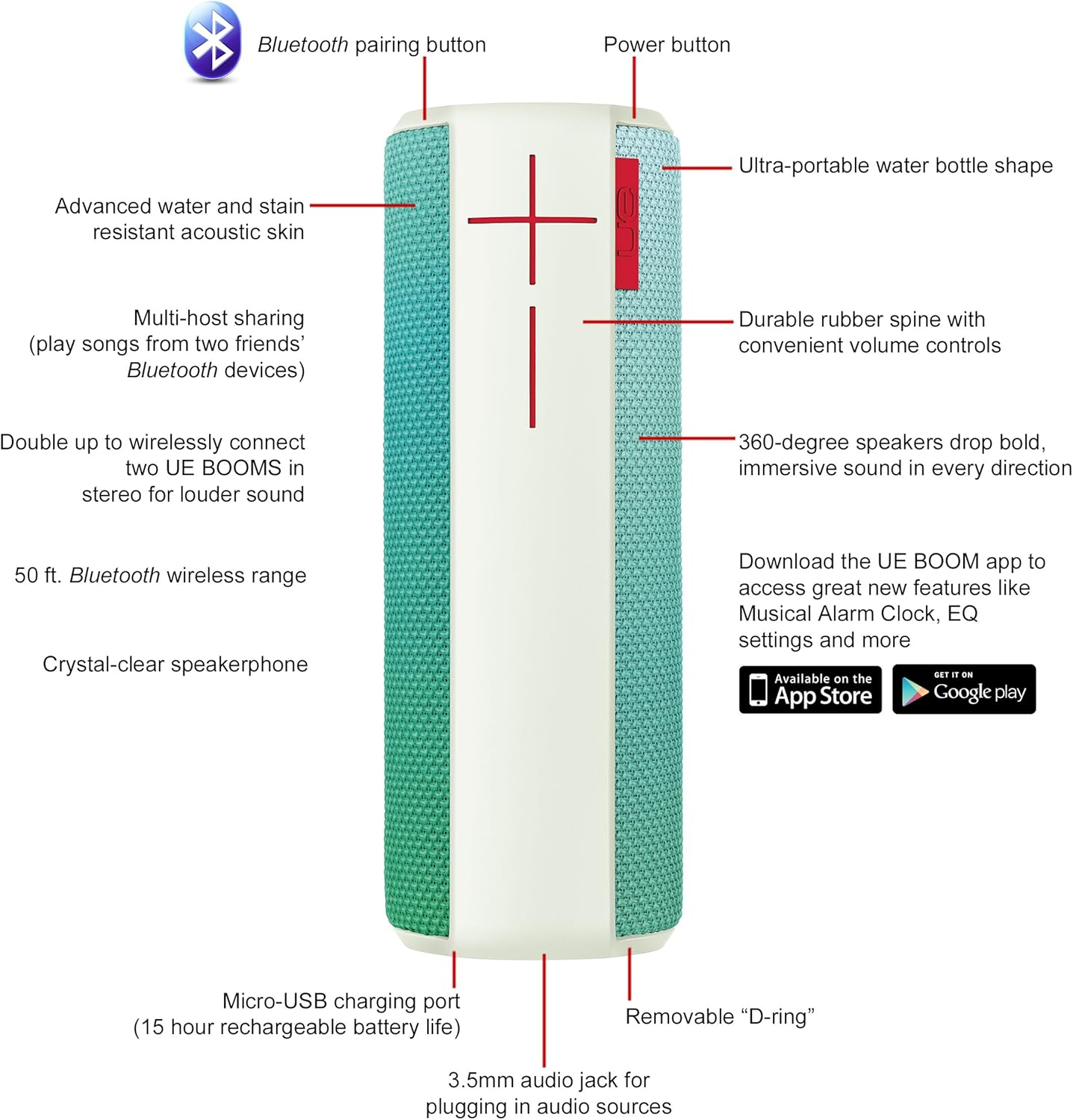
Image: Diagram highlighting key features and controls of the UE Boom speaker, including Bluetooth pairing button, power button, volume controls, micro-USB charging port, and 3.5mm audio jack.
Настройка
Зарадка дынаміка
Before initial use, fully charge your UE Boom speaker. Connect the provided micro-USB cable to the charging port located at the bottom of the speaker and plug the other end into a USB power source. The speaker's battery provides approximately 15 hours of playback on a full charge.
Спалучэнне Bluetooth
- Power on your UE Boom speaker by pressing the power button.
- Press and hold the Bluetooth pairing button (usually indicated by a Bluetooth icon) until you hear an audible tone and the LED indicator flashes rapidly.
- On your mobile device (smartphone or tablet), navigate to the Bluetooth settings.
- Select "UE Boom" from the list of available devices to pair.
- Once paired, you will hear a confirmation tone from the speaker.
For NFC-enabled devices, simply tap your device to the NFC area on the speaker for quick pairing.
Інструкцыя па эксплуатацыі
Асноўныя элементы кіравання
- Кнопка харчавання: Located on the top of the speaker to turn it on or off.
- Рэгулятары гучнасці: Large '+' and '-' buttons on the side of the speaker adjust the volume.
- Кнопка Bluetooth: Запускае рэжым спалучэння Bluetooth.
Using the UE BOOM App
Download the official UE BOOM app from your device's app store (available on App Store and Google Play) to unlock additional features:
- Musical Alarm Clock: Wake up to your favorite music.
- Аддаленая актывацыя: Turn your speaker on/off from your device.
- Налады эквалайзера: Наладзьце Sound Profile па вашым жаданні.
- Падвоіць: Connect two UE BOOM speakers for a stereo sound experience.
Функцыянальнасць гучнагаварыцеля
When connected to a smartphone, the UE Boom can be used as a speakerphone. Incoming calls will be routed through the speaker, allowing for hands-free communication.
Тэхнічнае абслугоўванне
The UE Boom speaker features a water and stain resistant acoustic skin. To clean, gently wipe the speaker with a damp cloth. Avoid using harsh chemicals or abrasive cleaners. Ensure all ports are dry before charging or connecting other devices.
Ліквідацыю непаладак
- Няма харчавання: Ensure the speaker is charged. Connect it to a power source using the micro-USB cable.
- Немагчыма падключыць праз Bluetooth:
- Пераканайцеся, што дынамік знаходзіцца ў рэжыме спалучэння (мігае святлодыёд).
- Праверце, ці ўключаны Bluetooth на вашай прыладзе.
- Move your device closer to the speaker (within 50 feet).
- Паспрабуйце адлучыць прыладу і зноў падлучыць яе.
- Нізкая гучнасць або скажоны гук:
- Адрэгулюйце гучнасць як на дынаміку, так і на падключанай прыладзе.
- Пераканайцеся, што дынамік цалкам зараджаны.
- Check for any obstructions around the speaker.
- Праграма не падключаецца: Ensure the speaker is powered on and connected via Bluetooth to your device. Update the app to the latest version.
Тэхнічныя характарыстыкі прадукту
| Назва мадэлі | Logitech UE Boom Wireless Bluetooth Speaker |
| Нумар мадэлі | 980-001023 |
| Марка | Logitech |
| Колер | Northern Light |
| Тып дынаміка | На адкрытым паветры |
| Тэхналогія падлучэння | Bluetooth, бесправадная сувязь |
| Далёкасць бесправадной сувязі | Да 50 футаў (15.24 метраў) |
| Крыніца харчавання | Працуе ад акумулятара (1 літый-іённы акумулятар уключаны) |
| Сярэдні тэрмін службы батарэі | 15 гадзін |
| Узровень воданепранікальнасці | Воданепранікальны |
| Вага прадмета | 2.2 фунта |
| Памеры прадукту (ДxШxВ) | 2.6 х 2.6 х 7.1 цалі |
| Матэрыял | Пластыкавыя |
| UPC | 097855112125 |
Афіцыйнае відэа пра прадукт
Відэа: Оверview of the Logitech UE Boom speaker's features, including 360-degree sound, water resistance, wireless connectivity, and the ability to pair two speakers for louder sound. This video demonstrates the speaker's durability and portability in various environments.
Гарантыя і падтрымка
The Logitech UE Boom Wireless Bluetooth Speaker comes with a Limited Warranty. For specific warranty details, please refer to the documentation included with your product or visit the official Logitech webсайт.
For technical support or customer service, you may contact Logitech at: 646-454-3200.


