1. Уводзіны
This manual provides detailed instructions for the setup, operation, and maintenance of your EMOS E0114 Digital Thermometer and Hygrometer. This device accurately measures indoor temperature and humidity, and also functions as a quartz clock with an alarm, snooze feature, and date display. Please read this manual thoroughly before using the product to ensure correct operation and to prevent damage.
2. Інфармацыя па бяспецы
- Трымайце прыладу далей ад экстрэмальных тэмператур, прамых сонечных прамянёў і высокай вільготнасці.
- Не падвяргайце прыладу ўздзеянню вады ці іншых вадкасцей.
- Не спрабуйце разбіраць або мадыфікаваць прыладу. Гэта прывядзе да анулявання гарантыі.
- Утылізуйце выкарыстаныя батарэі адказна ў адпаведнасці з мясцовымі правіламі.
- Захоўвайце батарэі ў месцах, недаступных дзецям.
3. Змесціва ўпакоўкі
Калі ласка, праверце змесціва ўпакоўкі пасля распакавання:
- EMOS E0114 Digital Thermometer and Hygrometer
- Кіраўніцтва карыстальніка
Note: 1 AA Mignon 1.5 V battery is required and not included in the package.

Figure 3.1: EMOS E0114 device in its retail packaging.
4. Прадукт скончыўсяview
Familiarize yourself with the components of your EMOS E0114 device.
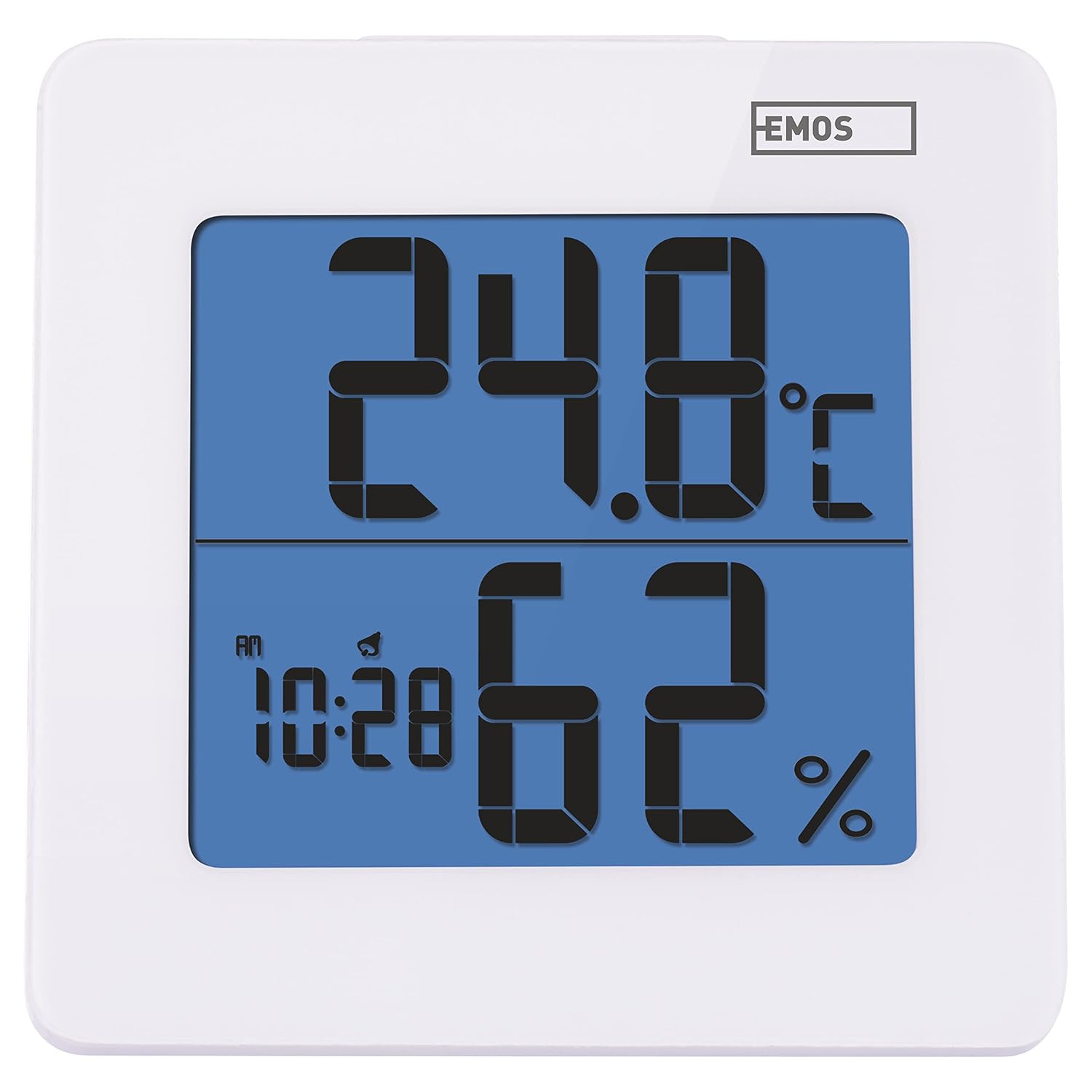
Малюнак 4.1: Спераду view of the EMOS E0114 display, showing temperature, humidity, and time.

Малюнак 4.2: Назад view of the EMOS E0114, highlighting the control buttons and battery compartment.
Кнопкі кіравання:
- Рэжым: Switches between time display, alarm setting, and date setting.
- UP: Increases values during setting, activates/deactivates alarm.
- MEM: Displays maximum and minimum temperature/humidity records.
- C/F: Пераключаецца паміж адзінкамі вымярэння тэмпературы па Цэльсію і Фарэнгейту.
- Скінуць: Скід прылады да заводскіх налад.
- SNOOZE/LIGHT (Top Bar): Activates snooze function during alarm, illuminates the display backlight.
5. Настройка
5.1 Устаноўка батарэі
- Знайдзіце батарэйны адсек на задняй панэлі прылады (гл. малюнак 4.2).
- Адкрыйце крышку батарэйнага адсека.
- Insert one (1) AA Mignon 1.5 V battery, ensuring correct polarity (+/-).
- Надзейна зачыніце крышку батарэйнага адсека.
5.2 Першапачатковае ўключэнне
Upon battery installation, the device will power on automatically and display the current time (default 12:00 AM), temperature, and humidity. The backlight will briefly illuminate.
6. Інструкцыя па эксплуатацыі
6.1 Устаноўка часу і даты
- У звычайным рэжыме адлюстравання часу націсніце РЭЖЫМ Націсніце кнопку адзін раз, каб увайсці ў рэжым усталёўкі часу. Лічбы гадзін будуць міргаць.
- Выкарыстоўвайце UP кнопку, каб наладзіць гадзіну.
- Прэса РЭЖЫМ again to set the minutes. The minute digits will flash. Use the UP кнопка для рэгулявання хвілін.
- Прэса РЭЖЫМ again to set the year. The year digits will flash. Use the UP кнопку, каб наладзіць год.
- Працягвайце націскаць РЭЖЫМ to set the month and then the day, adjusting each with the UP кнопка.
- Пасля ўсталёўкі дня націсніце РЭЖЫМ to exit setting mode and return to normal time display.
6.2 Налада будзільніка
- У звычайным рэжыме адлюстравання часу націсніце РЭЖЫМ button twice to enter alarm setting mode. The alarm time will be displayed, and the hour digits will flash.
- Выкарыстоўвайце UP кнопку, каб наладзіць час будзільніка.
- Прэса РЭЖЫМ again to set the alarm minutes. The minute digits will flash. Use the UP кнопку для налады хвілін будзільніка.
- Прэса РЭЖЫМ каб выйсці з рэжыму налады будзільніка.
- Каб уключыць або выключыць сігнал трывогі, націсніце кнопку UP button once in normal time display mode. An alarm icon will appear on the display when activated.
6.3 Using Snooze and Backlight
- Калі прагучыць сігнал трывогі, націсніце SNOOZE / LIGHT bar on top of the device to activate the snooze function. The alarm will pause for approximately 5 minutes and then sound again.
- To turn off the alarm completely, press any other button (MODE, UP, MEM, C/F) on the back of the device.
- Націсніце SNOOZE / LIGHT bar at any time to briefly illuminate the display backlight for better visibility in low light conditions.
6.4 Пераключэнне адзінак вымярэння тэмпературы (°C/°F)
У звычайным рэжыме адлюстравання націсніце З / ф button on the back of the device to toggle between Celsius (°C) and Fahrenheit (°F) temperature readings.
6.5 Viewing Maximum and Minimum Records
The device stores the maximum and minimum temperature and humidity values recorded since the last reset or battery change.
- Націсніце МЕМ адзін раз націсніце кнопку, каб адлюстраваць максімальную зафіксаваную тэмпературу і вільготнасць.
- Націсніце МЕМ зноў націсніце кнопку, каб адлюстраваць мінімальную зафіксаваную тэмпературу і вільготнасць.
- Прэса МЕМ a third time to return to the current temperature and humidity display.
- To clear the maximum/minimum records, press and hold the МЕМ кнопку прыблізна на 3 секунды, пакуль viewзапісы.
7. Тэхнічнае абслугоўванне
7.1 Ачыстка
- Працярыце прыладу мяккай сухой тканінай.
- Do not use abrasive cleaners, solvents, or chemical agents, as these may damage the display or casing.
7.2 Замена батарэі
When the display becomes dim or the device stops functioning, it is time to replace the battery.
- Адкрыйце крышку батарэйнага адсека на задняй панэлі прылады.
- Выміце старую батарэйку тыпу АА.
- Insert a new AA Mignon 1.5 V battery, observing correct polarity.
- Зачыніце крышку батарэйнага адсека.
- You may need to reset the time and date after battery replacement.
8. Выпраўленне непаладак
| праблема | Магчымая прычына | Рашэнне |
|---|---|---|
| Няма дысплея або дысплей цьмяны | Разраджаная або разраджаная батарэя; няправільная ўстаноўка батарэі. | Replace the battery with a new AA 1.5V battery. Ensure correct polarity. |
| Няправільны час/дата | Пасля ўсталёўкі батарэек або скіду налад час/дата ўстаноўлены няправільна. | Follow instructions in Section 6.1 to set the time and date. |
| Temperature/humidity readings seem inaccurate | Device placed in an unsuitable location (e.g., near heat source, vent, direct sunlight). | Relocate the device to a stable indoor environment away from direct influences. Allow 30 minutes for readings to stabilize. |
| Будзільнік не гучыць | Сігналізацыя не актываваная. | Ensure the alarm icon is visible on the display (refer to Section 6.2). |
| Прылада не рэагуе | Часовы збой электронікі. | Націсніце СКІД button on the back of the device using a thin object (e.g., paperclip). Note: This will clear all settings. |
9. Тэхнічныя характарыстыкі
- мадэль: E0114
- Марка: ЭМАС
- Дыяпазон вымярэння тэмпературы: Ад 0 °C да +50 °C (ад 32 °F да 122 °F)
- Тэмпературнае дазвол: 0.1 °C / 0.1 °F
- Дыяпазон вымярэння вільготнасці: 20% да 90% адноснай вільготнасці (RH)
- Дазвол вільготнасці: 1% адноснай вільготнасці
- гадзіннік: Quartz with 12/24 hour format
- Будзільнік: Yes, with Snooze function
- Дысплей: LCD з падсветкай
- Функцыя памяці: Максімальная/мінімальная тэмпература і вільготнасць
- крыніца харчавання: 1 x AA Mignon 1.5 V battery (not included)
- Памеры (Д х Ш х У): 3.7 х 9.3 х 9.3 см (прыблізна 1.46 х 3.66 х 3.66 цалі)
- Памеры экрана: 60 x 65 mm (approximately 2.36 x 2.56 inches)
- Вага: 109 грамаў (прыблізна 3.84 унцыі)
- Тып мацавання: Wall mountable (integrated stand)
- колер: White (with blue display backlight)

Figure 9.1: Dimensions of the EMOS E0114 device.
10. Гарантыя і падтрымка
EMOS products are designed for reliability and performance. For warranty information or technical support, please refer to the warranty card included with your purchase or visit the official EMOS webсайт. Калі ласка, захавайце пацвярджэнне пакупкі для любых гарантыйных прэтэнзій.


