1. Уводзіны
This manual provides essential instructions for the safe and efficient use of your Epson LQ-310 24-Pin Narrow Carriage Impact Printer. Please read this manual thoroughly before operating the printer and keep it for future reference.
The Epson LQ-310 is a compact and reliable dot matrix printer designed for fast and efficient printing of various documents, including multi-part forms, invoices, and reports. It features versatile connectivity options including USB, Serial, and Parallel ports.
2. Інфармацыя па бяспецы
Observe the following safety precautions to ensure safe operation and to prevent damage to the printer or injury to yourself.
- Always place the printer on a stable, flat surface.
- Do not block or cover the ventilation slots on the printer.
- Выкарыстоўвайце толькі шнур сілкавання, які пастаўляецца з прынтарам.
- Do not expose the printer to water, moisture, or excessive heat.
- Адключыце прынтар ад электрычнай разеткі перад чысткай або тэхнічным абслугоўваннем.
- Захоўваць у месцах, недаступных дзецям.
3. Змесціва ўпакоўкі
Праверце наяўнасць усіх прадметаў у камплекце:
- Epson LQ-310 Printer Unit
- Сілавы кабель
- Стужачны картрыдж
- Кіраўніцтва карыстальніка (гэты дакумент)
- CD-дыск з драйверамі (можа адрознівацца ў залежнасці ад рэгіёна)
4. Настройка
4.1 Распакоўка і размяшчэнне
- Дастаньце прынтар з упакоўкі.
- Remove all protective tapes and packing materials.
- Place the printer on a flat, stable surface with adequate ventilation.
4.2 Падключэнне кабеля сілкавання
Падключыце кабель харчавання да прынтара, а затым да заземленай электрычнай разеткі.
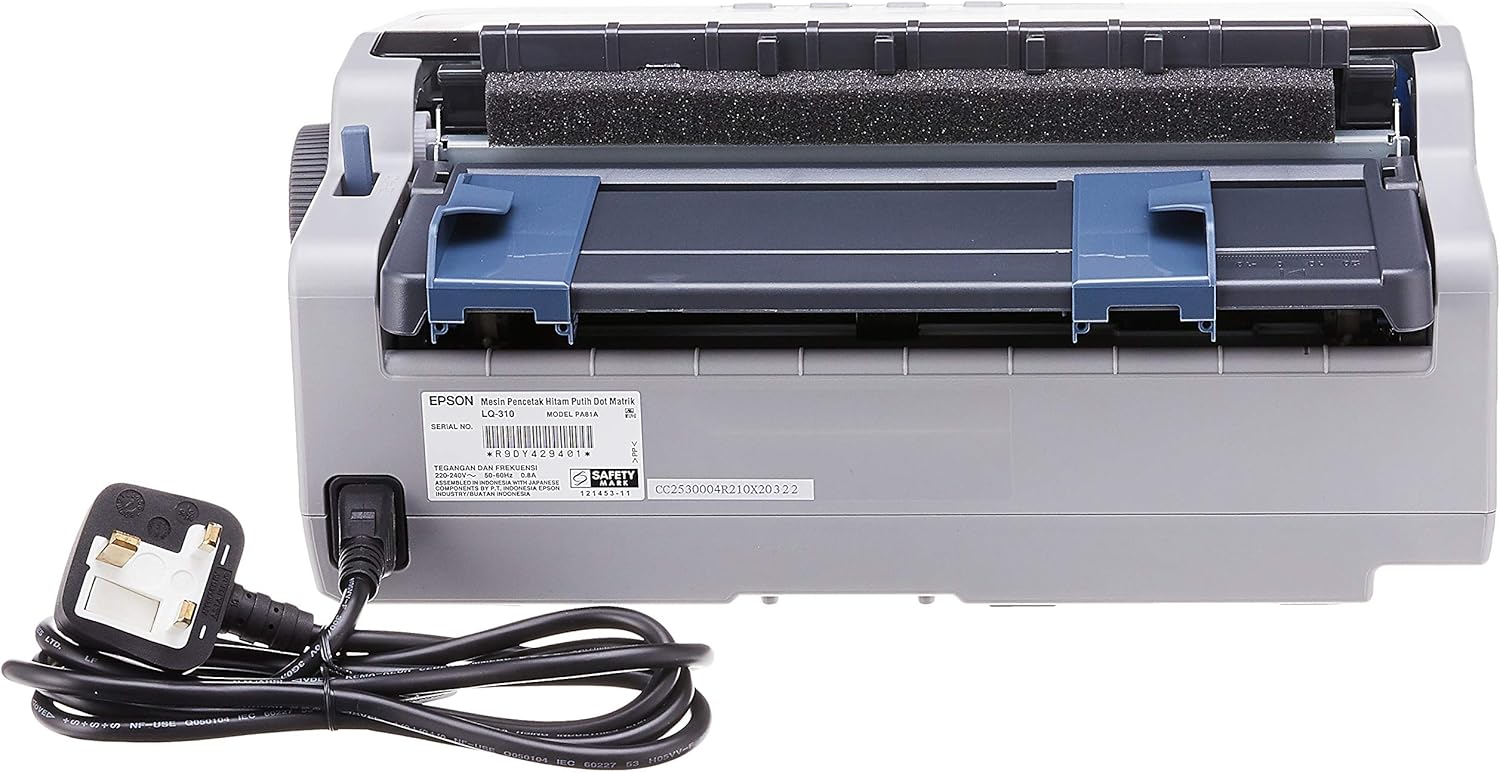
Малюнак 4.2.1: Тыл view of the Epson LQ-310 printer, highlighting the power input and various data ports (USB, Serial, Parallel) for connection to a computer.
4.3 Падключэнне да кампутара
The LQ-310 supports USB, Serial, and Parallel connections. Choose the appropriate cable for your computer and connect it to the corresponding port on the printer.
- USB-злучэнне: Use a standard USB A-B cable.
- Паслядоўнае злучэнне: Use a serial cable (RS-232C).
- Паралельнае падключэнне: Use a parallel cable (Centronics).
4.4 Усталёўка картрыджа са стужкай
- Пераканайцеся, што прынтар выключаны.
- Адкрыйце крышку прынтара.
- Unpack the new ribbon cartridge.
- Align the ribbon cartridge with the guides inside the printer and press down firmly until it clicks into place.
- Turn the ribbon feed knob on the cartridge to ensure the ribbon is taut and not twisted.
- Зачыніце крышку прынтара.

Малюнак 4.4.1: The ribbon cartridge for the Epson LQ-310 printer, which needs to be installed correctly for printing.
4.5 Загрузка паперы
The LQ-310 can handle various paper types, including continuous forms and single sheets.
- For Continuous Forms: Place the forms on the tractor feed mechanism at the rear of the printer. Adjust the tractor guides to match the paper width and engage the pins.
- For Single Sheets: Insert a single sheet into the front paper slot, ensuring it is straight.
4.6 Ўстаноўка драйвера
After connecting the printer, install the necessary drivers on your computer. You can typically find these on the included CD or download them from the official Epson support webсайт.
5. Інструкцыя па эксплуатацыі
5.1 Панэль кіравання скончанаview
The control panel on the front of the printer allows you to manage basic functions.

Малюнак 5.1.1: Фронт view of the Epson LQ-310 printer, showing the control panel with buttons for Tear Off, LF/FF, Load/Eject, Paper Out, Pause, Lock, Font, Item, Micro Adjust, and Set.
- Кнопка харчавання: Уключае або выключае прынтар.
- Paper Out Indicator: Lights up when the printer is out of paper.
- Кнопка паўзы: Часова спыняе друк. Націсніце яшчэ раз, каб аднавіць.
- LF/FF (Line Feed/Form Feed) Button: Advances paper by one line or one page.
- Load/Eject Button: Loads a single sheet of paper or ejects the current sheet.
- Tear Off Button: Advances continuous paper to the tear-off position.
- Font Button: Selects different fonts.
- Item/Set Buttons: Used for menu navigation and setting options.
5.2 Базавы друк
- Пераканайцеся, што прынтар уключаны і падлучаны да кампутара.
- Load paper according to the instructions in Section 4.5.
- Адкрыйце на камп'ютары дакумент, які вы хочаце раздрукаваць.
- Select the Epson LQ-310 as your printer in the print dialog.
- Adjust print settings (e.g., paper size, print quality) as needed.
- Націсніце кнопку «Друк».
6. Тэхнічнае абслугоўванне
6.1 Замена картрыджа са стужкай
Replace the ribbon cartridge when print quality deteriorates or the ribbon is visibly worn.
- Выключыце прынтэр і адключыце шнур сілкавання.
- Адкрыйце крышку прынтара.
- Carefully remove the old ribbon cartridge by lifting it out.
- Install a new ribbon cartridge as described in Section 4.4.
- Close the printer cover and reconnect the power.
6.2 Чыстка прынтара
Regular cleaning helps maintain printer performance.
- Выключыце прынтэр і адключыце шнур сілкавання.
- Працярыце знешнія паверхні прынтара мяккай тканінайamp тканіна. Не выкарыстоўвайце абразіўныя ачышчальнікі або растваральнікі.
- Gently clean the print head area with a soft, lint-free cloth if necessary, being careful not to touch the pins.
- Remove any paper dust or debris from the paper path.
7. Выпраўленне непаладак
This section addresses common issues you might encounter with your LQ-310 printer.
7.1 Printer Does Not Turn On
- Ensure the power cable is securely connected to both the printer and a working electrical outlet.
- Праверце працаздольнасць разеткі, падключыўшы да яе іншую прыладу.
7.2 "Paper Out" Indicator is On
- Load paper correctly as described in Section 4.5.
- Ensure the paper sensor is not obstructed.
7.3 Няма вываду на друк
- Verify the printer is powered on and connected to the computer.
- Check if the correct printer driver is installed and selected in your application.
- Ensure the ribbon cartridge is installed correctly and has ink.
- Check the printer's status on your computer; clear any pending print jobs.
7.4 Нізкая якасць друку
- The ribbon cartridge may be old or running out of ink. Replace it if necessary.
- Ensure the paper type is suitable for impact printing.
- Clean the print head area if there is visible debris.
8. Тэхнічныя характарыстыкі
| Асаблівасць | Спецыфікацыя |
|---|---|
| Тэхналогія друку | 24-Pin Narrow Carriage Impact Dot Matrix |
| Хуткасць друку | Up to 347 / 416 cps (10 / 12 cpi) |
| Сувязь | 1 Full-Speed USB 2.0, Serial Port, Parallel Port |
| Вывад на прынтэр | Colour (Ink Color: Black) |
| дазвол | 240 x 170 dpi (Max Print Resolution Black and White: 240 dpi) |
| Вага прадмета | 4.1 кілаграма |
| Памеры прадукту (Д х Ш х У) | 27.5 Г х 36.2 Ш х 15.4 У сантыметраў |
| Максімальны памер носьбіта | Ліст/А4 |
| Друкаваныя СМІ | Папера (звычайная) |
| Назва мадэлі | ЛК 310 |
| Нумар мадэлі | LQ-310 |
9. Гарантыя і падтрымка
The Epson LQ-310 printer comes with a limited warranty. For detailed warranty information, please refer to the warranty card included with your product or visit the official Epson webсайт.
For technical support, driver downloads, or further assistance, please visit the Epson support website or contact your local Epson customer service center. Have your printer model number (LQ-310) and serial number ready when contacting support.